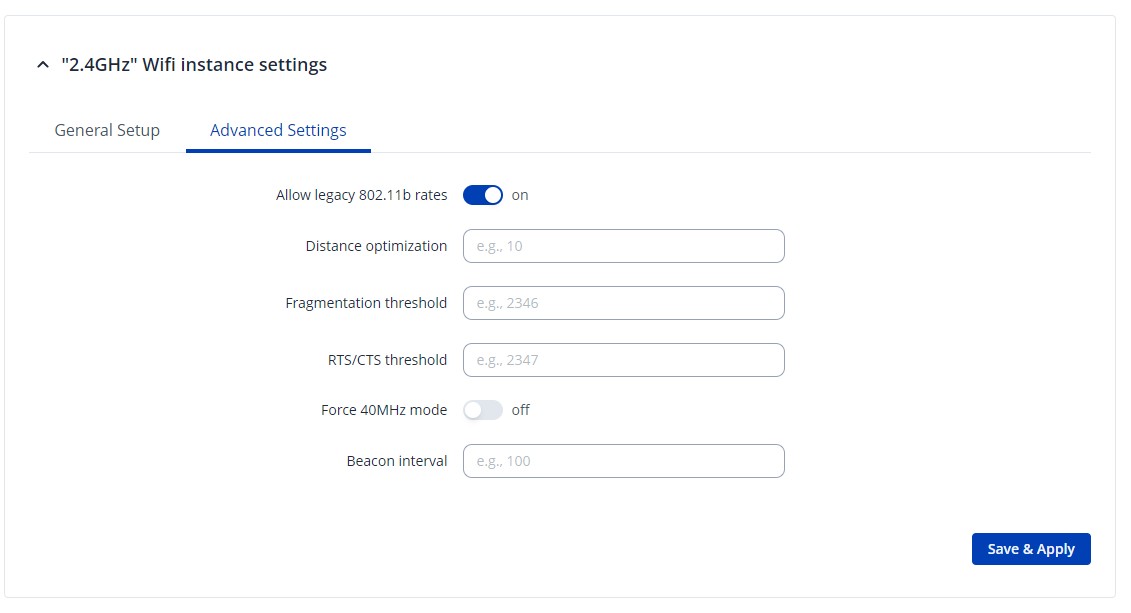
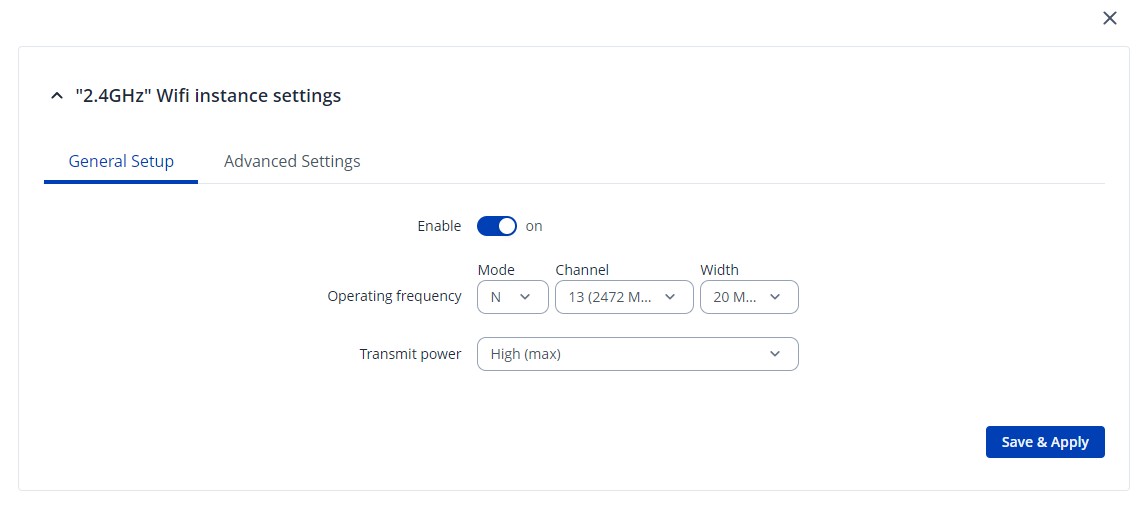
RUTX50 Problem - looses signal

Hi community,

I’ve the problem that round since half a year the router sets the signal to 0% and all clients are not connected anymore. This happens sometime twice a day and then 2 weeks not.

Than I’ve to reboot the router from lan and everything is fine again.

Why is this happen? Can I turn on some logging to see what’s going on?
The router is about 2 years old.

Thanks in advance.

Kind regards, Martin

I want to add some settings pages for 2.4 Ghz. 5 Ghz has been disabled for testing.
May be it’s helpful.
And I have also resettend the device and started from scratch with the settings. Behavior is the same.


Greetings,

Could you please clarify a few things? When the issue occurs, does the WiFi not appear at all, or is it still available, but when devices connect, they get no internet connection?

Does this happen only with WiFi, and if you use an ethernet cable, do you get the internet connection?

What devices are being used to connect to the WiFI on? Does the location of RUTX50 change, or is it always in the same spot? Are you using the default WiFi antennas that came with the router and if not, could you please provide details about the antennas being used? Are they properly attached to the device?

You can download a troubleshoot file from the device, which would contain all the logs, just keep in mind that you would have to do so, after the issue occurs and before any reboot takes place, since the logs are saved in the device’s RAM and delete after a reboot.
To get a troubleshoot file:

  1. Log in to WebUI
  2. Press on System → Maintenance → Troubleshoot
  3. Scroll down to Troubleshoot section and press “Download”

For troubleshooting purposes, we will require more sensitive information from your end, such as the troubleshoot file, which may contain passwords, public IP addresses, serial numbers, and such. To avoid leaking this information, we have sent you a form to fill out, which you will receive in your e-mail inbox that you have registered your account with in the forums. In the Ticket ID field of the form, please enter the ID of this thread, which is 15988.

Once you fill out the form, I will reach out to you via email, and when the issue occurs, you will be able to send me the file.

Best Regards,
Justinas

1 Like

Hi Justinas,

yesterday evening the error occurred again. But I can’t find no form in my emails.
I tried to answer to your email with the troubleshooting file but this was not successful.

Can you please resend the form?

Thanks, Martin

Greetings,

I have resent the form to you.

Best Regards,
Justinas

Hi Justinas,

did you receive the form? Yesterday the error occurred 2 times within a time distance from aprox. 1 minute.
I need to get this fixed. Otherwise I’ve to change the router.

Thanks, Martin

Hello,
I have the same problem but with a RUTX10.
See my post here : RUTX10 Wi-Fi hotspot disconnects intermittently

I also disabled 5 GHz a long time ago for home automation reasons.

Regards
Otto

1 Like

Hi,

I found this error also here:
RUT241 Wifi disappearing

And maybe here:
RUTXR1 intermittent wifi disconnections

Here is seems that the error was introduced with R_00.07.04.3:
Rut951 wifi disappearing occasionally

Here seems the error start with 7.15.xxx. V7.13 and 7.14.3 should work.
RutX12 wifi disappearing

Another:
Rutx50 occasionally drops 2.4ghz wifi

Here the Wifi signal drops also to 0:
Wifi access point down issue

Exactly my issue is described here:
RUT240 router disabling wifi network

A short search shows about more people having the same issues like me but also on different devices. It seems that this issue is related to the firmware. I think, 1 year ago, this issue didn’t happen but I can’t tell with which firmware version it was introduced.

Regards, Martin

For your information, I have just updated the firmware to version: RUTX_R_00.07.18.1.
This problem started intermittently at my house about 1 or 2 months ago.
However, I cannot say which version I installed from the beginning.
But it has worked perfectly for about 3 years since I purchased the RUTX10.

1 Like

Thank you for clarifying this. Here it is nearly the same. RUTX50 works for 1 or 2 years without any problems and at some point, I installed a new version (can’t remember, which one I had before) and after that, the WiFi sometime sets signal to 0% and no client sees than the WiFi (and nobody can’t connect).

Regards, Martin

Here is someone else with this problem. How can I check this list mentioned there? Where do I find it?

Rut240 wifi disconnects due to timer deauth

Regards, Martin

Hi everyone, this is my post about my specific case. The Wi-Fi problem only appeared after over a year and only this summer. Initially, I thought it might be a hardware issue with the Wi-Fi module or a malfunction due to overheating due to high temperatures. On October 15, I forwarded the troubleshooting file to support. I’m waiting for them to figure it out and fix the problem because I’d like to avoid having to replace my router.

RUTXR1- Intermittent Wi-Fi Disconnections and Congestion (Since Summer)

1 Like

Hello,
update: aside from several inquiries by support staff, no solution has yet been suggested by support.
Regards

Hi, I can confirm that my case is still unresolved. Let’s hope for the best, but it’s been a while.

1 Like

This topic was automatically closed after 60 days. New replies are no longer allowed.