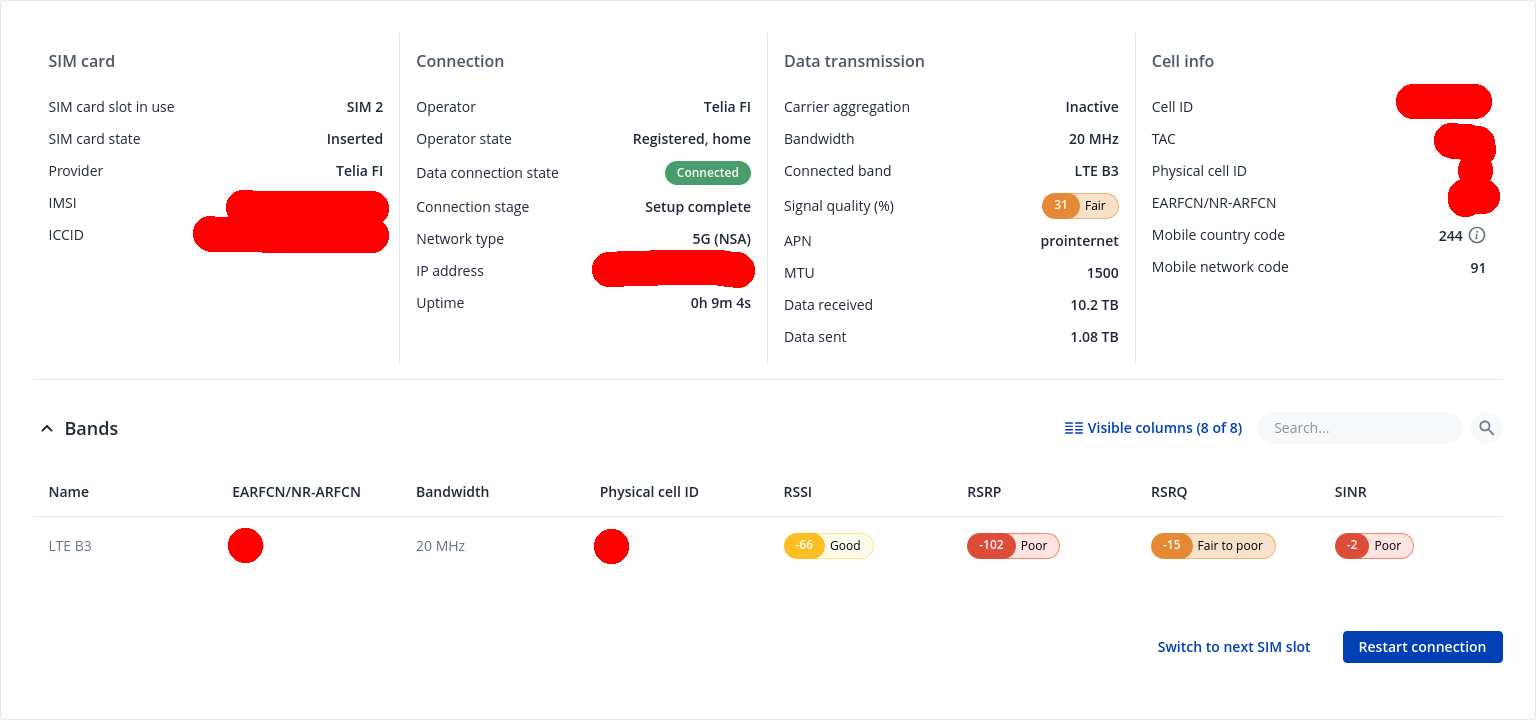
My mobile internet provider upgraded my internet subscription from 4G LTE only to 5G NSA, which substantially improved internet download speeds on my RUTX50 modem. However, I spotted a serious issue in my RUX50 right after the 5G NSA mode was enabled on my subscription. Namely, whenever I upload large files to the internet using RUX50 in 5G NSA mode, the connectivity drops after tens of minutes of heavy bandwidth usage. The connectivity drops for a few minutes, and then it is automatically restored. Still, the connection keeps dropping off again after some time, and the cycle continues. If I enable 4G LTE only mode, the connectivity remains stable.
There seem to be similar topics on this forum regarding connectivity issues of RUTX50 in 5G modes, but the issue I am facing is different:
It occurs on the latest Teltonika firmware RUTX_R_00.07.23.3 and modem firmware RG501QEUAAR12A11M4G
It concerns the older modem RG501Q-EU (which should be more reliable than the newer one)
I can very easily reproduce the issue by simply uploading large files for longer periods of time
I have tried enforcing 5G in NSA only mode (disabling SA), which did not help
System log has only entries like “IPv4 connectivity started to fail”, kernel log has nothing at the time of the connection drops
It only happens in 5G NSA mode, not in 4G mode.
At least for now, the issue seems to be with the internet connectivity. According to the status page of RUTX50, the modem keeps its connection to an LTE cell and a 5G NSA cell during the issue. Thus, it is nearly impossible for me to debug why this happens. I would need Teltonika’s help with the resolution. Could this be a serious malfunction at the hardware level?
How big is a large file to you? 1Gb? or 5Gb for example?
I have a RUTX50 and when my provider was EE UK i suffered IPv4 failing and offline issues and downloading 5Gb+ files was almost impossible. The largest file i’ve uploaded will be a little over 1Gb when i was with EE UK and at the time it uploaded in one go 1st time, but this will have been a couple of years ago now.
I switched provider a month ago to Three UK for this very reason, and it doesn’t happen any more, i no longer suffer Ipv4 failing and or offline issues.
My provider is Telia Finland. At the moment, I cannot upload even a 1GB file without the drop. It is trivial to reproduce the issue with heavy uploads, but so far, I have not seen the same with heavy downloads. Did you encounter the issue also in 5G NSA mode only?
I tried tweaking things as you are doing and i failed to resolve the issue. I was nearing the end of my 2 1/2yr EE UK preloaded sim and bought a 3 month preloaded Three UK sim to try.
The Three UK sim is so much better, so i switched network Provider and bought a 2 1/2yr preloaded Three UK sim and so far into my second month with them, i won’t be going back to EE UK.
5G SA isn’t available in my area yet, so i can only use 5G NSA at the mo.
Teltonika should consider this issue as a priority. ZTE, Huawei, and other Chinese shady 5G NSA routers work in all mobile network providers without issues.
Hello, have nearly the same with my OTD500. In my case the Modem temperature grow up under load over 90 °C and the Modem drops the connection to the 5G Network.
I can test the NSA connection with a prepaid subscription from a different mobile operator, if it helps to pinpoint the cause of the issue. The modem firmware is already in its latest version.
I have been testing for a few days the NSA connenction with two SIM cards. It seems that the modem of RUTX50 does not interplay well with Telia. I see often the connectivity drops that I described earlier with Telia. With Saunalahti SIM card, I have not seen a single connection drop so far.
I want to emphasize that I have not heard any compatibility complaints from others in the Telia NSA network. Chinese NSA routers work well in both networks, so there is most likely an issue in the modem or its firmware.
Now this issue is even worse! The connection drops on 5G, even during heavy downloads. Basically, I can download large files for maybe 15-30 minutes, and then I have to manually reboot the modem. Guess what the funniest part is? RUTX50 claims that it is locked to one LTE cell during the connection drops, although it is clearly on NSA mode. Sometimes it claims to be locked on some unknown cell (see the attachment)!
Teltonika: fix this system ASAP. I bought this device 2 years ago, hoping to get a reliable and future-proof 5G router. I have been using 5G features only for a few weeks, but this device seems unforgivably unreliable. I cannot stay connected even for an hour when it is being used heavily! I am very disappointed. Should I buy a Chinese spyware router to stay connected to 5G? By the way, please do not recommend me to upgrade to the latest firmware, it is already on the latest one (RUTX_R_00.07.23.6).
Exactly same behaviour as yours on the newer firmwares. We had 5G running for the last 3 years on the device with NSA successfully. Now after updating our device we have the same problems as you. For now maybe try downgrading, we are looking for the correct firmware which works for us (right now 07.19.4 looks stable on TRB500)
Also the upgrade Tool is completely broken and updating to the wrong version. Download the file manually for your device and update from file.
Do you experience slow speeds or total connectivity drops on 5G NSA? I checked with tcpdump in RUTX50 that no packets come back from the internet to the modem when the modem is “frozen”. The connection seems, however, to be on according to the LED indicators (both 4G and 5G).
EDIT: I read your post in the other thread. It seems you experience an uptime reset during the connection dropout, but in my case, it stays on. The connection returns by itself usually within 15 minutes, or if I toggle the mobile WAN off and on. Essentially, we are having the same issue.
Yesterday the connectivity dropped maybe 5-7 times because I had to download large files. Today it has dropped only once, but I have not downloaded anything big yet.
The latest firmware ((RUTX_R_00.07.23.7) did not help at all. Severe connection drops keep continuing. This router is virtually useless for heavy usage.
For troubleshooting purposes, we will require more sensitive information from your end, such as the troubleshoot file, which may contain passwords, public IP addresses, serial numbers, and such. To avoid leaking this information, we have sent you a form to fill out, which you will receive in your e-mail inbox that you have registered your account with in the forums. In the Ticket ID field of the form, please enter the ID of this thread, which is 19565.