After upgrading our Test Setup TRB500 to the newest firmware, we are getting high packet loss, slow speeds and noticed that the 5G shows RSSI N/A.
Following behaviour observed:
In idle state Mobile Status shows Network Type as 5G (NSA) with 5G n78 RSSI N/A. (Position and Provider didn’t change, we always had good 5G reception)
While under high traffic (or speedtest) connection will drop completely (modem restart, uptime reset) or will jump down to 4G+.
No matter what Network Type shows, speed is quite low compared to before the update. Speed caps out at local 4G speeds. (even when showing 5G)
Forcing 5G (NSA) in the settings gets the modem in a boot loop or connection loop. Will never establish connection.
Provider is T-Mobile (called Magenta in AT) in a big city, Old iPhone 13 which is 1 meter away from the TRB500 and which we use as a “benchmark” is showing 2x or sometimes 3x performance. (using same provider with same plan, so no mobile/phone user priority applied)
Firmware Version right now is TRB500_R_00.07.23.6 (updated from TRB500_R_00.07.19.X).
Device is in a test setup we use to verify deployments, deployed TRB500 run the old Firmware stable. (but still with the Bridge Mode performance bug which hasn’t been fixed since years)
We are slowly loosing hope for those devices as every time there is an update something breaks or implies more work for us.
Would like to hereby submit this bug and ask for assistance. We haven’t found time to downgrade and jump through the separate FW updates to find where the bug started. Only thing we know is that our deployed TRB500 run 07.19.x FW and we updated our Test Deployment straight to the newest. (We try to keep a 6 month update interval on the modems)
Following our post I got an update on observed behaviour:
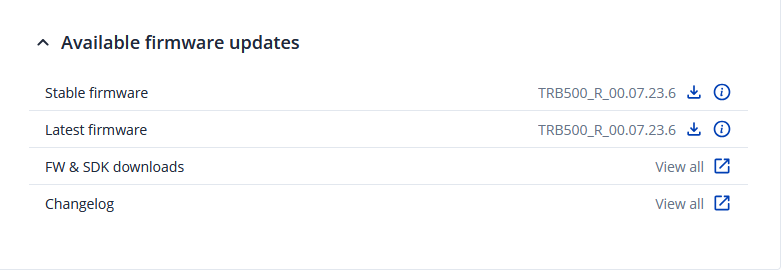
As somebody noticed and posted in the forum (in his case with a RUTX50), the Auto-Updater updates the TRB500 (and other devices) to the Latest Firmware even when Stable Firmware is selected. 07.22 is Stable, 07.23 is latest. No matter the selection in the Auto-Updater, it always goes for the latest. Not a good look… (also when we go to Network → Mobile → General to set up our APN, we noticed that there is a pop up at the top which tries to convince us that there is an update to 07.23 available.)
We downgraded now to the Stable release as we thought maybe the described Bug was already known in the Latest Release and the Stable one should be, well, stable…
Stable Firmware (07.22.4) still shows same or similar behaviour. Performance has not changed. We are still stuck at 4G Speeds with 5G being shown.
One thing that changed: 5G is still showing N/A on RSSI but the other metrics show a value. RSRP, RSRQ and SINR all show plausible values. Before that, all of the metrics showed N/A as values.
We will try to downgrade further and find the jump where this bug started…
We downgraded the FW on our test deployment to the same version our client deployments run. (00.07.19.4) Speed is up to par with the mentioned iPhone 13 next to the router and we get close to full bandwidth supplied by our operator.
Which means for now we are not touching our client deployments till this issue gets looked at and fixed. Somebody with a RUTX50 mentioned exactly the same behaviour with 5G NSA dropping on load. RUTX50 should be same/similar to the TRB500? (just one set up as modem with one LAN, other with a built in Switch?)
Please advice if we can supply some logs or other data to help.
Current FW which works for us (as deployed on our test deployment):
Firmware version: TRB500_R_00.07.19.4
Firmware build date: 2025-12-02 11:27:39
Internal modem firmware version: RG501QEUAAR12A11M4G
Kernel version: 4.14.336
Apologies for a delayed response. Thank you for the detailed report and for the additional testing performed across firmware versions. We would like to investigate this further and have summarized our current understanding below, along with the information we will need from your side to proceed.
Regarding the 5G RSSI showing N/A:
When connected to 5G SA, the underlying modem chipsets (like Quectel modules used in Teltonika hardware) query cellular towers using 5G NR AT commands. These commands simply do not output a legacy RSSI value since it is linked to LTE (4G) connection, which is why RutOS displays it as unavailable.
Regarding the connection drops, boot loop on forced 5G NSA, and reduced throughput:
This requires further investigation on our side, and we would like to rule out several possible factors. Could you please provide the following:
CLI output of gsmctl -A and gsmctl -G, captured during a reproduced failure. You can access the CLI following the instructions here:
Events Log (Status → Events Log) covering a period where the drop/throughput issue occurs, so we can review the connection state transitions.
Current Low Signal Reconnect configuration (Network → Mobile → Connection → Low signal reconnect) - please confirm whether this is enabled, and if so, the configured threshold.
Confirmation of the internal modem firmware version currently installed, and whether a modem firmware update (independent of the RutOS firmware) has been attempted. You can find the modem firmware in Status → System in the Inernal modem section.
Confirmation of your FOTA settings (System → Firmware → FOTA Settings) at the time the device updated to 07.23, so we can look into the Auto-Updater behavior you described.
For sensitive data such as the troubleshoot file, we will send you a secure form to your registered forum e-mail. Please enter 19877 in the Ticket ID field when submitting.
In the meantime, we would recommend continuing to use TRB500_R_00.07.19.4 on your production/client deployments, as you have already confirmed this version to be stable.
We appreciate your patience while we look into this, and will follow up as soon as we have further information from our R&D team.