i cant get VPN hubs to work reliable. somtimes they work somtimes it takes 3 to 4 reconnects , sometimes it needs vpn restarts. and some times it won’t work with what erver i try. why is that and what can i do about it ?
Greetings Mirjam,
Welcome to the Teltonika Community!
To assist you more effectively, I would need a bit more information about your setup. Could you please clarify the following:
- The number of devices connected to the VPN Hub
- Which server you are using for the RMS VPN Hub
Once I have these details, I’ll be able to investigate the issue further and provide appropriate guidance.
Looking forward to your response.
Best wishes,
V.
in this case i have several hubs, but the one today has only one and uses the server in Bahrein (because i had problems with Germany before) only one device a https surveillance system
Hello,
Thank you for your swift response.
Could you please confirm whether you are using the RMS VPN application? If so, I would recommend testing the connection using the OpenVPN Connect client instead. You can download it from the following link:
After installing the application, you will need to upload the VPN certificates. To download your certificate from RMS, navigate to RMS VPN → VPN Hubs, select your hub, and open the Clients tab. On the left side of your user entry, you will see a download button that allows you to retrieve your certificate, as shown below:
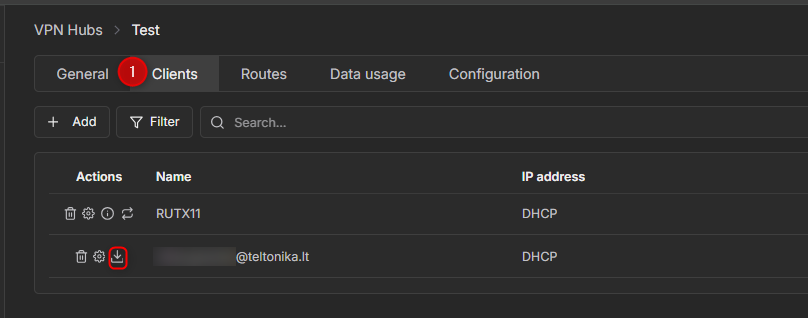
Once the certificate is downloaded, upload it to the OpenVPN Connect client. This will establish a secure VPN connection to your RMS VPN Hub.
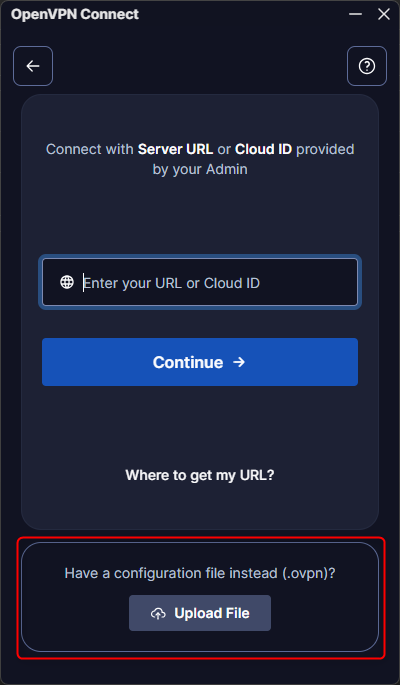
Please let me know how it goes. If you need any further assistance or encounter any difficulties during the setup, I will be glad to help.
Best regards,
V.
Bit difficult as i use open vpn for different set of networks and we are moving away from that, this morning however the vpn was working perfectly fine and i could reach the page i needed, and this is exactly what i mean, it’s unreliable. this time i didnt change any settings at all , if i would use another vpn it would be wireguard.
Greetings, mirjam,
Thank you for your message.
Could you please clarify whether you are still experiencing the VPN connection instability on the RMS Windows VPN App, or if this occurs on the RMS web client as well? Additionally, it would be helpful to know which platform you are using for the RMS VPN App (Windows, iOS, or Android).
Please note that the RMS VPN App for Windows is currently in BETA, so minor bugs or unexpected behavior may occur. The RMS web client, however, is fully stable.
Once I have this information, I can further investigate the issue or escalate it to our R&D team if necessary.
Kind regards,
V.
I’ve been experiencing the same issues as @mirjam. It was fixed temporarily by moving our VPN hubs from Germany to Bahrain/Australia as you can read in this post: Flaky and unstable VPN connection with RUTX10 .
However, the past few days Bahrain/Australia are starting to show the same problems. I’d really like Teltonika to solve this issue, as their VPN hubs are currently just not stable enough to use in production environments.
Today I had to tell our customer that we could not look into issues at a system, because VPN was not working, ouch…
A slight correction to this issue:
It appears I shot myself in the foot by applying configuration backups of a single device to multiple devices. If those devices then also each have a VPN hub, it can cause problems as described here: Configurations and device-specific data