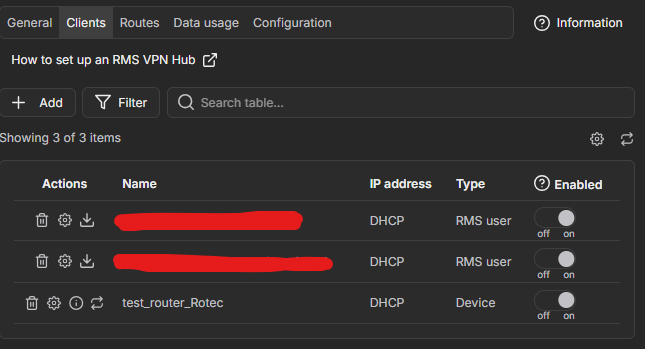
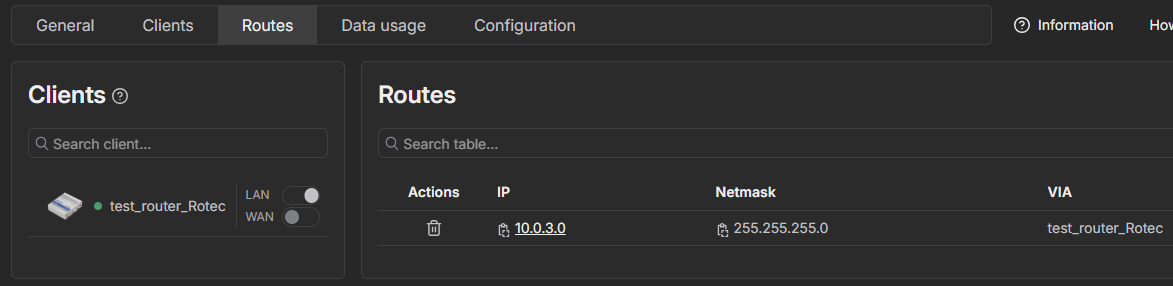
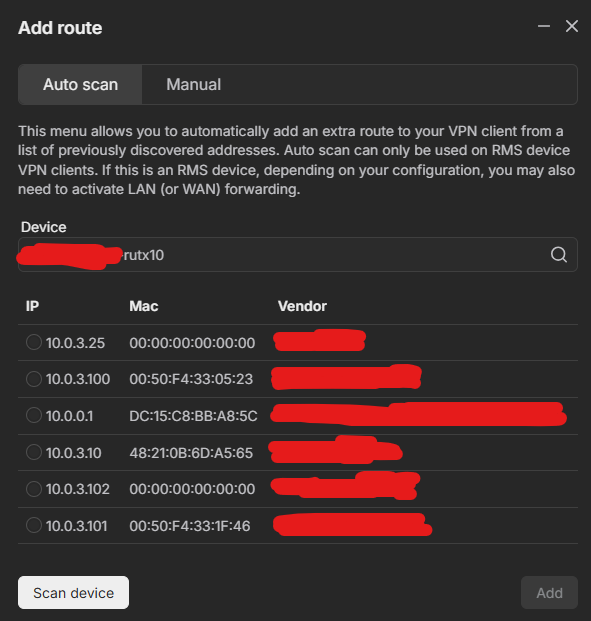
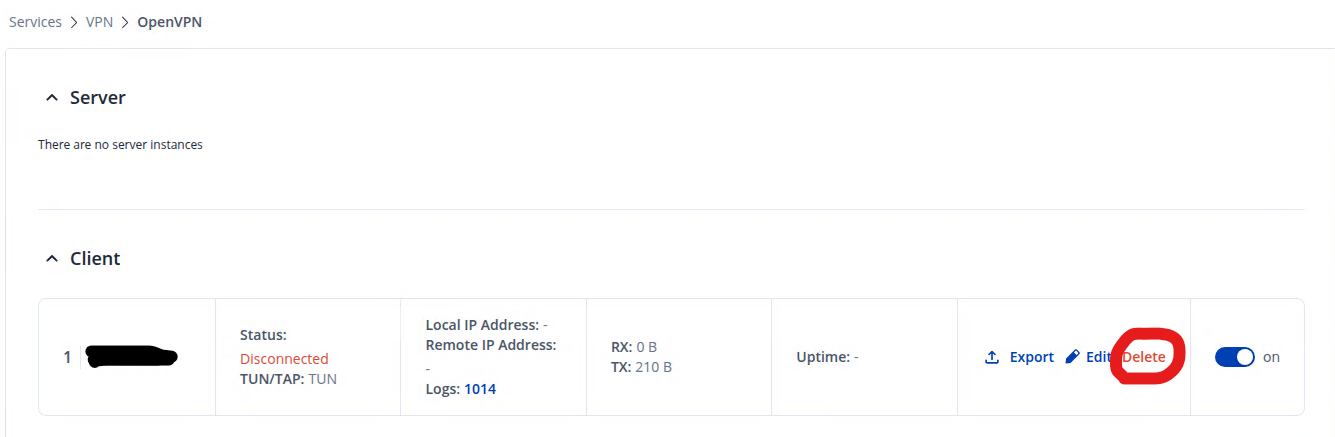
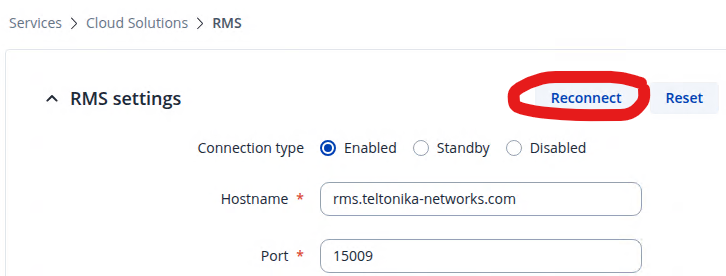
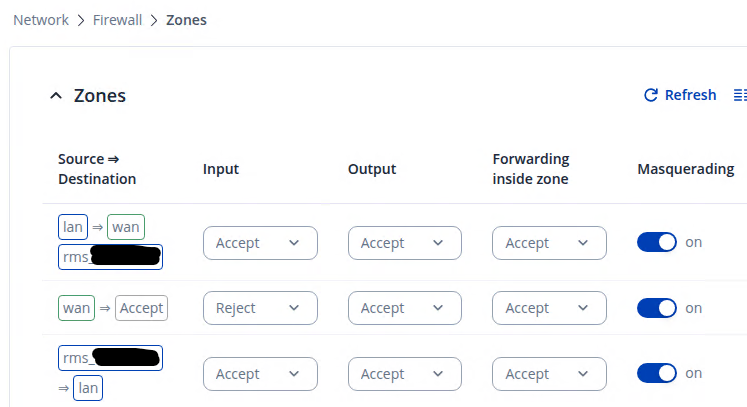
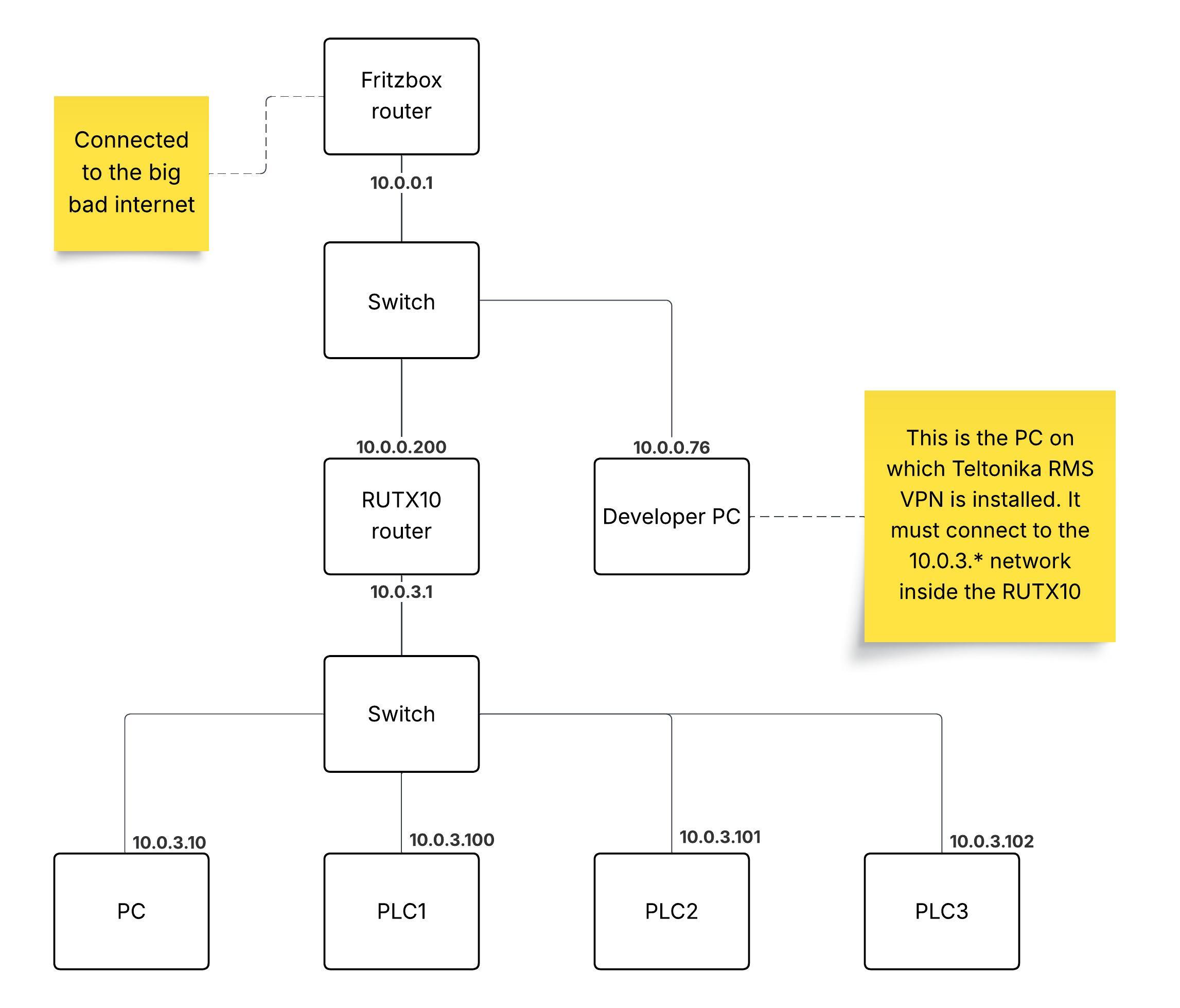
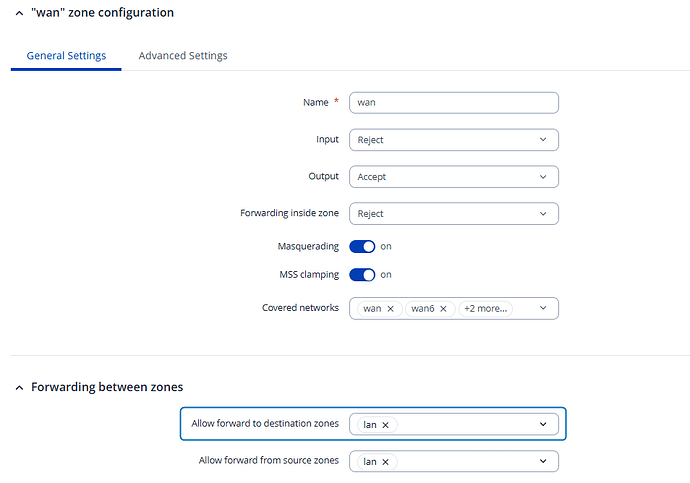
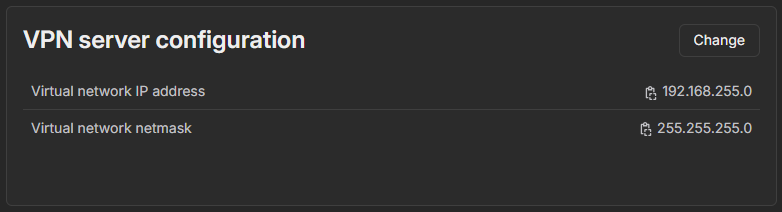
I did not know where to find the logs for the Teltonika RMS VPN application, so here are the logs from the OpenVPN Connect application where it says I connected twice. But during those connections I could not ping the devices inside the RUTX10. I could not upload .log files to your website, so here in plain text:
NOTE: I moved the RUTX10 lan network 10.0.0.x to 11.12.13.x intentionally last week.
⏎[Oct 3, 2025, 08:30:18] Frame=512/2112/512 mssfix-ctrl=1250
⏎[Oct 3, 2025, 08:30:18] EVENT: RESOLVE ⏎[Oct 3, 2025, 08:30:18] Contacting 3.69.106.81:53380 via UDP
⏎[Oct 3, 2025, 08:30:18] EVENT: WAIT ⏎[Oct 3, 2025, 08:30:18] WinCommandAgent: transmitting bypass route to 3.69.106.81
{
“host” : “3.69.106.81”,
“ipv6” : false
}
⏎[Oct 3, 2025, 08:30:18] Connecting to [3.69.106.81]:53380 (3.69.106.81) via UDP
⏎[Oct 3, 2025, 08:30:18] EVENT: CONNECTING ⏎[Oct 3, 2025, 08:30:18] Tunnel Options:V4,dev-type tun,link-mtu 1542,tun-mtu 1500,proto UDPv4,comp-lzo,keydir 1,cipher BF-CBC,auth SHA1,keysize 128,tls-auth,key-method 2,tls-client
⏎[Oct 3, 2025, 08:30:18] Creds: UsernameEmpty/PasswordEmpty
⏎[Oct 3, 2025, 08:30:18] Sending Peer Info:
IV_VER=3.11.3
IV_PLAT=win
IV_NCP=2
IV_TCPNL=1
IV_PROTO=8094
IV_MTU=1600
IV_CIPHERS=AES-128-CBC:AES-192-CBC:AES-256-CBC:AES-128-GCM:AES-192-GCM:AES-256-GCM:CHACHA20-POLY1305
IV_LZO=1
IV_LZO_SWAP=1
IV_LZ4=1
IV_LZ4v2=1
IV_COMP_STUB=1
IV_COMP_STUBv2=1
IV_AUTO_SESS=1
IV_GUI_VER=OCWindows_3.8.0-4528
IV_SSO=webauth,crtext
IV_BS64DL=1
⏎[Oct 3, 2025, 08:30:18] SSL Handshake: peer certificate: CN=teltonika-vpn-5QMV1dxvv9fpxwfw, 2048 bit RSA, cipher: TLS_AES_256_GCM_SHA384 TLSv1.3 Kx=any Au=any Enc=AESGCM(256) Mac=AEAD
⏎[Oct 3, 2025, 08:30:18] Session is ACTIVE
⏎[Oct 3, 2025, 08:30:18] EVENT: GET_CONFIG ⏎[Oct 3, 2025, 08:30:18] Sending PUSH_REQUEST to server…
⏎[Oct 3, 2025, 08:30:18] OPTIONS:
0 [comp-lzo] [no]
1 [route] [11.12.13.0] [255.255.255.0]
2 [route] [192.168.255.0] [255.255.255.0]
3 [topology] [net30]
4 [ping] [5]
5 [ping-restart] [15]
6 [ifconfig] [192.168.255.10] [192.168.255.9]
7 [peer-id] [1]
8 [cipher] [AES-256-GCM]
⏎[Oct 3, 2025, 08:30:18] PROTOCOL OPTIONS:
key-derivation: OpenVPN PRF
compress: LZO_STUB
control channel: tls-auth enabled
data channel: cipher AES-256-GCM, peer-id 1
⏎[Oct 3, 2025, 08:30:18] EVENT: ASSIGN_IP ⏎[Oct 3, 2025, 08:30:18] CAPTURED OPTIONS:
Session Name: 3.69.106.81
Layer: OSI_LAYER_3
Remote Address: 3.69.106.81
Tunnel Addresses:
192.168.255.10/30 → 192.168.255.9 [net30]
Reroute Gateway: IPv4=0 IPv6=0 flags=[ IPv4 ]
Block IPv4: no
Block IPv6: no
Block local DNS: no
Add Routes:
11.12.13.0/24
192.168.255.0/24
Exclude Routes:
⏎[Oct 3, 2025, 08:30:18] SetupClient: transmitting tun setup list to \.\pipe\agent_ovpnconnect
{
“allow_local_dns_resolvers” : false,
“confirm_event” : “3c0f000000000000”,
“destroy_event” : “380f000000000000”,
“tun” :
{
“add_routes” :
[
{
“address” : “11.12.13.0”,
“gateway” : “”,
“ipv6” : false,
“metric” : -1,
“net30” : false,
“prefix_length” : 24
},
{
“address” : “192.168.255.0”,
“gateway” : “”,
“ipv6” : false,
“metric” : -1,
“net30” : false,
“prefix_length” : 24
}
],
“block_ipv6” : false,
“block_outside_dns” : false,
“dns_options” :
{
“from_dhcp_options” : false,
“servers” : {}
},
“layer” : 3,
“mtu” : 0,
“remote_address” :
{
“address” : “3.69.106.81”,
“ipv6” : false
},
“reroute_gw” :
{
“flags” : 256,
“ipv4” : false,
“ipv6” : false
},
“route_metric_default” : -1,
“session_name” : “3.69.106.81”,
“tunnel_address_index_ipv4” : 0,
“tunnel_address_index_ipv6” : -1,
“tunnel_addresses” :
[
{
“address” : “192.168.255.10”,
“gateway” : “192.168.255.9”,
“ipv6” : false,
“metric” : -1,
“net30” : true,
“prefix_length” : 30
}
]
},
“tun_type” : 0
}
POST np://[\.\pipe\agent_ovpnconnect]/tun-setup : 200 OK
TAP ADAPTERS:
guid=‘{37EFCFE4-D992-4DA3-90B6-F8A70A0073A6}’ index=9 name=‘Local Area Connection’
Open TAP device “Local Area Connection” PATH=“\.\Global{37EFCFE4-D992-4DA3-90B6-F8A70A0073A6}.tap” SUCCEEDED
TAP-Windows Driver Version 9.27
ActionDeleteAllRoutesOnInterface iface_index=9
netsh interface ip set interface 9 metric=9000
Ok.
netsh interface ip set address 9 static 192.168.255.10 255.255.255.252 gateway=192.168.255.9 store=active
IPHelper: add route 11.12.13.0/24 9 192.168.255.9 metric=-1
IPHelper: add route 192.168.255.0/24 9 192.168.255.9 metric=-1
NRPT::ActionCreate pid=[13092] domains= dns_servers= dnssec=[0] id=[OpenVPNDNSRouting-13092]
DNS::ActionCreate interface name=[Local Area Connection] search domains=
DNS::ActionApply: successful
ipconfig /flushdns
Windows IP Configuration
Successfully flushed the DNS Resolver Cache.
TAP: ARP flush succeeded
TAP handle: 0c09000000000000
⏎[Oct 3, 2025, 08:30:18] Connected via TUN_WIN
⏎[Oct 3, 2025, 08:30:18] LZO-ASYM init swap=0 asym=1
⏎[Oct 3, 2025, 08:30:18] Comp-stub init swap=0
⏎[Oct 3, 2025, 08:30:18] EVENT: CONNECTED 3.69.106.81:53380 (3.69.106.81) via /UDP on TUN_WIN/192.168.255.10/ gw=[192.168.255.9/] mtu=(default)⏎[Oct 3, 2025, 08:31:11] SetupClient: signaling tun destroy event
⏎[Oct 3, 2025, 08:31:11] EVENT: DISCONNECTED ⏎[Oct 3, 2025, 08:32:20] OpenVPN core 3.11.3 win x86_64 64-bit OVPN-DCO built on Sep 16 2025 15:58:53
⏎[Oct 3, 2025, 08:32:20] Frame=512/2112/512 mssfix-ctrl=1250
⏎[Oct 3, 2025, 08:32:20] EVENT: RESOLVE ⏎[Oct 3, 2025, 08:32:20] Contacting 3.69.106.81:53380 via UDP
⏎[Oct 3, 2025, 08:32:20] EVENT: WAIT ⏎[Oct 3, 2025, 08:32:20] WinCommandAgent: transmitting bypass route to 3.69.106.81
{
“host” : “3.69.106.81”,
“ipv6” : false
}
⏎[Oct 3, 2025, 08:32:20] Connecting to [3.69.106.81]:53380 (3.69.106.81) via UDP
⏎[Oct 3, 2025, 08:32:20] EVENT: CONNECTING ⏎[Oct 3, 2025, 08:32:20] Tunnel Options:V4,dev-type tun,link-mtu 1542,tun-mtu 1500,proto UDPv4,comp-lzo,keydir 1,cipher BF-CBC,auth SHA1,keysize 128,tls-auth,key-method 2,tls-client
⏎[Oct 3, 2025, 08:32:20] Creds: UsernameEmpty/PasswordEmpty
⏎[Oct 3, 2025, 08:32:20] Sending Peer Info:
IV_VER=3.11.3
IV_PLAT=win
IV_NCP=2
IV_TCPNL=1
IV_PROTO=8094
IV_MTU=1600
IV_CIPHERS=AES-128-CBC:AES-192-CBC:AES-256-CBC:AES-128-GCM:AES-192-GCM:AES-256-GCM:CHACHA20-POLY1305
IV_LZO=1
IV_LZO_SWAP=1
IV_LZ4=1
IV_LZ4v2=1
IV_COMP_STUB=1
IV_COMP_STUBv2=1
IV_AUTO_SESS=1
IV_GUI_VER=OCWindows_3.8.0-4528
IV_SSO=webauth,crtext
IV_BS64DL=1
⏎[Oct 3, 2025, 08:32:20] SSL Handshake: peer certificate: CN=teltonika-vpn-5QMV1dxvv9fpxwfw, 2048 bit RSA, cipher: TLS_AES_256_GCM_SHA384 TLSv1.3 Kx=any Au=any Enc=AESGCM(256) Mac=AEAD
⏎[Oct 3, 2025, 08:32:20] Session is ACTIVE
⏎[Oct 3, 2025, 08:32:20] EVENT: GET_CONFIG ⏎[Oct 3, 2025, 08:32:20] Sending PUSH_REQUEST to server…
⏎[Oct 3, 2025, 08:32:20] OPTIONS:
0 [comp-lzo] [no]
1 [route] [11.12.13.0] [255.255.255.0]
2 [route] [192.168.255.0] [255.255.255.0]
3 [topology] [net30]
4 [ping] [5]
5 [ping-restart] [15]
6 [ifconfig] [192.168.255.10] [192.168.255.9]
7 [peer-id] [2]
8 [cipher] [AES-256-GCM]
⏎[Oct 3, 2025, 08:32:20] PROTOCOL OPTIONS:
key-derivation: OpenVPN PRF
compress: LZO_STUB
control channel: tls-auth enabled
data channel: cipher AES-256-GCM, peer-id 2
⏎[Oct 3, 2025, 08:32:20] EVENT: ASSIGN_IP ⏎[Oct 3, 2025, 08:32:20] CAPTURED OPTIONS:
Session Name: 3.69.106.81
Layer: OSI_LAYER_3
Remote Address: 3.69.106.81
Tunnel Addresses:
192.168.255.10/30 → 192.168.255.9 [net30]
Reroute Gateway: IPv4=0 IPv6=0 flags=[ IPv4 ]
Block IPv4: no
Block IPv6: no
Block local DNS: no
Add Routes:
11.12.13.0/24
192.168.255.0/24
Exclude Routes:
⏎[Oct 3, 2025, 08:32:21] SetupClient: transmitting tun setup list to \.\pipe\agent_ovpnconnect
{
“allow_local_dns_resolvers” : false,
“confirm_event” : “240f000000000000”,
“destroy_event” : “280f000000000000”,
“tun” :
{
“add_routes” :
[
{
“address” : “11.12.13.0”,
“gateway” : “”,
“ipv6” : false,
“metric” : -1,
“net30” : false,
“prefix_length” : 24
},
{
“address” : “192.168.255.0”,
“gateway” : “”,
“ipv6” : false,
“metric” : -1,
“net30” : false,
“prefix_length” : 24
}
],
“block_ipv6” : false,
“block_outside_dns” : false,
“dns_options” :
{
“from_dhcp_options” : false,
“servers” : {}
},
“layer” : 3,
“mtu” : 0,
“remote_address” :
{
“address” : “3.69.106.81”,
“ipv6” : false
},
“reroute_gw” :
{
“flags” : 256,
“ipv4” : false,
“ipv6” : false
},
“route_metric_default” : -1,
“session_name” : “3.69.106.81”,
“tunnel_address_index_ipv4” : 0,
“tunnel_address_index_ipv6” : -1,
“tunnel_addresses” :
[
{
“address” : “192.168.255.10”,
“gateway” : “192.168.255.9”,
“ipv6” : false,
“metric” : -1,
“net30” : true,
“prefix_length” : 30
}
]
},
“tun_type” : 0
}
POST np://[\.\pipe\agent_ovpnconnect]/tun-setup : 200 OK
TAP ADAPTERS:
guid=‘{37EFCFE4-D992-4DA3-90B6-F8A70A0073A6}’ index=9 name=‘Local Area Connection’
Open TAP device “Local Area Connection” PATH=“\.\Global{37EFCFE4-D992-4DA3-90B6-F8A70A0073A6}.tap” SUCCEEDED
TAP-Windows Driver Version 9.27
ActionDeleteAllRoutesOnInterface iface_index=9
netsh interface ip set interface 9 metric=9000
Ok.
netsh interface ip set address 9 static 192.168.255.10 255.255.255.252 gateway=192.168.255.9 store=active
IPHelper: add route 11.12.13.0/24 9 192.168.255.9 metric=-1
IPHelper: add route 192.168.255.0/24 9 192.168.255.9 metric=-1
NRPT::ActionCreate pid=[13092] domains= dns_servers= dnssec=[0] id=[OpenVPNDNSRouting-13092]
DNS::ActionCreate interface name=[Local Area Connection] search domains=
DNS::ActionApply: successful
ipconfig /flushdns
Windows IP Configuration
Successfully flushed the DNS Resolver Cache.
TAP: ARP flush succeeded
TAP handle: 6c0f000000000000
⏎[Oct 3, 2025, 08:32:21] Connected via TUN_WIN
⏎[Oct 3, 2025, 08:32:21] LZO-ASYM init swap=0 asym=1
⏎[Oct 3, 2025, 08:32:21] Comp-stub init swap=0
⏎[Oct 3, 2025, 08:32:21] EVENT: CONNECTED 3.69.106.81:53380 (3.69.106.81) via /UDP on TUN_WIN/192.168.255.10/ gw=[192.168.255.9/] mtu=(default)⏎[Oct 3, 2025, 08:32:52] SetupClient: signaling tun destroy event
⏎[Oct 3, 2025, 08:32:52] EVENT: DISCONNECTED ⏎