Currently we have a few (5) RUTX10 devices in RMS. All these devices are used for the same purpose and should have the same configuration. Each device also has a VPN hub configured.
When a new RUTX10 (D6) must be added, we are currently exporting a backup (.tar.gz) from an existing device (D5) and restoring that backup on D6. After restoring the configuration backup we create a VPN hub for D6.
The problem is that restoring a backup to D6 from another device (D5), will also include the VPN hub connectivity configuration. So in the D6 RUTX10 UI, you will see 2 OpenVPN clients: One for the D5 VPN hub and one for the D6 VPN hub.
This causes problems when connecting to the D6 VPN hub. We had to learn the hard way that you then have to manually remove the D5 VPN client configuration from the D6.
Here’s an example of how VPN failed for D6 in those cases.
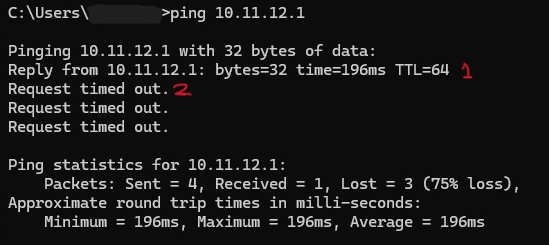
This can be explained with the tcpdump of the D6 RUTX10:
– Ping request 1
10:45:29.674344 tun_c_rms_tv3AU In IP 192.168.255.10 > 10.11.12.1: ICMP echo request, id 1, seq 107, length 40
10:45:29.674628 tun_c_rms_tv3AU Out IP 10.11.12.1 > 192.168.255.10: ICMP echo reply, id 1, seq 107, length 40
– Ping request 2
10:45:30.696021 tun_c_rms_tv3AU In IP 192.168.255.10 > 10.11.12.1: ICMP echo request, id 1, seq 108, length 40
10:45:30.696236 tun_c_rms_KhymH Out IP 10.11.12.1 > 192.168.255.10: ICMP echo reply, id 1, seq 108, length 40
As you can see the failed ‘ping request 2’ tries to respond over the wrong VPN tunnel (KhymH instead of tv3AU). This is because D6 has 2 VPN client configurations, the one from D5 (KhymH) and the one from D6 (tv3AU).
This leaves me with 2 questions:
- What is the proper way to copy device configuration to a new device, without device-specific stuff like VPN hub connectivity?
- How is it possible that in this case the response goes through that wrong tunnel? D6 is not even added to the D5 VPN hub in RMS and it seems a lot more logical that a response should be passed through the tunnel from which it arrived (tv3AU).