I am experiencing a persistent internal modem problem on a RUTM30 which started immediately after a modem firmware update. Before the modem update the router was working normally.
I got sometimes notification that the intern modem is unreachable (unexpected shutdown)
The issue persists after factory reset and clean configuration.
System firmware: RUTM_R_00.07.20.3
Modem firmware: RG520NEBDCR03A05M4G
Sim card is working (tried it in my phone) i also tried instead a Esim→didn’t work
i’ve found a workaround for the people with the modem firmware problem:
Choose 4G instead 5G!
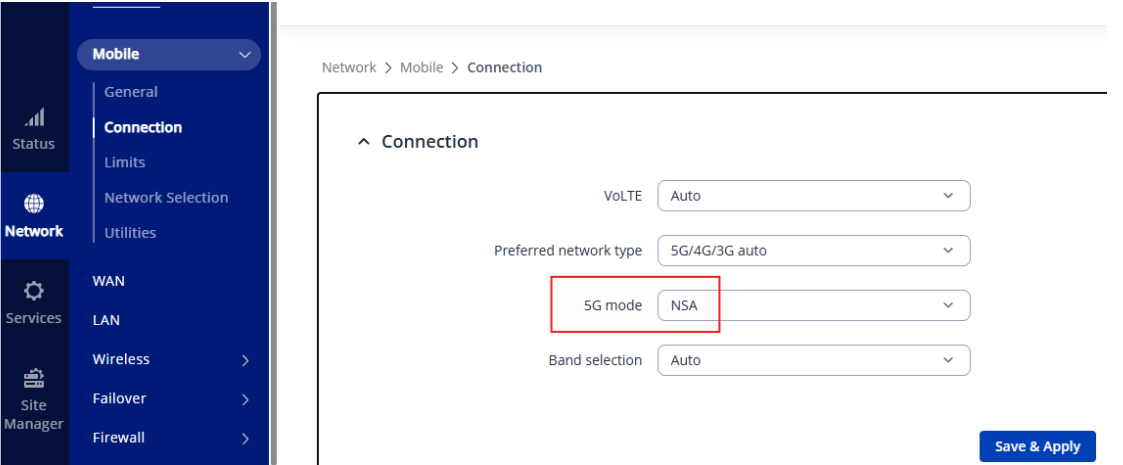
In the device go to: Network→Mobile→Connection
Choose the correct SIM-Card (the one you use for the internet)
Edit the “Prefered network typ” to 4G/3G auto
Save & Apply
See the attached Screenshots how to do. I know its only 4G instead of 5G, but ist a huge difference between having a little bit slower internet or no internet. Hope that will help you and hope it will help the support for solving this problem.
Same issue here! After updating the modem’s firmware, 5G connections can no longer be established or drop immediately. 4G connections are still possible. Release RG520NEBDCR03A05M4G appears to have a bug. Please investigate this and provide a fixed version or a way to downgrade to a stable version. Thank you.