Hello,
I have a Teltonika RUT360 and the manufacturer/factory information appears to be lost or corrupted.
What happened:
-
I first performed a factory reset.
-
After the factory reset, the router was not working/reachable normally.
-
I then used the bootloader menu recovery option to reinstall the firmware.
-
After using the bootloader recovery option, the router started working again and the WebUI is now accessible, but the manufacturer/device information is missing or corrupted.
Current status:
-
WebUI is accessible now
-
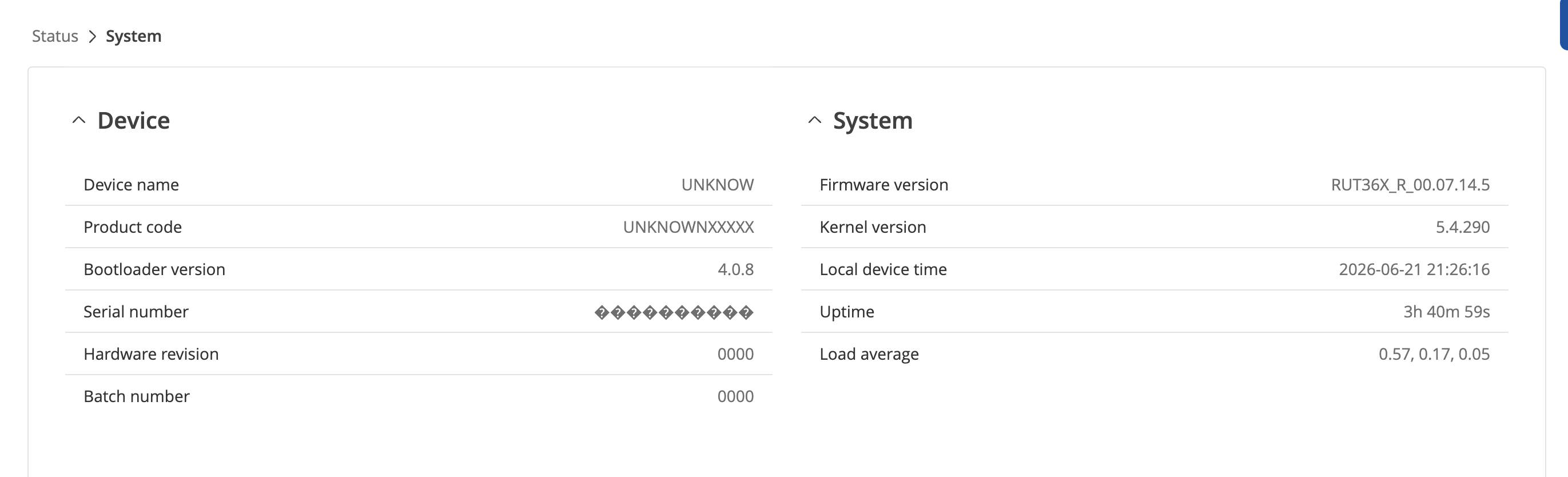
Device name shows as: UNKNOW
-
Product code shows as: UNKNOWNXXXXX
-
Serial number appears corrupted/unreadable
-
Hardware revision shows: 0000
-
Batch number shows: 0000
-
SSH prompt shows: root@UNKNOW
-
Firmware: RUT36X_R_00.07.14.5
-
Kernel: 5.4.290
-
Bootloader version: 4.0.8
From SSH, mnf_info -mtnwbv returns:
XX:XX:XX:XX:XX:XX
XX:XX:XX:XX:XX:XX
UNKNOWNXXXXX
N/A
0000
4.0.8

I also found these related community issues:
-
RUT950 admin page not reachable after firmware update:
RUT-950 - Admin page not reachable after firmware update -
RUT200 lost manufacturer info:
Rut 200 Lost manufacturer info
Based on the related issue, it looks like this may require help from the Teltonika support team to recover/restore the manufacturer information remotely.
Could someone from the Teltonika support team please help me recover the manufacturer/factory information for this device?
I can provide the full serial number, MAC address, and any other required device information privately to Teltonika support.
I have attached screenshots from SSH and the WebUI showing the missing/corrupted device information.
Thank you.