Hello @AIO,
Please let me know if you still require any assistance.
Best regards,
Thanks, Mike.
I updated the server’s listen port to 51820, and the issue does not appear to have changed.
Hi Marija,
Thank you - I would definitely appreciate your assistance on this.
I was considering resetting the RUT241 to factory and setting up a simple PC Client ←→ RUT241 wireguard tunnel, eliminating my VPS in an attempt to isolate the issue. I will wait for your input first, though.
Greetings,
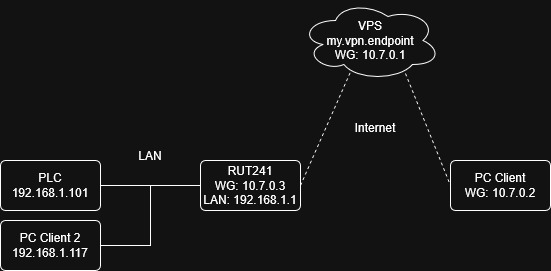
Could you please share a network topology diagram that includes IP addresses?
Additionally, please provide the updated WireGuard configuration, as this will help me better understand the current setup.
Best Regards,
Justinas
The pc should also be told that it may send 192.168.1.x pings via it’s wireguard connection?
After all the pc has an ip addres 10.7.0.x adress while it’s connected to the wireguard server, so the pc must be told it may send 192.168.1.x traffic to the Wireguard server also?
So PC Peer config should have:
AllowedIPs = 10.7.0.0/24, 192.168.1.0/24
Hi Justinas,
See below. Happy to share my RUT config file as needed.
Network topology:
Wireguard Configurations:
VPS
[Interface]
#Name = VPS Server
Address = 10.7.0.1/24
MTU = 1280
PreUp =
PostUp =
PreDown =
PostDown =
ListenPort = 51820
PrivateKey = <vpsPrivateKey>

[Peer]
#Name = RUT241
PublicKey = <rutPublicKey>
AllowedIPs = 10.7.0.3/32, 192.168.1.0/24

[Peer]
#Name = PC Client
PublicKey = <pcPublicKey>
AllowedIPs = 10.7.0.2/32
PC Client
[Interface]
#Name = PC Client
PrivateKey = <pcPrivateKey>
Address = 10.7.0.2/24
DNS = 9.9.9.9
MTU = 1280

[Peer]
PublicKey = <vpsPublicKey>
AllowedIPs = 0.0.0.0/1, 128.0.0.0/1
Endpoint = my.vpn.endpoint:51820
PersistentKeepalive = 25
RUT241
config interface 'WG1'
        option listen_port '51820'
        option proto 'wireguard'
        option public_key '<rutPublicKey>'
        list addresses '10.7.0.3/24'
        option private_key '<rutPrivateKey>'
        option disabled '0'
        option mtu '1280'
        list dns '9.9.9.9'

config wireguard_WG1 'Server'
        option description 'Server'
        option public_key '<vpsPublicKey>'
        option force_tunlink '0'
        option endpoint_host 'my.vpn.endpoint'
        option route_allowed_ips '1'
        option tunlink 'any'
        option endpoint_port '51820'
        option persistent_keepalive '25'
        list allowed_ips '0.0.0.0/1'
        list allowed_ips '128.0.0.0/1'
Hi Justinas,
Just checking back in. Any further advice? Thanks!
Also make sure none of your interface participate in failover or loadbalancing: see this (still unresolved) issue: Failover and Wireguard mutually exclusive
Thanks for the suggestion - I’ll check it out. 
Hi @Justinas - I believe I provided an answer to you inquiry, looking for follow up please. Thank you!
Hi Justinas,
Still looking for follow up. I answered your last query and have not heard back. Is there someone I should call instead?
Thanks!
Greetings,
We are currently working on your inquiry and will get back to you as soon as possible.
Best Regards,
Justinas
Greetings,
For troubleshooting purposes, we will require more sensitive information from your end, such as the troubleshoot file, which may contain passwords, public IP addresses, serial numbers, and such. To avoid leaking this information, we have sent you a form to fill out, which you will receive in your e-mail inbox that you have registered your account with in the forums. In the Ticket ID field of the form, please enter the ID of this thread, which is 16721.
Best Regards,
Justinas
The most probable cause of the failure is a wrong SNAT rule on the VPS server. Check it with iptables -t nat -n -L. Is there something suspicious ?
An no contemptuous comments cannot help.
Happy new year anyway.
See below.
iptables -t nat -n -L
Chain PREROUTING (policy ACCEPT)
target     prot opt source               destination

Chain INPUT (policy ACCEPT)
target     prot opt source               destination

Chain OUTPUT (policy ACCEPT)
target     prot opt source               destination

Chain POSTROUTING (policy ACCEPT)
target     prot opt source               destination
SNAT       0    --  10.7.0.0/24         !10.7.0.0/24          to:my.vpn.endpoint
Yes, this is the culprit. Delete this SNAT rule or at least add 192.168.1.0/24 to the exclusion list.
Thank you for the suggestion sthyr.
I both deleted the rule but remain unable to ping the RUT LAN from WG server or remote PC client. Happy to try additional solutions.
iptables -D FORWARD -s 10.7.0.0/24 -j ACCEPT
With this command you have deleted the FORWARD rule not the POSTROUTING one.
Check with iptables-save the exact syntax used and replace the -A or -I POSTROUTING with -D POSTROUTING.
Of course restore the FORWARD rule you have deleted.
user:~$ sudo iptables-save
# Generated by iptables-save v1.8.10 (nf_tables) on Mon Jan  5 22:54:09 2026
*filter
:INPUT ACCEPT [5944683:1280679432]
:FORWARD ACCEPT [17330:1359402]
:OUTPUT ACCEPT [0:0]
-A INPUT -p udp -m udp --dport 443 -j ACCEPT
-A FORWARD -m state --state RELATED,ESTABLISHED -j ACCEPT
-A FORWARD -s 10.7.0.0/24 -j ACCEPT
COMMIT
# Completed on Mon Jan  5 22:54:09 2026
# Generated by iptables-save v1.8.10 (nf_tables) on Mon Jan  5 22:54:09 2026
*nat
:PREROUTING ACCEPT [0:0]
:INPUT ACCEPT [0:0]
:OUTPUT ACCEPT [0:0]
:POSTROUTING ACCEPT [13070:759404]
-A POSTROUTING -s 10.7.0.0/24 ! -d 10.7.0.0/24 -j SNAT --to-source my.vpn.endpoint
COMMIT
# Completed on Mon Jan  5 22:54:09 2026
user:~$ sudo iptables -D POSTROUTING -s 10.7.0.0/24 ! -d 10.7.0.0/24 -j SNAT --to-source my.vpn.endpoint
iptables: Bad rule (does a matching rule exist in that chain?).
Ahh, good catch, my mistake.
Trying to delete that rule does not appear to work.
iptables -t nat -D POSTROUTING -s 10.7.0.0/24 ! -d 10.7.0.0/24 -j SNAT --to-source my.vpn.endpoint
Replace my.vpn.endpoint by the original value. Checked it, works for me.