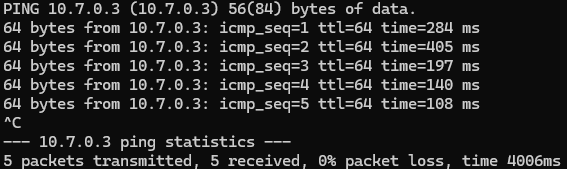
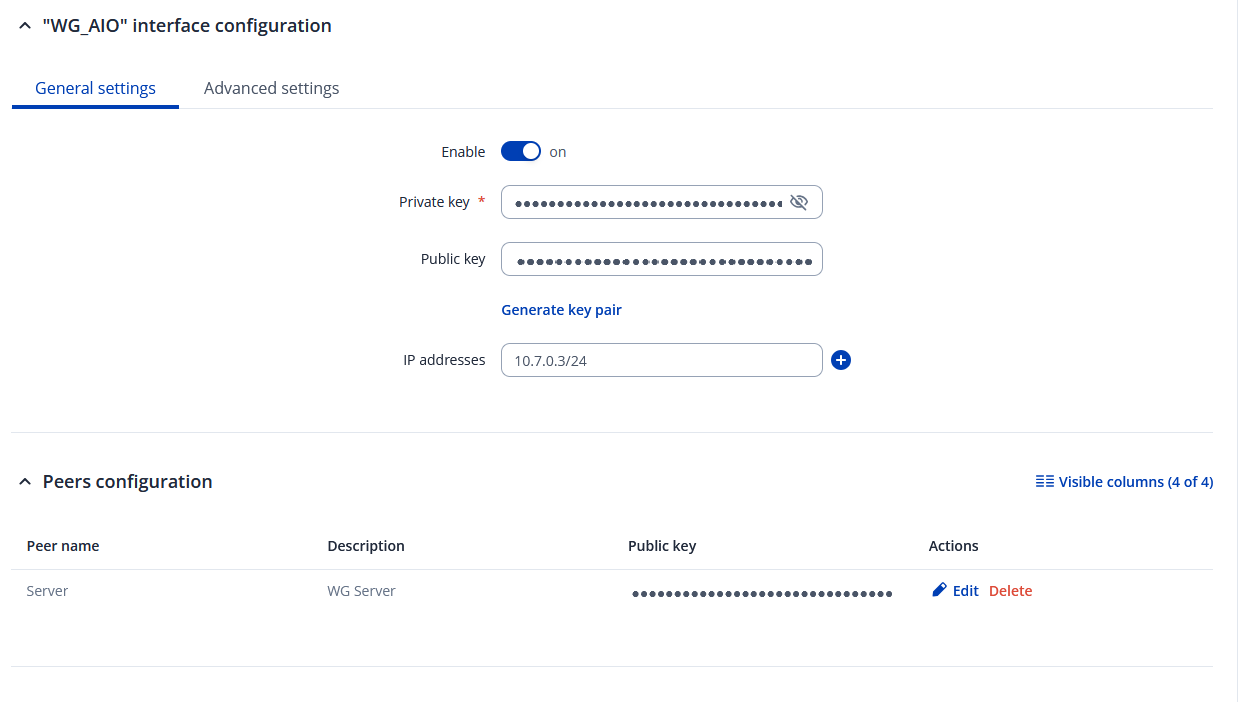
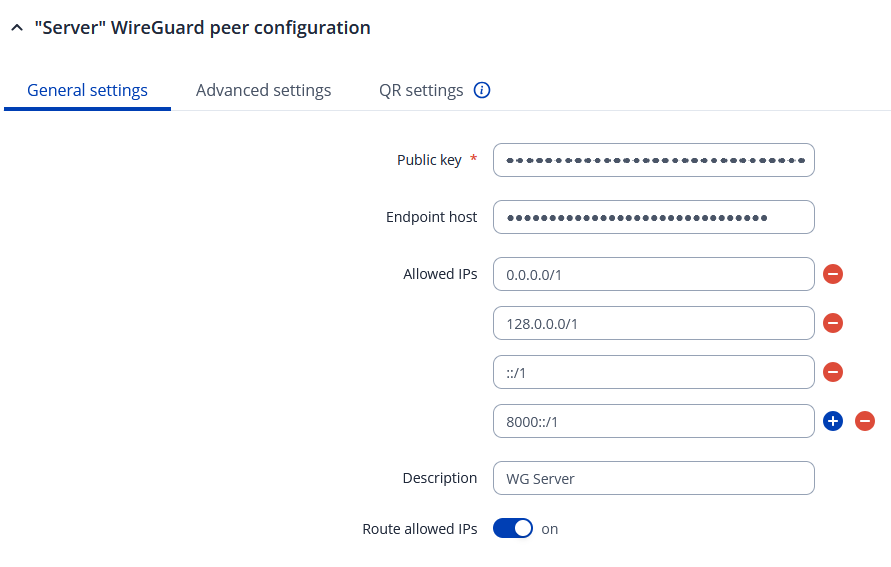
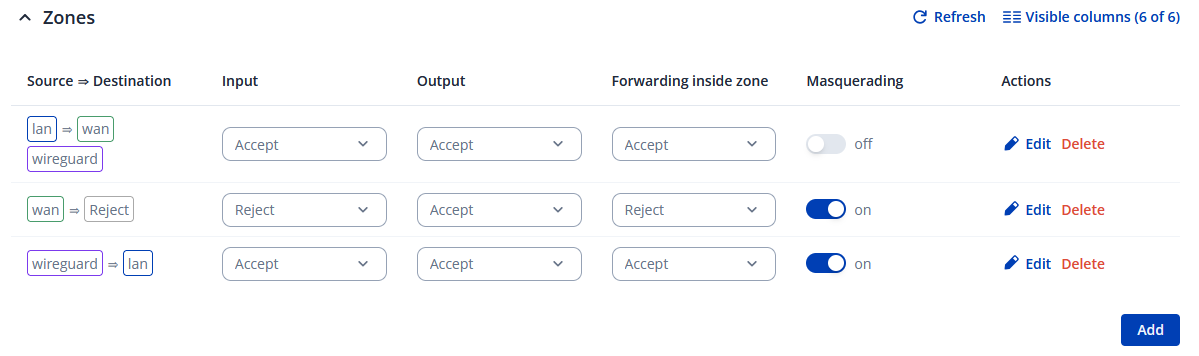
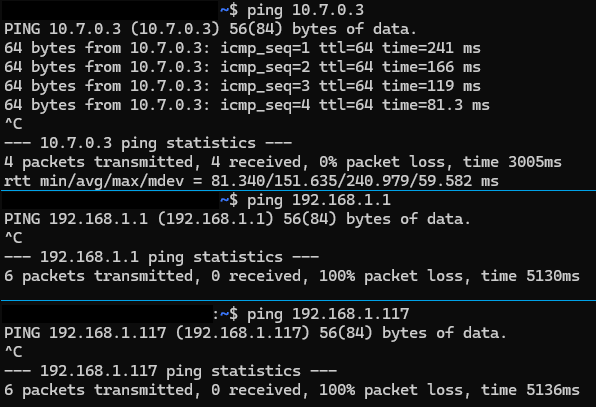
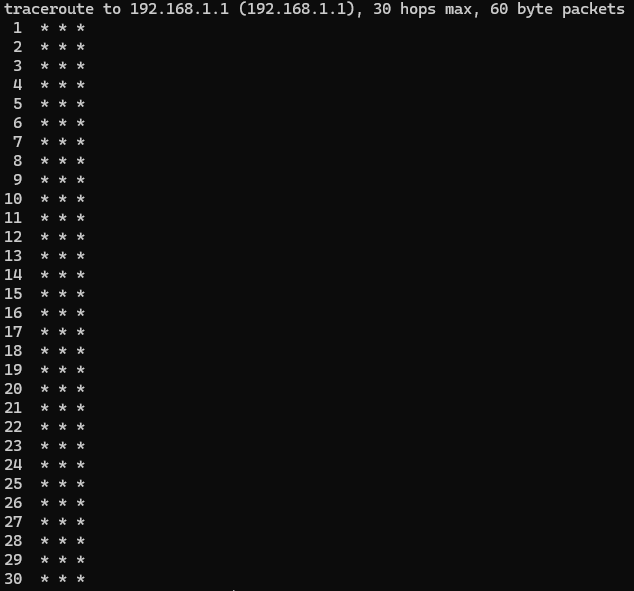
Try with traceroute instead of ping. What is the output ?

What is the output of tcpdump ?
This is tcpdump while running traceroute to 192.168.1.101.
root@RUT241:~# tcpdump -i any -n -v icmp
tcpdump: WARNING: any: That device doesn't support promiscuous mode
(Promiscuous mode not supported on the "any" device)
tcpdump: listening on any, link-type LINUX_SLL2 (Linux cooked v2), snapshot length 262144 bytes
11:54:51.894783 qmimux0 Out IP (tos 0xc0, ttl 64, id 37581, offset 0, flags [none], proto ICMP (1), length 88)
    100.95.249.37 > my.vpn.endpoint: ICMP time exceeded in-transit, length 68
        IP (tos 0x0, ttl 1, id 29293, offset 0, flags [none], proto UDP (17), length 60)
    my.vpn.endpoint.54308 > 192.168.1.101.33434: UDP, length 32
11:54:51.910015 qmimux0 Out IP (tos 0xc0, ttl 64, id 37583, offset 0, flags [none], proto ICMP (1), length 88)
    100.95.249.37 > my.vpn.endpoint: ICMP time exceeded in-transit, length 68
        IP (tos 0x0, ttl 1, id 5336, offset 0, flags [none], proto UDP (17), length 60)
    my.vpn.endpoint.46258 > 192.168.1.101.33435: UDP, length 32
11:54:51.910127 qmimux0 Out IP (tos 0xc0, ttl 64, id 37584, offset 0, flags [none], proto ICMP (1), length 88)
    100.95.249.37 > my.vpn.endpoint: ICMP time exceeded in-transit, length 68
        IP (tos 0x0, ttl 1, id 33720, offset 0, flags [none], proto UDP (17), length 60)
    my.vpn.endpoint.54704 > 192.168.1.101.33436: UDP, length 32
11:54:51.911849 eth0  In  IP (tos 0x6,ECT(0), ttl 64, id 20815, offset 0, flags [none], proto ICMP (1), length 88)
    192.168.1.101 > my.vpn.endpoint: ICMP 192.168.1.101 udp port 33437 unreachable, length 68
        IP (tos 0x0, ttl 1, id 20874, offset 0, flags [none], proto UDP (17), length 60)
    my.vpn.endpoint.57472 > 192.168.1.101.33437: UDP, length 32
11:54:51.911858 eth0.1 In  IP (tos 0x6,ECT(0), ttl 64, id 20815, offset 0, flags [none], proto ICMP (1), length 88)
    192.168.1.101 > my.vpn.endpoint: ICMP 192.168.1.101 udp port 33437 unreachable, length 68
        IP (tos 0x0, ttl 1, id 20874, offset 0, flags [none], proto UDP (17), length 60)
    my.vpn.endpoint.57472 > 192.168.1.101.33437: UDP, length 32
11:54:51.911880 br-lan In  IP (tos 0x6,ECT(0), ttl 64, id 20815, offset 0, flags [none], proto ICMP (1), length 88)
    192.168.1.101 > my.vpn.endpoint: ICMP 192.168.1.101 udp port 33437 unreachable, length 68
        IP (tos 0x0, ttl 1, id 20874, offset 0, flags [none], proto UDP (17), length 60)
    my.vpn.endpoint.57472 > 192.168.1.101.33437: UDP, length 32
11:54:51.912113 qmimux0 Out IP (tos 0x6,ECT(0), ttl 63, id 20815, offset 0, flags [none], proto ICMP (1), length 88)
    192.168.1.101 > my.vpn.endpoint: ICMP 192.168.1.101 udp port 33437 unreachable, length 68
        IP (tos 0x0, ttl 1, id 20874, offset 0, flags [none], proto UDP (17), length 60)
    my.vpn.endpoint.57472 > 192.168.1.101.33437: UDP, length 32
11:54:51.912152 eth0  In  IP (tos 0x6,ECT(0), ttl 64, id 21071, offset 0, flags [none], proto ICMP (1), length 88)
    192.168.1.101 > my.vpn.endpoint: ICMP 192.168.1.101 udp port 33438 unreachable, length 68
        IP (tos 0x0, ttl 1, id 29746, offset 0, flags [none], proto UDP (17), length 60)
    my.vpn.endpoint.37743 > 192.168.1.101.33438: UDP, length 32
11:54:51.912156 eth0.1 In  IP (tos 0x6,ECT(0), ttl 64, id 21071, offset 0, flags [none], proto ICMP (1), length 88)
    192.168.1.101 > my.vpn.endpoint: ICMP 192.168.1.101 udp port 33438 unreachable, length 68
        IP (tos 0x0, ttl 1, id 29746, offset 0, flags [none], proto UDP (17), length 60)
    my.vpn.endpoint.37743 > 192.168.1.101.33438: UDP, length 32
11:54:51.912171 br-lan In  IP (tos 0x6,ECT(0), ttl 64, id 21071, offset 0, flags [none], proto ICMP (1), length 88)
    192.168.1.101 > my.vpn.endpoint: ICMP 192.168.1.101 udp port 33438 unreachable, length 68
        IP (tos 0x0, ttl 1, id 29746, offset 0, flags [none], proto UDP (17), length 60)
    my.vpn.endpoint.37743 > 192.168.1.101.33438: UDP, length 32
11:54:51.912275 qmimux0 Out IP (tos 0x6,ECT(0), ttl 63, id 21071, offset 0, flags [none], proto ICMP (1), length 88)
    192.168.1.101 > my.vpn.endpoint: ICMP 192.168.1.101 udp port 33438 unreachable, length 68
        IP (tos 0x0, ttl 1, id 29746, offset 0, flags [none], proto UDP (17), length 60)
    my.vpn.endpoint.37743 > 192.168.1.101.33438: UDP, length 32
11:54:51.912294 eth0  In  IP (tos 0x6,ECT(0), ttl 64, id 21327, offset 0, flags [none], proto ICMP (1), length 88)
    192.168.1.101 > my.vpn.endpoint: ICMP 192.168.1.101 udp port 33439 unreachable, length 68
        IP (tos 0x0, ttl 1, id 9959, offset 0, flags [none], proto UDP (17), length 60)
    my.vpn.endpoint.47243 > 192.168.1.101.33439: UDP, length 32
11:54:51.912299 eth0.1 In  IP (tos 0x6,ECT(0), ttl 64, id 21327, offset 0, flags [none], proto ICMP (1), length 88)
    192.168.1.101 > my.vpn.endpoint: ICMP 192.168.1.101 udp port 33439 unreachable, length 68
        IP (tos 0x0, ttl 1, id 9959, offset 0, flags [none], proto UDP (17), length 60)
    my.vpn.endpoint.47243 > 192.168.1.101.33439: UDP, length 32
11:54:51.912311 br-lan In  IP (tos 0x6,ECT(0), ttl 64, id 21327, offset 0, flags [none], proto ICMP (1), length 88)
    192.168.1.101 > my.vpn.endpoint: ICMP 192.168.1.101 udp port 33439 unreachable, length 68
        IP (tos 0x0, ttl 1, id 9959, offset 0, flags [none], proto UDP (17), length 60)
    my.vpn.endpoint.47243 > 192.168.1.101.33439: UDP, length 32
11:54:51.912407 qmimux0 Out IP (tos 0x6,ECT(0), ttl 63, id 21327, offset 0, flags [none], proto ICMP (1), length 88)
    192.168.1.101 > my.vpn.endpoint: ICMP 192.168.1.101 udp port 33439 unreachable, length 68
        IP (tos 0x0, ttl 1, id 9959, offset 0, flags [none], proto UDP (17), length 60)
    my.vpn.endpoint.47243 > 192.168.1.101.33439: UDP, length 32
11:54:51.912427 eth0  In  IP (tos 0x6,ECT(0), ttl 64, id 21583, offset 0, flags [none], proto ICMP (1), length 88)
    192.168.1.101 > my.vpn.endpoint: ICMP 192.168.1.101 udp port 33440 unreachable, length 68
        IP (tos 0x0, ttl 2, id 17995, offset 0, flags [none], proto UDP (17), length 60)
    my.vpn.endpoint.47013 > 192.168.1.101.33440: UDP, length 32
11:54:51.912432 eth0.1 In  IP (tos 0x6,ECT(0), ttl 64, id 21583, offset 0, flags [none], proto ICMP (1), length 88)
    192.168.1.101 > my.vpn.endpoint: ICMP 192.168.1.101 udp port 33440 unreachable, length 68
        IP (tos 0x0, ttl 2, id 17995, offset 0, flags [none], proto UDP (17), length 60)
    my.vpn.endpoint.47013 > 192.168.1.101.33440: UDP, length 32
11:54:51.912444 br-lan In  IP (tos 0x6,ECT(0), ttl 64, id 21583, offset 0, flags [none], proto ICMP (1), length 88)
    192.168.1.101 > my.vpn.endpoint: ICMP 192.168.1.101 udp port 33440 unreachable, length 68
        IP (tos 0x0, ttl 2, id 17995, offset 0, flags [none], proto UDP (17), length 60)
    my.vpn.endpoint.47013 > 192.168.1.101.33440: UDP, length 32
11:54:51.912538 qmimux0 Out IP (tos 0x6,ECT(0), ttl 63, id 21583, offset 0, flags [none], proto ICMP (1), length 88)
    192.168.1.101 > my.vpn.endpoint: ICMP 192.168.1.101 udp port 33440 unreachable, length 68
        IP (tos 0x0, ttl 2, id 17995, offset 0, flags [none], proto UDP (17), length 60)
    my.vpn.endpoint.47013 > 192.168.1.101.33440: UDP, length 32
11:54:51.912559 eth0  In  IP (tos 0x6,ECT(0), ttl 64, id 21839, offset 0, flags [none], proto ICMP (1), length 88)
    192.168.1.101 > my.vpn.endpoint: ICMP 192.168.1.101 udp port 33441 unreachable, length 68
        IP (tos 0x0, ttl 2, id 12369, offset 0, flags [none], proto UDP (17), length 60)
    my.vpn.endpoint.53925 > 192.168.1.101.33441: UDP, length 32
11:54:51.912563 eth0.1 In  IP (tos 0x6,ECT(0), ttl 64, id 21839, offset 0, flags [none], proto ICMP (1), length 88)
    192.168.1.101 > my.vpn.endpoint: ICMP 192.168.1.101 udp port 33441 unreachable, length 68
        IP (tos 0x0, ttl 2, id 12369, offset 0, flags [none], proto UDP (17), length 60)
    my.vpn.endpoint.53925 > 192.168.1.101.33441: UDP, length 32
11:54:51.912575 br-lan In  IP (tos 0x6,ECT(0), ttl 64, id 21839, offset 0, flags [none], proto ICMP (1), length 88)
    192.168.1.101 > my.vpn.endpoint: ICMP 192.168.1.101 udp port 33441 unreachable, length 68
        IP (tos 0x0, ttl 2, id 12369, offset 0, flags [none], proto UDP (17), length 60)
    my.vpn.endpoint.53925 > 192.168.1.101.33441: UDP, length 32
11:54:51.912667 qmimux0 Out IP (tos 0x6,ECT(0), ttl 63, id 21839, offset 0, flags [none], proto ICMP (1), length 88)
    192.168.1.101 > my.vpn.endpoint: ICMP 192.168.1.101 udp port 33441 unreachable, length 68
        IP (tos 0x0, ttl 2, id 12369, offset 0, flags [none], proto UDP (17), length 60)
    my.vpn.endpoint.53925 > 192.168.1.101.33441: UDP, length 32
11:54:51.912687 eth0  In  IP (tos 0x6,ECT(0), ttl 64, id 22095, offset 0, flags [none], proto ICMP (1), length 88)
    192.168.1.101 > my.vpn.endpoint: ICMP 192.168.1.101 udp port 33442 unreachable, length 68
        IP (tos 0x0, ttl 2, id 57387, offset 0, flags [none], proto UDP (17), length 60)
    my.vpn.endpoint.47126 > 192.168.1.101.33442: UDP, length 32
11:54:51.912691 eth0.1 In  IP (tos 0x6,ECT(0), ttl 64, id 22095, offset 0, flags [none], proto ICMP (1), length 88)
    192.168.1.101 > my.vpn.endpoint: ICMP 192.168.1.101 udp port 33442 unreachable, length 68
        IP (tos 0x0, ttl 2, id 57387, offset 0, flags [none], proto UDP (17), length 60)
    my.vpn.endpoint.47126 > 192.168.1.101.33442: UDP, length 32
11:54:51.912703 br-lan In  IP (tos 0x6,ECT(0), ttl 64, id 22095, offset 0, flags [none], proto ICMP (1), length 88)
    192.168.1.101 > my.vpn.endpoint: ICMP 192.168.1.101 udp port 33442 unreachable, length 68
        IP (tos 0x0, ttl 2, id 57387, offset 0, flags [none], proto UDP (17), length 60)
    my.vpn.endpoint.47126 > 192.168.1.101.33442: UDP, length 32
11:54:51.912794 qmimux0 Out IP (tos 0x6,ECT(0), ttl 63, id 22095, offset 0, flags [none], proto ICMP (1), length 88)
    192.168.1.101 > my.vpn.endpoint: ICMP 192.168.1.101 udp port 33442 unreachable, length 68
        IP (tos 0x0, ttl 2, id 57387, offset 0, flags [none], proto UDP (17), length 60)
    my.vpn.endpoint.47126 > 192.168.1.101.33442: UDP, length 32
11:54:51.912814 eth0  In  IP (tos 0x6,ECT(0), ttl 64, id 22351, offset 0, flags [none], proto ICMP (1), length 88)
    192.168.1.101 > my.vpn.endpoint: ICMP 192.168.1.101 udp port 33443 unreachable, length 68
        IP (tos 0x0, ttl 3, id 28450, offset 0, flags [none], proto UDP (17), length 60)
    my.vpn.endpoint.57917 > 192.168.1.101.33443: UDP, length 32
11:54:51.912818 eth0.1 In  IP (tos 0x6,ECT(0), ttl 64, id 22351, offset 0, flags [none], proto ICMP (1), length 88)
    192.168.1.101 > my.vpn.endpoint: ICMP 192.168.1.101 udp port 33443 unreachable, length 68
        IP (tos 0x0, ttl 3, id 28450, offset 0, flags [none], proto UDP (17), length 60)
    my.vpn.endpoint.57917 > 192.168.1.101.33443: UDP, length 32
11:54:51.912830 br-lan In  IP (tos 0x6,ECT(0), ttl 64, id 22351, offset 0, flags [none], proto ICMP (1), length 88)
    192.168.1.101 > my.vpn.endpoint: ICMP 192.168.1.101 udp port 33443 unreachable, length 68
        IP (tos 0x0, ttl 3, id 28450, offset 0, flags [none], proto UDP (17), length 60)
    my.vpn.endpoint.57917 > 192.168.1.101.33443: UDP, length 32
11:54:51.912924 qmimux0 Out IP (tos 0x6,ECT(0), ttl 63, id 22351, offset 0, flags [none], proto ICMP (1), length 88)
    192.168.1.101 > my.vpn.endpoint: ICMP 192.168.1.101 udp port 33443 unreachable, length 68
        IP (tos 0x0, ttl 3, id 28450, offset 0, flags [none], proto UDP (17), length 60)
    my.vpn.endpoint.57917 > 192.168.1.101.33443: UDP, length 32
11:54:51.912943 eth0  In  IP (tos 0x6,ECT(0), ttl 64, id 22607, offset 0, flags [none], proto ICMP (1), length 88)
    192.168.1.101 > my.vpn.endpoint: ICMP 192.168.1.101 udp port 33444 unreachable, length 68
        IP (tos 0x0, ttl 3, id 37442, offset 0, flags [none], proto UDP (17), length 60)
    my.vpn.endpoint.32872 > 192.168.1.101.33444: UDP, length 32
11:54:51.912947 eth0.1 In  IP (tos 0x6,ECT(0), ttl 64, id 22607, offset 0, flags [none], proto ICMP (1), length 88)
    192.168.1.101 > my.vpn.endpoint: ICMP 192.168.1.101 udp port 33444 unreachable, length 68
        IP (tos 0x0, ttl 3, id 37442, offset 0, flags [none], proto UDP (17), length 60)
    my.vpn.endpoint.32872 > 192.168.1.101.33444: UDP, length 32
11:54:51.912960 br-lan In  IP (tos 0x6,ECT(0), ttl 64, id 22607, offset 0, flags [none], proto ICMP (1), length 88)
    192.168.1.101 > my.vpn.endpoint: ICMP 192.168.1.101 udp port 33444 unreachable, length 68
        IP (tos 0x0, ttl 3, id 37442, offset 0, flags [none], proto UDP (17), length 60)
    my.vpn.endpoint.32872 > 192.168.1.101.33444: UDP, length 32
11:54:51.913057 qmimux0 Out IP (tos 0x6,ECT(0), ttl 63, id 22607, offset 0, flags [none], proto ICMP (1), length 88)
    192.168.1.101 > my.vpn.endpoint: ICMP 192.168.1.101 udp port 33444 unreachable, length 68
        IP (tos 0x0, ttl 3, id 37442, offset 0, flags [none], proto UDP (17), length 60)
    my.vpn.endpoint.32872 > 192.168.1.101.33444: UDP, length 32
11:54:51.913670 eth0  In  IP (tos 0x6,ECT(0), ttl 64, id 22863, offset 0, flags [none], proto ICMP (1), length 88)
    192.168.1.101 > my.vpn.endpoint: ICMP 192.168.1.101 udp port 33445 unreachable, length 68
        IP (tos 0x0, ttl 3, id 25987, offset 0, flags [none], proto UDP (17), length 60)
    my.vpn.endpoint.45362 > 192.168.1.101.33445: UDP, length 32
11:54:51.913682 eth0.1 In  IP (tos 0x6,ECT(0), ttl 64, id 22863, offset 0, flags [none], proto ICMP (1), length 88)
    192.168.1.101 > my.vpn.endpoint: ICMP 192.168.1.101 udp port 33445 unreachable, length 68
        IP (tos 0x0, ttl 3, id 25987, offset 0, flags [none], proto UDP (17), length 60)
    my.vpn.endpoint.45362 > 192.168.1.101.33445: UDP, length 32
11:54:51.913706 br-lan In  IP (tos 0x6,ECT(0), ttl 64, id 22863, offset 0, flags [none], proto ICMP (1), length 88)
    192.168.1.101 > my.vpn.endpoint: ICMP 192.168.1.101 udp port 33445 unreachable, length 68
        IP (tos 0x0, ttl 3, id 25987, offset 0, flags [none], proto UDP (17), length 60)
    my.vpn.endpoint.45362 > 192.168.1.101.33445: UDP, length 32
11:54:51.913923 qmimux0 Out IP (tos 0x6,ECT(0), ttl 63, id 22863, offset 0, flags [none], proto ICMP (1), length 88)
    192.168.1.101 > my.vpn.endpoint: ICMP 192.168.1.101 udp port 33445 unreachable, length 68
        IP (tos 0x0, ttl 3, id 25987, offset 0, flags [none], proto UDP (17), length 60)
    my.vpn.endpoint.45362 > 192.168.1.101.33445: UDP, length 32
11:54:51.913959 eth0  In  IP (tos 0x6,ECT(0), ttl 64, id 23119, offset 0, flags [none], proto ICMP (1), length 88)
    192.168.1.101 > my.vpn.endpoint: ICMP 192.168.1.101 udp port 33446 unreachable, length 68
        IP (tos 0x0, ttl 4, id 47042, offset 0, flags [none], proto UDP (17), length 60)
    my.vpn.endpoint.52875 > 192.168.1.101.33446: UDP, length 32
11:54:51.913964 eth0.1 In  IP (tos 0x6,ECT(0), ttl 64, id 23119, offset 0, flags [none], proto ICMP (1), length 88)
    192.168.1.101 > my.vpn.endpoint: ICMP 192.168.1.101 udp port 33446 unreachable, length 68
        IP (tos 0x0, ttl 4, id 47042, offset 0, flags [none], proto UDP (17), length 60)
    my.vpn.endpoint.52875 > 192.168.1.101.33446: UDP, length 32
11:54:51.913977 br-lan In  IP (tos 0x6,ECT(0), ttl 64, id 23119, offset 0, flags [none], proto ICMP (1), length 88)
    192.168.1.101 > my.vpn.endpoint: ICMP 192.168.1.101 udp port 33446 unreachable, length 68
        IP (tos 0x0, ttl 4, id 47042, offset 0, flags [none], proto UDP (17), length 60)
    my.vpn.endpoint.52875 > 192.168.1.101.33446: UDP, length 32
11:54:51.914075 qmimux0 Out IP (tos 0x6,ECT(0), ttl 63, id 23119, offset 0, flags [none], proto ICMP (1), length 88)
    192.168.1.101 > my.vpn.endpoint: ICMP 192.168.1.101 udp port 33446 unreachable, length 68
        IP (tos 0x0, ttl 4, id 47042, offset 0, flags [none], proto UDP (17), length 60)
    my.vpn.endpoint.52875 > 192.168.1.101.33446: UDP, length 32
11:54:51.914097 eth0  In  IP (tos 0x6,ECT(0), ttl 64, id 23375, offset 0, flags [none], proto ICMP (1), length 88)
    192.168.1.101 > my.vpn.endpoint: ICMP 192.168.1.101 udp port 33447 unreachable, length 68
        IP (tos 0x0, ttl 4, id 59601, offset 0, flags [none], proto UDP (17), length 60)
    my.vpn.endpoint.42707 > 192.168.1.101.33447: UDP, length 32
11:54:51.914102 eth0.1 In  IP (tos 0x6,ECT(0), ttl 64, id 23375, offset 0, flags [none], proto ICMP (1), length 88)
    192.168.1.101 > my.vpn.endpoint: ICMP 192.168.1.101 udp port 33447 unreachable, length 68
        IP (tos 0x0, ttl 4, id 59601, offset 0, flags [none], proto UDP (17), length 60)
    my.vpn.endpoint.42707 > 192.168.1.101.33447: UDP, length 32
11:54:51.914115 br-lan In  IP (tos 0x6,ECT(0), ttl 64, id 23375, offset 0, flags [none], proto ICMP (1), length 88)
    192.168.1.101 > my.vpn.endpoint: ICMP 192.168.1.101 udp port 33447 unreachable, length 68
        IP (tos 0x0, ttl 4, id 59601, offset 0, flags [none], proto UDP (17), length 60)
    my.vpn.endpoint.42707 > 192.168.1.101.33447: UDP, length 32
11:54:51.914210 qmimux0 Out IP (tos 0x6,ECT(0), ttl 63, id 23375, offset 0, flags [none], proto ICMP (1), length 88)
    192.168.1.101 > my.vpn.endpoint: ICMP 192.168.1.101 udp port 33447 unreachable, length 68
        IP (tos 0x0, ttl 4, id 59601, offset 0, flags [none], proto UDP (17), length 60)
    my.vpn.endpoint.42707 > 192.168.1.101.33447: UDP, length 32
11:54:51.914238 eth0  In  IP (tos 0x6,ECT(0), ttl 64, id 23631, offset 0, flags [none], proto ICMP (1), length 88)
    192.168.1.101 > my.vpn.endpoint: ICMP 192.168.1.101 udp port 33448 unreachable, length 68
        IP (tos 0x0, ttl 4, id 55600, offset 0, flags [none], proto UDP (17), length 60)
    my.vpn.endpoint.37436 > 192.168.1.101.33448: UDP, length 32
11:54:51.914242 eth0.1 In  IP (tos 0x6,ECT(0), ttl 64, id 23631, offset 0, flags [none], proto ICMP (1), length 88)
    192.168.1.101 > my.vpn.endpoint: ICMP 192.168.1.101 udp port 33448 unreachable, length 68
        IP (tos 0x0, ttl 4, id 55600, offset 0, flags [none], proto UDP (17), length 60)
    my.vpn.endpoint.37436 > 192.168.1.101.33448: UDP, length 32
11:54:51.914255 br-lan In  IP (tos 0x6,ECT(0), ttl 64, id 23631, offset 0, flags [none], proto ICMP (1), length 88)
    192.168.1.101 > my.vpn.endpoint: ICMP 192.168.1.101 udp port 33448 unreachable, length 68
        IP (tos 0x0, ttl 4, id 55600, offset 0, flags [none], proto UDP (17), length 60)
    my.vpn.endpoint.37436 > 192.168.1.101.33448: UDP, length 32
11:54:51.914353 qmimux0 Out IP (tos 0x6,ECT(0), ttl 63, id 23631, offset 0, flags [none], proto ICMP (1), length 88)
    192.168.1.101 > my.vpn.endpoint: ICMP 192.168.1.101 udp port 33448 unreachable, length 68
        IP (tos 0x0, ttl 4, id 55600, offset 0, flags [none], proto UDP (17), length 60)
    my.vpn.endpoint.37436 > 192.168.1.101.33448: UDP, length 32
11:54:51.914374 eth0  In  IP (tos 0x6,ECT(0), ttl 64, id 23887, offset 0, flags [none], proto ICMP (1), length 88)
    192.168.1.101 > my.vpn.endpoint: ICMP 192.168.1.101 udp port 33449 unreachable, length 68
        IP (tos 0x0, ttl 5, id 23349, offset 0, flags [none], proto UDP (17), length 60)
    my.vpn.endpoint.40225 > 192.168.1.101.33449: UDP, length 32
11:54:51.914378 eth0.1 In  IP (tos 0x6,ECT(0), ttl 64, id 23887, offset 0, flags [none], proto ICMP (1), length 88)
    192.168.1.101 > my.vpn.endpoint: ICMP 192.168.1.101 udp port 33449 unreachable, length 68
        IP (tos 0x0, ttl 5, id 23349, offset 0, flags [none], proto UDP (17), length 60)
    my.vpn.endpoint.40225 > 192.168.1.101.33449: UDP, length 32
11:54:51.914391 br-lan In  IP (tos 0x6,ECT(0), ttl 64, id 23887, offset 0, flags [none], proto ICMP (1), length 88)
    192.168.1.101 > my.vpn.endpoint: ICMP 192.168.1.101 udp port 33449 unreachable, length 68
        IP (tos 0x0, ttl 5, id 23349, offset 0, flags [none], proto UDP (17), length 60)
    my.vpn.endpoint.40225 > 192.168.1.101.33449: UDP, length 32
11:54:51.914509 qmimux0 Out IP (tos 0x6,ECT(0), ttl 63, id 23887, offset 0, flags [none], proto ICMP (1), length 88)
    192.168.1.101 > my.vpn.endpoint: ICMP 192.168.1.101 udp port 33449 unreachable, length 68
        IP (tos 0x0, ttl 5, id 23349, offset 0, flags [none], proto UDP (17), length 60)
    my.vpn.endpoint.40225 > 192.168.1.101.33449: UDP, length 32
11:55:24.083366 WG_AIO Out IP (tos 0xc0, ttl 64, id 7684, offset 0, flags [none], proto ICMP (1), length 342)
    10.7.0.3 > 100.83.234.192: ICMP 100.83.234.191 udp port 68 unreachable, length 322
        IP (tos 0x0, ttl 254, id 20, offset 0, flags [none], proto UDP (17), length 314)
    100.83.234.192.67 > 100.83.234.191.68: BOOTP/DHCP, Reply, length 286, xid 0xd543bb59, Flags [none]
          Your-IP 100.83.234.191
          Server-IP 100.83.234.192
          Client-Ethernet-Address 00:00:00:00:00:00
          Vendor-rfc1048 Extensions
            Magic Cookie 0x63825363
            DHCP-Message (53), length 1: Offer
            Subnet-Mask (1), length 4: 255.255.255.128
            Default-Gateway (3), length 4: 100.83.234.192
            Domain-Name-Server (6), length 8: 198.224.167.135,198.224.166.135
            Hostname (12), length 6: "RUT241"
            Lease-Time (51), length 4: 7200
            Server-ID (54), length 4: 100.83.234.192
^C
56 packets captured
73 packets received by filter
0 packets dropped by kernel
tcpdump while traceroute to 192.168.1.1
root@RUT241:~# tcpdump -i any -n -v icmp
tcpdump: WARNING: any: That device doesn't support promiscuous mode
(Promiscuous mode not supported on the "any" device)
tcpdump: listening on any, link-type LINUX_SLL2 (Linux cooked v2), snapshot length 262144 bytes
11:59:40.624793 qmimux0 Out IP (tos 0xc0, ttl 64, id 19430, offset 0, flags [none], proto ICMP (1), length 88)
    192.168.1.1 > my.vpn.endpoint: ICMP 192.168.1.1 udp port 33434 unreachable, length 68
        IP (tos 0x0, ttl 1, id 62162, offset 0, flags [none], proto UDP (17), length 60)
    my.vpn.endpoint.36397 > 192.168.1.1.33434: UDP, length 32
11:59:40.624988 qmimux0 Out IP (tos 0xc0, ttl 64, id 19431, offset 0, flags [none], proto ICMP (1), length 88)
    192.168.1.1 > my.vpn.endpoint: ICMP 192.168.1.1 udp port 33435 unreachable, length 68
        IP (tos 0x0, ttl 1, id 22378, offset 0, flags [none], proto UDP (17), length 60)
    my.vpn.endpoint.48348 > 192.168.1.1.33435: UDP, length 32
11:59:40.625172 qmimux0 Out IP (tos 0xc0, ttl 64, id 19432, offset 0, flags [none], proto ICMP (1), length 88)
    192.168.1.1 > my.vpn.endpoint: ICMP 192.168.1.1 udp port 33436 unreachable, length 68
        IP (tos 0x0, ttl 1, id 56956, offset 0, flags [none], proto UDP (17), length 60)
    my.vpn.endpoint.51727 > 192.168.1.1.33436: UDP, length 32
11:59:40.625356 qmimux0 Out IP (tos 0xc0, ttl 64, id 19433, offset 0, flags [none], proto ICMP (1), length 88)
    192.168.1.1 > my.vpn.endpoint: ICMP 192.168.1.1 udp port 33437 unreachable, length 68
        IP (tos 0x0, ttl 2, id 57930, offset 0, flags [none], proto UDP (17), length 60)
    my.vpn.endpoint.43864 > 192.168.1.1.33437: UDP, length 32
11:59:40.625630 qmimux0 Out IP (tos 0xc0, ttl 64, id 19434, offset 0, flags [none], proto ICMP (1), length 88)
    192.168.1.1 > my.vpn.endpoint: ICMP 192.168.1.1 udp port 33438 unreachable, length 68
        IP (tos 0x0, ttl 2, id 19661, offset 0, flags [none], proto UDP (17), length 60)
    my.vpn.endpoint.56687 > 192.168.1.1.33438: UDP, length 32
11:59:40.625851 qmimux0 Out IP (tos 0xc0, ttl 64, id 19435, offset 0, flags [none], proto ICMP (1), length 88)
    192.168.1.1 > my.vpn.endpoint: ICMP 192.168.1.1 udp port 33439 unreachable, length 68
        IP (tos 0x0, ttl 2, id 33452, offset 0, flags [none], proto UDP (17), length 60)
    my.vpn.endpoint.48161 > 192.168.1.1.33439: UDP, length 32
11:59:45.745408 qmimux0 Out IP (tos 0xc0, ttl 64, id 19760, offset 0, flags [none], proto ICMP (1), length 88)
    192.168.1.1 > my.vpn.endpoint: ICMP 192.168.1.1 udp port 33450 unreachable, length 68
        IP (tos 0x0, ttl 6, id 50783, offset 0, flags [none], proto UDP (17), length 60)
    my.vpn.endpoint.54606 > 192.168.1.1.33450: UDP, length 32
11:59:45.745709 qmimux0 Out IP (tos 0xc0, ttl 64, id 19761, offset 0, flags [none], proto ICMP (1), length 88)
    192.168.1.1 > my.vpn.endpoint: ICMP 192.168.1.1 udp port 33451 unreachable, length 68
        IP (tos 0x0, ttl 6, id 42327, offset 0, flags [none], proto UDP (17), length 60)
    my.vpn.endpoint.54210 > 192.168.1.1.33451: UDP, length 32
11:59:45.745907 qmimux0 Out IP (tos 0xc0, ttl 64, id 19762, offset 0, flags [none], proto ICMP (1), length 88)
    192.168.1.1 > my.vpn.endpoint: ICMP 192.168.1.1 udp port 33452 unreachable, length 68
        IP (tos 0x0, ttl 7, id 11236, offset 0, flags [none], proto UDP (17), length 60)
    my.vpn.endpoint.41916 > 192.168.1.1.33452: UDP, length 32
11:59:45.746091 qmimux0 Out IP (tos 0xc0, ttl 64, id 19763, offset 0, flags [none], proto ICMP (1), length 88)
    192.168.1.1 > my.vpn.endpoint: ICMP 192.168.1.1 udp port 33453 unreachable, length 68
        IP (tos 0x0, ttl 7, id 15124, offset 0, flags [none], proto UDP (17), length 60)
    my.vpn.endpoint.57422 > 192.168.1.1.33453: UDP, length 32
11:59:45.746277 qmimux0 Out IP (tos 0xc0, ttl 64, id 19764, offset 0, flags [none], proto ICMP (1), length 88)
    192.168.1.1 > my.vpn.endpoint: ICMP 192.168.1.1 udp port 33454 unreachable, length 68
        IP (tos 0x0, ttl 7, id 26873, offset 0, flags [none], proto UDP (17), length 60)
    my.vpn.endpoint.38636 > 192.168.1.1.33454: UDP, length 32
12:00:15.333302 WG_AIO Out IP (tos 0xc0, ttl 64, id 44670, offset 0, flags [none], proto ICMP (1), length 342)
    10.7.0.3 > 100.126.179.190: ICMP 100.126.179.189 udp port 68 unreachable, length 322
        IP (tos 0x0, ttl 254, id 22, offset 0, flags [none], proto UDP (17), length 314)
    100.126.179.190.67 > 100.126.179.189.68: BOOTP/DHCP, Reply, length 286, xid 0x3ca2c81f, Flags [none]
          Your-IP 100.126.179.189
          Server-IP 100.126.179.190
          Client-Ethernet-Address 00:00:00:00:00:00
          Vendor-rfc1048 Extensions
            Magic Cookie 0x63825363
            DHCP-Message (53), length 1: Offer
            Subnet-Mask (1), length 4: 255.255.255.252
            Default-Gateway (3), length 4: 100.126.179.190
            Domain-Name-Server (6), length 8: 198.224.167.135,198.224.166.135
            Hostname (12), length 6: "RUT241"
            Lease-Time (51), length 4: 7200
            Server-ID (54), length 4: 100.126.179.190
12:00:15.336182 WG_AIO Out IP (tos 0xc0, ttl 64, id 44671, offset 0, flags [none], proto ICMP (1), length 342)
    10.7.0.3 > 100.126.179.190: ICMP 100.126.179.189 udp port 68 unreachable, length 322
        IP (tos 0x0, ttl 254, id 23, offset 0, flags [none], proto UDP (17), length 314)
    100.126.179.190.67 > 100.126.179.189.68: BOOTP/DHCP, Reply, length 286, xid 0x3ca2c81f, Flags [none]
          Your-IP 100.126.179.189
          Server-IP 100.126.179.190
          Client-Ethernet-Address 00:00:00:00:00:00
          Vendor-rfc1048 Extensions
            Magic Cookie 0x63825363
            DHCP-Message (53), length 1: ACK
            Server-ID (54), length 4: 100.126.179.190
            Subnet-Mask (1), length 4: 255.255.255.252
            Default-Gateway (3), length 4: 100.126.179.190
            Domain-Name-Server (6), length 8: 198.224.167.135,198.224.166.135
            Hostname (12), length 6: "RUT241"
            Lease-Time (51), length 4: 7200