Modem Firmware Update guide for TRB501 RG520NEBDC

Hello,

After further internal discussions with the R&D and our Engineers, we have decided to publicly share the modem firmware file for those who have troubles with their TRB501 device, specifically for the RG520NEBDC firmware. Your current modem firmware version can be checked under Status → System, or via CLI/SSH through the command gsmctl -y

As mentioned in some of our earlier topics, we currently have released RG520NEBDCR03A02M4G_OCPU_02.200.00.000, which is the latest, and until now, we scheduled remote sessions with users to update their devices ourselves.

Below, you’ll find the download link, as well as instructions on how to update your TRB501 modem firmware up to the latest, which, according to some of the feedback we’ve got, should resolve any instability issues you may have.

A02 Firmware update instructions

File download link: RG520NEBDCR03A02M4G_OCPU_02.200.00.000.bin - Teltonika
^ If the link somehow ends up breaking, please don’t hesitate to comment below, we’ll get it fixed as soon as possible.

Instructions for updating

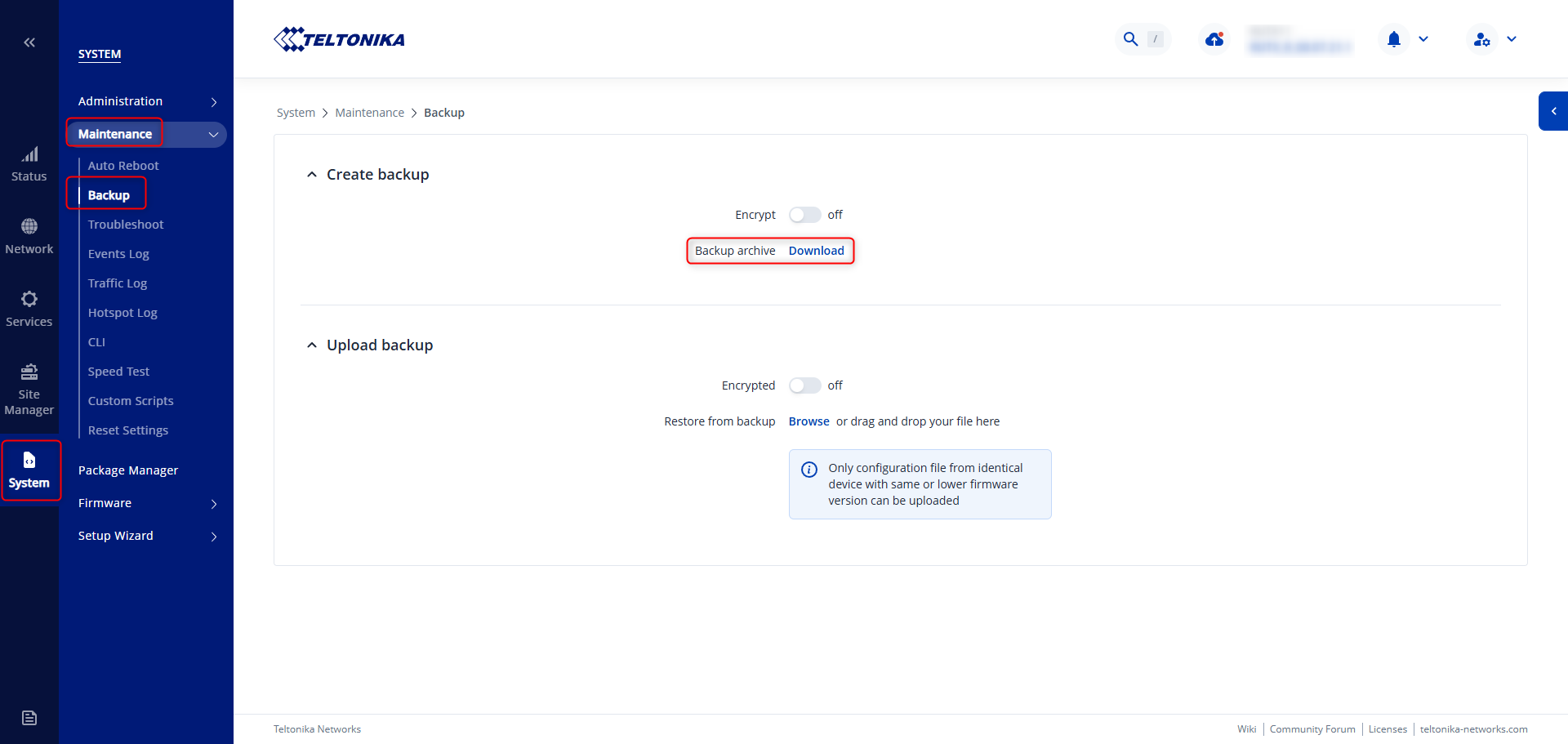
  1. After downloading the firmware file, please ensure that you back up your device configuration under System → Maintenance → Backup → Download:

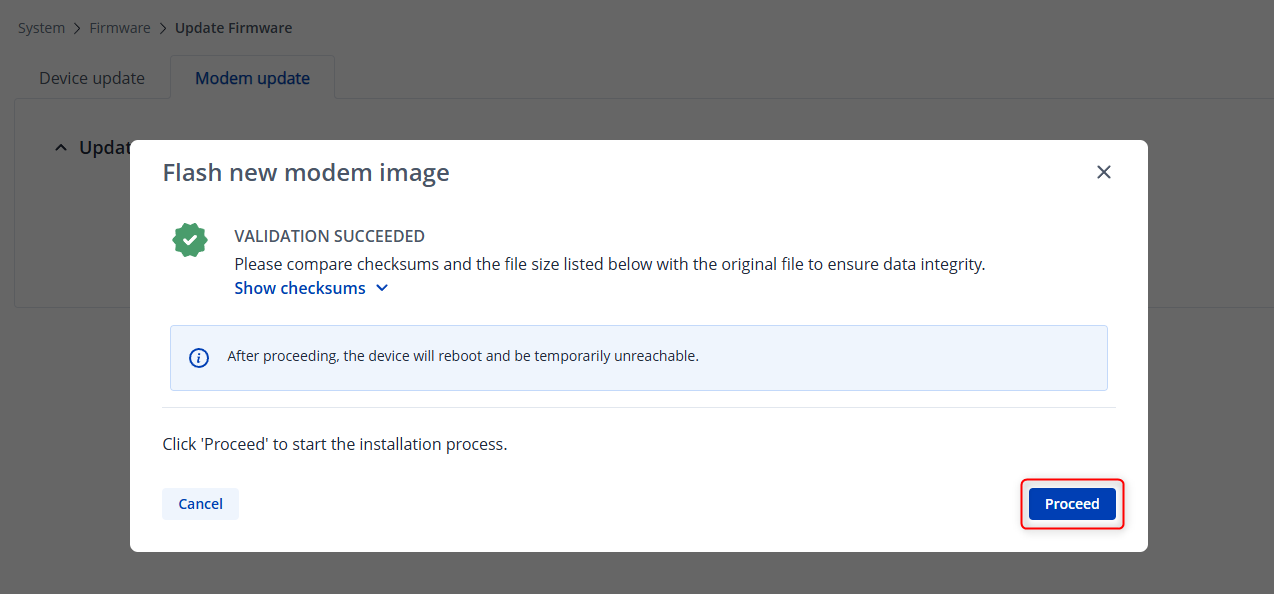
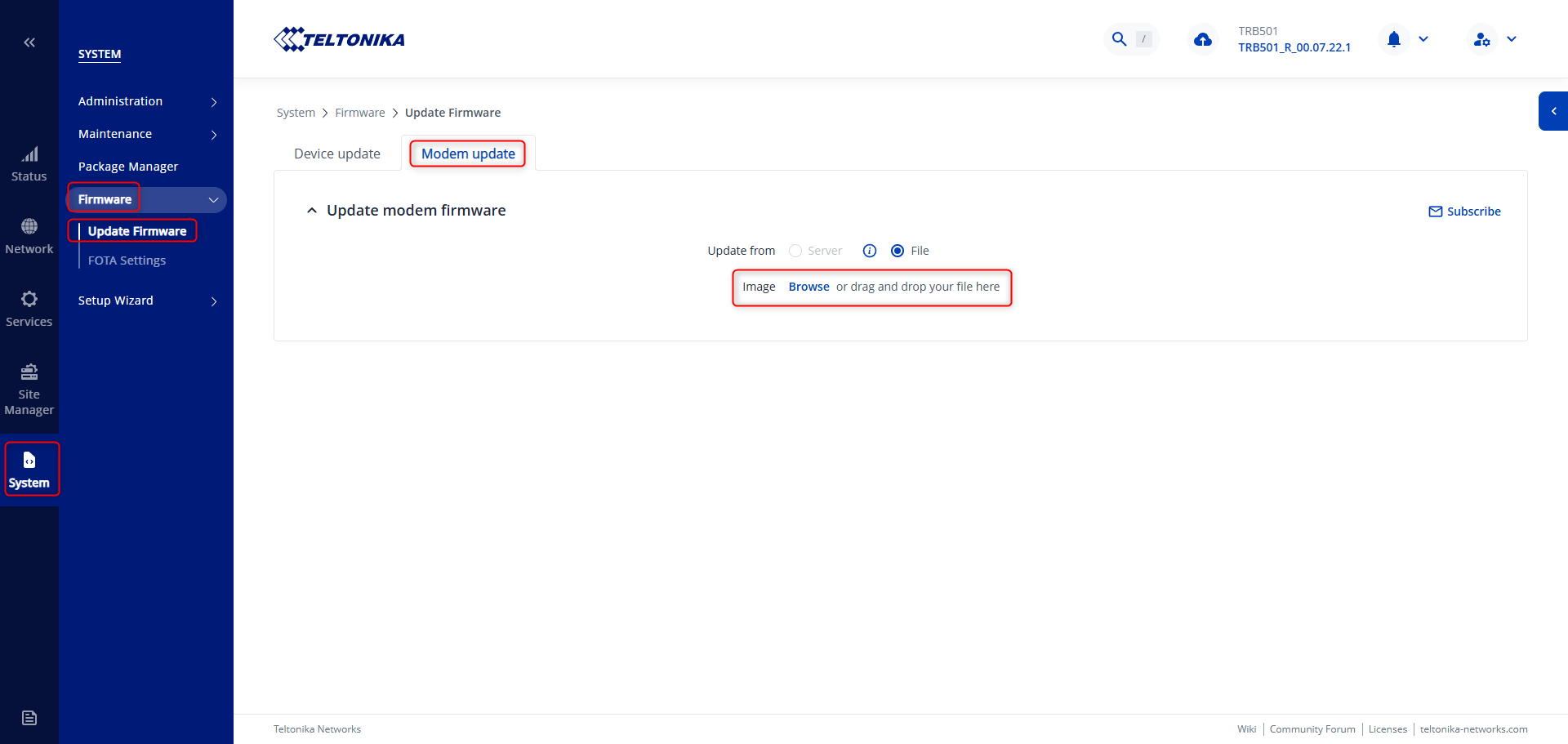
  2. Next, head to System → Firmware → Update firmware → Modem update and simply drag & drop, or browse and double click on the file you’ve downloaded earlier, this should start the verification process, and then prompt you to either proceed or cancel:


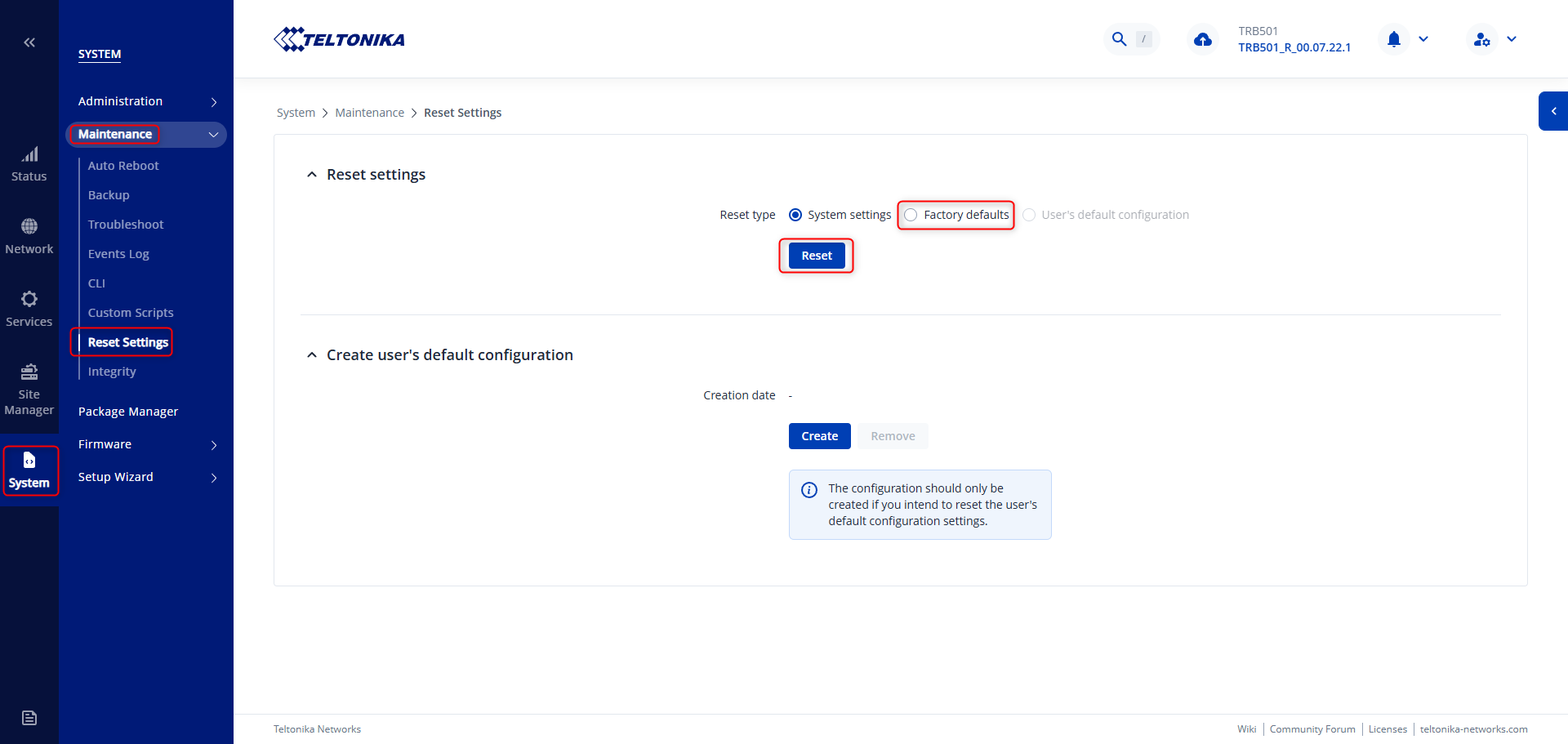
  3. If you get an unexpected error, or the upload fails, we recommend resetting your device by holding the physical reset button for 12 seconds, or alternatively, head to System → Maintenance → Reset Settings and select Factory Defaults:
After the reset, attempt to upload the file again, the reason for this is to clear up any RAM/Flash memory that might be taken by temporary files / configurations / packages and such, so we’re able to upload the firmware file onto the device. Once done with the firmware upgrade, you can then reupload the backup file from the first step.

After the process is complete, please post some feedback below, whether your situation has improved.

Regards,
Matas.

Hi,

I have now successfully installed the new firmware. I did need to perform a factory reset first, but that was not an issue since I could not yet use the modem in production anyway.

My first experiences are very positive so far. The modem appears to be much more stable and overall performance has improved noticeably.

Many thanks for making this new firmware available, it is very much appreciated!

I will try to share some more detailed experiences in this post again next week after some additional testing.

Update 2026-05-22 @ 09:27 - Lost connection… Unable to re-connect.

[   60.560833] br-lan: port 2(usb0) entered blocking state
[   60.560862] br-lan: port 2(usb0) entered disabled state
[   60.574530] device usb0 entered promiscuous mode
[   60.575851] br-lan: port 2(usb0) entered blocking state
[   60.578231] br-lan: port 2(usb0) entered forwarding state
[   60.599885] br-lan: port 2(usb0) entered disabled state
[   60.609794] file system registered
[   61.628947] read descriptors
[   61.629038] read strings
[   63.226400] gpio gpiochip0: (f100000.pinctrl): allocate IRQ 148, hwirq 63
[   63.226435] gpio gpiochip0: (f100000.pinctrl): found parent hwirq 4294967295
[   63.254698] gpio gpiochip0: (f100000.pinctrl): alloc_irqs_parent for 148 parent hwirq -1
[   63.260800] gpio gpiochip0: (f100000.pinctrl): allocate IRQ 149, hwirq 65
[   63.264105] gpio gpiochip0: (f100000.pinctrl): found parent hwirq 81
[   63.275804] gpio gpiochip0: (f100000.pinctrl): alloc_irqs_parent for 149 parent hwirq 81
[   70.321663] ipa-wan __ipa_wwan_close:1388 [rmnet_ipa0]: ipa3_deregister_intf failed -22
[   76.017564] NOHZ: local_softirq_pending 08
[   76.017592] NOHZ: local_softirq_pending 08
[   76.032236] NOHZ: local_softirq_pending 08
[   76.032266] NOHZ: local_softirq_pending 08
[   76.154254] NOHZ: local_softirq_pending 08
[   76.154282] NOHZ: local_softirq_pending 08
[   76.166197] NOHZ: local_softirq_pending 08
[   76.166224] NOHZ: local_softirq_pending 08
[   76.198689] NOHZ: local_softirq_pending 08
[   76.198716] NOHZ: local_softirq_pending 08
[  243.764964] ipa-wan __ipa_wwan_close:1388 [rmnet_ipa0]: ipa3_deregister_intf failed -22
[  312.105526] ipa-wan __ipa_wwan_close:1388 [rmnet_ipa0]: ipa3_deregister_intf failed -22
root@TRB501:~# ping 8.8.8.8
PING 8.8.8.8 (8.8.8.8): 56 data bytes
ping: sendto: Network unreachable
root@TRB501:~# gsmctl -y
RG520NEBDCR03A02M4G_OCPU_02.200.00.000
root@TRB501:~# 


Update 2026-05-22 @ 10:06 - Running smooth now…

Thank you kindly for the feedback. I can see that a disconnection has occurred, let us know if this happens again, please note the weather conditions, the location and whether the device has been physically moved at the time of the disconnection happening.

Regards,
Matas.

Good Morning,
My device is TRB50110XXXX with firmware TRB501_R_00.07.23.3, internal modem RG520N-EBDC with firmware RG520NEBDCR03A01M4G.

Can i safely proceed to upgrade?

Hello,

Since you are on A01, you may upgrade to the version listed in the guide.

Regards,
Matas.

Hi @Matas

Passthrough and bridge doesn’t work (denat SIM).

Doesnt work with firm A01 and A02 or only in A2? (Regression)
I ask because i have A01 and work for me the Passthrough with Denat Sim.

Hi,

Could you clarify whether this is after upgrading to the A02 firmware version? And just to confirm - you are using a TRB501, correct?

Regards,
Matas.

Hi @Matas

I only have the TRB501 and can’t use it. I only bought it for passthrough or bridging.

It didn’t work with A01 and it doesn’t work with A02. With A02, it works if you assign a local ip address to the Ethernet port. Neither A01 nor A02 transfers the public IP to the Ethernet port. Furthermore, in passthrough and bridging (only with a local ip), the performance is significantly worse than with NAT.

@Zilvinas, with whom I spoke on the phone for over 4 hours on May 14th, is aware of all this.

On May 12th, I was promised a fix within 2 days !

Kind regards, Michele

@Matas

In addition to my previous message and with reference to Teltonika TRB501 device firmware (not modem fw):

with @Zilvinas we never install TRB501_R_00.07.23.3.
All tests were conducted with 07.22.

Michele

Hi there,

I spoke with Žilvinas just now; he should reach out to you via email (the form that you’ve filled out some time ago).

If possible, kindly continue further communication there, and we’ll get you sorted.

Regards,
Matas.

I am not able to to upgrade the modem sadly.
Validation goes through but on upgrading it fails after around a minute, returns to the Validation Successfull screen and thats it.

Tried it again after fully factory resetting the device, again the same Error (did not upload my backup, it was fully factory resetted with only the password changed).

Firmware version TRB501_R_00.07.23.4
Kernel version 5.4.197-perf
Hardware revision 0007
Batch number 0024

Only thing i found in the logs was this:
938 Mon Jun 1 20:10:01 2026 daemon.err uhttpd[3507]: rm: can’t remove ‘/tmp/modem_update-RG520NEBDCR03A02M4G_OCPU_02.200.00.000/CONTROL’: Permission denied
941 Mon Jun 1 20:14:18 2026 kern.info kernel: [ 730.833582] sh (8390): drop_caches: 3
942 Mon Jun 1 20:15:28 2026 daemon.err uhttpd[3507]: rm: can’t remove ‘/tmp/modem_update-RG520NEBDCR03A02M4G_OCPU_02.200.00.000/CONTROL’: Permission denied

Current Modem Version was A01 obv and i tried upgrading as my Speed are only around 200Mbits while my phone can easily reach over 600Mbit in multiple tests.

Hello,

Thanks for the feedback. I’ll need your troubleshoot file right after you’ve attempted to do the upgrade.

I have sent you a form to fill out, which you will receive in your e-mail inbox that you have registered your account with in the forums. In the Ticket ID field of the form, please enter the ID of this thread, which is 19450.

Thank you,
Matas.

Good morning, First upgrade attempt failed with an error. After a factory reset, the upgrade completed successfully. However, there is no significant speed improvement.

Hello,

The main aim of this firmware version was to improve stability & get rid of those pesky, random disconnections that happen to a lot of users.

Lower speeds may be related to something else; I’d recommend creating a separate thread for that so my colleagues can handle it.

Regards,
Matas.