Hi,
good morning everybody. Isn’t it another beautiful day to spend with microelectronics?
Today, I am trying to configure a RUTX08 via the RMS and set the machine up as an OpenVPN client. The key material (private key, certificate, ca certificate, crl) was uploaded manually since I already know that the RMS cannot do that.
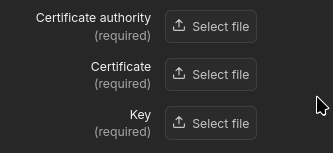
But, alas, I cannot tell the RMS to use key material that is already on the router:
And when I click on “Select file”, a local file selection box opens on my client. I’d expect either a dropdown of the files that are already on the RUTX08, or a text field where I can enter the file name.
Greetings, Marc Haber
Greetings,
We are currently working on your inquiry and will get back to you as soon as possible.
Best Regards,
Justinas
Greetings,
Currently, this functionality is not available in RMS.
As a workaround, you can use the CLI to specify the certificate paths for the OpenVPN configuration.
First, run the command:
uci show openvpn
This will display the OpenVPN instance ID. In the example shown in the image below, you can see where the instance ID appears.

Once you have the correct ID, use the following commands to set the file path for the certificates and keys:
uci set openvpn.<instance_id>.ca='/etc/certificates/ca.crt'
uci set openvpn.<instance_id>.key='/etc/certificates/client.key'
uci set openvpn.<instance_id>.cert='/etc/certificates/client.crt'
uci commit
Please let me know if this helps.
Best Regards,
Justinas
It does, quite well. Thank you.
Is there documentation about the openvpn parameters in uci? I might like doing the complete configuration on the CLI (see my rather annoyed message from last night).
Greetings, Marc
Greetings,
Sorry for the delayed response.
Although there is no dedicated documentation for the OpenVPN parameters themselves, you can configure an OpenVPN instance through the WebUI and then run the command uci show openvpn to view all the relevant parameters.
Once you identify the parameters you need, you can use the uci set command to configure a new instance accordingly.
More information and examples of UCI command usage can be found here:
Best Regards,
Justinas
I fixed that with a task:
VPN_DIR="/etc/openvpn"
VPN_NAME="inst1"
CERT_DIR="/etc/certificates"
REMOTE_IP="(IP address)"
KindOfConnection="{KindOfConnection}"

if [ "$KindOfConnection" == "invalid" ]; then
  exit 1
fi
if [ "$KindOfConnection" == "instancetype1" ]; then
  CA_FILE="$CERT_DIR/CA_for_instancetype1_crt.pem"
  VPN_FRIENDLY_NAME="it1"
  REMOTE_NAME="(hostname for server for instancetype1"
  REMOTE_PORT="(port for server for instancetype1)"
fi
if [ "$KindOfConnection" == "instancetype2" ]; then
  CA_FILE="$CERT_DIR/CA_for_instancetype2_crt.pem"
  VPN_FRIENDLY_NAME="it2"
  REMOTE_NAME="(hostname for server for instancetype2"
  REMOTE_PORT="(port for server for instancetype2)"
fi

CERT_FILE="$CERT_DIR/${HOSTNAME}.crt.pem"
KEY_FILE="$CERT_DIR/${HOSTNAME}.key.pem"

uci -q delete openvpn.$VPN_NAME || true

# Create OpenVPN client config
uci set openvpn.$VPN_NAME="openvpn"
uci set openvpn.$VPN_NAME.configuration="manual"
uci set openvpn.$VPN_NAME.name="$VPN_FRIENDLY_NAME"
uci set openvpn.$VPN_NAME.enable="0"
uci set openvpn.$VPN_NAME.type="client"
uci set openvpn.$VPN_NAME.dev="tun_c_1"
uci set openvpn.$VPN_NAME.topology="subnet"
uci set openvpn.$VPN_NAME.proto="udp"
uci set openvpn.$VPN_NAME.port="$REMOTE_PORT"

# Remote hosts
uci add_list openvpn.$VPN_NAME.remote="$REMOTE_NAME"
uci add_list openvpn.$VPN_NAME.remote="$REMOTE_IP"

# TLS authentication mode
uci set openvpn.$VPN_NAME.tls_client="1"
uci add_list openvpn.$VPN_NAME.extra="remote-cert-tls server"

# Keepalive
uci set openvpn.$VPN_NAME.keepalive="30 180"
uci set openvpn.$VPN_NAME.resolv_retry='infinite'


# Encryption
uci set openvpn.$VPN_NAME.cipher="AES-256-GCM"
uci set openvpn.$VPN_NAME.data_ciphers="AES-256-GCM"

# Authentication
uci set openvpn.$VPN_NAME.auth="sha512"
uci set openvpn.$VPN_NAME.tls_security='none'

# HMAC: None
uci del openvpn.$VPN_NAME.tls_auth || true

# Certificate paths (local files)
uci set openvpn.$VPN_NAME.device_files='1'
uci set openvpn.$VPN_NAME.use_pkcs='0'
uci set openvpn.$VPN_NAME.ca="$CA_FILE"
uci set openvpn.$VPN_NAME.cert="$CERT_FILE"
uci set openvpn.$VPN_NAME.key="$KEY_FILE"

# Finalize
uci commit openvpn
Btw, the documentation for tasks and the task manager leaves a lot to the imagination. Thankfully, I have lots of experience and was thus able to figure out how things work. For example, it is totally unclear how many shell control structures are available in a task. Thankfully, variables and if/then/else/fi seems to be available.
Greetings, Marc Haber