We are using a RUTX50 with an established WireGuard VPN connection to a server hosted on a Ubiquiti Dream Machine.
When the RUTX leaves the Wi-Fi coverage, the failover switches to mobile data, but the VPN seems to remain bound to the Wi-Fi connection, which is no longer available. As a result, there is no internet connectivity and no access to the remote network.
Interestingly, if I manually disable the Wi-Fi interface on the RUTX or turn off the Wi-Fi itself, the failover works correctly and the VPN reconnects over mobile data.
I have updated to the latest firmware (RUTX_R_00.07.18.3), but the issue persists.
My best guess, is that it sounds like implementing the native Wireguard Watchdog, is worth giving a go.
As of firmware version 07.17.1, the wireguard_watchdog script was no longer in the firmware package (bummer) but the good news is …. as of firmware version 07.19, they re-instated it.
For it to work, your RUTX50 should ideally be the VPN initiator but MUST have a ‘perisistant keep alive’ set, in its ‘Peers’ settings - normal value for this is 25.
In essence, the script checks the tunnel(s) to your ‘server’ that have a ‘keep alive’ set, and if it doesn’t get a response, it toggles the wireguard interface(s) off and on.
Try upgrading to 07.19.2. In previous firmware versions prior to 07.17.1, you had to ammend cron to call the script but in the latest fw, it now starts automatically as soon as you activate a wireguard tunnel.
If you really want to stay on 07.18.3 then it is possible by uploading the watchdog script (slightly modified) to the device into say /etc/opt/ and create a line in crontabs to run the script every minute.
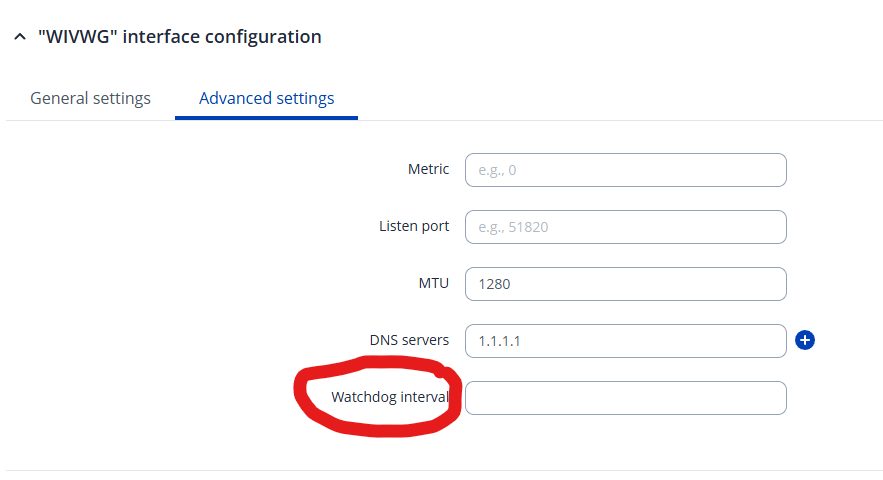
In fw 07.19.2, you can set the interval that the watchdog checks the tunnel(s). If left blank, then the check runs every 1 minute.
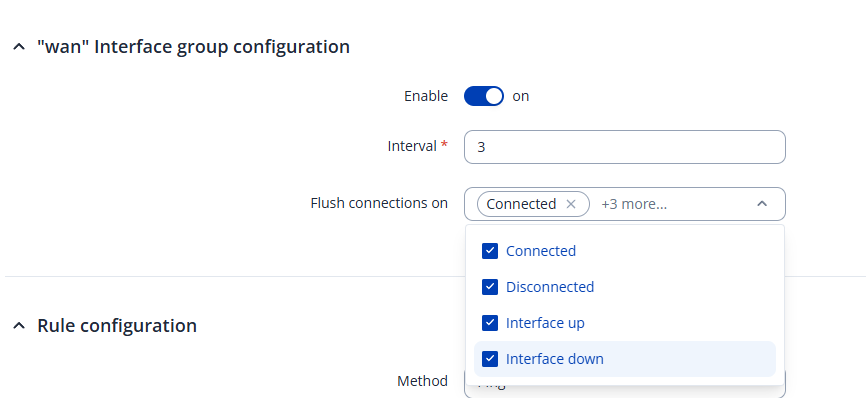
In addition, not sure if it is having any influence in a ‘wireguard’ scenario but in the failover settings at NETWORK > FAILOVER > MULTIWAN > INTERFACE ….. for each interface that can be potentially used in failover (e.g. wan, mob1s1a1, etc.), try setting the ‘flush connections’ as per below, if the previous suggestion doesn’t bear fruit.
Let me know how you get on, because if your setup is using WiFi as WAN, either as a client or Multi AP, then it might be as simple as not using Failover but reordering the wan interface priority but still utilising the watchdog. A little bit of speculation on my part, but worth a try if all else fails.
unfortunately the modifications I did, doesn’t changed the situation. I still have the issue. No Internet after Failover when switching from Wifi to mob or mob to wifi when WireGuard VPN is engaged. Can you explain what you mean with “ not using failover” ?
OK using a test bed it worked, maintained the wireguard tunnel and a constant video stream. This does NOT use failover functionality. WAN sources: phone wifi hotspot and mob1s1a1.
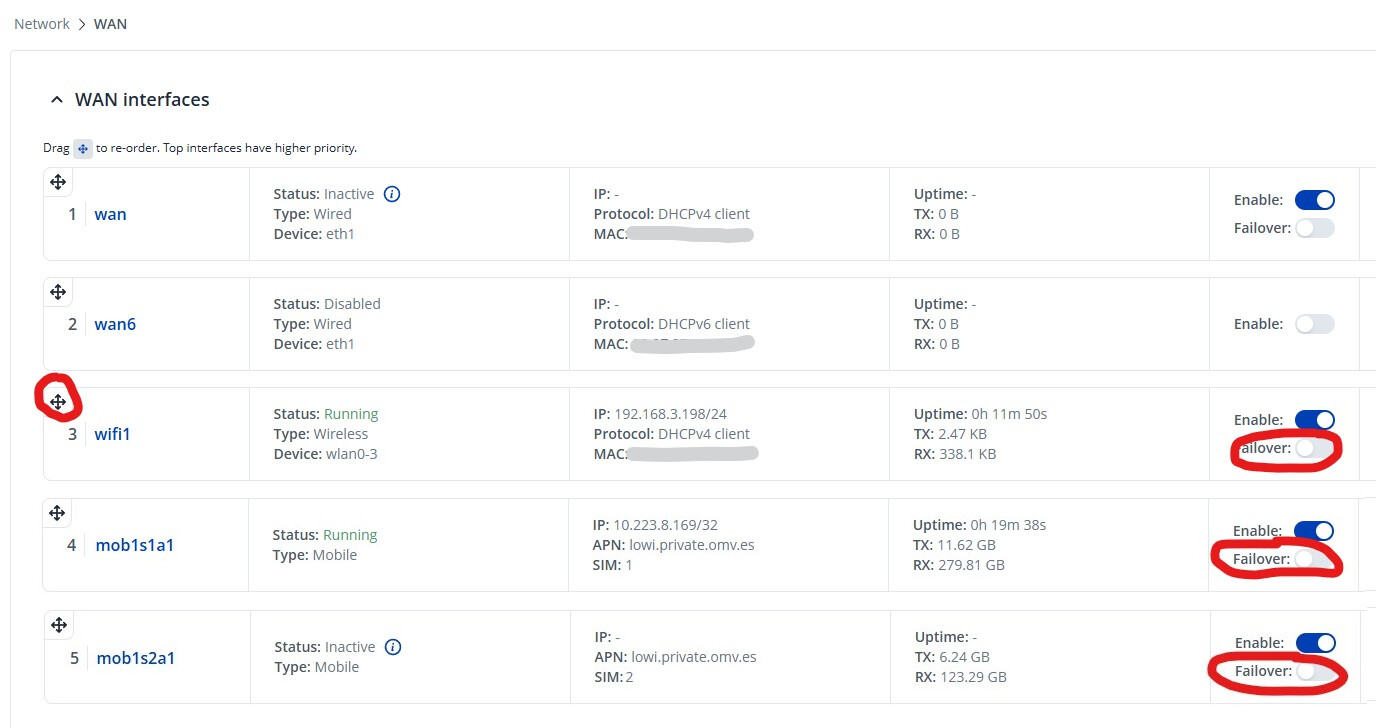
remove any failover switches that are set to ‘enabled’ by going to NETWORK > WAN > WAN INTERFACES - Save & Apply.
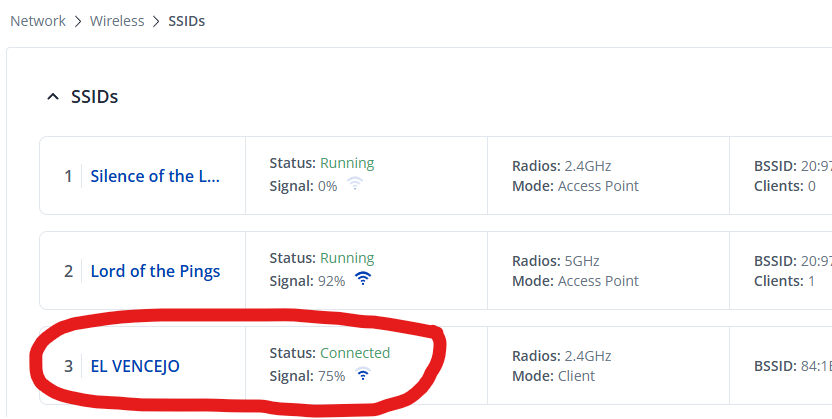
start with a blank canvas and delete your existing WiFi Client by going to NETWORK > WIRELESS > SSIDs. This will also delete the WAN Interface associated with the WiFi Client (named wifi1 as default) - Save & Apply.
on the same page NETWORK > WIRELESS > SSIDs, scan for the wifi SSID you want to setup as a Client. Join the network and on the next dialogue box for the wifi1 settings click on Save & Apply. You should now see the the Client SSID, in this example named El VENCEJO, is now connected
now we prioritise the WAN Interfaces, so that your wifi1 interface has priority over your mobile interface. Go to NETWORK > WAN > WAN INTERFACES, grab the handle beside wifi1 and drag it to be above you mobile interface - Save & Apply
And it’s ready for testing with your wireguard tunnel. Should the WiFi uplink go out of range, it will switch to mobile and once WiFi is back in range, it should reconnect as it has a higher priority.
I have the same issue, and although your solution works -without failover- it is counter intuitive: why disable failover if it is precisely the functionality you need?
Not strictly true because in @Thorsten_S scenario, when on mobile, there’s nothing to failover to, as there is no connected WiFi uplink.
I agree though, it does seem a bit counter-intuitive - you’d think that the tunnel would persist, with a change of WAN interface combined with watchdog, with a Failover.
Alas, I’ve never played with your particular scenario (wireguard + failover) and I don’t have the experience to instantly recognise where the problem is. My first experiment would be to ensure the interfaces have visibilty of DNS when failover and switchback occur.
Actually, it is working now.
I checked the WireGuard settings again. With the reintegration of the watchdog in firmware 7.19.2, there was no default interval set in the advanced settings and you mentioned it would be then standard 60 sec. After adding the interval, it started working for me. Obviously if it is blank it doesn’t work.
Thank Mike, I have replicated your suggestions (wireguard watchdog at 60s, keep alive at 25, flush connections on active interfaces: in my case MOB1S1A1 and WIFI0). Wireguard was rock solid before and still is after these changes (perhaps unnoticeably more solid). The problem I experience is that as soon as I enable those interfaces as load-balanced or failover in MultiWan, the wifi clients connected to the RUTX lose connectivity to the internet. They can still access the rutx and anything over the wireguard tunnel, but nothing outside the local and wireguard network (i.e internet).
I’ve compared the routing table and the firewall settings (uci show firewall) before and after changing the failover/loadbalancing settings and they have remained the same.
So: WG + no load balancing, no failover: wg tunnel and RUTX function as expected. WG + loadbalancing/failover: no internet route for RUTX clients. No WG + failover/loadbalancing: RUTX functions as a proper router.
To replicate:
Have a working WG connection up.
MOB1SA1 disconnected via flight mode=on
WIFI0 active via a MultiAP connection to a wifi hotspot
Nothing enabled in Multiwan: clients have internet connectivity via mobile (flight mode off) or the wifi hotspot when mobile loses connection (set flight mode to on).
Anything enabled in multiwan: clients lose connection to the internet.
WG disabled: multiwan works as expected.
Hi, I’m just about to go onboard and will be at sea until Friday, so will not have an opportunity to follow this up.
I wasn’t able to replicate your issue and on my configuration, wifi clients are able to authenticate to the RUTX, with internet access over wireguard, that persists through failover and switchback.
I suggest you add the detail of your post above to the seperate thread you started, and hope for someone to step in.
This behavior usually points to how WireGuard binds to the source interface and endpoint at tunnel initialization. When Wi-Fi drops but the interface isn’t fully brought down, the tunnel can remain bound to the old route, so it doesn’t automatically re-establish over the mobile WAN. That’s why disabling Wi-Fi manually forces a clean rebind and makes failover work. i Suggest you add the details on Failover and Wireguard VPN mutually exclusive on RUTX50
On RUTX devices, this is often addressed by:
Ensuring correct routing metrics so the mobile interface becomes the preferred default route during failover
Using interface tracking or scripts to restart the WireGuard service when WAN priority changes
Verifying that WireGuard is not pinned to a specific interface or source IP
In setups where connectivity is critical and behavior needs to be demonstrated or documented (for example, recording short troubleshooting or explainer videos with motion overlays using tools like Alight Motion Mod APK), clearly visualizing interface state changes can help diagnose when and why the tunnel fails to rebind.