TAP400: Fast transition and disassociation don't work

I have multiple TAP400 devices. The 5 GHz AX network is configured the same across them with regards of roaming:

  • 802.11 r+v+k all enabled;
  • “Disassociate On Low Acknowledgement” enabled;
  • “Mobility Domain” is the same on all devices;
  • The firmware version is 7.22.1 everywhere.

The problem is that neither the assisted roaming, nor the disassociation work. As soon as I go to the edge of the reception circle of the current access point, the signal gets very weak (zero bars in Android), as expected. However, the phone can stay on this weak channel for minutes; it disconnects only when the reception disappears completely.

In the picture below the same SSID on two different channels is shown. The green is connected currently (in bold) with around -85 dBm, while the blue is already available with a lot stronger signal, -35 dBm.

I’d expect that

  1. the switching happens automatically due to 802.11r, and even if not (which is a problem),
  2. then the AP disassociates.

An additional feature request to these two bugs: could you please make it configurable how weak the signal should be when the AP kicks out the client?

Greetings, @szotsaki ,

Thank you for the detailed report.

To summarise: despite 802.11r/v/k and “Disassociate On Low Acknowledgement” being enabled across all TAP400 units, client devices are sticking to a very weak AP (−85 dBm, ch. 144) while a much stronger one (−35 dBm, ch. 153) is already visible. Neither the assisted roaming nor the AP-side disassociation appear to be triggering.

To investigate further, we have a few questions about the current configuration:

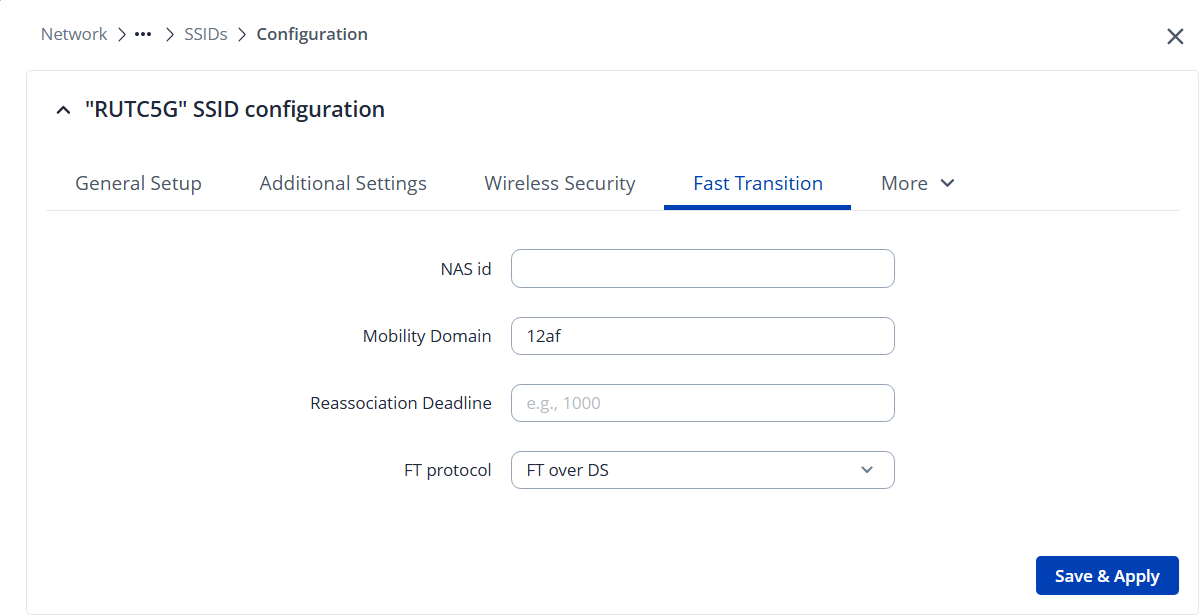
  1. FT protocol - Under Network → Wireless → [SSID edit] → Fast Transition tab, what is the “FT protocol” set to: FT over DS or FT over Air? FT over DS requires all APs to be on the same Layer 2 segment to exchange roaming information; if they are not, the transition will silently fail.

  2. Network topology - Are all TAP400 units connected to the same switch and VLAN (same Layer 2 broadcast domain)? Could you please share a scheme or topology of your network?

  3. Encryption - What encryption mode is in use (e.g. WPA2-PSK, WPA3-SAE, or a mixed mode)

  4. Channel configuration - Are the channels on each AP set manually, or is Auto channel selection in use? The screenshots show the two APs are on different channels (144 and 153), which is expected - we just want to confirm this is intentional and stable.

Finally, if possible, could you run the following command via CLI on one of the affected APs while a client is connected with a weak signal and share the output?

logread | grep -i ‘disassoc|roam|low ack|bss’

This will help us determine whether the AP is detecting the low-acknowledgement condition at all.

Looking forward to your reply!

Best regards,
V.

Thank you for the detailed reply.

I used FT over DS deliberately because I don’t use mesh and wanted my network to be more reliable. However, I wasn’t aware of this limitation about the same L2 segment. Could you please make this requirement a bit more obvious on the web interface?

My network topology is: two of the TAP400s are connected to a central switch, the two others are connected to one-one other switches (that are connected to this central switch). And this central switch is managed by a router. Therefore, the TAPs are on the same L2 segment (if I understood the definition correctly).

I use multiple VLANs on the switches, but all of them are set by TAPs (by assigning the appropriate VLAN IDs on the selected networks). The switches enable the TAP ports to participate in all of these VLANs. The one example SSID shown above uses the default VLAN (1), and for this SSID the VLAN ID is left on “Default” on all TAPs.

I have multiple WiFi SSIDs configured on them, but the one I shown in the original message uses 5 GHz only, with WPA3-SAE (on all TAPs). The channels were selected manually, individually for all TAPs.

I ran the command but grep didn’t return anything, so I ran it without, and I didn’t see any disconnection (apart from a timeout).

This got logged after I connected with my mobile phone:

684 Fri Jun 12 22:29:45 2026 daemon.notice hostapd: wlan1-1: AP-STA-CONNECTED wi:fi:mac:add:ress auth_alg=sae
685 Fri Jun 12 22:29:45 2026 connections.notice WiFiSSIDName: WiFi client connected: wi:fi:mac:add:ress
686 Fri Jun 12 22:29:45 2026 daemon.info hostapd: wlan1-1: STA wi:fi:mac:add:ress IEEE 802.1X: authorizing port
687 Fri Jun 12 22:29:45 2026 daemon.info hostapd: wlan1-1: STA wi:fi:mac:add:ress RADIUS: starting accounting session FCA7256xxxxxxx
688 Fri Jun 12 22:29:45 2026 daemon.info hostapd: wlan1-1: STA wi:fi:mac:add:ress WPA: pairwise key handshake completed (RSN)
689 Fri Jun 12 22:29:45 2026 daemon.notice hostapd: wlan1-1: EAPOL-4WAY-HS-COMPLETED wi:fi:mac:add:ress

Then, in the next minute I moved to another AP but there was no sign of acknowledging this. The next logs show that it simply couldn’t connect to the mobile phone after a few minutes of timeout. During this five minutes I was on the neighbouring AP.

Is it expected to have a small gap in the message numbering? It remains when I rerun this command.

704 Fri Jun 12 22:36:19 2026 daemon.notice hostapd: wlan1-1: AP-STA-DISCONNECTED wi:fi:mac:add:ress
705 Fri Jun 12 22:36:19 2026 connections.notice WiFiSSIDName: WiFi client disconnected: wi:fi:mac:add:ress
706 Fri Jun 12 22:36:19 2026 daemon.info hostapd: wlan1-1: STA wi:fi:mac:add:ress IEEE 802.11: disassociated due to inactivity
707 Fri Jun 12 22:36:20 2026 daemon.info hostapd: wlan1-1: STA wi:fi:mac:add:ress IEEE 802.11: deauthenticated due to inactivity (timer DEAUTH/REMOVE)

802.1X client is disabled on all TAPs, I don’t have a Radius server.

Afterwards, I changed the roaming info sharing to FT over the Air on all devices, but unfortunately, I still see the same behaviour:

3767 Sat Jun 13 21:59:25 2026 connections.notice WiFiSSIDName: WiFi client connected: wi:fi:mac:add:ress
3768 Sat Jun 13 21:59:25 2026 daemon.info hostapd: wlan1-1: STA wi:fi:mac:add:ress IEEE 802.1X: authorizing port
3769 Sat Jun 13 21:59:25 2026 daemon.info hostapd: wlan1-1: STA wi:fi:mac:add:ress RADIUS: starting accounting session 54B7F28xxxxxx
3770 Sat Jun 13 21:59:25 2026 daemon.info hostapd: wlan1-1: STA wi:fi:mac:add:ress WPA: pairwise key handshake completed (RSN)
3771 Sat Jun 13 21:59:25 2026 daemon.notice hostapd: wlan1-1: EAPOL-4WAY-HS-COMPLETED wi:fi:mac:add:ress

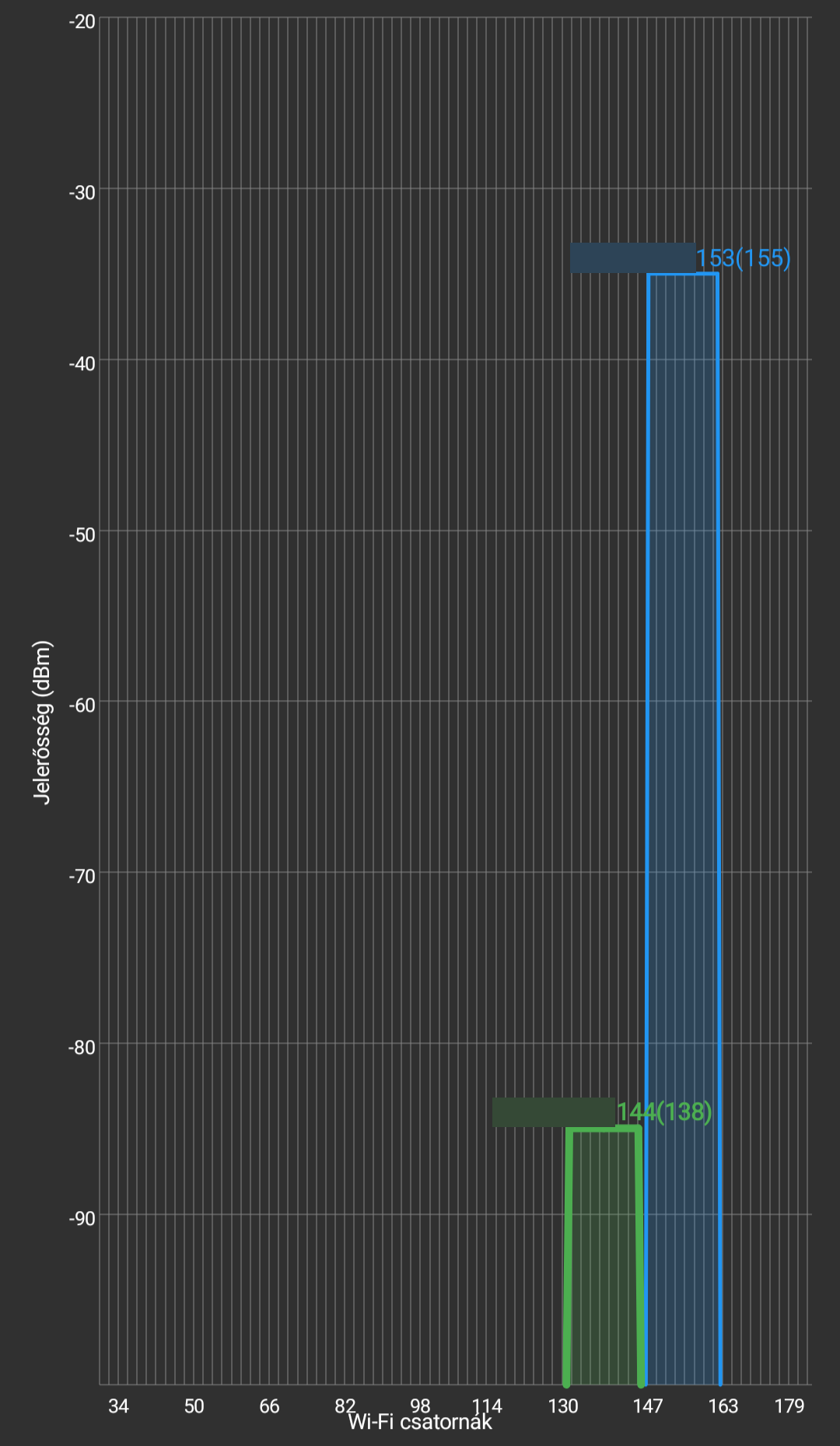
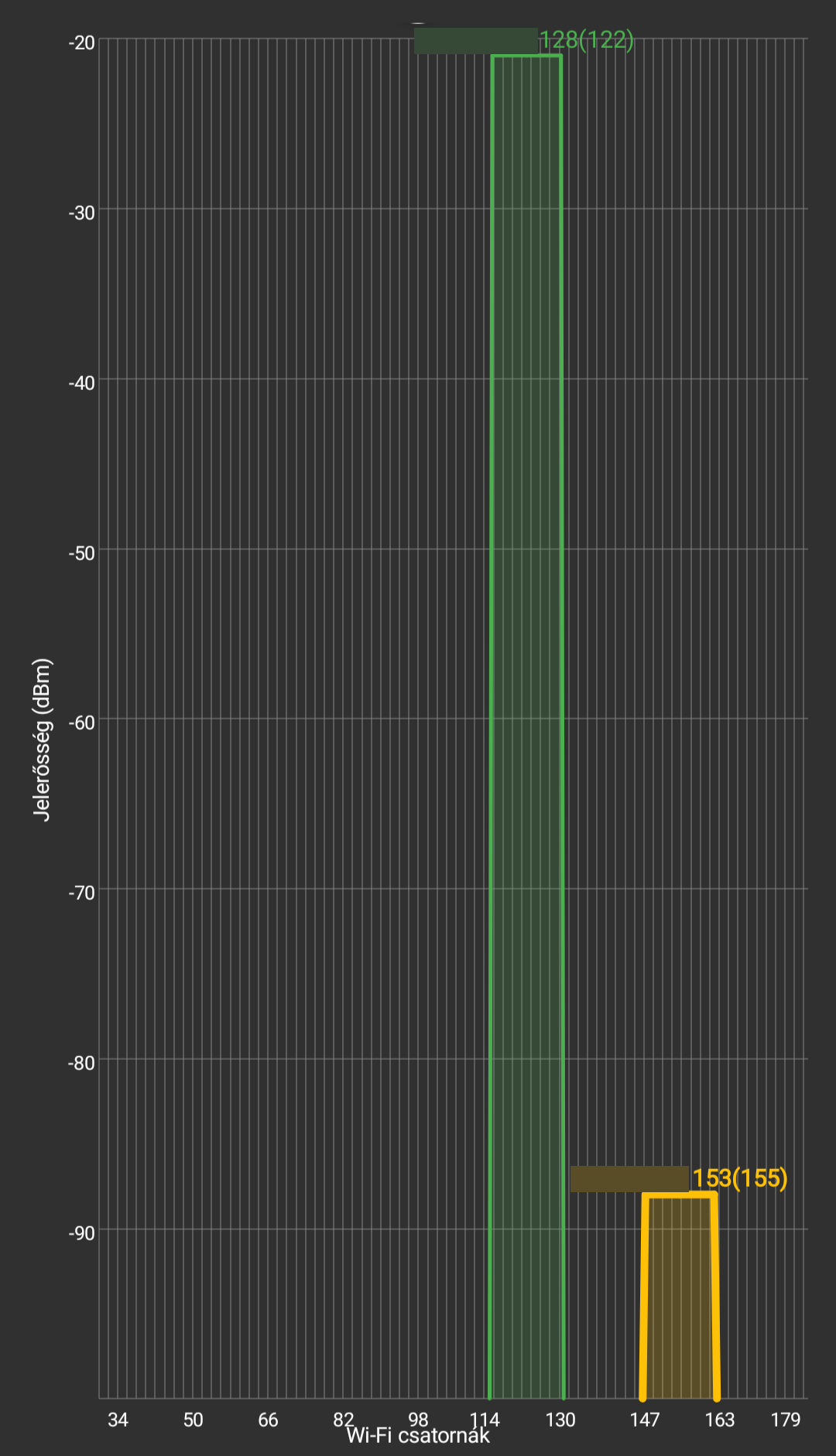
This time my phone stayed on the wrong network with a -20 vs. -87 dBm difference for a few minutes.
@Vilius, may I ask if you need anything else from my side? Does it contain enough information to identify what should be the next steps?

Could anyone from Teltonika help me to analyse why 802.11r/v/k don’t work on TAP400?

I’d like to avoid to RMA all these devices if possible.

@Vilius, after I switched back to FT over DS everywhere, I ran the following commands. They show the same output for both tested devices:

uci show wireless.1 | grep -E "ft_psk_generate_local|ft_over_ds|r0kh|r1kh"
wireless.1.ft_over_ds='1'

This means that FT over DS is active.

cat /var/run/hostapd-phy1.conf | grep -E "ft_psk_generate_local|r0kh|r1kh|disassoc_low_ack"
disassoc_low_ack=1
ft_psk_generate_local=0

It says that the R1 keys are not derived from the pre-shared key but the predefined key list is missing.

Also disassociation on low ACK should be working (but for some reason, it doesn’t).

Even after forcing this option, roaming doesn’t seem to work.

uci set wireless.1.ft_psk_generate_local='1'
uci set wireless.2.ft_psk_generate_local='1'
uci set wireless.3.ft_psk_generate_local='1'
uci commit wireless
wifi reload

cat /var/run/hostapd-phy1.conf | grep ft_psk_generate_local

About forced disassoc: I verified that it’s enabled in the configs (see above), and when I’m monitoring the “tx failed” counter while I’m moving away, it increases, then it remains the same for some time. Despite this, disconnection doesn’t occur. Can it be a driver issue?

while true; do iw dev wlan1-1 station dump | grep -F '<client MAC>' -A7 | grep -E 'retries|failed'; sleep 1; done

       tx retries:     94
        tx failed:      95
        tx retries:     94
        tx failed:      95
        tx retries:     94
        tx failed:      95
        tx retries:     108
        tx failed:      109
        tx retries:     108
        tx failed:      109
        tx retries:     114
        tx failed:      115
        tx retries:     123
        tx failed:      124
        tx retries:     123
        tx failed:      124
        tx retries:     123
        tx failed:      124
        tx retries:     123
        tx failed:      124
        tx retries:     123
        tx failed:      124
        tx retries:     123
        tx failed:      124
        tx retries:     134
        tx failed:      135
        tx retries:     134
        tx failed:      135
        tx retries:     134
        tx failed:      135
        tx retries:     134
        tx failed:      135
        tx retries:     134
        tx failed:      135
        tx retries:     134
        tx failed:      135
        tx retries:     134
        tx failed:      135
        tx retries:     134
        tx failed:      135
        tx retries:     134
        tx failed:      135
        tx retries:     136
        tx failed:      137
        tx retries:     136
        tx failed:      137
        tx retries:     136
        tx failed:      137
        tx retries:     136
        tx failed:      137
        tx retries:     136
        tx failed:      137
        tx retries:     136
        tx failed:      137
        tx retries:     136
        tx failed:      137
        tx retries:     136
        tx failed:      137
        tx retries:     136
        tx failed:      137
        tx retries:     136
        tx failed:      137
        tx retries:     147
        tx failed:      148
        tx retries:     147
        tx failed:      148
        tx retries:     147
        tx failed:      148
        tx retries:     147
        tx failed:      148
        tx retries:     147
        tx failed:      148
        tx retries:     148
        tx failed:      149
        tx retries:     148
        tx failed:      149
        tx retries:     148
        tx failed:      149
        tx retries:     148
        tx failed:      149
        tx retries:     155
        tx failed:      156
        tx retries:     155
        tx failed:      156
        tx retries:     156
        tx failed:      157
        tx retries:     156
        tx failed:      157
        tx retries:     156
        tx failed:      157
        tx retries:     156
        tx failed:      157
        tx retries:     156
        tx failed:      157
        tx retries:     156
        tx failed:      157
        tx retries:     156
        tx failed:      157
        tx retries:     156
        tx failed:      157
        tx retries:     160
        tx failed:      161
        tx retries:     160
        tx failed:      161
        tx retries:     160
        tx failed:      161
        tx retries:     165
        tx failed:      166
        tx retries:     165
        tx failed:      166
        tx retries:     165
        tx failed:      166
        tx retries:     165
        tx failed:      166
        tx retries:     165
        tx failed:      166
        tx retries:     165
        tx failed:      166
        tx retries:     165
        tx failed:      166
        tx retries:     165
        tx failed:      166
        tx retries:     165
        tx failed:      166
        tx retries:     165
        tx failed:      166
        tx retries:     165
        tx failed:      166
        tx retries:     165
        tx failed:      166
        tx retries:     165
        tx failed:      166
        tx retries:     165
        tx failed:      166
        tx retries:     165
        tx failed:      166

About roaming: what is the way to force the server to migrate a client? I tried with ubus, but it seems this feature is not enabled:

# grep bss_transition /var/run/hostapd-phy1.conf
bss_transition=1
bss_transition=1

# ubus call hostapd.wlan1-1 bss_mgmt_enable '{"neighbor_report": true, "beacon_report": true, "link_measurements": true, "bss_transition": true}'

# ubus call hostapd.wlan1-1 bss_tm_req '{"addr":"<client-MAC>","neighbors":["<AP2-BSSID>"]}'
Command failed: Method not found

Upon observing the current roaming status, I noticed that the AP never tried to communicate this to the clients:

# ubus call hostapd.wlan1-1 get_status

[...]
        "beacon_interval": 100,
        "bss_color": 19,
        "phy": "phy1",
        "rrm": {
                "neighbor_report_tx": 1
        },
        "wnm": {
                "bss_transition_query_rx": 0,
                "bss_transition_request_tx": 0,
                "bss_transition_response_rx": 0
        },

Hello,

For troubleshooting purposes, we will require more sensitive information from your end, such as the troubleshoot file, which may contain passwords, public IP addresses, serial numbers, and such. To avoid leaking this information, we have sent you a form to fill out, which you will receive in your e-mail inbox that you have registered your account with in the forums. In the Ticket ID field of the form, please enter the ID of this thread, which is 19674.

Please let me know once you filled out the form.

Thank you,

V.

Hi Vilius,

I filled out the form. (Sorry, I thought the notifications are automatic, that’s why I’m a bit late with the feedback here.)

Hello,

I can confirm that we received the form, I have sent you further instructions via email.

Kind regards,
V.

(A reply to avoid the topic being auto closed.)

The case was forwarded to the R&D team in the beginning of August. I’m planning to update this topic when there’s news.

Hello, @szotsaki ,

The investigation is currently ongoing. I will keep you informed and provide an update as soon as I receive further information from our R&D team.

Thank you for your patience.

Kind regards,
V.

Greetings, @szotsaki,

I hope you’re doing well.

For some reason, I was unable to send you an additional email. Could you please confirm whether your email address is still the same?

If your contact details have changed, please complete the form once again. When filling it out, please enter 19674-2 in the Ticket Number field and make sure to provide a valid and accessible email address.

Kind regards,
V.

Hi Vilius,
I filled out the form and submitted it (though my e-mail address didn’t change). Please, let me know what kind of sending issue you ran into. Feel free to DM me here, messaging works from here.

Hello, @szotsaki ,

I have managed to send you an email with further instructions, I will be waiting for your feedback.

All the best,
V.

Unfortunately, I didn’t receive the email from you yesterday.

Reception, in general, was working, and I received many other emails from various sources, even from this forum. I filled out the form again with an alternative email address. Could you please forward your mail to that address, too?

Hi szotsaki

I don’t mean to butt in, but here’s a quick tip… did you enter the “Mobility Domain” as well? That was the crucial factor for me in getting the handoff between Wi-Fi access points—switching to a stronger signal—to work… I hope this helps.

SW: TAP400_R_00.07.24.3

Best regards

Gerd

Thanks for the tip! Yes, the mobility domain is filled and is the same across all devices.