Send SMS via HTTP command- Episode 2

Hello,

I will link to previous discussion.

I would like to know who was this bright to remove this functionality abruptly and with no warning. HTTP to SMS send was THE REASON why we bought the RUT956.

I recommended it to many of my colleagues. Several of them got back to me to “thank me” for recommending “stupid ruter that does not work anymore.”.

What kind of reason is to abruptly discontinue it for “security reasons”.

What security reasons? It runs in internal networks, and it is optional component. Just warn user that it is not “CIA grade” and give them choice to choose.

You say API? We chose this HTTP to AVOID to need to mess with API’-s. Not everybody is programmer or wants to deal with that.

I have current Zabbix instalations that worked well and reliable sending SMS over WEB.

Setting it to work with API is additional work I need to do now.

Excuse me for being agitated, but it was unpleasant surprise, by so far very good product and very relaible company.

Do you have a solution for sending SMS from Zabbix now or I need to reflash old FW and never update?

Please, could you help with this?

Thank you for your answer.

Greetings,

Although it’s unfortunate that you and your colleagues feel this way, this is something that has been decided by the development team, and there are no plans to go back on this update.

We have a full guide available for Monitoring via Zabbix, which can be found here: Monitoring via Zabbix - Teltonika Networks Wiki

After doing some research, it looks like Zabbix also have a documentation of their own on webhooks: 1 Webhook script examples

This should give you somewhat of a head start on setting up the functionality to properly work with our API.

If you feel like setting up your configuration with our API is too much work, I suppose you should opt for a downgrade instead in that case.

Regards,
M.

Thank you for the answer.

It is very sad that you don’t understand what is wrong here. It was not for your developer team to make decision that will remove a feature that it was sold with. It is like car manufacturer disabling my car audio in an update 2 years after purchase because they thought it was good idea. It is not right to the customers.

I am sorry if I come out bitter, but you created problem for me. That was not really needed.

But, it seems I am now stuck with status quo here and I might as well try to figure out how get myself out of this mess.

Your comments are not any help, I am afraid. Link to Monitoring via Zabbix - Teltonika Networks Wiki shows how to monitor Teltonika equipment in Zabbix. That is not the problem. That is bog standard SNMP and works just fine.

Problem is exactly sending SMS messages out from Zabbix via Teltonika ruter.

We are already using web hook to send, but that was easy because all we were sending were one liner HTTP posts.

Looking into RT956 API calls, it is not documented well enough with examples. You have authentication example and get config example. Not a single send SMS example. Looking into API, Send SMS does not show it needs authentication. Yet it does.

And no, I cannot downgrade FW simply, because if I do, I loose all config and router defaults to factory settings. Meaning I loose connection to it on remote network where it lives.

Web hooks in Zabbix are great pain because you have no way of debugging except stabbing in the dark and trying to figure out from a log. Not to mention that I am not JScript programmer and Zabbix is not really documenting how it actually works.

So what I need is :

Send Authenticate API call → it will return answer containing security token.

I need to parse that response to extract security token.

Than I need to call Send Message Api call, and pass the parameters. Including security token. How do I do that? What would be example?

Using Curl I managed to get authenticated and get session and token. Then I tried to send SMS.

curl -X POST “https://10.179.246.116/api/messages/actions/send” -H “Content-Type: application/json” -H “Authorization: Bearer 6ee154f4b42a41839d20a4ded7d8c8e8” -d ‘{“data”:{“number”:“0038599xxxxxxx”,“message”:“Test API”,“modem”:“1-1.4”}}’ -k

I kinda figured this is how it should work, by logic. Sec token is copied from authentication few seconds before that. And it did not show error, but I did not receive a message.

And now I have a problem. Api shows only parameters for Send.

How do I send session token with it? Did I do it right?

What is a modem parameter? Modem name, modem ID, what? I found this 1-1.4 somewhere on the Internet. Is that right?

How do I know what modem to use? We have two sim card slots, so I guess it is more than one destination, what is syntax to choose modem? I use only one SIM at the time, in Slot1

Also, what should be user rights for a user to send SMS?

As I am determined to make this work I would really need help figuring this out. I think that would be nice of you guys, considering the circumstances.

If I have this sorted out, I can keep buying your devices for my purpose. Which I would like because these routers are darn nice and reliable and work well otherwise. As you can see, I am not just complaining, I tried what I could, but between me not understanding well, and incomplete documentation on both Zabbix and your side I I am stuck.

So please, do right by me and give me a hand if you can.

If you do, I will personally make sure that Zabbix includes the working WebHook into distro so people could have off the shelf solution that works. That will bring customers, instead of the opposite.

Best,

Siniša
Downgrade your routers firmware to a version that works for you.

However, i can also see a potential security issue with what you’re doing.

If someone gains access to the device that is being used to do what you’re doing and types into the browsers address bar, the browser offers previous entries and exposes:

A useful command that could be used and abused by themselves without you knowing about it, the IP address of the router, the routers access UserName & PassWord and someone’s mobile number, wordage within the message itself too. This info could be used and abused, even sold!!! It gives them access to the router and someone’s phone number!!!

Yeah, I cannot downgrade. I said that.

Routers are remote in different cities. When you downgrade FW, it defaults configuration to default IP address and all config is wiped. I loose remote connection to them…

I tried on the test one I have in my office.

My only recourse now is to force it to work via API..

And these are devices that are being sent those URLs by servers , form a process. There is no browser. There are no James Bond scenarios. Private networks, locked data centers and locations. There is no risk. If someone is so deep inside my network to be able to sniff traffic even if plain text http is used I have much bigger problems than little SMS ruter…

But if you have some advice, maybe you can help?

Hello,

I’d like to clarify more on your use case - what data is exactly being sent/received, from where, and to what exactly? Could you possibly provide a topology of your setup so things are a bit clearer?

Thank you,
M.

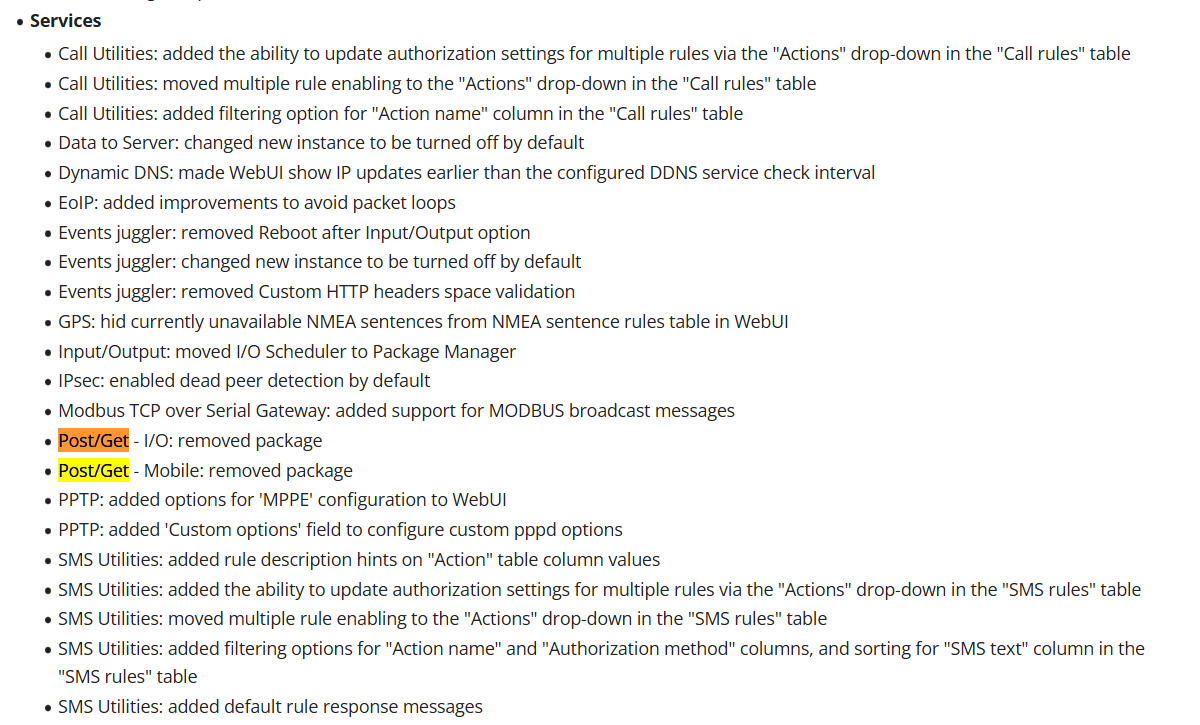
Wow, so this is the reason I couldn’t find the Post/Get package anymore.

So instead of displaying a warning to inform your client of the potential security risk, you just deleted it. Very smart, thank you.

Now, we all need to develop a new app from scratch, thanks !

1 Like

Thank you for asking.

I researched further and what I need at this moment is to create webhook for Zabbix.

Zabbix can send warnings and messages as result of internal events and triggers. To send messages, you pre-define a “Media type”. Zabbix supports sending E-Mails, sending strings to serial ports and what they call WebHook. That is piece of JavaScript (you can see example of WebHook on that documentation pages you linked for me), that can from inside the code connect to http(s) and do post/get in addition to being javascript language. In that scriptlet it can see some variables, defines from environment, some zabbix object etc. When you define that WebHook in addition to code you define variables that will be passed to the script when it is invoked. So far so good. Messages are sent to users, which can have phone number defined. So when Zabbix event happens, it takes (for instance) Event ID, a trigger message (server this and that has cpu over 90% for instance) and phone number of person to send to.

It fills that into parameters and invokes WebHook. JavaScript inside runs, and finishes.

It is all. Problem is that I am not a JavaScript programmer, and have even less knowledge of JSON or whatever your API implementation is called.

I can take care of definition of passed parameters. I can figure out basic rearranging of code.

I presume it could be something similar in logic as how WebHook for Jira works.

Basically authenticate, extract session ID token, combine that with new call to Message.Send with modem, message and phone filled in.

But that is my limit. I don’t know what exactly to do, I have not programmed in JavaScript ever. And don’t have details how to exactly combine your API calls to achieve authenticate+send sms

If you could write down an example webhook that sends SMS from defined constants on top of code : username, password, message text, number, modem, I can modify that to pass parameters from Zabbix. Once I have working solution I will post it here and to Zabbix so other people don’t have to go through the hoops..

Anyways, any help will be appreciated.

I also have some devices that are not Zabbix related (some embedded stuff) for other company but those are not problem now because they are isolated and we will not upgrade FW before figuring this out.

Zabbix stuff is critical now because client needs his SMS warning back.

Thank you for your effort.

Best

Sinisa

Hello,

These changes have been announced within the forums first, found here: Implementation of Read-Only System Files and Mobile and I/O POST/GET Service Removal with RutOS 7.14

Then in the Product change notifications: RUT956 Product Change Notifications - Teltonika Networks Wiki

Then in the changelogs of the firmware (any device): RUT956 Firmware Downloads - Teltonika Networks Wiki

Kind regards,
M.

Hello,

We in technical support do not typically work with JavaScript or other programming-related languages, so providing detailed assistance with this topic may be challenging. I can try to reach out to our R&D team for further input; however, please note that a response is not guaranteed and may take some time due to their current priorities.

Since this involves a third-party solution, I would also recommend contacting their support team or checking their community forums (if available) for guidance regarding webhooks and related integrations.

Regards,
M.

Dear Matas,

Don’t get me wrong, I appreciate your personal effort to help. You are trying to help me. I recognize that and respect that.

What is the problem is company is not understanding customer needs and whole dynamics of customer relationship…

We don’t buy routers from you. We buy solutions to our problems, and things that fill our needs. Additionally, function removed after the purchase is a big no. Even less so to remove it in such short time without consulting customers. By your own log, there is a mention of already made decision on 25.2.2025 to be discontinued soon, and on 24.04.2025. you killed it.

As for showing changelogs, it is even worse. First, it is written in deliberately obscure language to conceal your intentions. It is listed as “Improvements” in a list a meter long, with a name that is deliberately vague “Post/Get - Mobile: removed package”. Instead of BIG RED line in first line of release note “WARNING: Customers that use HTTP Mobile send API to send SMS messages make note that functionality is REMOVED in this FW and will not be supported anymore. etc.etc…”.

Also, I didn’t download 7.14. I downloaded last stable one at the time 7.16.3. I went few releases back to see if there are blaring problems stated in release notes… If you take the release notes and paste them in Word, the vague and, frankly, hidden sentence mentioning “removed package” is 16 pages down from FW I downloaded. And I did actually go a browse thorugh it. But FW 7.14 was marked “ Removed.” Good practice is to keep all the release notes from removed vesion propagating to next one that is recomended. Why? Because by removing it because of error, you create new version that replaces it. One removed was never, in fact released, so all notes to it are both irrelevant and invalidated. And fixed version is the one that makes the changes not one that does not exist.

And finally, from change notification web page:

Change impact
Risk assessment
undefined
  • Clients using Mobile POST/GET and I/O POST/GET services will need to transition to API-based methods.

  • Some automation processes relying on these legacy services may require reconfiguration

  • API documentation and support resources will be available to facilitate a smooth transition.

Suggested implementation plan

Information included in this PCN will help adapt to the upcoming changes. For more detailed information, please contact your sales representative.

Hereby I would ask you to, please, help provide the services promised.

Documentation has not got a single example of any API calls that could be replacement of denied/removed mobile SMS send. In any form. There is an example of sending an authentication request with Curl. By using that I was able within the minutes to replicate the call. Very good. In the same manner, if there were such samples how to send SMS we would not be having this conversation.

So, again, please, we need help with this.

And again, I thank you personally for taking the time and effort. Your trying to help me is the reason why I am still trying to solve this by converting to API instead of scrapping Teltonika from my solutions and going with some other hardware.

I hope for the quick resolution of this annoying situation.

My best,

Siniša

Hello,

I’ve reached out to our R&D for assistance. As mentioned earlier, this might take a while and support is not 100% guaranteed depending on their current task priorities.

Regards,
M.

Show of sincere good will is better than fake promise.

I will be waiting..

Thank you!

Siniša

1 Like

Hi Sinisa, just a private RUT241 user here who likes tinkering with the Teltonika router. I feel your pain, maybe this helps you: i have found that Chatgpt is quite good at giving practical help for my Teltonika experiments.
I just typed “In this link, a user is having trouble with the removed functionality for sending SMS via HTTP on a Teltonika router. Can you help him with API examples for sending SMS that do work? https://community.teltonika.lt/t/send-sms-via-http-command-episode-2/15865”

in the free Chatgpt version and it gave examples which seem helpful, maybe give that a try.

Btw, entering “can you find other working examples” gave me also hints to find the right modem

Thank you for your kind help!

I will take a look into it.

My best,

Siniša

Hello, Sinisa,

It’s definitely possible to achieve this with Zabbix and our API. If you’re not comfortable writing the webhook script yourself, you can use a tool like ChatGPT to help generate the code - just provide the following details:

  • Your Teltonika router model and firmware version
  • The Zabbix variables you want to include
  • Examples from our API documentation

The general logic of the webhook would be:

  1. Authenticate with the router by sending a POST request to obtain a temporary session token. Example:
    Login API example
    (This example may need to be adapted to JavaScript for use in Zabbix.)
  2. Send the SMS using the authenticated token with a second POST request to the /messages/actions/send endpoint.
    Full reference:
    Send SMS API endpoint

The modem ID and other required parameters can be found in the same documentation - just make sure to select the correct device model and firmware version on the page:

Regards,
M.

This topic was automatically closed after 60 days. New replies are no longer allowed.