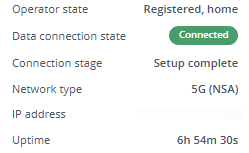
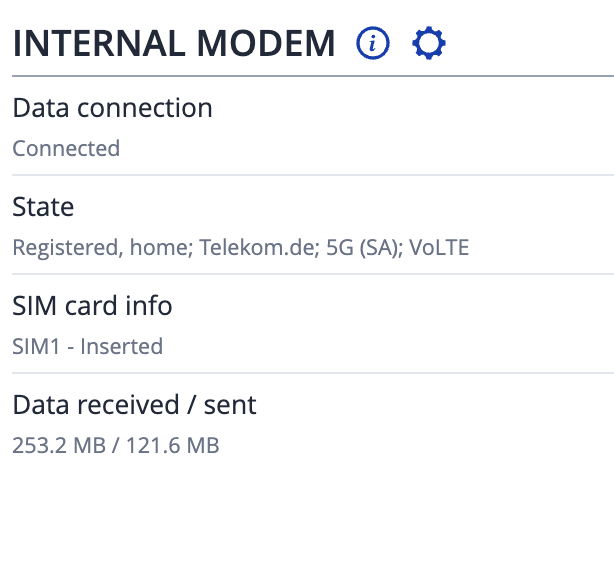
RUTX50 internal modem unstable after RG520 modem firmware update – SIM failure, gsmctl N/A, no registration

Hello,

Thank you for your swift response,

I can confirm that now we have received the troubleshoot file. I have forwarded it to our R&D team for further investigation and I will inform you once I have more information on the matter.

Kind regards,
V.

Hi from Germany,
same issue here.

Some annotations:

  • Of course modem firmware RG520NEBDCR03A05M4G
  • Downgrading the "RUTX-” firmware did not fix the issue
  • Upgrading the "RUTX-” firmware did not fix the issue
  • The issue started with upgrade to 7.22 (do the 7.22 upgrade includes a modem-firmware-update?)
  • Issue is persisent to “data-reset” during the downgrade
  • Changing the SIM slot did not fix the issue
  • Removing the SIM-PIN causes other “error messages”

Hi from Germany,
someone in RUTC50 Modem issue since Update - Mobile 5GMM reject cause: N1 mode not allowed mentioned “disabling 5G” as confirmed (temporary) workaround.

Hi, I think I’m having a similar issue, but unfortunately I am not technical enough to fully explain my fault.

I bought this for home use, and until recently it was superb.

I did recently update the firmware and modem firmware, and it was probably after this I started experiencing the issue.

After a full reboot (disconnect power lead) the RUTX50 goes back to normal, full 5g download capability (using ‘three’). However, over time, could be 10-minutes, could be hours, the speed drops to an unusable level and has to be unplugged again.

Please provide server updates ASAP.

Im reading this thread, and it is unbelievable to me how many people have issues with RUTX50. And here i am with the same device that i regularly update as soon as the update shows up, and i never had a single issue with it. And i have a pretty complex setup with wireguard and openvpn tunnels + several vlans for isolation in my home. On top of that, im using custom scripts that get executed with sms messages and scripts are using rest api to control my home assistant integration. I set this device up years ago, and aside from firmware updates, i never touch it. Im really puzzled why are you all having these issues and im curious what the solution is.

Just pure speculation with absolutely no evidence …. it may be because they have the later version of the RUTX50 with the RG520 modem and not the previous RG501.

There are most likely hundreds of users with the newer version, upgrading with no problems.

Like you, my RG501Q-EU version has been rock solid.

1 Like

That makes sense. Thanks for clarification.

But some people specifically bought this model because of its eSIM functionality. This has less to do with stationary use and more to do with mobile use.

The issues appear to be with the new modem firmware update and 5G connectivity, pushing 5G SA mode when the network doesn’t support it.

Even after a full factory reset and no settings altered the issue still remains - it’s nothing to do with the end user.

Hi…

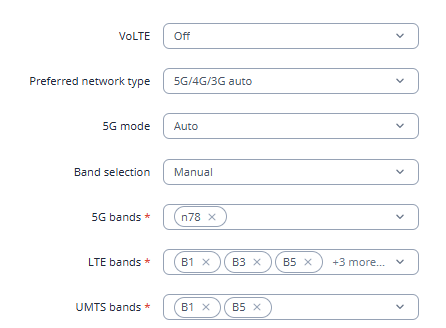
Have you try to change band selection from AUTO to MANUAL?

Choosing only the LTE bands used at your country?

sample…

Hello everyone, and thanks a lot for the tips on fixing the problem.
Sorry, but all these workarounds are, in short, bullshit.

I spent about 3 hours on the problem this evening and found a solution.
I don’t understand why Teltonika itself didn’t offer this solution to me or to the rest of you affected users.

ThisHowTo is Only for the Quectel RG520N-EU Modem!

In short: a downgrade of the modem from version RG520NEBDCR03A05M4G to the previous version RG520NEBDCR03A04M4G_01.200.01.200 via the shell.

I warn about possible damage to your devices and I will not explain how to log in via shell or how to perform this procedure.

Without technical knowledge, please keep your hands off this. I take no responsibility for success.

An internet connection via WAN is required for the fix.

Configure WAN as main, remove the SIM card and disconnect the power supply. Wait 60 seconds and reconnect it.
Once the RUTX50 is back online, check the internet connection and whether the device is online.

Ideally log into the shell and for example run: ping 1.1.1.1
If everything is fine, continue step by step.**

  1. Prepare tools**
    opkg update && opkg install sshfs modem_updater

2. Check available firmware files
/usr/local/usr/bin/modem_updater -g

3. Force downgrade (use LAN in WAN port for stability – NOT via mobile network)
/usr/local/usr/bin/modem_updater -v RG520NEBDCR03A04M4G_01.200.01.200 -f

4. Check after reboot
gsmctl -i

After that my RUTX50 was back online with 5G SA!

Ideally, after successfully downgrading, you should perform a factory reset so that all your settings are restored to their default values.

I would also like to express my disappointment with the support experience.

I opened this ticket about 14 days ago and repeatedly asked for guidance regarding a possible modem firmware downgrade, but did not receive clear technical instructions. In the end I had to investigate and test a possible fix myself.

For a professional product like this, I expected a higher level of technical support. Not having partner status and therefore no direct or faster access via the partner portal makes the process especially frustrating for technically experienced users.

I would appreciate more accessible technical guidance for non-partners as well.

Good luck with the downgrade
Best regards, Leigh

4 Likes

Thank you for this, I’ll try it myself. It’s frustrating, I’ve sent them the logs and filled in the tickets and chased up with multiple emails but not heard back at all.

Hi Leigh,
thank you very much for documenting your solution.

IRegardless of partner status, the manufacturer should have responded much better and faster here. Especially when you see how many systems are already affected here in the forum.

I will make my views on this issue very clear to the sales team. The issue itself is embarrassing enough. The way it’s been handled is absolutely appalling. Especially when you consider how detailed the logs and error descriptions you and others here in the forum provided over two weeks ago were.

Greetings @Leigh,

I hope you’re doing well.

Thank you for sharing your solution with the community. It may be helpful for other members experiencing a similar issue. I also apologize for the delay in providing an update. Our R&D team is currently investigating the root cause, and I am awaiting further information from them.

I will update this topic as soon as I receive any new details.

Note for other community members: Leigh’s solution requires a certain level of technical expertise. If performed incorrectly, it may result in the device becoming unusable, so please proceed with caution.

Best regards,
V.

Hi @Leigh …. all straight forward stuff but I just want to clarify what what you mean by the above instruction and how that translates to physical connections. I think I know what you mean but just need to make sure.

@Mike

Sorry, the wording is somewhat unfortunate.

“Use LAN in WAN” means connecting the LAN port of another router to the WAN port of the affected RUTX.
This should actually also be clear from the statement
“An internet connection via WAN is required for the fix.”

A downgrade via cellular connection will not work.

2 Likes

Many thanks, Mike

1 Like

Brrrr … I do have a RUTC50 and updated the modem yesterday to RG520NEBDCR03A05M4G and have the same issues with 5G now:

4277 Wed Apr  8 13:50:01 2026 kern.crit kernel: [24557.129964] qmi_wwan 2-1.1:1.4 wwan0: NETDEV WATCHDOG: CPU: 0: transmit queue 0 timed out 5230 ms
4278 Wed Apr  8 13:50:02 2026 daemon.notice netifd: mob1s2a1 (3745): Request timed out
4279 Wed Apr  8 13:50:06 2026 kern.crit kernel: [24562.139946] qmi_wwan 2-1.1:1.4 wwan0: NETDEV WATCHDOG: CPU: 0: transmit queue 0 timed out 5010 ms
4280 Wed Apr  8 13:50:06 2026 daemon.notice netifd: mob1s2a1 (3745): Request timed out
4281 Wed Apr  8 13:50:10 2026 daemon.notice netifd: mob1s2a1 (3745): Request timed out
4282 Wed Apr  8 13:50:11 2026 kern.crit kernel: [24567.149948] qmi_wwan 2-1.1:1.4 wwan0: NETDEV WATCHDOG: CPU: 0: transmit queue 0 timed out 5010 ms
4283 Wed Apr  8 13:50:14 2026 daemon.notice netifd: mob1s2a1 (3745): Request timed out
4284 Wed Apr  8 13:50:16 2026 kern.crit kernel: [24572.169944] qmi_wwan 2-1.1:1.4 wwan0: NETDEV WATCHDOG: CPU: 0: transmit queue 0 timed out 5020 ms
4285 Wed Apr  8 13:50:21 2026 kern.crit kernel: [24577.179945] qmi_wwan 2-1.1:1.4 wwan0: NETDEV WATCHDOG: CPU: 0: transmit queue 0 timed out 5010 ms
4286 Wed Apr  8 13:50:26 2026 kern.crit kernel: [24582.189979] qmi_wwan 2-1.1:1.4 wwan0: NETDEV WATCHDOG: CPU: 0: transmit queue 0 timed out 5010 ms
4287 Wed Apr  8 13:50:31 2026 kern.crit kernel: [24587.199946] qmi_wwan 2-1.1:1.4 wwan0: NETDEV WATCHDOG: CPU: 0: transmit queue 0 timed out 5010 ms
4288 Wed Apr  8 13:50:36 2026 kern.crit kernel: [24592.209947] qmi_wwan 2-1.1:1.4 wwan0: NETDEV WATCHDOG: CPU: 0: transmit queue 0 timed out 5010 ms
4289 Wed Apr  8 13:50:37 2026 daemon.notice netifd: mob1s2a1 (3745): Request timed out
4290 Wed Apr  8 13:50:38 2026 user.notice mobile.sh: Received unknown error(1/5): "Unknown error"
4291 Wed Apr  8 13:50:38 2026 daemon.notice netifd: mob1s2a1 (3745): Mobile connection lost! status: Unknown error
4292 Wed Apr  8 13:50:38 2026 daemon.notice netifd: Interface 'mob1s2a1' has lost the connection
4293 Wed Apr  8 13:50:38 2026 daemon.notice netifd: Network device 'wwan0' link is down
4294 Wed Apr  8 13:50:38 2026 daemon.notice netifd: mob1s2a1 (6650): Stopping network mob1s2a1
4295 Wed Apr  8 13:50:38 2026 daemon.notice netifd: Interface 'mob1s2a1_6' is now down
4296 Wed Apr  8 13:50:38 2026 daemon.notice netifd: Interface 'mob1s2a1_6' has link connectivity loss

This happens every 30-60min. My 5G provider(s) are all NSA.

So, I would say, something is terribly wrong with the modem firmware RG520NEBDCR03A05M4G.

Teltonika, please fix this by providing an official way forward! Firmware RG520NEBDCR03A05M4G basically breaks the core functionality of that router…

1 Like

Did a downgrade to RG520NEBDCR03A04M4G_01.200.01.200 and all problems gone. :slight_smile:
RUTC50 back in the game.

Thank you @Leigh to point that out.

UPDATE with some more extra info:

  1. I do have a RUTC50 with a Quectel RG520N-EBDC.

  2. I did the downgrade without the -f parameter, worked with no problems.

  3. On a first attempt, I tried to run modem_updater to downgrade the firmware without a reliable online connectivity via the WAN port of that router (yes, I know, it has clearly been mentioned you need a connectivity NOT relying on the modem itself). The result: The modem is put into EDL mode before that modem_updater tried to download the firmware files. Then, with no internet, downloading the firmware files is failing, modem_updater terminates with an error and the modem is left stuck in EDL mode. Luckily this does NOT brick the modem (in my case at least). After power-cycling the router, the modem was back working.

  4. After downgrading the firmware I have NOT done a factory reset of the router. It continues to run with its config as before with no problems.

  5. Now, many hours after the firmware downgrade still no issues, 5G NSA is working reliable even with not-so-optimal signal quality here.

A note to all that: Beside of all critics, we can be happy that it is possible to do such a downgrade on Teltonika devices. Not sure how it would look with other brands …

1 Like

Greetings everyone,

@Leigh, @2b84t, @wico, @Mike, @heartless, @Marcelo.Barros, @Breizh2019, @redspoons1

I have received an update from our R&D team. Please let me know if you still require assistance so we can arrange a remote session to help resolve the issue you are experiencing.

I look forward to your reply.

Best regards,
V.