We are experiencing repeated 2.4 GHz Wi‑Fi outages on our RUTX50 unit. The Wi‑Fi network appears active in the UI, but all 2.4 GHz clients disconnect and the SSID becomes invisible to users, meaning devices cannot detect or connect to the network until the device is rebooted. This occurs after a few hours of uptime (1-4h).
The system logs show repeated errors such as:
ath10k_ahb a000000.wifi: failed to send pdev bss chan info request
hostapd: Failed to set beacon parameters
These errors correlate tightly with the Wi‑Fi stopping. Based on kernel logs, the ath10k driver appears to hang when trying to update beacon/channel information, and hostapd repeatedly reports being unable to set beacon parameters. Clients then disconnect even though the 2.4 GHz SSID is still shown as enabled.
We initially had this problem on our old RUTX11, which we assumed “had done its time,” so we purchased brand new RUTX50 unit — the exact same failure occurs on both devices.
We have:
Tried multiple channels and fixed bandwidth (20 MHz).
Tried rebooting the Wi‑Fi service, but only a full device reboot restores connectivity and uptime of the WiFi again.
This strongly suggests an issue with the ath10k Wi‑Fi firmware/driver on 2.4 GHz, rather than configuration or RF interference.
There are existing reports on the Teltonika community describing the same symptoms:
“RUTX50 occasionally drops 2.4 GHz Wi‑Fi — Wi‑Fi still shows on but clients lost, reboot fixes it” — users noted this started after firmware upgrades and affects primarily 2.4 GHz with IoT devices (smart plugs, cameras, sensors) connecting, requiring a reboot to restore service. (community.teltonika.lt)
“RUTX50 sometimes drops 2.4 WiFi connection — Wi‑Fi works but clients are lost; restarting Wi‑Fi doesn’t solve it but reboot does” — further confirms community experience of similar failures (logs and troubleshooting discussions included). (community.teltonika.lt)
Please advise if this is a known regression in the current firmware, and how we should resolve this issue. Is there a recommended firmware version, patch, or configuration change that will prevent this ath10k beacon/driver failure on 2.4 GHz?
To answer your question first, this is not a known issue, so we’ll take a look at what’s going on.
I can see that you are already on the latest firmware, but could you clarify which firmware you were on previously when you upgraded to 7.20.3?
Did you try resetting your device as a troubleshooting step? Does a phone find & connect to the WiFi? Does the issue occur only with one beacon, or with others as well if you have multiple? What power supply is being used to power the RUTX50? What antennas?
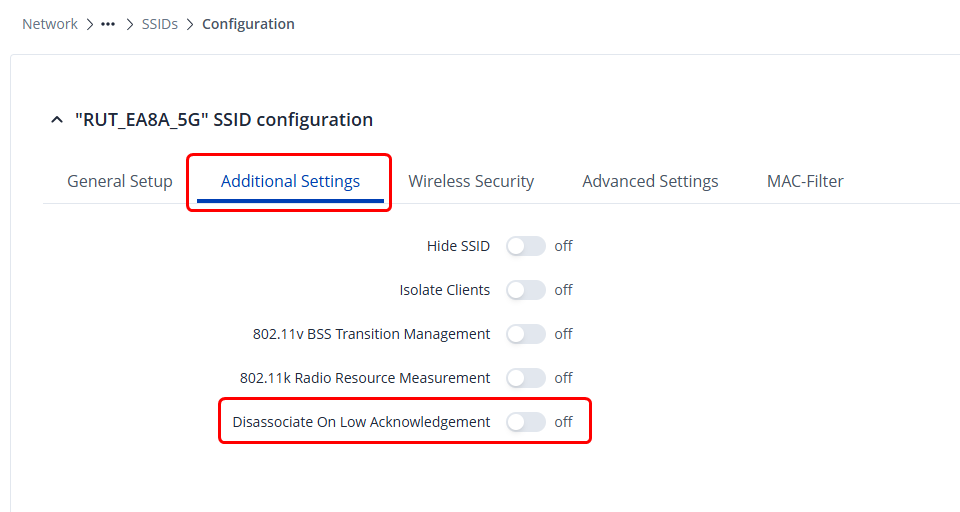
On top of this, could you also try disabling the Disassociate on low acknowledgement setting under Network → Wireless → SSIDs → “Edit” on the interface → Additional settings:
Next, under Network → DHCP → Server Settings, could you confirm that the server is enabled? If it’s disabled, this could very well cause the devices to either connect/disconnect, or not connect at all:
Thank you for getting back to us. Please see our answers below.
Regarding the firmware version:
Since the device is completely new, the very first thing we did was to upgrade it to the latest firmware (7.20.3).
On our previous RUTX11 device (which unfortunately has now been recycled), we were also running the latest firmware version.
Yes, we have performed a full factory reset of the device and reconfigured it from scratch, but the issue persists.
We are running two separate 2.4 GHz WiFi networks (SSIDs). Over the last day, we noticed that if one of the two networks is disabled, only a single SSID is broadcast and the WiFi then works as expected. When we activate both SSIDs again, the problem return within a few hour(s).
The RUTX50 is powered using the included power adapter.
This caught my eye. I believe it would be wise for me to collect the troubleshoot file from your device so I can see what’s happening. I’ve sent you a form to fill out, you’ll receive it in your email inbox. Simply fill it out with your contact details, and for the ticket ID use 17551
I have a RUTX11 which suffers the same isssue, 5Ghz is always fine, the 2.4Ghz stops sending out an SSID and it shows there are 16 devices connected, however none of them are reachable. Using latest firmware/modem firmware. Only a reboot will recover the 2.4Ghz and everything goes back to working fine. The issue is completely random, after a few hours or days the wifi 2.4Ghz network will go offline - any attempts to try and get this working fail - only a reboot fixes it. I have setup an auto-reboot once a week to try and stop this issue, but of recent this occurs quite often between reboots.
I dont want to purchase a replacement router as I suspect this is driver/firmware rather than hardware as everything else on the router works fine and as expected.
Did you uncover anything which could help with this issue?
Ok, so the router has again dropped 2.4Ghz wifi, I pulled a troubleshoot file from the router before restarting and found the following entries:
[18845.706668] ath10k_ahb a000000.wifi: received unexpected tx_fetch_ind event: in push mode
[18845.706740] ath10k_ahb a000000.wifi: received unexpected tx_fetch_ind event: in push mode
[18845.713912] ath10k_ahb a000000.wifi: received unexpected tx_fetch_ind event: in push mode
[19619.264105] ath10k_ahb a000000.wifi: received unexpected tx_fetch_ind event: in push mode
[19619.264179] ath10k_ahb a000000.wifi: received unexpected tx_fetch_ind event: in push mode
[19619.271379] ath10k_ahb a000000.wifi: received unexpected tx_fetch_ind event: in push mode
[20272.727927] ath10k_ahb a000000.wifi: bss channel survey timed out
[20275.767917] ath10k_ahb a000000.wifi: wmi command 36892 timeout, restarting hardware
[20275.767995] ath10k_ahb a000000.wifi: failed to set dtim period for vdev 0: -11
[20275.774682] ath10k_ahb a000000.wifi: failed to recalculate rts/cts prot for vdev 0: -108
[20275.782015] ath10k_ahb a000000.wifi: failed to set cts protection for vdev 0: -108
[20275.790408] ath10k_ahb a000000.wifi: failed to set erp slot for vdev 0: -108
[20275.797338] ath10k_ahb a000000.wifi: failed to set preamble for vdev 0: -108
[20275.804630] ath10k_ahb a000000.wifi: failed to set mgmt tx rate -108
[20275.834523] ieee80211 phy0: Hardware restart was requested
[20275.837901] ath10k_ahb a000000.wifi: failed to halt axi bus: 0
[20276.038508] ath10k_ahb a000000.wifi: Failed to get pcie state addr: -16
[20276.038576] ath10k_ahb a000000.wifi: failed to setup init config: -16
[20276.044104] ath10k_ahb a000000.wifi: Could not init hif: -16
So it appears the Wifi encounters an issue, tries to restart hardware and results in the wifi being unaccessible.
So I suspect this could be a driver/firmware issue?
Is this the only device you own and the only device that has issues, or do you have multiple devices and only one of them has this issue? Additionally, what firmware are you currently running on your device?
This is the only device I own - RUTX11 - running RUTX_R_00.07.20.3, its only the 2.4Ghz network that is affected, everything else works fine. 5Ghz, GPS, Bluetooth etc all stable.
If you don’t mind - I’d like to collect the troubleshoot file from your device as well to have more information to pass to the R&D on top of the initial users who has created this thread.
I’ve sent you a form to fill out - fill it out with your contact details, and for the ticket ID, please use 17551-2
Hi again. We bought also one new Teltonika rutx50 (esim) and we have the same issue with this one. 2,4ghz networks dies (Status: Pending). About 10 clients connected. I have not received any solution or response from Teltonika yet… this is to bad!
Apologies, did you not receive our email stating that we’ve reached out to the R&D and are awaiting for a response?
I kindly ask you to understand that the R&D on their own are super busy, as they not only have to work with resolving issues like so, but are also working on a whole lot of different projects at once, as well as handling just as many issues as we, the technical support do.