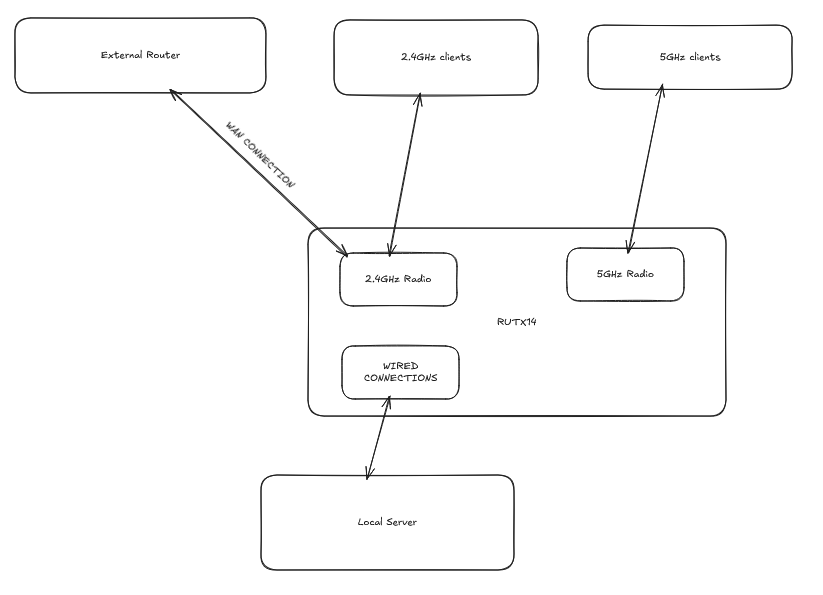
I saw there are very similar issues as this but for other routers, so decided to make a new topic. Here is more info that could help, especially that the problem doesn’t occur with every AP.
So I’m using a RUTX14, now on RUTX_R_00.07.24.3.
When being connected to 4G there are no problems, when using the router as a wifi bridge 2.4GHz drops after about an hour:
Connected to a 2.4GHz AP.
WLAN 2.4GHz clients get disconnected and no more access to the AP, 4G failover kicks in.
When logging in to my router using 5GHz I can see that the client connection to the AP shows as Network disabled, but the normal 2.4GHz SSID is still Running, yet there is 0% signal and the SSID is no longer visible.
LAN also still works.
Only a reboot fixes it.
The problems started when I upgraded from RUTX_R_00.07.22.4 to RUTX_R_00.07.23.6 about 2 months ago. When downgrading back to RUTX_R_00.07.22.4 it worked again.
Then a short while later I moved locations and decided to try RUTX_R_00.07.23.7 thinking maybe it could have been fixed. And yes, it worked. Connecting as a 2.4GHz bridge.
Now I’m back at the previous location and the problem is back. I’m connecting to a TPLink AP, so this could be a useful hint. No idea what brand the other AP was.
If you need more info, let me know.
Didn’t want to try to reset the wifi driver as suggested here since I don’t know if this is applicable to my device. And the “Wireless Reboot” package is not available for RUTX14 I think.
I tried changing the channel to auto as suggested here but that didn’t do the trick for me.
Found out that running a speedtest (on the ookla website) does trigger the fault though.
Funny thing.. first time I did the speedtest both 2.4GHz & 5GHz went out.. so had to do a hard reboot then. The only thing different was that transmission power for the 2.4GHz radio was set to medium, instead of max. It’s on max now again and when I do the speedtest only the 2.4GHz radio drops out.
Downloaded a troubleshoot file so if you want it, it’s here.
Inspired by this post I manually changed the 2.4GHz radio channel to the same channel as the AP. (which normally happens automatically) And 2h15m later, downloaded around 25GB, did a lot of speedtests,.. and still works.
It never worked for so long so maybe they are on to something there.
I’ll let you know if it failed again. Otherwise I’ll come back 2 days later to say if it still works. If I don’t forget…
Still working. Not gonna mark this as a solution though. Could also still fail later.
So concretely the only thing that is changed now is deliberatly setting the 2.4GHz radio channel to the same channel as the AP.
It was manually set to a different channel before, but that shouldn’t matter. Changing to auto didn’t improve it. Now it is at the same channel as the AP and this so far has worked for 2 days. Could hopefully be a good indication to troubleshoot for the engineers.
Did happen again now. Apparently the AP changed channel and connection was very flaky. Changed my radio to be the same again but doesn’t seem to fix it anymore.
Disabled my 4G modem (which was running as fallback) and it seems the connection is stable now. At least for 2 days now.
So I have:
2.4GHz wan connection to an AP.
A few 2.4GHz & 5GHz clients connected to my router.
2.4GHz & 5GHz radio channel set to auto.
And disabled the 4G connection.
Decided to do more testing with combinations of 4G on/off, outdoor/indoor mode, etc..
Always failed, sometimes a good bit later. What changed now is before I could do a soft reboot, whereas I had to do a hard reboot now. Sometimes even 5GHz was out too instead of only 2.4GHz.
One time I wasn’t even able to boot after a hard reboot (3G&4G leds blinking again) but a second try fixed it. The next time I wasn’t so lucky and couldn’t boot my device anymore, even after a hard reboot the 3G&4G leds just kept blinking and I couldn’t even access my router through the LAN port. Autoconfiguration IP on my computer, no DHCP. Probably something got corrupted by the unexpected shutdowns so soon after booting.
Had to do a full reset to get it working again. Luckily I have a backup. I decided now to go back to software version RUTX_R_00.07.22.4 until this issue has been directly adressed. I’m willing to help out by testing new firmware versions.
I would recommend to other users to backup their device so they can do a full reset when needed.
Going back to 07.22.4 also resetted my device. I had a backup suited for 07.22.4, so not sure if a backup for a later version would be applicable.
Will let you know if the problem occurs again though…
Well,… just had the same issue on 07.22.4. Before going out this time there were some weird issues with static IPs though, but probably unrelated. (A server IP redirecting to my computer while it already had it’s own different IP, and the server itself getting an IP that was not listed as a client..)
Disabled everthing I can now. Only the 2.4GHz radio is on. Connected to an AP. Both sims are disabled. Only 1 LAN port is enabled. We’ll see how it goes. So far wifi got disconnected once but then reconnected.
Guys.. I really think this should be investigated more actively since it has been going on for some time now and renders the device barely usable. I can help you if you want. Just tell me what you need tested. I have a troubleshoot file if you want.
We are aware of this issue, and our R&D team has been working on it. The issue was caused by the wireless subsystem recovery procedure not functioning correctly.
This should be resolved in firmware version 07.25.1. We recommend updating the device to this version with Keep Settings disabled.
For more information about the changes, improvements, and fixes included in this firmware version, please refer to the Changelog section of the following Wiki page:
Please let us know if the issue still persists after updating to this version.
We appreciate your patience and look forward to your response.
Great! Just installed the update and so far it seems to be fine. Will let you know if something happens. Will come back in a week to say if it still works.
Under General Setup, what is selected for Network?
lan
Under Additional Settings, is Disassociate On Low Acknowledgement enabled or disabled?
It was on now, but before the reset this was off. Forgot to change this. Turned it off again now.
Under Wireless Security, what Encryption and Cipher are selected?
WPA2-PSK & Auto
Under Advanced Settings, is Disable Inactivity Polling enabled or disabled?
disabled (off)
Additionally, could you please clarify what specific configuration changes you have made to the device manually?
Euuhh I’ll just list them all even though they probably aren’t all related.. let me try to recall..
Add custom external dns servers for the wan connections (and in general dns config)
one static dns ip address for a local domain
using subnet 192.168.178.0
push a local dns server via dhcp
a few static dhcp leases
disable ipv6 (though disabled it more thoroughly today after reading a post here)
connect to an AP through 2.4GHz (which I turned off for now)
country code => Spain
The rest is back to default I guess.
EDIT1: I also filtered 1 MAC address from connecting to the 2.4GHz SSID
EDIT2: Disabled all other WAN interfaces
I’m not 100% sure what multiAP is. But that is where multiple AP’s share the same SSID so devices can roam and everywhere is the same network, right?
Then no there are only routers here that have their own SSID and also act as routers.
I have a wan connection on my router to an external router over 2.4GHz, and my router sends out its own SSID.
It is hard to interpret your setup from the description, and it may be useful to upload a drawing of your setup, including which connections are wifi and which are hard cabled.
It may also be usful to upload pictures of the following screens:
a) NETWORK > WAN > WAN Interfaces
b) NETWORK > WIRELESS > SSIDs
A brief description of what you are trying to achieve will be useful.
It may also be usful to upload pictures of the following screens:
a) NETWORK > WAN > WAN Interfaces
b) NETWORK > WIRELESS > SSIDs
Can’t do that right now since I’m not at that location atm, hence not connected to the external router. Next week I’ll probably have the opportunity to be in a similar situation and I’ll send the pictures then.
A brief description of what you are trying to achieve will be useful.
I’m trying to make a stable WAN connection (wifi bridge) from the RUTX14 to the external (local) router over the 2.4GHz radio but after about an hour, or under some load, the 2.4GHz radio just hangs apparently.
I do still have a troubleshoot file from when that happened if interested.
Thank you for providing the topology and apologies for the delayed response.
For troubleshooting purposes, we will require more sensitive information from your end, such as the troubleshoot file, which may contain passwords, public IP addresses, serial numbers, and such. To avoid leaking this information, we have sent you a form to fill out, which you will receive in your e-mail inbox that you have registered your account with in the forums. In the **Ticket ID** field of the form, please enter the ID of this thread, which is 20875.