New WIFI setup of RUT200, having issues connecting users (tested a few devices, iphone 16, and Dell Laptop) to Wifi. Tried deleting Wifi profile and starting from scratch. I can see the users connect momentarily on the Wireless Page, but it drops off immediately.
Things done:
Analysis of Channels and using non-congested channel
Set to Appropriate Country
Was on Firmware 7.18.3, and updated to 7.19.1 - same issues.
What’s working:
Wireless - but only when SSID is configured with No Authentication/Security.
Cannot see anything useful in the logs (from UI), because nothing is connecting.
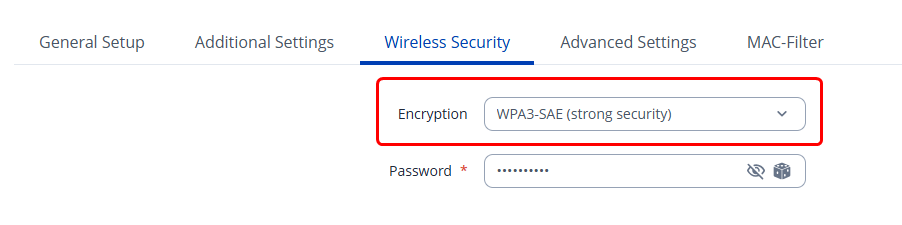
Could you please head to Network → Wireless, press Edit, and head to the Wireless Security tab. From the dropdown menu, please try selecting WPA3-SAE and hit Save & Apply:
Can confirm WPA3 works as you have suggested. When the issue first started, i tried to downgrade the encryption thinking it was a negotiation issue but i was experimenting with mostly WPA2 modes.
Hi Matas, false alarm. User thought it was working but it connected to hotspot. Can confirm WPA3 still presents to user as ‘incorrect password’. Other than rolling back, can you advise other options.
Could you please SSH into the device (Guide how to do that is here: )
And then enter the following commands - keep in mind, the first command only works for RUT200/RUT240/RUT241 devices. echo 1 > /sys/kernel/debug/ieee80211/phy0/mt76/full_reset reboot
This command triggers a full hardware reset of the Wi-Fi radio (phy0) handled by the mt76 driver.
In that case - let’s move to a different communication channel so I could collect the logs and escalate this to our R&D to investigate. I’ve sent you a form to fill out. In the ticket ID field, simply enter 16444 which is the ID of your thread. I’ll reach out to you as soon as possible.