We have a RUTM10 running 07.16.3 firmware which we are using as a remote access device with an IPSEC tunnel configured. The IPSEC works and we can reach the local traffic (172.20.0.0/24). However, now we need to add extra phase2 networks for resources routable through that local network. Those extra phase2 networks are reachable for the RUT10M through its default gateway.
We added the phase2 networks (172.16.0.0/24 and 192.168.0.0/24) on the IPSEC tunnel and see traffic going through the tunnel (tcpdump also shows the ICMP requests, but no responses). This makes sense, as our LAN network 10.20.30.0/24 is not known for the networks 172.16.0.0/24 and 192.168.0.0/24.
So we configured a NAT rule for all incoming IPv4 from 10.20.30.0/24 to 172.16.0.0/24 to be SNAT to 172.20.0.10 (RUTM10 LAN). We also tried using MASQUERADE, but both options fail to generate an ICMP response.
We also tried using a custom NAT ruleiptables -t nat -A POSTROUTING -s 10.20.30.0/24 -o br-lan -j SNAT --to-source 172.20.0.10
To better understand the situation, could you please provide a simple topology diagram of your full network setup, including IP addresses and how each device/network is connected, as well as which networks on the RUTM10 side you want to reach?
At the moment, it is difficult to clearly identify which network serves which role.
Additionally, please share screenshots of your current IPsec, firewall (NAT rules), and routing configurations.
From the initial view, assuming I correctly understood your network structure, this should be achievable using an iptables SNAT rule similar to:
Also, to mention, if possible, it’s highly recommended to update the device firmware to the latest stable release (7.18.3) or the newest (7.19.1), as there have been some improvements and fixes related to IPsec added since 7.16.3.
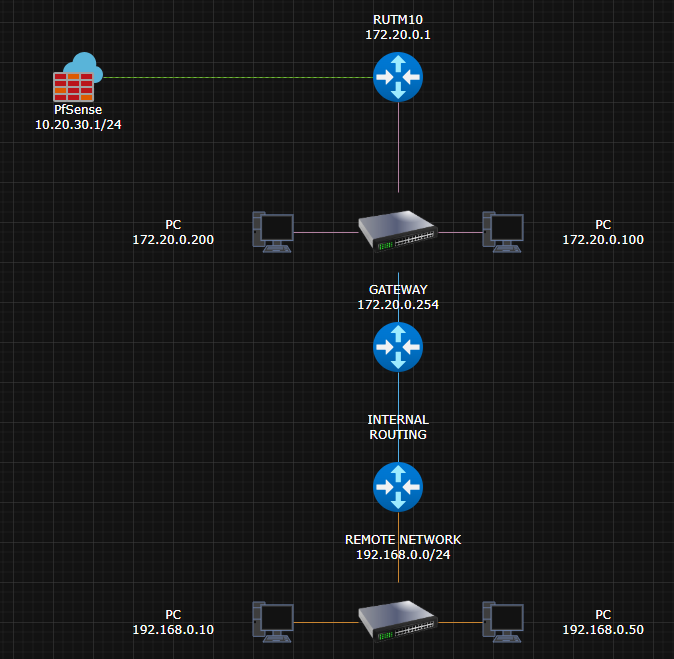
You’re right - I’ve created a network topology. Green is the IPSEC, pink is the RUTM10 LAN and orange is the remote network we need to reach from the PfSense.
PfSense (10.20.30.1) can reach RUTM10 (172.20.0.1), PC 172.20.0.200 and PC 172.20.0.100. When the PfSense pings 192.168.0.50, we get no reply. This is normal, as the rest of the network has no knowledge about 10.20.30.0/24, so normally if the SNAT is configured correctly, to match 172.20.0.1, it should work?
I’ll also update the device firmware to the latest stable - I didn’t see there was an update available.
For a setup where PfSense needs to reach a remote network through the RUTM10 using IPsec and SNAT, you normally must add a manual SNAT rule on the RUT so that traffic from the PfSense (10.20.30.0/24) is translated into an address known to the remote network, like the RUTM10 LAN IP (172.20.0.1). This is typically done by adding a custom iptables rule via WebUI (Network → Firewall → Custom Rules).
Additionally, I suggest reviewing similar example threads that might bring useful insights and be helpful here: