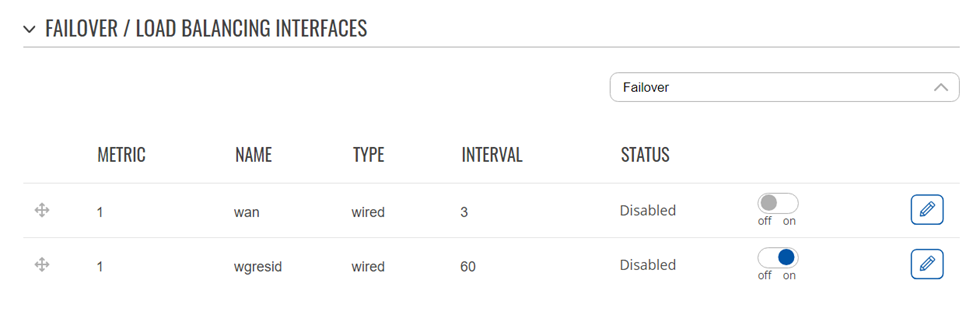
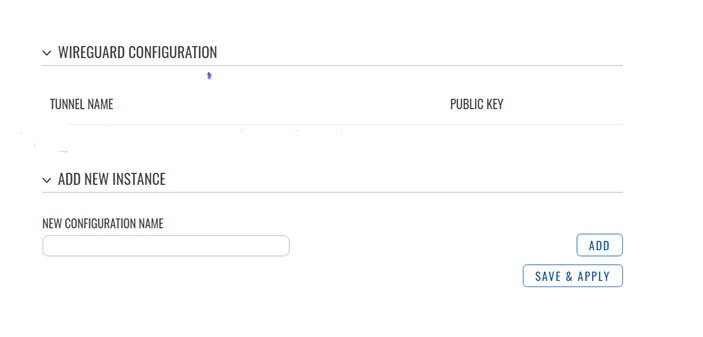
Since I lost all connectivity yesterday I started to fiddle, forgot what I did and have now reset again to get rid of any silly thing I might have put in there.
Apologies for the wall of text below, but I will give you a detailed description of what worked how/when as I proceeded for error analysis.
First step today was to add a wg instance and peer exactly as per installation file through the webUI. All fine when wg off. Also fine when wg on, but only handshake seems to go through wg interface. This was confirmed by the VPN provider test page which gave an IP address associated with the internet provider, not the VPN provider.
Wg, iproute, iprule:
root@RUTX10:~# wg
interface: wgresid
public key: (EDITED)
private key: (hidden)
listening port: 48574
peer: (EDITED)
endpoint: (PUBLIC IP OF SERVER):48574
allowed ips: 0.0.0.0/0, ::/0
latest handshake: 22 seconds ago
transfer: 184 B received, 520 B sent
persistent keepalive: every 25 seconds
root@RUTX10:~# ip -4 rule show
0: from all lookup local
32766: from all lookup main
32767: from all lookup default
root@RUTX10:~# ip -4 route show
default via 192.168.176.1 dev eth1 proto static src 192.168.176.198 metric 2
10.0.138.0/24 dev wgresid proto kernel scope link src 10.0.138.123
192.168.1.0/24 dev br-lan proto static scope link metric 1
192.168.176.0/24 dev eth1 proto static scope link metric 2
root@RUTX10:~#
128 prelocal
255 local
254 main
253 default
0 unspec
After editing config mwan and mwan3.user + restart as above I lost internet. As yesterday Windows thinks it is there, but I cannot open any web pages and there is no new handshake in the tunnel.
Interestingly, a few bytes are received now and then in the existing tunnel but nothing seems to be sent, a behavior I have not noted before.
Wg, iprule and iproute - note that your 1001 rule now appears in 32764:
root@RUTX10:~# wg
interface: wgresid
public key: (EDITED)
private key: (hidden)
listening port: 48574
fwmark: 0xbdbe
peer: (EDITED)
endpoint: (EDITED):48574
allowed ips: 0.0.0.0/1, ::/0, 128.0.0.0/1, 8000::/1
latest handshake: 3 minutes, 15 seconds ago
transfer: 50.08 KiB received, 73.91 KiB sent
persistent keepalive: every 25 seconds
root@RUTX10:~# wg
interface: wgresid
public key: (EDITED)
private key: (hidden)
listening port: 48574
fwmark: 0xbdbe
peer: (EDITED)
endpoint: (EDITED):48574
allowed ips: 0.0.0.0/1, ::/0, 128.0.0.0/1, 8000::/1
latest handshake: 4 minutes, 10 seconds ago
transfer: 50.37 KiB received, 73.91 KiB sent
persistent keepalive: every 25 seconds
root@RUTX10:~# ip -4 rule show
0: from all lookup local
1002: from all iif wgresid lookup 2
2002: from all fwmark 0x200/0x3f00 lookup 2
2061: from all fwmark 0x3d00/0x3f00 blackhole
2062: from all fwmark 0x3e00/0x3f00 unreachable
3002: from all fwmark 0x200/0x3f00 unreachable
32764: from all lookup main suppress_prefixlength 0
32765: not from all fwmark 0xbdbe lookup 48574
32766: from all lookup main
32767: from all lookup default
root@RUTX10:~# ip -4 route show
default via 192.168.176.1 dev eth1 proto static src (PUBLIC ENDPOINT AS EDITED OUT ABOVE) metric 2
10.0.138.0/24 dev wgresid proto kernel scope link src 10.0.138.123
192.168.1.0/24 dev br-lan proto static scope link metric 1
192.168.176.0/24 dev eth1 proto static scope link metric 2
root@RUTX10:~# wg
interface: wgresid
public key: (EDITED)
private key: (hidden)
listening port: 48574
fwmark: 0xbdbe
peer: (EDITED)
endpoint: (EDITED):48574
allowed ips: 0.0.0.0/1, ::/0, 128.0.0.0/1, 8000::/1
latest handshake: 5 minutes, 50 seconds ago
transfer: 50.37 KiB received, 73.91 KiB sent
persistent keepalive: every 25 seconds
root@RUTX10:~#
When trying to add the first line manually the router stopped responding while (or after?) trying to execute. I lost webUI contact and the shell never gave me a new ready signal.
I cut the power for a while and the router came alive again but still no internet. (Windows thought it had, but nothing could be opened etc).
Wg and iprule - note the disappearance of the 1001 rule after the mwan restart:
root@RUTX10:~# wg
interface: wgresid
public key: (EDITED)
private key: (hidden)
listening port: 48574
fwmark: 0xbdbe
peer: (EDITED)
endpoint: (EDITED):48574
allowed ips: 0.0.0.0/1, ::/0, 128.0.0.0/1, 8000::/1
transfer: 0 B received, 148 B sent
persistent keepalive: every 25 seconds
root@RUTX10:~# ip -4 rule show
0: from all lookup local
1000: from all lookup main suppress_prefixlength 0
1001: not from all fwmark 0xbdbe lookup 48574
1002: from all iif wgresid lookup 2
2002: from all fwmark 0x200/0x3f00 lookup 2
2061: from all fwmark 0x3d00/0x3f00 blackhole
2062: from all fwmark 0x3e00/0x3f00 unreachable
3002: from all fwmark 0x200/0x3f00 unreachable
32766: from all lookup main
32767: from all lookup default
root@RUTX10:~# /etc/init.d/mwan3 restart
root@RUTX10:~# ip -4 rule show
0: from all lookup local
1002: from all iif wgresid lookup 2
2002: from all fwmark 0x200/0x3f00 lookup 2
2061: from all fwmark 0x3d00/0x3f00 blackhole
2062: from all fwmark 0x3e00/0x3f00 unreachable
3002: from all fwmark 0x200/0x3f00 unreachable
32766: from all lookup main
32767: from all lookup default
root@RUTX10:~#
That yielded:
root@RUTX10:~# ACTION=ifup INTERFACE=wgresid /bin/sh /etc/mwan3.user
RTNETLINK answers: File exists
RTNETLINK answers: File exists
root@RUTX10:~#
Finally here is what I added to my mwan3.user file, every line should be copypasted from your post except for my own table and wgname:
table=48574
wgname=“wgresid”
[ x"$ACTION" = x"ifup" ] && [ x"$INTERFACE" = x"$wgname" ] && {
logger -t “mwan3.user[$]” -p notice " add rules/routes $ACTION interface $INTERFACE device $DEVICE"
wg set $INTERFACE fwmark $table
ip -4 route add default dev $INTERFACE table $table
if [ $(ip -4 rule show 2>/dev/null | grep -c “lookup $table”) -eq 0 ]; then
ip -4 rule add not fwmark $table table $table
fi
if [ $(ip -4 rule show 2>/dev/null | grep -c “from all lookup main suppress_prefixlength 0”) -eq 0 ]; then
ip -4 rule add table main suppress_prefixlength 0
fi
ip -6 route add default dev $INTERFACE table $table
if [ $(ip -6 rule show 2>/dev/null | grep -c “lookup $table”) -eq 0 ]; then
ip -6 rule add not fwmark $table table $table
fi
if [ $(ip -6 rule show 2>/dev/null | grep -c “from all lookup main suppress_prefixlength 0”) -eq 0 ]; then
ip -6 rule add table main suppress_prefixlength 0
fi
}
[ x"$ACTION" = x"ifdown" ] && [ x"$INTERFACE" = x"$wgname" ] && {
logger -t “mwan3.user[$]” -p notice " delete rules/routes $ACTION interface $INTERFACE device $DEVICE"
while [ $(ip -4 rule show 2>/dev/null | grep -c “lookup $table”) -gt 0 ]; do
ip -4 rule delete table $table
done
while [ $(ip -4 rule show 2>/dev/null | grep -c “from all lookup main suppress_prefixlength 0”) -gt 0 ]; do
ip -4 rule delete table main suppress_prefixlength 0
done
while [ $(ip -6 rule show 2>/dev/null | grep -c “lookup $table”) -gt 0 ]; do
ip -6 rule delete table $table
done
while [ $(ip -6 rule show 2>/dev/null | grep -c “from all lookup main suppress_prefixlength 0”) -gt 0 ]; do
ip -6 rule delete table main suppress_prefixlength 0
done
}
I hope this helps in trying to find out where the gremlins are hiding…
Thank you for your patience & best regards,
T