Greetings,
By default, the TAP interface isn’t bridged to the br-lan (LAN) interface, which prevents Layer 2 communication over the VPN tunnel.
First we will need to connect to the router’s CLI, here are the instructions on how to do so:
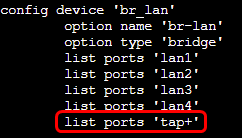
To resolve the issue, you must edit the /etc/config/network configuration file. Specifically under the br-lan device options, manually add this line list ports ‘tap+’
You can use vim editor, so execute the command vi /etc/config/network, then press Insert or the letter “I” on your keyboard, you will be able to edit the file. To save, press ESC, write :wq, and press ENTER
After that, restart the network services using the following command:
/etc/init.d/network restart
The TAP interface is now automatically bridged to br-lan. I tested this out myself and it fixed the issues. Let me know if it helps.
Keep in mind you have to edit the config file on every router.
Best Regards,
Justinas