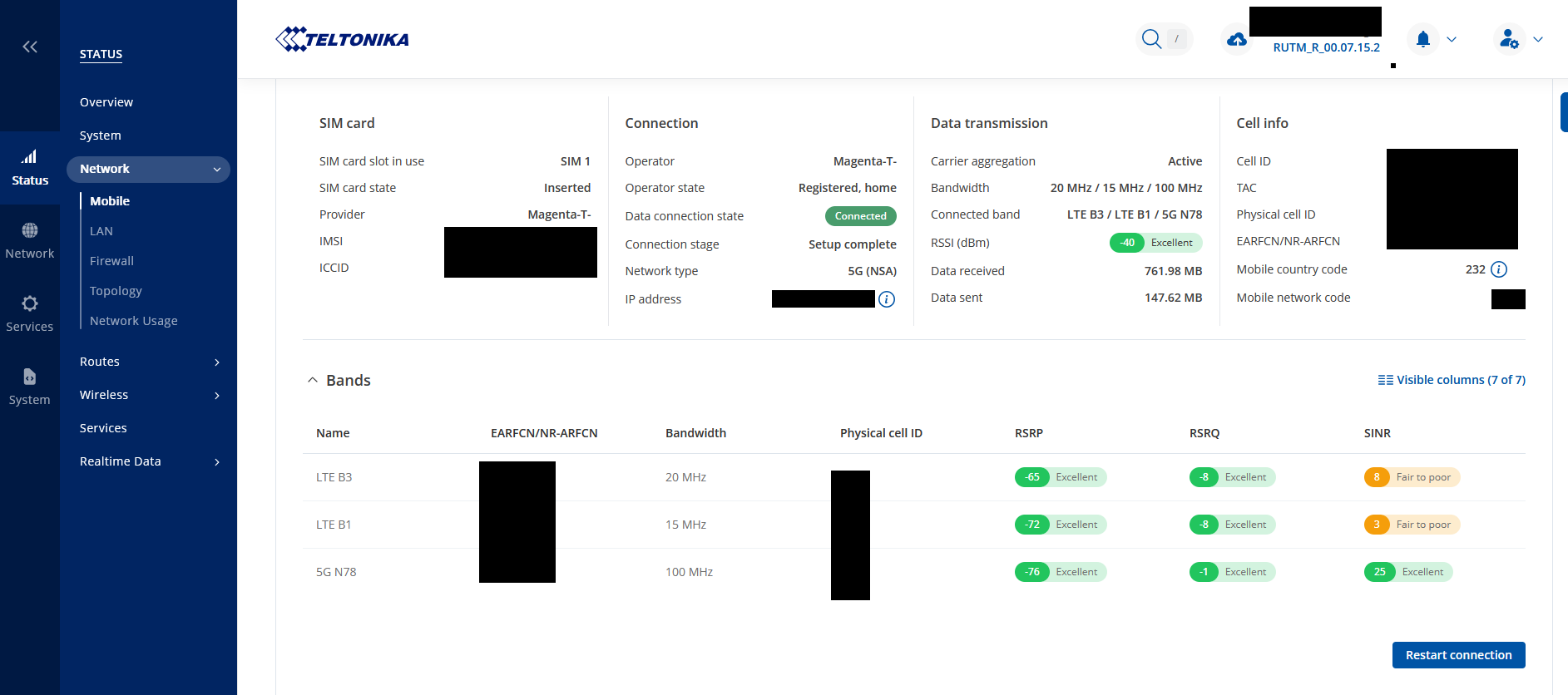
a few weeks ago I used to purchase a Teltonika 5G/LTE router. I’ve made this decision because I do have 2 mobile towers with 5G/LTE antennas nearby and the model mentioned above meets my requirements quite well.
I was able to reach speeds of 500-600 down and 60-100 up with my smartphone (same provider) and 600 down/60 up with a typical 5G router from Xiaomi.
Therefore I expected to have a similar performance with my Teltonika router.
Unfortunately, I didn’t get the expected results after inserting the sim-card into the Teltonika router.
The download speed (measured using the speed test included into the webserver) was between 140-250 mbits.
The upload speed was always at the maximum level - therefore the only thing I am unhappy with is the upload speed.
So here is what I did:
I’ve adjusted the routers position.
I’ve locked all the unused/unavailable LTE/5G bands.
I’ve checked the signal quality at the Teltonika router and the other devices (different router, smart phone). I am quite happy with the signal quality.
I’ve checked the router load (CPU, memory, …) which was also okay.
I’ve updated the firmware recently.
Do you know if there is anything else I could check?
First, could you please clarify which specific bands you’ve locked the router to? I assume you’ve selected the bands that are most reliable and stable based on your area’s coverage, right?
Additionally, it’s important to mention that modern smartphones often support higher LTE and 5G modem categories with more advanced carrier aggregation (CA) combinations than most industrial-grade routers, including Teltonika-Networks devices. Smartphones and consumer routers like the Xiaomi model you mentioned are typically equipped with higher-category modems capable of aggregating multiple frequency bands simultaneously, which has a significant impact on achievable speeds.
I’d also recommend having a look at a similar discussion shared in our forum here:
where you might find some valuable insights and practical adjustments in relevant situations.
I’ve tried many bandlocking combinations.
I’ve always selected the strong bands in my area. One time i have enabled 5G n78, LTE B1 and LTE B3 while blocking the rest. I’ve also tried using only single bands (5G n78 or LTE B1 or LTE B3) as well.
Unfortunately those tests didn’t bring any improvements.
I have assumed that the different carrier aggregation algorythms in smartphones and other routers might have led to the performance differences. Unfortunately, I couldn’t find an option to block certain frequency channels.
I would have tried to block the bad/overloaded frequencys there.
Is there a way to check if the modem is the bottleneck? I really want to use robust Teltonika products in my setup.
I’ve read through the article - unfortunately i couldn’t find anything helpful there.
Thank you for the update. In this case, to assist and troubleshoot this matter effectively, we’ll need to continue this process privately, because sensitive/publicly unshareable information needs to be gathered. You should find a support request form in the inbox of the email address you used for your forum registration. Kindly fill out the form, and please reference Ticket ID: 14545 when submitting it. Once the form is completed, we’ll contact you directly via email to investigate the issue in detail and help work towards a solution.