What’s Your “Must-Have” Setup Checklist for Deployments?

Dear community,

When setting up a new device, everyone has their own routine.

What’s your personal checklist before calling a deployment “done”?

For example:

  • Security hardening steps
  • Monitoring setup
  • Failover testing
  • Custom scripts or automation

Sharing workflows could help others avoid common mistakes.

Warm regards,
Community Support Team

Remove the need to create, download and install certificates for browsers. For some reason on my RUTX50 with the latest stable firmware i’m unable to copy and paste the output of a CLI session. This could be a related issue too.

As more and more data sims become “Data Only” and sms messaging to a sms command is no longer possible it would be great to choose whether to have a response via an sms message or by email instead.

Hello @akwe-xavante,

Thank you for sharing your feedback!

Could you kindly create separate topic for these suggestions? This will allow us to review them properly and forward them to our RnD team for consideration.

Thank you in advance for your contribution and ideas.

Best regards,

Hi @akwe-xavante,

About your certificate comment and you aren’t the only one that has past year given same kind of comments and asked why devices ship with private certificates.

This kind of suggestions made are very easy thinking they would be easyly solved. But unfortunately they aren’t. The following is quite long explanation why.

What I’m about to assure you if it was easy for Teltonika, then why very same out of box installed public certificates with convenient auto renewal isn’t implemented by the very large enterprise class network gear makers devices which are suffering exactly same problem. Just to mention few: Cisco, Huawei, Arista Networks, Hewlett Packard Enterprise (Aruba, Juniper Networks) and Nokia, etc.

While you think why this is an issue. Also let me convince you there isn’t some global conspiracy among device vendors, just to tease their customers not to fix such easy issue and keep trolling their customers just for fun.

Following is very simplified high level version basic information I need to make you first understand how certificates work in general, There are much much more details involved each stage, but I’m not going to complicate things further and try explain more than bare minimum here.

  1. The policies around Web X.509 certificates are managed by The CA/Browser Forum. That is the collaboration forum which issues policies and rules how it’s member CA’s (Certificate Authorities) are expected to manage each of their own CA operation and very detailed rules of various kind of certificates they are only allowed to issue. It is very bureaucratic organisation and harsh to any compliance issues found to be solved.

  2. Each CA builds largely their own CA architecture, writes required pile of policy, technical and operational documents, applies then approval pass auditing and inspections of course. Once CA does pass and is approved its CA root certificates are eligible to be included by each of the major browser vendors browser products root-CA repository.

  3. When someone requires a certificate for a site, they contact some of these CA’s with providing CSR (a certificate request), which validity CA need to verify according to its written policies they had agreed as a CA/Browser forum member.

In practise CA’s root-CA’s are long lived and for security reasons kept usually in safe, and they use as a every day signing certificate another they issue themselves and sign by their root-CA certificate. This another is called an intermediate CA. These two now form a two certificate chain, root-certificate followed by intermediate certificate. Theintermediate is then used to sign customer CSR’s in most simplified case. Sometimes certificate chains are bit longer etc. But you get the idea how this works. And these intermediate CA’s are much shorter lived, rolled over ie. replaced by the newer issued before previously used one Not After date expires.

  1. When that CA signed customer certificate is then installed some web-site or like, then the somebody connecting with browser in HTTPS protocol is given back from that site the issued certificate together with all and any intermediate certificates from that certificate up to the issuer root-certificate, which has to be found from the browser. If that is the case then browser will happily connect to that service and user is not bothered by any question “Do you trust this service yadda yadda …” that was your point to get rid of.

OK right. Let’s get back to what makes it hard for Teltonika or actually any other trying to do the same however large or resourceful enterprise. There are few problems, why solving this is in practise impossible to achieve. Because:

  • Keep in mind while reading the points below: CA/Browser forum policies and rules control CA’s and prevent them using their root-certificates which are included in browsers to anything but what is approved by those policies and rules.
  1. Public certificates, which public CA’s are able to issue, can’t issue certificate for private network addresses, that is RFC 1918 (10.0.0.0/8, 172.16.0.0/22, 192.168.0.0/16) and the like (IPv6 ULA and LinkLocal addresses).

  2. Nor they can issue any certificates for customers private local domains, which are not visible.outside. That is because various types of certificates (EV, OV, DV) all require also domain verification which requires verifyin that applicant can be proven to have control of that domain. And that simply not possible for local domains.

  3. For more complete list, search Google “General rules what ca/browser forum has mandated what are currently rules required and what are denied types of browser certifcates CA’s are not allowed to issue?

That covers reasons why Teltonika or whatever router, network gear whatever doesn’t have those convenient non complaining certificates readily available out of the box when you start using them.

And how would any device manufacturer be able any more know and install ready made working certificate for devices on WAN sides any better? CA’s don’t generally sign certificates even for public IP’s, they just don’t do it.

Some of them like free Let’s encrypt issues DV (domain validated) certificates for your domain once you apply from already connected and runnig system. But to get one yo need first to add your domain appropriate entry (A or AAAA RR) for the device. They can’t just pick some random domain name or sign certificate which Subject cn or SAN contains private IP’s etc.

Cisco tried to solve this almost 20 years ago by creating a SCEP protocol, but it was clumsy and tied only to one CA, which you had to first become paying customer before you could use it in devices you bought. Let’s Encrypted protocol ACME is open and much better, but it also has its limits. Because they are also required to follow CA/Browser forum rules, you could possibly if ACME was installable packet for Teltonika router or builtin feature base OS get WAN side public IP address a certificate using that. It wouldn’t solve your private IP-side router management interface certificate issues.

But if that WAN address from your network operator is DHCP given address which reverse was a generated DNS name inserted also DNS forward, you need to apply new certificate each time your DHCP issued IP is changing. It all depends your network operator how often that then would happen how much of the nuisance it would become.

If you think that this kind of issue would be solvable if network device manufacturer would either become CA themselves or try making some kind of agreement with any of the current CA/Browser Forum member CA’s which then would somehow try avoiding this kind of issues.

I’m afraid you didn’t quite understand how binding those rules are any and all of the involved parties working with CA/Browser forum as CA or their coopeating intermediate CA’s. They are not allowed to skimp or skew any of rules. Those knowinly breaking rules or even accidental mishaps have led mistrust and removal of untrusted party CA root certificates from browsers.

CA business is the business of trust. If other CAs’ and browser makers don’t trust someone there it’s end of that untrusted CAs’ business very swiftly indeed.

Right, this reply became much longer than I first thought and it’s time to wrap up this now. But just one more link to CA/Browser Forum Baseline TLS Certificates Requirements. And they have a GitHub.account also, which contains quite useful information of their working groups which can be found good to know information about future plans of changes etc.

Anyway, if you think there is a way to solve these issues described above which make it either impractical or practically impossible for device manufacturers solve these issues. Not just me but quite many would be interested to hear about your idea. So share if you have a good idea and we can see how well it flies with the rules CA/Browser forum has set.

Cheers,

:slight_smile: riku

ps. Those thinking who am I to write you about this. I’m someone who worked about 25 years with certificates daily in my work, both enterprise MPKI context CA liaison and RA for a mid sized university. Ran and kept our own internal CA for a while and wrote tools for make our lives bit easier with this hot mess what certificates have been all these years. (And there is much much more misfeatures and issues I didn’t even touch with this whole certificate system. Not that X.509 etch PKI techical standards are bad, no they aren’t mostly but there are long standing other severe issues which hae not been solved at all too.

Hi @akwe-xavante again,

Don’t let my previous message discourage you where I explained why that certificate issue is much much harder most people assume it truly is. I did not mean to attack and downplay you as person. No nothing such at all. I got winded and because it’s so hard thought it would deserve explanation so that we as Teltonika customers would not expect impossible from them. Best we can do is just forget bothering them about that matter and move on.

The other points you wrote and @Marija kindly asked you to create separate topics is very much good idea.

And again, my writing was not towards you as person. It was genuinely only meant to get us here understand there is no realistic way Teltonika would be able to fix that so that you wouldn’t be bothered by pesky private certificates when you deploy these things. They can’t and nor can any of those much much bigger networks gear makers either. If it was solvable, it would certainly have been solved 20+ years ago.

:slight_smile: riku

Don’t worry, i’m thick-skinned, broad shouldered and not very bright! I promise not to sulk for more than six weeks… ok, eight weeks to be safe!!

OK, that’s great. I already grew bit worried you a hire hitman to get me <phew> :stuck_out_tongue:

Seriously. I understand your wishing there would be no need to click trough private certificates is understandable as is anybody else too. But public certificates that browsers included root certificates can verify to trust issuance is so limited and restricted that it becomes exercise in futility trying to solve it some well working way.

Some manufacturers have gone trough route maintaining their own private CA, which root certificate they then let customers download and distribute to browsers using those devices or services. That way you get somewhat similar feeiing you don’t click trough accepting each device certificate trust dialog.

But there is always a catch with private CA root certificate. With those you place great amount of trust to that private CA root-certificate that all your browser TLS/SSL traffic.

Because someone in control of that root-certificate and it’s private key or anyone those leaked could create a valid intermediate and by it sign service certificates absolutely any service anywhere. Capturing and opening all TLS/SSL encrypted traffic from clients isn’t too hard if you also control DNS which clients resolve DNS names.

That is exactly how advanced firewall purposely providing that kind of features do TLS/SSL traffic inspection. Where it isn’t illegal some organisations add Microsoft AD root-certificate issued intermediate root certificate to a firewall TLS/SSL capable inspection features and that will then on demand create client destination domain certificates signed with that intermediate root, proxy it’s traffic towards destination and client user doesn’t notice anything unusual. Unless they happen to check site certificate such detail that they look up which root and intermediate certificate site certificate is signed. Firewalls usually these days have quite good control settings which kind of sites traffic either are never opened and inspected or which always are etc. Such features are readily available for example Palo Alto and Fortigate enterprise firewalls.

So in short, playing with installing either company self signed or anyone else signed private CA root certificate also can bring security and privacy issues, either real ones or in basis on believed when someone notices unusual CA root-certificate installed in their browser then jumping to conclusion spreading gossip. Seriously not fun later trying cutting wings of such large organisation. Small group, like few engineers or dev group using that kind of thing everyone knowing about why that root certificate is there is no problem of course.

Some of you may also remember when Lenovo laptops IIRC came with some built in windows software they installed that was proxying and inspecting all TLS/SSL traffic. To be able to do that they had also installed their additional CA root-cert default install browsers certificate repository. That is also exactly same trick there, just one computer spoofing. It was quite bad publicity disaster which caused the losing some customer trust and lost sales.

And some spyware has done this kind tricks over the years to capture TLS/SSL of unsuspected users.

Anyway, I think if you or anyone else still want to ask more details about this matter, we could wrap this up.

:slight_smile: riku

Oh, just more thing. You could of course if you need with that device management certificate or such be in use with just you or perhaps small team. Maintain your own CA with own root-cert & key,.

There are few quite simple and good CA tools availablle, some even free. I’ve used quite few, but “xcd” ie. X - Certificate and Key management is quite nice and worth trying for modest needs.

:slight_smile: riku

Hello @mesrik,

Thank you for taking the time to provide such a detailed and insightful explanation. We truly appreciate your willingness to share your knowledge and help other community members better understand the complexities involved.

We would like to get in touch with you privately regarding a separate matter. For this purpose, I have sent you a form to the email address associated with your community forum account. Please fill out the form using ticket ID “19763-1” .

Once we receive the completed form, we will contact you via email.

Thank you again for your valuable contribution to the community.

Best regards,

@Marija, Just sent you that form..

@Marija, I add one thing I almost forgot this which I was reminded by " Feature request RUTX50: test FTP server connection posted by @Clipper87

it reminded me following thing I notice week ago.

When I use a security scanner like nmap (with frontend Zenmap GUI if you like) RUTX50 outside interfaces, it showed that FTP port (tcp/21) was being shown open ie. there is something that is listening that port which makes it look like it would be an open port.

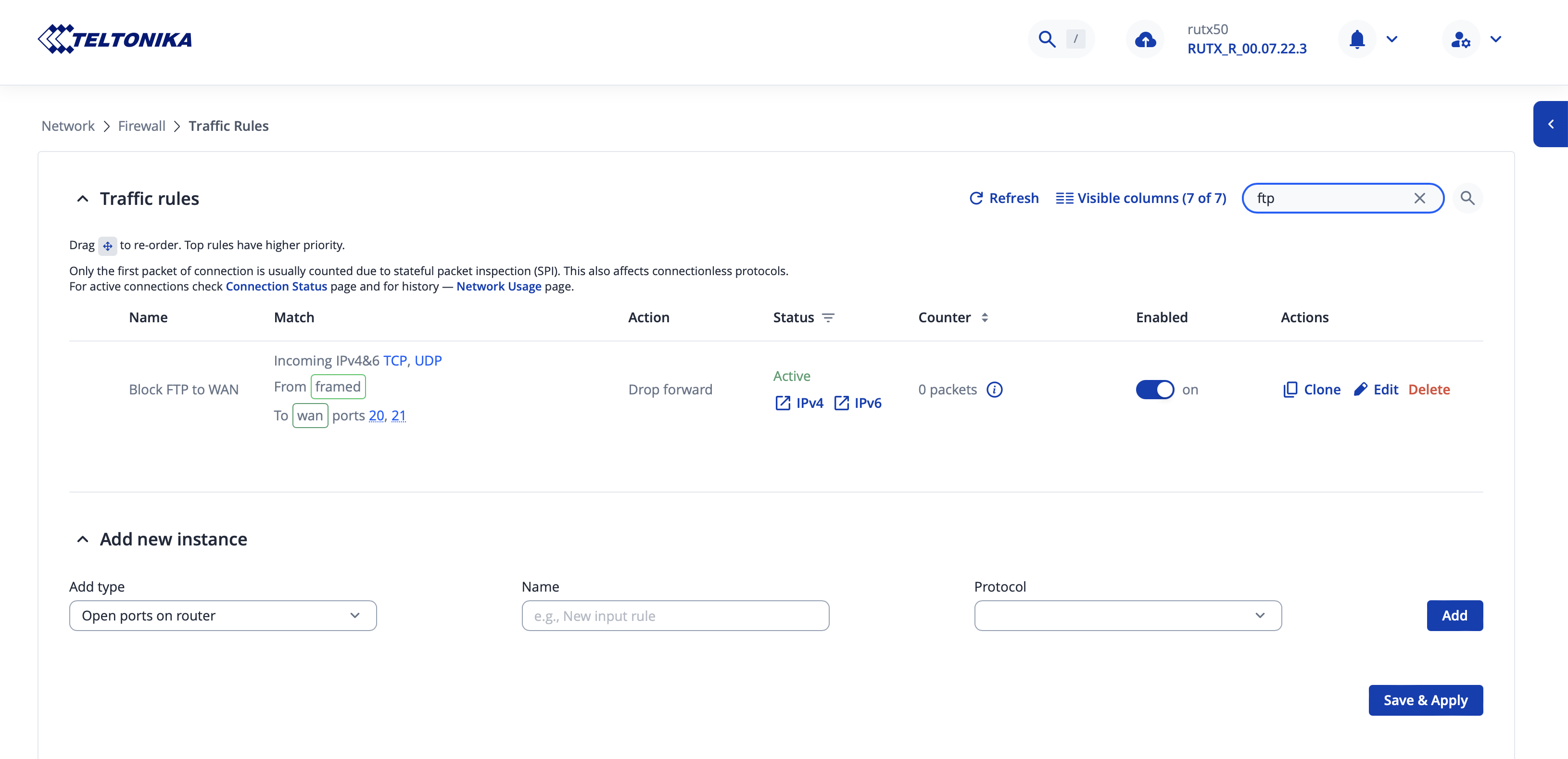
Trying connection with telnet or nc does’t succeed, but regardless it’s not good to show as just appearing open port draws network scanning parties and random vulnerabilities poking attention, which is not a good thing. Thus ended up adding new firewall which is shown next screen capture. Name which I give it is perhaps not one you had used, but is good enough for me now.

I have done just quick general scans this far, nothing extensive yet. It would be worth you running complete scans at least with publicly available tools like Zenmap or script nmap check default configs what you ship devices.

Hello,

Thank you for bringing this to our attention.

This discussion topic is intended for sharing deployment checklists and best practices before considering a deployment complete.

If you have any issues, questions, or suggestions, we kindly ask you to create a separate topic on the Community Forum. This will help us review and address each matter individually.

Thank you for your understanding.

Best regards,

One step that is crucial from my end is ensuring all port forwarding rules have the correct Source IP limitations. This is done with a custom script through RMS, but would be nice to be able to implement an Access Control List of source IPs at the device level in some way to they don’t need to be added to 30+ individual port forward rules.