What’s the most challenging part when configuring your devices?

As we begin exploring user experience and interfaces together, we want to hear about your experiences with the device configuration process.

What are the most challenging aspects of the configuration process? Which tasks are the most time-consuming or difficult?

Your insights will be invaluable as we work to improve the user experience. We look forward to hearing from you!

Warmly,
The Design Team

1 Like

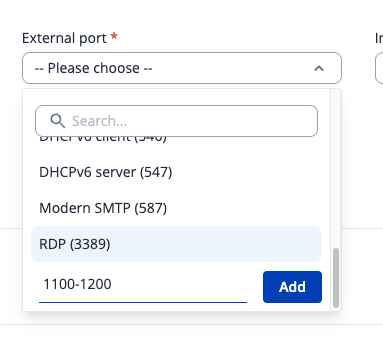
For our application, I have found the most time consuming process to be managing Port Forwards. Due to the fact that not every device uses the same port forwards, a simple backup or task manager config solution is not applicable. Being able to easily setup ranges (ie: set ports 1100-1200 as open to traffic) would save a lot of effort as we currently have to create a rule for 1100,1101,1102, and so forth, each with setting the allowed IPs in the advanced settings of the rule.

2 Likes

Thank you for sharing, and I’m very sorry to hear this is causing you trouble. To begin exploring some UX improvements, I’d like to understand exactly where the problem occurs. Have you tried entering the port range in the “Custom input” field?

Or tried the setup in DMZ page?

If you could attach the screenshot, that would be very helpful!

The range there would not work as we would need to be able to select multiple devices under “Internal IP address” when creating the rule as port 1111 for example needs to go to a specific device.

2 Likes

First of all, your devices are good and work like a charm, and your updates on regular bases talk for themselves.

We use similar setups on different locations with different network-devices. The combination of devices may change, but the devices themselves are often from “the same pool of devices”. Starting with our own standard base-configuration already saves an amount of time, but still requires boring manual adaptions. It would be cool to have “sectioned” configuration files, e.g. for VPN-combinations (set of ovpn-files), snipets for firewall rules or a set of rules per network-device, etc., something comparable to the wireless network list…

Best regards,

Axel

2 Likes

Thanks for asking! Personally there are two things that I struggle with.

  1. Firewall rules. Zones are VERY Cool, and I have found them very helpful. The issue is that they relate to Traffic Rules in a way, and i get very confused viewing what is going on between the two worlds (Zones and Traffic Rules, and even a third layer of the System/Access Control – all play into automatically changing firewall rules and can run each other over). The Zone configuration settings seem simple but are not necessarily the whole story. You need to go into ‘edit’ each one of the zone settings and really mess with the ‘Allow forward to destination zones’ and ‘Allow forward from source zones’ to make zone firewalls work, and this is really not apparent when you just go into Networking/Firewall/Zones. I know I talk on this forum a lot about Ubiquiti (mostly because my world is focused on Teltonika and UBNT), but their implementation of how they visualize zone based firewalls is quite good, and may be a good thing to just look at as a reference. You see everything in one place. ITs not perfect, and can also get confusing, but a ‘matrix’ approach is very nice. Picture example below. To be totally honest. Zone filewalls just need to be documented better in the Teltonika world.

  1. The configuration options around some of the VPNS are very counter-intutive. Wireguard offers some dangerous options that do brick the router and require a hard reset when you get into that condition. (Accidentally putting the wireguard address in the same subnet as your LAN is for some reason allowed in the WebUI, and causes this). Again - some of this could be solved with better documentation, but i think some guardrails around some settings and better in-WebUI documentation and protections are warranted.

Saying all of this, I Just love your products. and even more – you ask questions like this and actually have an active forum! its great!

1 Like

We sincerely appreciate your insights and beautiful words. It means a lot to us and will help us to improve our products significantly! Thank you!

Best regards,

The Design Team

Hello,

Regarding RutOS (Linux) firewall management I would suggest you (Teltonika) put first more efforts upgrading from current iptables legacy version used to nftables, which has been in kernel since 3.3. Nftables combines many of previously separate xtables, ettables and iptables functions and has built new functionality top that since then.

Nftables supersedes old legacy versions and it improves many things providing named sets, reduces size of kernel a bit as parsing rules before loading them to kernel is done in user mode etc. And nftables provides also very good backwards compatible iptables-nft which makes transition quite easy as your can upgrade gradually. First switching to new interface in kernel with nftables tools and use iptables-nft up till bit later time you have upgraded your firewall generating code and UX to support nftables in that part of your product.

If you now put effort continuing support older legacy iptables, you will still have to redo things later when that legacy support will be dropped from future kernels and netfilter tools at some point. Thus if I were you, I wouldn’t much put effort continue working UX or any other part of iptables legacy any more. Just perhaps what is needed fixing errors if those are found up till new nftables supporting code would be shipping. Better use all resources something that will last longer would make more sense to me.

e: had to edit multiple times my replies as some autocorrection changed words unintentionally and without me noticing them before submitting.

1 Like

Another comment about what is most challenging part configuring for my point of view is that there isn’t an option to both download and upload plain text format configuration of the running system.

There has been at least one customer in this chat asking something related to this and which I commented about then.

RutOS does have API that can be used to download parts of configuration, but not a single API GET call that would export complete running configuration at once. That would be extremely useful for being able to periodically poll routers (like any other network active elements) to a management station, which will check if configuration has changed and if true save changes in version control system. Saving configurations in version controls (GIT, etc) provides benefits both for network operations perspective and security monitoring and auditing can be built to top of that feature too. Also when needing to make changes just some devices among many devices, you can easily write script that searches from version control repository which devices would need to be changed. And likewise there are many more similar benefits alike you will find useful when operating a great number of devices. Which all configurations in same version control system regardless of the brand or make of those equipment.

Above “export complete running configuration at once” is in principle same as what those familiar with Cisco IOS in enable mode Cli command would do when “show run” was issued, or when JunOS in similar context “show configuration” would produce.

It does not matter if output is JSON/XML or any other text format, but to be easy to used outside systems it would be important to use only printable characters only.

The problem with binary (backup) formats, were they some proprietary formats, .bin, .zip, .tar.gz or any some network devices provide as backup-method is problematic because those can be restored usually only exactly same model, os-version. Worst case that is not even any more available or if it is shipping takes time and brining back service takes much much more time than if you could try to resolve downtime issue with some other devices you had in hand. With binary backups that’s either impossible or much more harder than if configuration would have been human readable textual format.

Just for those who didn’t know it before. Cisco IOS text based configuration was in early days of internet which made it so popular. Many other manufacturers like HP, 3Com, Cabletron, Bridge, etc. did not get why we wanted and complained “give us textual configuration format like IOS has”. It took quite long before for example HP understood and switched text formats right after turn of century. Juniper seemed to understood right from beginning. But some like Fore, Nortel, Alcatel (ATM-switch makers) and many others did not understand before going out of business. When you have thousands to even tens of thousands of network devices in use as we had where I were working you need to be rely that even when you encounter device failure and you don’t have same model any more available, you are able to adapt and find working fix configuring something else doing what is needed.

Binary and any non textual configurations may fit the purpose in home user category devices, but when network grows even bit larger and configurations more complex there isn’t anything better than text base configs as far as us humans will need to configure and maintain those devices.

So now once I’ve written benefits of just getting the configuration out of device in human readable textual format, be it these days JSON or XML I will add suggestion how to get Teltonika moving that direction.

  1. First add your Teltonika Web-API GET config and let us get all (preferably changed from defaults) configuration at once. It would be easier for us to rely that all included than relying each customer to check self made management scripts after all new software releases whether something has been added or removed and also try to figure out how that script would be able to understand different versions still being used.

  2. Second make a plan at some future time to provide means to upload a downloaded configuration in same downloaded format. That would a bonus and make easier making larger changes in network or to recover (do rollback) from version control saved configuration. While doing that you will encounter question what should we do if text file includes something the device being uploaded does not support or understand? The answer is same what web-browsers do, they ignore anything not supported or what browser doesn’t understand. That is all fine, with network devices in question but they usually write log entry or output console short warning message.

To understand better how you migrate from not any more avail device to another model. It’s great help to be able to get new replacing device as close configured with that perhaps different model device config. But to make sure everything works, you then download that config and compare it (diff) to what old had and add yourselves manually rest to new system where that functionality is needed to be configured.

Large manufacturers and network management systems vendors always when hearing this kind of talk propose why not get us a proper network management system that does that all to you. Right, the problem is that there isn’t any single NMS that supports well enough different vendors system. Each support that manufacturers own and perhaps some partner systems too they have good relationship. But anything else is hit and miss, doesn’t work and isn’t even expected to work any foreseeable future. That what it has been past three decades and I don’t expect it to change going forward also.

So as long as there would be some kind of open standard configuration language which systems would well support there isn’t much other choices to that network management is quite dependent readable configurations and have to themselves implement or buy consulting who comes and bridges gaps between different vendors systems, building working system that can be enough trusted.

ps. Sorry about long comment (a rant really), but this is a matter of most frustration with networking for a very long time. And given a chance feedback I thought it would be worth writing what’s wrong about binary configs and why.

1 Like

Hello, @mesrik

Thanks for sharing your struggles! It is very valuable. We will try to find some solutions here.

Best regards,

The Design Team

Hello,

@Aureja, thanks for you reply.

Please do not take my writing as negative comment towards Teltonika. Just to make it clear, it wasn’t what was intended. I like Teltonika way of approaching developing equipment, software and having great documentation wiki etc. online. It’s good work what you do and have done in past. Just add at least text backup via API and already mentioned API lacked features are things needing improvement. And I do not blame you from anything. The viewpoint I wrote is not obvious without learning or seeing where where those needs raises.

My intention was to give a view few ideas how to make those who need build network management in complex large environments prefer your devices when they go trough requirements how then integrate, manage and when needed recover service it provides. And preferably without not always the need to add e even more complexity by adding new single vendor only management solution for such a always needed basic tasks as config backup, long term changes and verification tracking (version control) and reasonable recovery to working state even if that device model is no more available or compatible with made backups.

Vendor specific management systems like RMS Teltonika are fine. But it’s very hard to fulfil all needs with each vendor specific management solutions across all equipment used and to get good enough visibility and being able go quickly reply compliance, organisation management, audit, failure root-cause analysis data requests and/or when your boss rushes need to get information with him on his way meeting upper management if and when all information is spread out these different systems.

Cheers,

:slight_smile: riku

1 Like

This topic was automatically closed after 43 days. New replies are no longer allowed.