After update to RUT9M_R_00.07.22.1 do the Web IU not show.
i only get ‘ERR_CONNECTION_REFUSED’ when trying to connect to it via browser.
It is the same on two of my RUT956
After update to RUT9M_R_00.07.22.1 do the Web IU not show.
i only get ‘ERR_CONNECTION_REFUSED’ when trying to connect to it via browser.
It is the same on two of my RUT956
Two weeks without any response.
Do anyone have a way how to get around this?
It looks like something else is missing, when I try to send an SMS to it it is like some data is missing compared to the last SMS i got for it.
Try reflashing the firmware using the bootloader menu.
It see the Ethernet shortly the Cable in the Ethernet icon is blinking, but the 192.168.1.1 do not respond.
After a while it just jost show no connection.
I can access via SSH (i don’t remember activating it) but don’t know the login.
My standard login do not work and admin admin01 do not work.
Have you tried http://192.168.1.1 and https://192.168.1.1
Try using the UserName: root and your PassWord: YourPassWord
If you have done a factory reset then the UserName & PassWord can be found on the product label.
I am not able to do factory reset. that function is disabled.
If you haven’t done a reset then the UserName will be root and your PassWord will be your own YourPassWord.
Now I used terminal with root and My personal Password.
Downloaded an installed an older firmware and the UI is now working, but I’m the process it is reset to factory default.
How can I now be shure that a upgrade will not remove the Web UI again?
You cannot be absolutely sure it won’t happen again, but you now have the knowledge and knowhow to get yourself out of trouble if it does.
You’re not the first and you won’t be the last to experience what has happened to you and others including myself have used the bootloader to recover access to a RUT and have then updated afterwards without issues.
Go for it, do it.
But the bootload Web UI did not work.
That’s why I had to use putty.
And the Reset button was deactivated in the system.
And I still don’t know how it disappeared in the first place.
But it did work using putty?
The CLI (Command Line Interface) via the WebUI is a pain and won’t work by default unless you go to a lot of trouble creating security certificates, download them onto your device then painfully install them… then it will.
I use Putty, it just works.
I think you have just been unlucky, and your previous update just failed for some unknown reason. I would have no reason not to try upgrading your RUT to the latest stable version again.
If it does fail again you know how to use putty to get in and repair the issue. If it fails a second time, (It won’t) then i would want the help of Teltonika Support to get your RUT updated.
Hello,
Could you please confirm whether you are now able to access the device’s WebUI?
Regarding the firmware upgrade, could you kindly clarify which firmware version you upgraded from and which version is currently installed on the device? This information will help us better understand the situation.
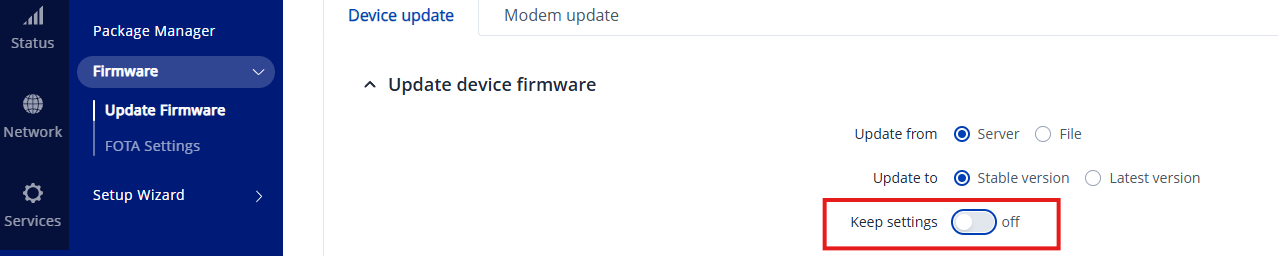
We recommend upgrading to the latest firmware version without keeping the existing settings, as this often helps resolve such issues.
Please also note that downgrading the firmware automatically erases all device settings, so there is no need to perform an additional factory reset after the downgrade.
Let us know how it goes!
Kind regards,
Žilvinas.
Hello,
Adding onto what Žilvinas has requested, I’d like for you to try the following:
Please try executing the following command:
rm /usr/share/vuci/menu.d/menu.json
Then, reboot the router (reboot) to check if makes any change logging to WebUI.
Additionally, you can try restarting the HTTP server service by running:
/etc/init.d/uhttpd restart
If the issue persists, please check the HTTP server service status with:
/etc/init.d/uhttpd status
Let me know if this improves the situation or if further assistance is needed.
Best regards,
M.
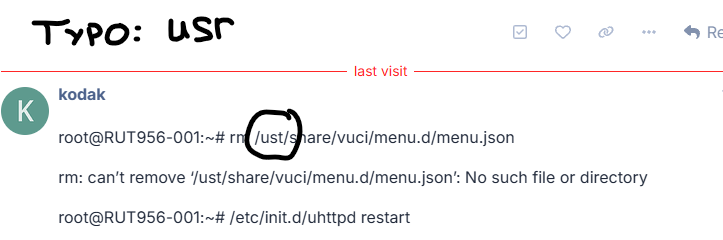
root@RUT956-001:~# rm /ust/share/vuci/menu.d/menu.json
rm: can’t remove ‘/ust/share/vuci/menu.d/menu.json’: No such file or directory
root@RUT956-001:~# /etc/init.d/uhttpd restart
root@RUT956-001:~# /etc/init.d/uhttpd status
running
root@RUT956-001:~# /sbin/api GET /system/device/status
Error: 4
Dooh.
I’ll try again.