WAN obtaining IP - does never happen RUTM30

I have a RUTM30 that work perfectly fine with a SIM card installed, but when I connect the WAN cable, the WAN interface never gets an IP address. So, it does not work after all because it never gets an IP address from the WAN cable. The priority order is WAN first then mobile.

When I connect my RUTX10 to the same WAN cable, it gets an IP address and works as expected.

On the RUTM30, I pulled the SIM card and disabled everything except the WAN interface, still no IP address.

What am I doing wrong?

Hello,

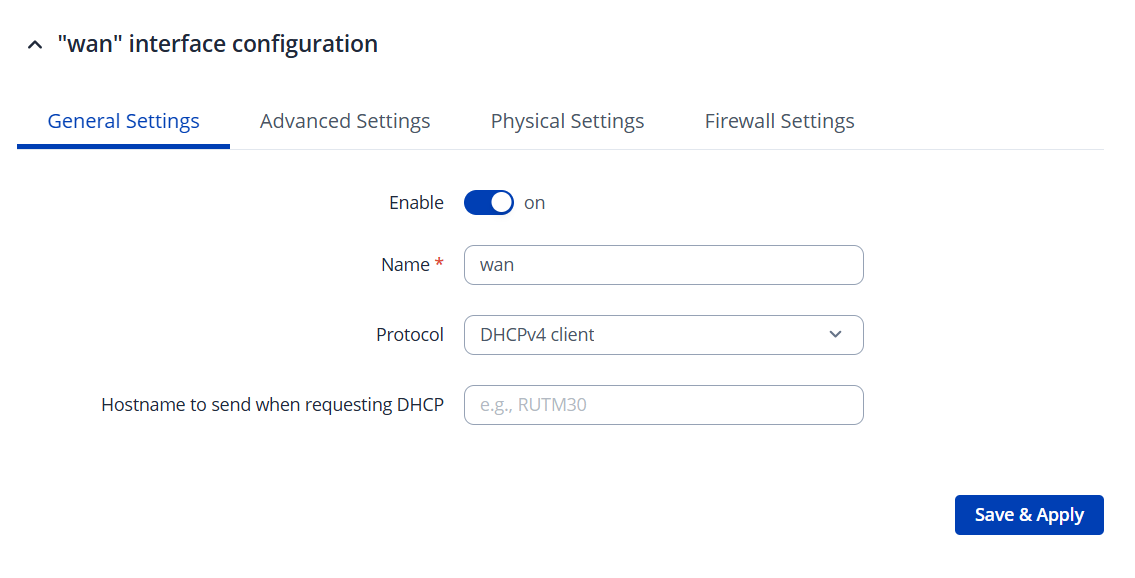
Go to Network→Wan / General settings, set the Protocol Field to DHCP and of course enable the interface.

Regards,

It has been like that all the time.

Have you checked the firewall ? The “Allow-DHCP-Renew” rule ?

Greetings,

Please navigate to Network → WAN
Could you clarify the current status of the WAN interface? Is it connected but not receiving an IP address, or is it inactive?

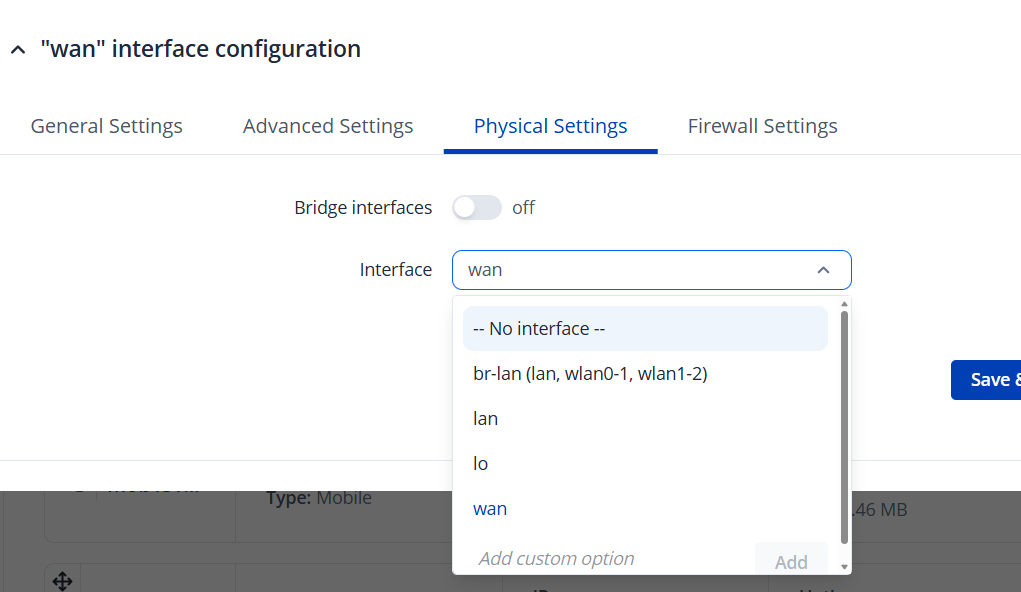
Next, click Edit on the WAN interface and open Physical Settings. Check which interface is assigned to it, it should be eth0.2 or eth1

Since the WAN port should function by default, I would recommend performing a factory reset if possible: RUTM30 Device Recovery Options - Teltonika Networks Wiki

Best Regards,
Justinas

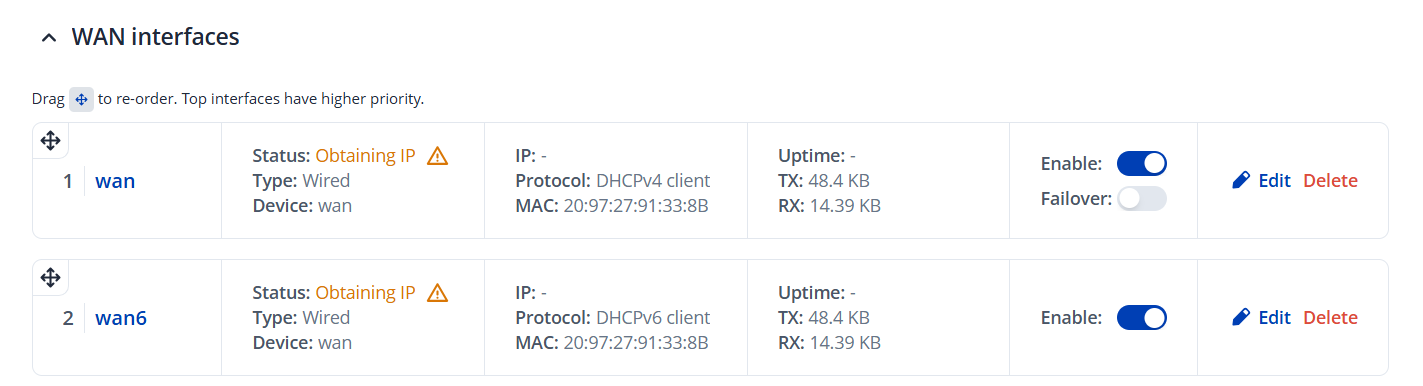
Both WAN and WAN6 says “Obtaining IP address”.

Interface says wan.

Options are: br-lan (lan, wlan0-1, wlan1-2)

lan

wan

No eth alternative available.

The physical WAN port is active, the green LED is blinking.

Can you do a tcpdump on the wan interface:

tcpdump -i wan -n -v ‘port 68 or port 546’

Do you see something coming back ?

what are you connecting to the wan port?
if it is connecting to internet provider gear, try overriding mac address of the wan to the rutx10, maybe they attach to 1 router something

maybe try manual link speed

Ok, I have two routers: one RUTX10 and one RUTM30.

I get my internet via the WAN cable from the fiber optics converter unit.

When connecting the RUTX10 to the WAN cable, it gets an IP address and I get internet.

When connecting the RUTM30 to the very same WAN cable (i.e. replacing the RUTX10 with the RUTM30 physically), it never gets an IP address.

Why is that?

Hello,

Just a random thought, what I would check if I were you.

Does your ISP have a limit how many simultaneous IP’s or MAC-addresses they provide address with DHCP to one customer?

If they have, then ISP device port will keep record what’s connected up till the customer leading port goes down and then all is cleared.

Normally this kind of thing doesn’t bother customers which connect their router directly to ISP-device.

But if you have your own ethernet-switch (L2-device) between ISP-device and your router, simply switching router does not clear MAC-table from ISP-device as the link between your switch and ISP-device was not dropped.

If this is the issue, you need to up/down port towards ISP either from managed switch, reconnect ISP-leading cable momentarily or just reboot the switch. Then ISP-device clears MAC-address cache and lets you new IP-address.

This what I described above is a same kind of ISP-devices feature which that is being used enterprise-class switches and for example Cisco IOS switches is implemented:

switch(config-if)# switchport port-security
switch(config-if)# switchport port-security maximum 10
switch(config-if)# switchport port-security violation restrict

Once this is in place, which only limits maximum mac addresses it’s common to also add DAI ( Dynamic Address Inspection) feature, which prevent’s iP-spoofing and requires client IP-addresses to be given by DHCP.

HP has same features by name ARP Protection. And many other vendors have had these available decades also. But these are not on by default and are configured explicitly, which been happening long time increasingly and are now very common.

Thus if you have a switch between your router and ISP-device, clear cache any means written above. If you don’t have a switch between router and ISP-device and can test that the new router get’s and IP when it’s connected local lan of the old router, then you know it’s not with the new device but very likely something with the ISP-side and not with the new router.

There isn’t any real means observing from that ISP-device or enterprise-switch client side ethernet connection what kind of features have been configured. But it’s good to know that those devices can limit and do many network side protecting things most people outside such devices managing aren’t often aware.

So this was just thing that came to my mind what could perhaps cause issues. It could well be that it isn’t if you don’t have switch between and then with a simple test, connect that new thing behind old router, you should be quite easy rule out which side problem lies.

Cheers,

:slight_smile: riku

My router(s) only connects to the incoming internet box (mounted on the wall) via the WAN cable, nothing in between.

I tried an old D-Link the other day, no problems

So again: I remove the RUTX10 alltogether and puts the RUTM30 in its place.

The RUTX10 gets an IP address, the RUTM30 does not.

The green led on the WAN port lights up, so it recognizes the WAN cable obviously.

Ok, issue isn’t likely to be on ISP side then.

Cheers,

:slight_smile: riku

Did you @j79 BTW, test connecting that new router behind the old one?

You could see if new gets an IP from old one and rule out it’s (new) dhcp-client obtaining IP config is working as it should. Nothing prevents daisy chaining those routers at least testing purposes. You have a working dhcp-service in your old, why not test new WAN link towards it.

Edited: if you have same LAN subnet old and new, you will need to chance it time of testing, so that your WAN side and LAN side can’t share same IP-prefix. Just change LAN subnet time of testing first on new, and then try daisy changing otherwise there is subnet conflict and it doesn’t work. But when WAN and LAN sides are different daisy chaining works OK.

And yet another check I did not see mentioned already. Are you testing old and new connectivity towards ISP with the same cabling? Not similar and same-type, but exactly_the_same_item which works with old one.

So that you have ruled out that it’s not a cabling issue. This may sound first silly question, but it’s not worth overlooking anything trying to locate fault.

Now I have tested connecting the RUTM30 WAN port to the LAN port of the RUTX10 and, yes it gets an IP address from the RUTX10.

But if I connect the RUTM30 directly to the incoming internet box, then it does not get an IP address.

Further testing in progress.

I hooked up my old D-Link straight to the incoming internet box and it works.

So why will not my RUTM30 obtain an IP address from my ISP, when both the RUTX10 and the D-Link does?

Greetings,

Apologies for the delayed response.

Could you please clarify whether you still require assistance or if the issue has already been resolved?

Best Regards,
Justinas