VRRP active/active scenario does not work

Hi,
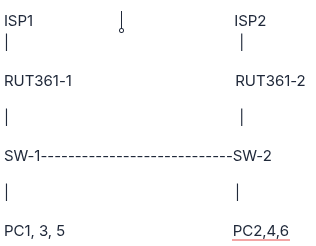
Topology:

image

image316×246 3.53 KB

I configured one VRRP instance for all PCs. It works. Failover works well when RUT361-1 is down
If I configure multi-instance and they are all Master on the same RUT361, it works well too.

My purpose:

  • PC1,3,5 get the primary path to RUT361-1; backup RUT261-2

  • PC2,4,6 get the primary path to RUT361-2; backup RUT261-1

But, when I configured 2 instances:
Instance 1 EdgePC_1: RUT361-1 is the VRRP master as the default gateway for PC1,3,5

Instance 2 EdgePC_2: RUT361-2 is the VRRP master as the default gateway for PC2,4,6

The status of the VRRP instance is unstable; it often changes. The logfile is very confuse while it indicate the
It happens with various OS. I currently use the latest 7.23.7
RUT361-1 configuration

root@firewall-1:~# uci show vrrpd
vrrpd.EdgePC_1=vrrpd
vrrpd.EdgePC_1.virtual_id='1'
vrrpd.EdgePC_1.interface='lan6'
vrrpd.EdgePC_1.priority='110'
vrrpd.EdgePC_1.virtual_mac='0'
vrrpd.EdgePC_1.virtual_ip='172.20.11.254'
vrrpd.EdgePC_1.delay='1'
vrrpd.EdgePC_1.enabled='1'
vrrpd.EdgePC_1_ping=ping
vrrpd.EdgePC_1_ping.time_out='1'
vrrpd.EdgePC_1_ping.interval='10'
vrrpd.EdgePC_1_ping.enabled='0'
vrrpd.EdgePC_1_ping.retry='5'
vrrpd.EdgePC_1_ping.ping_attempts='4'
vrrpd.EdgePC_1_ping.packet_size='56'

vrrpd.EdgePC_2=vrrpd
vrrpd.EdgePC_2.virtual_id='2'
vrrpd.EdgePC_2.interface='lan5'
vrrpd.EdgePC_2.priority='100'
vrrpd.EdgePC_2.virtual_mac='0'
vrrpd.EdgePC_2.virtual_ip='172.20.12.254'
vrrpd.EdgePC_2.delay='1'
vrrpd.EdgePC_2.enabled='1'
vrrpd.EdgePC_2_ping=ping
vrrpd.EdgePC_2_ping.time_out='1'
vrrpd.EdgePC_2_ping.interval='10'
vrrpd.EdgePC_2_ping.enabled='0'
vrrpd.EdgePC_2_ping.retry='5'
vrrpd.EdgePC_2_ping.ping_attempts='4'
vrrpd.EdgePC_2_ping.packet_size='56'


RUT361-2 configuration

root@firewall-2:~# uci show vrrpd
vrrpd.EdgePC_1=vrrpd
vrrpd.EdgePC_1.delay='1'
vrrpd.EdgePC_1.enabled='1'
vrrpd.EdgePC_1.interface='lan5'
vrrpd.EdgePC_1.virtual_id='1'
vrrpd.EdgePC_1.virtual_mac='0'
vrrpd.EdgePC_1.priority='100'
vrrpd.EdgePC_1.virtual_ip='172.20.11.254'
vrrpd.EdgePC_1_ping=ping
vrrpd.EdgePC_1_ping.packet_size='56'
vrrpd.EdgePC_1_ping.time_out='1'
vrrpd.EdgePC_1_ping.enabled='0'
vrrpd.EdgePC_1_ping.ping_attempts='4'
vrrpd.EdgePC_1_ping.interval='10'
vrrpd.EdgePC_1_ping.retry='5'

vrrpd.EdgePC_2=vrrpd
vrrpd.EdgePC_2.delay='1'
vrrpd.EdgePC_2.enabled='1'
vrrpd.EdgePC_2.interface='lan6'
vrrpd.EdgePC_2.virtual_id='2'
vrrpd.EdgePC_2.virtual_mac='0'
vrrpd.EdgePC_2.priority='110'
vrrpd.EdgePC_2.virtual_ip='172.20.12.254'
vrrpd.EdgePC_2_ping=ping
vrrpd.EdgePC_2_ping.packet_size='56'
vrrpd.EdgePC_2_ping.time_out='1'
vrrpd.EdgePC_2_ping.enabled='0'
vrrpd.EdgePC_2_ping.ping_attempts='4'
vrrpd.EdgePC_2_ping.interval='10'
vrrpd.EdgePC_2_ping.retry='5'


Logs status changes:

RUT361-1

3006 Wed Jul  1 11:00:05 2026 system.warn vrrpd[17443]: VRRP ID 2 on eth0.2012: 172.20.12.101 is up, we are now a backup router.
3008 Wed Jul  1 11:00:05 2026 system.warn vrrpd[17443]: VRRP ID 2 on eth0.2012: Send gratuitous ARP for all ip addresses
3009 Wed Jul  1 11:00:05 2026 system.warn vrrpd[17442]: VRRP ID 1 on eth0.2011: 172.20.11.101 is up, we are now a backup router.
3011 Wed Jul  1 11:00:05 2026 system.warn vrrpd[17442]: VRRP ID 1 on eth0.2011: Send gratuitous ARP for all ip addresses
3012 Wed Jul  1 11:00:05 2026 system.warn vrrpd[17443]: VRRP ID 2 on eth0.2012: 172.20.12.101 is up,  - INIT State (backup) -
3014 Wed Jul  1 11:00:05 2026 system.warn vrrpd[17443]: VRRP ID 2 on eth0.2012: be backup 172.20.12.101 is up,  - Receive packet from Master -
3017 Wed Jul  1 11:00:10 2026 system.warn vrrpd[17442]: VRRP ID 1 on eth0.2011: 172.20.11.101 is up,  - INIT State (backup) -
3019 Wed Jul  1 11:00:13 2026 system.warn vrrpd[17442]: VRRP ID 1 on eth0.2011: delay expired = 1 no response after 1 + 3441 ms VID 1
3020 Wed Jul  1 11:00:13 2026 system.warn vrrpd[17442]: VRRP ID 1 on eth0.2011: 172.20.11.101 is down, we are now the master router.
3024 Wed Jul  1 11:00:16 2026 system.warn vrrpd[17443]: VRRP ID 2 on eth0.2012: delay expired = 1 no response after 1 + 3444 ms VID 2
3025 Wed Jul  1 11:00:16 2026 system.warn vrrpd[17443]: VRRP ID 2 on eth0.2012: 172.20.12.101 is down, we are now the master router.
3029 Wed Jul  1 11:00:22 2026 system.warn vrrpd[17443]: VRRP ID 2 on eth0.2012: 172.20.12.101 is up, we are now a backup router.
3031 Wed Jul  1 11:00:22 2026 system.warn vrrpd[17443]: VRRP ID 2 on eth0.2012: Send gratuitous ARP for all ip addresses
3032 Wed Jul  1 11:00:22 2026 system.warn vrrpd[17442]: VRRP ID 1 on eth0.2011: 172.20.11.101 is up, we are now a backup router.
3034 Wed Jul  1 11:00:22 2026 system.warn vrrpd[17442]: VRRP ID 1 on eth0.2011: Send gratuitous ARP for all ip addresses
3035 Wed Jul  1 11:00:22 2026 system.warn vrrpd[17443]: VRRP ID 2 on eth0.2012: 172.20.12.101 is up,  - INIT State (backup) -
3037 Wed Jul  1 11:00:22 2026 system.warn vrrpd[17443]: VRRP ID 2 on eth0.2012: be backup 172.20.12.101 is up,  - Receive packet from Master -
3040 Wed Jul  1 11:00:27 2026 system.warn vrrpd[17442]: VRRP ID 1 on eth0.2011: 172.20.11.101 is up,  - INIT State (backup) -
3042 Wed Jul  1 11:00:30 2026 system.warn vrrpd[17442]: VRRP ID 1 on eth0.2011: delay expired = 1 no response after 1 + 3458 ms VID 1
3043 Wed Jul  1 11:00:30 2026 system.warn vrrpd[17442]: VRRP ID 1 on eth0.2011: 172.20.11.101 is down, we are now the master router.
3047 Wed Jul  1 11:00:33 2026 system.warn vrrpd[17443]: VRRP ID 2 on eth0.2012: delay expired = 1 no response after 1 + 3461 ms VID 2
3048 Wed Jul  1 11:00:33 2026 system.warn vrrpd[17443]: VRRP ID 2 on eth0.2012: 172.20.12.101 is down, we are now the master router.
3052 Wed Jul  1 11:00:39 2026 system.warn vrrpd[17443]: VRRP ID 2 on eth0.2012: 172.20.12.101 is up, we are now a backup router.
3054 Wed Jul  1 11:00:39 2026 system.warn vrrpd[17443]: VRRP ID 2 on eth0.2012: Send gratuitous ARP for all ip addresses
3055 Wed Jul  1 11:00:39 2026 system.warn vrrpd[17442]: VRRP ID 1 on eth0.2011: 172.20.11.101 is up, we are now a backup router.
3057 Wed Jul  1 11:00:39 2026 system.warn vrrpd[17442]: VRRP ID 1 on eth0.2011: Send gratuitous ARP for all ip addresses
3058 Wed Jul  1 11:00:39 2026 system.warn vrrpd[17443]: VRRP ID 2 on eth0.2012: 172.20.12.101 is up,  - INIT State (backup) -
3060 Wed Jul  1 11:00:39 2026 system.warn vrrpd[17443]: VRRP ID 2 on eth0.2012: be backup 172.20.12.101 is up,  - Receive packet from Master -
3063 Wed Jul  1 11:00:44 2026 system.warn vrrpd[17442]: VRRP ID 1 on eth0.2011: 172.20.11.101 is up,  - INIT State (backup) -
3065 Wed Jul  1 11:00:48 2026 system.warn vrrpd[17442]: VRRP ID 1 on eth0.2011: delay expired = 1 no response after 1 + 3476 ms VID 1
3066 Wed Jul  1 11:00:48 2026 system.warn vrrpd[17442]: VRRP ID 1 on eth0.2011: 172.20.11.101 is down, we are now the master router.
3070 Wed Jul  1 11:00:51 2026 system.warn vrrpd[17443]: VRRP ID 2 on eth0.2012: delay expired = 1 no response after 1 + 3479 ms VID 2
3071 Wed Jul  1 11:00:51 2026 system.warn vrrpd[17443]: VRRP ID 2 on eth0.2012: 172.20.12.101 is down, we are now the master router.
3075 Wed Jul  1 11:00:56 2026 system.warn vrrpd[17443]: VRRP ID 2 on eth0.2012: 172.20.12.101 is up, we are now a backup router.
3077 Wed Jul  1 11:00:56 2026 system.warn vrrpd[17443]: VRRP ID 2 on eth0.2012: Send gratuitous ARP for all ip addresses
3078 Wed Jul  1 11:00:56 2026 system.warn vrrpd[17442]: VRRP ID 1 on eth0.2011: 172.20.11.101 is up, we are now a backup router.
3080 Wed Jul  1 11:00:56 2026 system.warn vrrpd[17442]: VRRP ID 1 on eth0.2011: Send gratuitous ARP for all ip addresses
3081 Wed Jul  1 11:00:56 2026 system.warn vrrpd[17443]: VRRP ID 2 on eth0.2012: 172.20.12.101 is up,  - INIT State (backup) -
3083 Wed Jul  1 11:00:56 2026 system.warn vrrpd[17443]: VRRP ID 2 on eth0.2012: be backup 172.20.12.101 is up,  - Receive packet from Master -
3086 Wed Jul  1 11:01:01 2026 system.warn vrrpd[17442]: VRRP ID 1 on eth0.2011: 172.20.11.101 is up,  - INIT State (backup) -
3088 Wed Jul  1 11:01:05 2026 system.warn vrrpd[17442]: VRRP ID 1 on eth0.2011: delay expired = 1 no response after 1 + 3493 ms VID 1
3089 Wed Jul  1 11:01:05 2026 system.warn vrrpd[17442]: VRRP ID 1 on eth0.2011: 172.20.11.101 is down, we are now the master router.
3093 Wed Jul  1 11:01:08 2026 system.warn vrrpd[17443]: VRRP ID 2 on eth0.2012: delay expired = 1 no response after 1 + 3496 ms VID 2
3094 Wed Jul  1 11:01:08 2026 system.warn vrrpd[17443]: VRRP ID 2 on eth0.2012: 172.20.12.101 is down, we are now the master router.

RUT361-2

3154 Wed Jul  1 11:00:01 2026 system.warn vrrpd[12014]: VRRP ID 2 on eth0.2012: 172.20.12.1 is up,  - INIT State (backup) -
3161 Wed Jul  1 11:00:05 2026 system.warn vrrpd[12014]: VRRP ID 2 on eth0.2012: delay expired = 1 no response after 1 + 3259 ms VID 2
3162 Wed Jul  1 11:00:05 2026 system.warn vrrpd[12014]: VRRP ID 2 on eth0.2012: 172.20.12.1 is down, we are now the master router.
3166 Wed Jul  1 11:00:08 2026 system.warn vrrpd[12013]: VRRP ID 1 on eth0.2011: delay expired = 1 no response after 1 + 3262 ms VID 1
3167 Wed Jul  1 11:00:08 2026 system.warn vrrpd[12013]: VRRP ID 1 on eth0.2011: 172.20.11.1 is down, we are now the master router.
3173 Wed Jul  1 11:00:13 2026 system.warn vrrpd[12013]: VRRP ID 1 on eth0.2011: 172.20.11.1 is up, we are now a backup router.
3175 Wed Jul  1 11:00:13 2026 system.warn vrrpd[12013]: VRRP ID 1 on eth0.2011: Send gratuitous ARP for all ip addresses
3176 Wed Jul  1 11:00:13 2026 system.warn vrrpd[12014]: VRRP ID 2 on eth0.2012: 172.20.12.1 is up, we are now a backup router.
3178 Wed Jul  1 11:00:13 2026 system.warn vrrpd[12014]: VRRP ID 2 on eth0.2012: Send gratuitous ARP for all ip addresses
3179 Wed Jul  1 11:00:13 2026 system.warn vrrpd[12013]: VRRP ID 1 on eth0.2011: 172.20.11.1 is up,  - INIT State (backup) -
3181 Wed Jul  1 11:00:13 2026 system.warn vrrpd[12013]: VRRP ID 1 on eth0.2011: be backup 172.20.11.1 is up,  - Receive packet from Master -
3184 Wed Jul  1 11:00:18 2026 system.warn vrrpd[12014]: VRRP ID 2 on eth0.2012: 172.20.12.1 is up,  - INIT State (backup) -
3186 Wed Jul  1 11:00:22 2026 system.warn vrrpd[12014]: VRRP ID 2 on eth0.2012: delay expired = 1 no response after 1 + 3276 ms VID 2
3187 Wed Jul  1 11:00:22 2026 system.warn vrrpd[12014]: VRRP ID 2 on eth0.2012: 172.20.12.1 is down, we are now the master router.
3191 Wed Jul  1 11:00:25 2026 system.warn vrrpd[12013]: VRRP ID 1 on eth0.2011: delay expired = 1 no response after 1 + 3279 ms VID 1
3192 Wed Jul  1 11:00:25 2026 system.warn vrrpd[12013]: VRRP ID 1 on eth0.2011: 172.20.11.1 is down, we are now the master router.
3196 Wed Jul  1 11:00:31 2026 system.warn vrrpd[12013]: VRRP ID 1 on eth0.2011: 172.20.11.1 is up, we are now a backup router.
3198 Wed Jul  1 11:00:31 2026 system.warn vrrpd[12013]: VRRP ID 1 on eth0.2011: Send gratuitous ARP for all ip addresses
3199 Wed Jul  1 11:00:31 2026 system.warn vrrpd[12014]: VRRP ID 2 on eth0.2012: 172.20.12.1 is up, we are now a backup router.
3201 Wed Jul  1 11:00:31 2026 system.warn vrrpd[12014]: VRRP ID 2 on eth0.2012: Send gratuitous ARP for all ip addresses
3202 Wed Jul  1 11:00:31 2026 system.warn vrrpd[12013]: VRRP ID 1 on eth0.2011: 172.20.11.1 is up,  - INIT State (backup) -
3204 Wed Jul  1 11:00:31 2026 system.warn vrrpd[12013]: VRRP ID 1 on eth0.2011: be backup 172.20.11.1 is up,  - Receive packet from Master -
3207 Wed Jul  1 11:00:36 2026 system.warn vrrpd[12014]: VRRP ID 2 on eth0.2012: 172.20.12.1 is up,  - INIT State (backup) -
3210 Wed Jul  1 11:00:39 2026 system.warn vrrpd[12014]: VRRP ID 2 on eth0.2012: delay expired = 1 no response after 1 + 3294 ms VID 2
3211 Wed Jul  1 11:00:39 2026 system.warn vrrpd[12014]: VRRP ID 2 on eth0.2012: 172.20.12.1 is down, we are now the master router.
3215 Wed Jul  1 11:00:42 2026 system.warn vrrpd[12013]: VRRP ID 1 on eth0.2011: delay expired = 1 no response after 1 + 3297 ms VID 1
3216 Wed Jul  1 11:00:42 2026 system.warn vrrpd[12013]: VRRP ID 1 on eth0.2011: 172.20.11.1 is down, we are now the master router.
3221 Wed Jul  1 11:00:48 2026 system.warn vrrpd[12013]: VRRP ID 1 on eth0.2011: 172.20.11.1 is up, we are now a backup router.
3223 Wed Jul  1 11:00:48 2026 system.warn vrrpd[12013]: VRRP ID 1 on eth0.2011: Send gratuitous ARP for all ip addresses
3224 Wed Jul  1 11:00:48 2026 system.warn vrrpd[12014]: VRRP ID 2 on eth0.2012: 172.20.12.1 is up, we are now a backup router.
3226 Wed Jul  1 11:00:48 2026 system.warn vrrpd[12014]: VRRP ID 2 on eth0.2012: Send gratuitous ARP for all ip addresses
3227 Wed Jul  1 11:00:48 2026 system.warn vrrpd[12013]: VRRP ID 1 on eth0.2011: 172.20.11.1 is up,  - INIT State (backup) -
3229 Wed Jul  1 11:00:48 2026 system.warn vrrpd[12013]: VRRP ID 1 on eth0.2011: be backup 172.20.11.1 is up,  - Receive packet from Master -
3232 Wed Jul  1 11:00:53 2026 system.warn vrrpd[12014]: VRRP ID 2 on eth0.2012: 172.20.12.1 is up,  - INIT State (backup) -
3234 Wed Jul  1 11:00:56 2026 system.warn vrrpd[12014]: VRRP ID 2 on eth0.2012: delay expired = 1 no response after 1 + 3311 ms VID 2
3235 Wed Jul  1 11:00:56 2026 system.warn vrrpd[12014]: VRRP ID 2 on eth0.2012: 172.20.12.1 is down, we are now the master router.
3239 Wed Jul  1 11:00:59 2026 system.warn vrrpd[12013]: VRRP ID 1 on eth0.2011: delay expired = 1 no response after 1 + 3314 ms VID 1
3240 Wed Jul  1 11:00:59 2026 system.warn vrrpd[12013]: VRRP ID 1 on eth0.2011: 172.20.11.1 is down, we are now the master router.
3244 Wed Jul  1 11:01:05 2026 system.warn vrrpd[12013]: VRRP ID 1 on eth0.2011: 172.20.11.1 is up, we are now a backup router.
3246 Wed Jul  1 11:01:05 2026 system.warn vrrpd[12013]: VRRP ID 1 on eth0.2011: Send gratuitous ARP for all ip addresses
3247 Wed Jul  1 11:01:05 2026 system.warn vrrpd[12014]: VRRP ID 2 on eth0.2012: 172.20.12.1 is up, we are now a backup router.
3249 Wed Jul  1 11:01:05 2026 system.warn vrrpd[12014]: VRRP ID 2 on eth0.2012: Send gratuitous ARP for all ip addresses
3250 Wed Jul  1 11:01:05 2026 system.warn vrrpd[12013]: VRRP ID 1 on eth0.2011: 172.20.11.1 is up,  - INIT State (backup) -
3252 Wed Jul  1 11:01:05 2026 system.warn vrrpd[12013]: VRRP ID 1 on eth0.2011: be backup 172.20.11.1 is up,  - Receive packet from Master -

@johnny.v Hello,

I haven’t used VRRP with Teltonika, but otherwise yes. Thus a quick question have you checked for example using tcpdump that both devices hear each other IP multicast packets that the other sends?

Looking logs you posted, it could be a thing that’s causing issues. Wikipedia VRRP article seems to include enough information what to check.

Hi mesrik,

I captured the packets during the test. The VRRP Backup just suddenly sends multicast to raise itself as a Master.
It has never happened. If there is one VRRP instance or a multi-instance VRRP with VRRP Masters in the same device.

I think it is a bug, or it’s simply that the RUTOS does not support the active/active model. From the captured packets. The VRRP Master sends an announcement to raise itself for a specific VRRP Router ID, but the other does not process it as a specific VRRP Router ID.

I would appreciate it if someone from Teltonika could confirm this.

The issue is easy to reproduce.

Sorry, but I have no real idea what you are actually trying to achieve with VRRP.

Have you given any thought yet that even if you got that VRRP working in active/active mode, then how would your routers be able to keep forwarded traffic state of firewall, NAT and TCP sequences so that any remote end using non-connectionless (connection state requiring) protocols like TCP would be able to work?

Not to answer if you have given yet thought about it that far, but let me tell you that requires having some kind of clustered firewall setting. Which means the firewalls need means to exchange all that information so that when traffic goes out they make concerted effort to keep state, update it to it’s peer and when the traffic then returns at times to it’s peer it will be able to allow related traffic in exactly as it was returning same firewall it went out. Otherwise traffic doesn’t work as expected.

I do not know, I haven’t studied Teltonika or any OpenWRT etc. routers with firewall & NAT capabilities can do that. That kind of firewalls exists enterprise class devices like Juniper SRX so called secure-routers class devices, at least some model of those. FOSS software OpenBSD & FreeBSD CARP with pf firewall can do part of it, but active/passive mode only as far as I know and I’ve used it with both.

And if you would get that kind of feature working LAN side, then there is uplink side towards service providers. There are more constraints too with stateful devices what firewalls are.

For starters you would be able to make active/active work only and only if both firewalls are sharing same L2 LAN and a ‘framed’ subnet prefix from single provider.

Mobile uplink’s are P2P modem links where our firewall can talk to provider end IP gateway and it to you. Your firewalls both having own mobile network interfaces cannot talk to each other that kind of network.

That is so because not having shared uplink L2 you would not be able to get VRRP working there. Thus you would have two separate uplinks, with each having own IP and when NAT is used that’s from where your remote end whatever it is where you try will see traffic coming from. So mobile network side using single IP with two routers can’t work and that’s what you have to live with.

OK, so if you have fixed line from one provider, fine and that framed provider given some /xx or so subnet, and you put a switch to uplink from where you connect to provider and you connect each of your firewalls uplink port. Great then you can technically make VRRP like thing working there. But you still need firewalls sharing all stateful information they got from passing traffic and to be able to handle it correctly and make them use a single IP as source IP.

That may sound easy but in fact usually isn’t at least if you insist active/active on that side too, because it requires uplink data layer medium and your service provider equipment being able to handle L2 multicast well, so that you will actually receive returning traffic to both firewalls. If the uplink L2 is ethernet, there is a chance it would be possible, but many provider L2 circuits are non-broadcast medium and L2 multicast is far cry.

And if you would get that to work, you have moved your single point of failure (SPoF) from your firewalls routers to single provider SPoF. If you want to get rid of that, you need to build that twice, one towards each service provider.

You could do that sure, I’ve done bit of same kind 14 years back. But it was very complicated to manage and debug and explain to anyone else how to operate it safely without breaking and keeping monitored that all failover features still work after software version updates etc.

So this post is getting too long already. I think you perhaps adjust your goals and what you can actually achievable. If you are relying NAT outside and especially

if you are using two providers and if uplinks are not fixed line or fibre WAN stuff etc. Knowing what is involved if I were you I wouldn’t waste my time active/active then. That kind of situation active/passive is the way to get it work.

And that VRRP active/passive to work, you need to make sure you both routers can hear each others multicast traffic and act accordingly to make educated choices how to behave in that situation. Now read that carefully I wrote hear. If you confirmed that you firewalls are sending those packets that 1 part OK, but next is to make sure the other device can get those packets.

OK, that’s enough this matter this time. Cheers.

Thanks for your comments.

I have a fixed-line ISP at each building. I have a dedicated dark fibre link between buildings (SW1 - SW2).

So, I would like to have Internet redundancy. If ISP1 failed, traffic would be directed to ISP2 via SW1-SW2 link.

The idea is to run VRRP on RUT361s, but if I run a single instance of VRRP, it becomes an actual master/backup scenario for all VLANs. It means that traffic from PC VLANs 2, 4, and 6 must go to ISP1 at all times if RUT361-1 is the VRRP Master.
Instead, I want to balance the traffic. It means building 1’s traffic will go to ISP1 via RUT361-1, and vice versa. That’s why I create 2 VRRP instances: one is the master at RUT361-1 for building 1, and one is the master at RUT361-2 for building 2.
If a failover happens, it is fair to re-establish TCP sessions for applications. It does not matter.
I don’t have firewalls to make a cluster.

OK, let’s take one more try to clarify things. I’ll cut/paste below what you wrote, but I will rearrange answering order a bit, because that way it makes more sense and builds consistent reply as whole.

So, I would like to have Internet redundancy.

Sure.

I have a fixed-line ISP at each building.

And the IP addresses you are using WAN-side (outside) are they private-ip addresses or globally routed addresses?

You can check this if you enable ICMP-echo (ping) to your WAN side from a publicly available “network looking-glass” service. Try with some found from following page.

Knowing what kind of WAN side IP-addresses you have will be useful info about what possibilities you have and can implement.

I have a dedicated dark fibre link between buildings (SW1 - SW2).

OK, so it’s reasonably fast, reliable and L2 -clean is good.

I don’t have firewalls to make a cluster.

Then you can’t have active/active mode firewalling as you expressed. And probably, because you have misunderstood what active/active and active/passive terms mean.

In networking general terms, when you state “active/active” it means you balance all traffic between two network devices all the time, not just when a device failover for something is wrong or inoperable state. That is referred active/pasive or active/standby, or “failover” terms, which do not belong to active/active in any way, because there is no need to failover anything, right.

  • L2 (switching) LACP is a protocol which you can configure active/active mode, which then balances ethernet traffic between even (two-pairs multiples 2,4,6,8,… odd number of links do not work correctly) of connected links using either round-robin, mac-address based or incase multilayer-switches (L2 exteded by some L3 features) also by IP addresses.

  • L3 (routing) the FHRPs (First Hop Redundancy Protocols) protocols like VRRP, CARP, GLBP and vendor specifics like Cisco HSRP where this fad started long time ago, all enable routers sharing virtual-IP which usually is active only on one device at time with some differences. So usually they operate active/standby (also known active/passive) mode. Only vendor specific extended versions some of these like Cisco GLBP can do load balancing using techniques I’m not going to delve here. But the thing you need to know, is VRRP what you have available with your RutOS linux-based device basic VRRP does not have active/active features. (More of this later down).

  • L4 (session) with network class gear, this usually means Load Balancers (LB’s), from which some commercial pretty expensive like Citrix Netscalers and F5 BigIP can implement reverse-proxy real active/active state front of servers running web services sharing incoming load to backend servers. I mention this just to point out real gear that can do this kind of things, but they are not routers and not firewalls.

Firewalls, like those Juniper SRX advertise active/active means, they support both firewalls being able to take part of some traffic forwarding when conditions apply. That means:

a) You have a two SRX all identical firewalls configured as a cluster, add all needed interconnected L2 links between the two etc.

b) You configure both at least service-group to share resources with its peer

c) You configure a shared interface resource rethX (redundant ethernet) and attach it to service group, specify which physical or VLAN interface it is. If you like to have some more other resources which need to go with this to same service group you can do it.

d) You attach monitoring to that service group which then switches it of which of the cluster members it will be active ie. you have active/passive setup now and faults failover the service group to other cluster member if running instance breaks down.

Now when you get that done you can repeat whole thing again, and add another adjacent service group, rethY etc, and then those groups services are independent from the other and be be active in either firewalls.

What you end up having is two firewall cluster, which has two indpendent active/passive VRRP groups. I’m not sure, can’t remember now and because now I’m too lazy to check up what is current situation with newer Junos versions if there is way to automatically distribute in normal operation load and how service groups are run normal condition when all is working. So that each firewall runs just one of those service groups or any combination how you like to have it. When I sas using these there was priority values which made some of this possible and I think preempt option too, so it could be possible to make groups run in device you desire them being active. All of it depends of those monitor settings, but I don’t speculate it more now.

But in short, marketing folks think and consider that when you can in theory at least balance traffic trough both devices having one or more service groups running simultaneously in both firewalls it’s active/active use of the firewall-cluster.

It does not however mean they are able to have all service groups running both firewalls same time and all clients traffic shared and balanced by some defined principle via both firewalls all the time. That they can’t do that. Thus with firewalls active/active does not mean exactly same as it does L2 switches and L4 LB’s for example. L3 Routers it can be with vendor extended version of FHRP’s but it’s like with firewalls that there are serious constraints, things that depend on where it is applicable and can be made to work and in most cases it can’t. Firewalls and especially if NAT is used, those require keeping state and then it becomes even more difficult.

The idea is to run VRRP on RUT361s, but if I run a single instance of VRRP, it becomes an actual master/backup scenario for all VLANs. It means that traffic from PC VLANs 2, 4, and 6 must go to ISP1 at all times if RUT361-1 is the VRRP Master.
Instead, I want to balance the traffic. It means building 1’s traffic will go to ISP1 via RUT361-1, and vice versa. That’s why I create 2 VRRP instances: one is the master at RUT361-1 for building 1, and one is the master at RUT361-2 for building 2.
If a failover happens, it is fair to re-establish TCP sessions for applications. It does not matter.

OK, you can perhaps do active/passive (active/standby) configuration for each building. So that one of the routers are only active at any moment for any VLAN.

Rest is figuring out how you when both routers are active, keep active state in the router you would like it to be.

If you don’t worry about losing momentarily sessions forwarded traffic etc. when active state switches over ie. does failover, then you are good to go.

And forget about that talk abute active/active, using it when you don’t really mean all time both devices forwarding traffic from same clients, it is confusing and anyone who has working with these gets scared that you are some kind of nuts. Not that you are, but you make it sound if you demand active/active without really understanding all that is involved and becomes to be implemented with it.

OK, and make sure that those VLAN’s where you configure VRRP, that your receiving firewall hears those multicast messages what it’s peer sends. That and also check that the multicast MAC-address that VRRP group number given is derived. I think you don’t need to worry so much about that if you are only one setting up this kind of things, but anywhere were a unicast IP-address is bound multicast-MAC address this may happen, with is datacenter etc.

Use the tcpdump to check and capture traffic, save it to file, copy over scp/sftp to workstation and study using Wireshark, a free tool. Tcpdump is available, at RutOS cli, would advise you to ssh to device, you will have to be patient with tcpdump if you are not familiar with it’s quite complicated use first. Ask help from Google search engine AI-mode. Ask, how do I capture VRRP traffic from peer firewall sending and save it to file etc. Just chat with it, it will give you good answers if you ask with well enough written questions, so that it can understand what you are about to do.

Cheers,

:slight_smile: riku

ps. That outside WAN addresses public vs private doesn’t really matter if/when not really trying to get active/active, so don’t worry about it.

e: I came back to fix few typos, I wish it makes it easier to understand now.