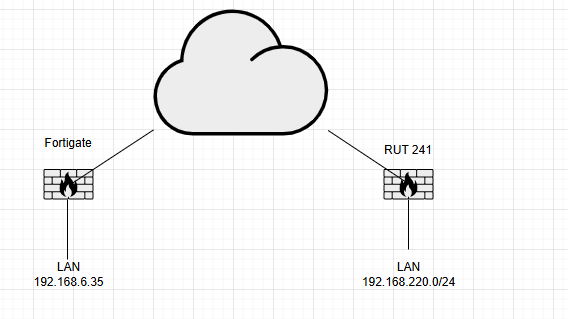
Hello we have a RUT 241 (7.17.1) with 4G sim connected via VPN IPSec to Fortigate running 7.4.8.
We have created an ikev2 tunnel and it’s up correctly, but it’s working on one way.
From the Teltonika’s LAN I can reach the LAN behind the fortigate but not viceversa. When I ping from 192.168.6.35 toward LAN 192.168.220.0/24 (I tried an host inside the LAN or the Teltonika itself) but I cannot see traffic.
In the fortigate sniffer I can see traffic entering the tunnel but tcpdump in the Teltonika is empty
Hello, additional information: We tried to enable/disable the local firewall and remote firewall on the Teltonika with all possible combinations, but with no luck. Additionally, we created a specific rule in the firewall with no result. Can someone please help us?
In the first instance, please advise what firmware you are using with the device. Upgrade it to the newest.
Can you also advise if you use a public IP adress with your Sim card? As that is necessary for VPN configuration, unless you use our RMS system, which allows you to set up a VPN connection without one. More information : RMS Quick Connect - Teltonika Networks Wiki
Some further questions:
What is the exact Phase 2 configuration (local and remote subnets/traffic selectors) on the Teltonika router, and separatately, phase 2 proposal on the fortigate for this IPSEC connection?
What firewall zones and rules exist on the Teltonika regarding traffic from the VPN interface to the LAN and vice versa?
What do Fortigate and Teltonika IPSec logs say at the time traffic is sent from Fortigate LAN to Teltonika LAN (With Teltonika device, I would recommend logging into CLI in WEBUI System → Maintenance → ClI, and run logread -f command, to see what messages you get when you try to pass traffic)
Hello, as per my first message, we have 7.17.1 on RUT.
The 4G SIM does not have a direct public ip address, but as it has internet access, it can initiate a dial-up IPsec with NAT. However, we solved the problem by expanding the remote subnet from 192.168.6.35/32 to a/24 subnet. Is it possible that the subnet length needs to be the same to work properly?
That’s right. The subnet length on both sides of an IPsec tunnel should match for the tunnel to work properly in both directions. If one side uses a /32 (host) and the other uses a broader subnet like /24, the mismatch can cause traffic flow issues. This is because the VPN device will only encrypt and route traffic matching the configured selectors. In your case, expanding the remote subnet from 192.168.6.35/32 to a /24 subnet fixed the problem because it aligned the traffic selectors on both ends, allowing all hosts in the subnet to be reached through the tunnel and traffic to flow both directions.