Unable to set up RUTX50 with two zerotier networks connected to different VLANs

Hi All,

I need to have a solution that allow two zerotier networks to be connected into different VLANs with a RUTX50 with FW RUTX_R_00.07.22.1.

Both zerotier networks connected into respective VLAN are tested and work in a single zerotier network configuration.

I encounter two main problems:

  1. Unable to connect to two zerotier networks at the same time. I have a single zerotier configuration with two networks configured, lets call the ZT_Nw_1 and ZT_Nw_2. Only the ZT_Nw_2, which is the second NW in the NW-conf list in the GUI, is visible when I run zerotier-cli listnetworks with the CLI. When I change the order in the GUI, it’s still only the last that appear with zerotier-cli listnetworks.

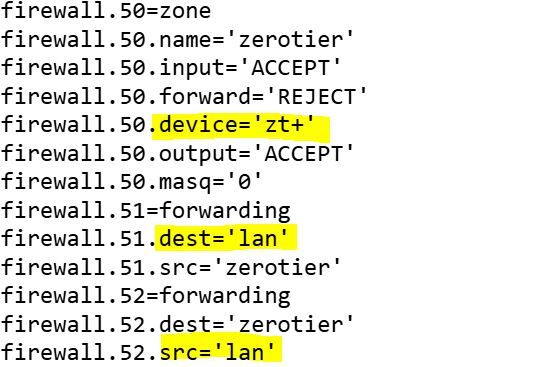
  2. How to set up the firewall. When zerotier is enabled in the GUI a zerotier zone is created in the firewall. This zone contains a wildcarded device=zt+ which makes both zerotier networks to end up in this zone. The zerotier zone accept traffic to lan by default. How to distinguish between traffic coming from ZT_Nw_1 that should go to VLAN 1 and VLAN 20 and the traffic coming from ZT_Nw_2 that should go to VLAN 30?

Without a working firewall configuration it is hard to test more than one zerotier network.

In hope of a solution

Anders

Hi Again,

Both of the problems I listed involves the relation between Teltonika GUI and the underlying functionality of OpenWRT and Linux. I believe that both could be solved with configuration made in the CLI (Command Line Interface) operating on the underlying functionality. However I have noticed that if I go back to the GUI to enable/disable a zerotier network it will result in re-creation of the “default” firewall zone.

This makes me request clarification about when and for what to use the GUI and when to use the CLI. Additionally I’m concerned about if reboot or FW upgrade or zerotier package upgrade will impact the configuration made at the CLI level from “stale” configuration made in the GUI.

Does the community and Teltonika support have some experiences and recommendations to share concerning this?

In hope of response

Anders

Hello, @AndersR,

I hope you’re doing well.

My apologies for the delayed response.

I am currently testing this setup on my end and will provide you with an update as soon as I have more information.

All the best,
V.

Hello,

I have a few follow-up questions regarding your setup:

  • How are the VLANs intended to be separated (port-based or interface-based)?
  • How have you configured the firewall zones?

If possible, could you also attach screenshots of your configuration (with any personal or sensitive information removed) as a reply to this topic? This information will help me reproduce your setup more accurately and provide you with more detailed insights.

I look forward to your reply.

Best regards,
V.

Hello Vilius,

I’m sorry for my delayed reply. I did not monitor this topic intensely anymore since almost 2 moths passed without any response.

For background, the IP network consist of:

  • a RUTX50 router connected to the internet over a mobile 5G network.
  • 3 TSW202 switches connected with fiber and cat6 in a chain where one end of the chain is connected to the router.
  • All interconnect links run multiple VLANs (VLAN trunks) realized by tag based VLANs in the Teltonika nodes
  • The VLAN configuration use port based VLANs
  • This network is managed over VLAN 1

The most important application we run over this network is a surveillance system with a number of kameras and a recorder/NVR. The surveillance system primarily use VLAN 20. The exception is the NVR that sit on two networks VLAN 20 and 30.

The network is also used for other applications, but they are not in the scope of remote access.

We use zerotier for remote access because of its ability to traverse the double NATs commonly used in mobile networks. We would like to have 2 different zerotier networks that I called ZT_Nw_1 and ZT_Nw_2 in the original post. ZT_Nw_1 for remote management and ZT_Nw_2 for remote access to the NVR using VLAN 30. They will be used by different groups of people.

We have currently halted our attempts to support two zerotier networks , because of that we did not find a way two configure this with RutOS GUI and our uncertainty about how a hybrid configuration (RutOS GUI, RutOS CLI and Linux) will survive reboot or FW upgrade or zerotier package upgrade and will impact the configuration. So guidance is very much sought for.

Today we only use ZT_NW_1 for both groups, not a good solution from a security point of view.

The ZT_NW_1 this ends up in the default zerotier zone created in the firewall by the GUI. This zone contains a wildcarded device=zt+ which makes all zerotier networks to end up in this zone. The zerotier zone accept traffic to LAN by default, however we do not have any network called LAN.

I hope this info can make you dig deeper into this.

Best regards

Anders

Hi again,

Some added screenshots to clarify

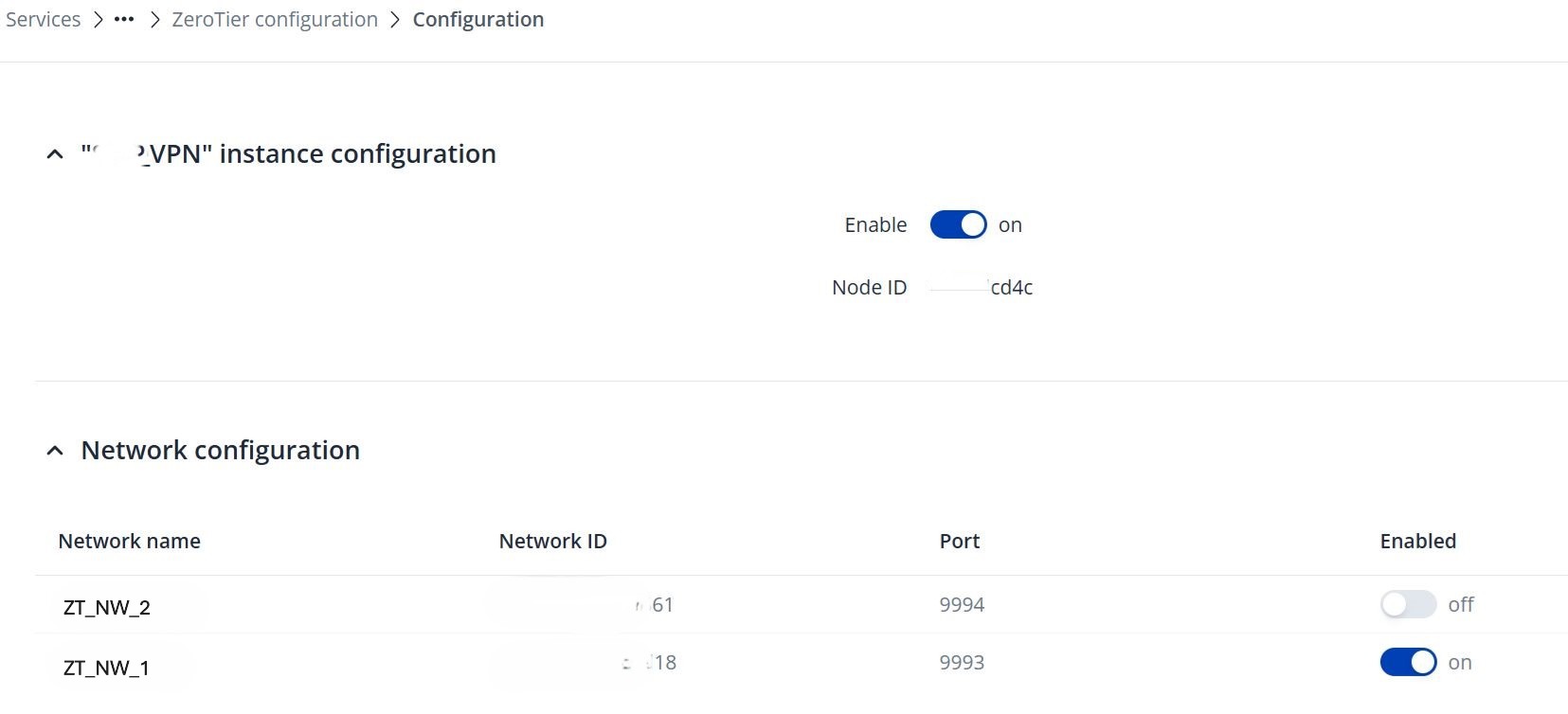
Unable to connect to two zerotier networks at the same time using RutOS GUI

I have a single zerotier configuration with two networks configured, lets call the ZT_Nw_1 and ZT_Nw_2.

When I enable the ZT_NW_2 and check with CLI and zerotier-cli listnetworks. Only the ZT_NW_1, which is the second NW in the NW-conf list in the GUI, is shown.

When I change the order in the GUI, it’s still only the last that appear with CLI zerotier-cli listnetworks.

On the How to set up the firewall.

Here is the zerotier zone as shown with CLI uci show firewall

The zerotier zone includes the wildcarded device=zt+ and accept traffic to/from LAN by default, however we do not have any network called LAN.

Hybrid configuration using, RutOS GUI, RutOS CLI and Linux

From my point of view, I would prefer to do as much configuration as possible using the GUI but currently certain operations are implicit e.g. the creation of the zerotier zone and other are not possible e.g. creating networks in the RUTX50 to bind to zones each with the relevant zerotier device for the different zerotier networks.

If a hybrid configuration is the way forward we need clear rules on what to use for different configuration items as well as assurance that this configuration survive reboot or FW upgrade or zerotier package upgrade. See also my second post above.

Hello,

Thank you for your patience.

I recreated a test environment matching your topology as closely as possible and performed a series of tests to verify the behaviour of ZeroTier Ethernet Bridging.

Below is a summary of each concern and the corresponding test results.

  1. Does Ethernet Bridging work with VLAN interfaces?

Yes.

I created separate bridges for individual VLANs and added the corresponding ZeroTier interfaces to each bridge. The router successfully attached the ZeroTier interfaces to the bridges, and remote MAC addresses were learned on the bridge, confirming that Layer-2 Ethernet frames were traversing the ZeroTier network.

  1. Can multiple ZeroTier networks be bridged independently?

Yes.

I tested two independent ZeroTier networks, each assigned to its own VLAN and Linux bridge. Both ZeroTier interfaces operated independently without interfering with each other, indicating that multiple bridged ZeroTier networks can coexist on the same router.

  1. Is enabling “Allow Ethernet Bridging” in ZeroTier Central sufficient?

It is a required step, but not the only requirement.

After enabling Allow Ethernet Bridging for the router member in ZeroTier Central, the router correctly reported:

  • bridge: true

  • broadcastEnabled: true

This confirms that bridge mode was successfully enabled.

  1. Does Layer-2 traffic actually pass through the bridge?

Yes.

Bridge forwarding was verified by observing:

  • dynamically learned remote MAC addresses on the Linux bridge;

  • ARP traffic traversing the bridge;

  • normal Ethernet frame forwarding between the physical interface and the ZeroTier interface.

This confirms that the bridge itself is operating correctly.

  1. Can devices behind the router communicate through the bridge?

Yes.

LAN devices connected behind the router were able to generate traffic normally, and packet captures confirmed that their traffic was successfully forwarded through the bridge.

  1. Can a regular ZeroTier client directly access LAN devices behind the bridged router using their LAN IP addresses?

This behaviour could not be reproduced.

Although remote ZeroTier members were able to communicate with other ZeroTier members using their assigned ZeroTier IP addresses, they were not able to communicate directly with LAN devices behind the bridged router using their LAN IP addresses.

During testing, packet captures showed that no ARP requests for the destination LAN device were received from the remote ZeroTier client. Since ARP resolution never occurred, communication with the LAN device could not be established.

Based on these observations, the bridge itself is functioning correctly; however, the remote endpoint does not appear to be participating in the same Layer-2 broadcast domain. Ethernet Bridging extends an Ethernet segment only between members that participate in that bridged segment. A standard routed ZeroTier client remains a Layer-3 endpoint and therefore cannot automatically access devices on the bridged LAN using their native LAN addresses.

Based on the testing performed, I was able to confirm that the bridge configuration itself operates correctly and that Ethernet frames are successfully forwarded through the bridged ZeroTier interfaces. The only behaviour that could not be reproduced was direct access from a standard ZeroTier client to LAN devices behind the bridged router.

To better understand your intended topology, could you please clarify the following?

  1. What type of device is acting as the remote ZeroTier client (Windows, Linux, another router, etc.)?

  2. Is that remote device configured as a standard ZeroTier client, or is it also participating in an Ethernet bridge?

  3. Could you provide a simple network diagram showing both ends of the ZeroTier connection, including which interfaces are bridged and where the end devices are connected?

This information will help determine whether the observed behaviour is expected for the current topology or whether additional bridge configuration is required.

Kind regards,
V.
Hi Vilius,

Sorry for the delayed response, its vacation time

First some questions on your test environment, have you created it by:

  1. Only using RutOS GUI?
  2. Only using RutOS CLI?
  3. Using RutOS GUI and RutOS CLI in combination?
  4. another method? If this is your way, please describe

To your questions,

Q1: What type of device is acting as the remote ZeroTier client (Windows, Linux, another router, etc.)?

Q2: Is that remote device configured as a standard ZeroTier client, or is it also participating in an Ethernet bridge?

Our remote devices are Phones/tablets/Windows PC with standard ZeroTier clients giving connectivity for surveillance system client and browsers. These clients and browser are used with our surveillance system and to manage the Teltonika router and switches. Nodes and interfaces connected to the VLANs behind the RUTX50 are addressed with their IP-addresses belonging to the networks in the VLANs.

Very much like in the “Private network access” section in ZeroTier Configuration - Teltonika Networks Wiki however we use networks in VLANs on the inside of the router.

Q3: Could you provide a simple network diagram showing both ends of the ZeroTier connection, including which interfaces are bridged and where the end devices are connected?

Our ZeroTier networks consist of members where the RUTX50 is the member to receive traffic from the other members that contain clients and browsers.

The ZeroTier networks contain managed routes similar to the one in the wiki-paper mentioned above. These routes are exposed through the ZeroTier clients which enable us to communicate using IP-addresses of the nodes connected to our VLANs.

The managed routes are the IP-addresses of the ZeroTier network where the ZeroTier members are connected to e.g. 10.xx.yy.0/16 (These are not used, except the router address) and in our case we have added the addresses of the networks in our VLANs like 192.168.zzz.0/24 via10.xx.xx.236 (the IP-address of the router in the ZeroTier network)

Here is a simple diagram

A solution could be to let the each of the two ZT networks end up in its own zerotier zone and handle the routing as zone policies, but I could not do this in the RutOS GUI.

As I have mentioned before it is important for us to have a solution built on clear easy to understand principles and configuration methods that are future proof.

Kind regards

Anders

Hello,

During my testing, I was able to configure the setup successfully using only the router’s WebUI.

Based on the network topology you shared, the remote devices are expected to access different endpoints through separate ZeroTier networks. To achieve this, the end devices will need to switch between the appropriate ZeroTier networks as required.

As long as the devices (nodes) have been added to the corresponding ZeroTier networks and authorized, they should be able to select and switch between those networks using the ZeroTier application installed on their end devices.

If you have any additional questions or require further clarification, please don’t hesitate to let me know.

Kind regards,
V.

Hello Vilius,

Thanks for verifying that our target can be realized using the RutOS GUI.

However I would also like to know the procedure and configuration looks like specificly:

  1. What version of FW did you use?
  2. Did you encounter the same problem as we did when adding the second ZeroTier network (as described in my first post, only the second was added)?
  3. Did you connect both ZeroTier networks to the “zerotier” zone containing the wildcarded zerotier device?
  • If Yes, how does the zone policies and traffic routing rules look like?
  • If No, how did you get hold of the zerotier devices/ interfaces to add into the new zerotier zones using the RutOS GUI and how does the zone policies and traffic routing rules look like?

Kind regards

Anders

Hello,

  1. The firmware version used during testing was RUTX_R_00.07.24.1.
  2. I was unable to reproduce the reported issue. I was able to add an additional ZeroTier instance and keep both instances running simultaneously without any issues.

  1. The firewall rule was created automatically. Please see the attached screenshot for reference.

I hope this answers your questions.

Kind regards,
V.

Hi Vilius,

I’m sorry you have not given a complete solution and answer to our target architecture.

But first it’s good to hear that you were unable to reproduce our issue with an additional ZeroTier instance by using a later FW. I need to verify this on our system.

Going on to our target solution, as described in earlier posts, it involves:

  • 2 zerotier networks; ZT_NW_1 and ZT_NW_2
  • 3 Networks private class C in VLANS; NW1, NW2 and NW3

The following routing is required:

  • Traffic from remote devices connoted to ZT_NW_1 shall only be able to reach IP addresses in NW1 and NW2.
  • Traffic from remote devices connoted to ZT_NW_2 shall only be able to reach IP addresses in NW3.
  • Traffic between the ZT-NW_1 and ZT_NW_2 shall be blocked
  • Traffic between the NW1, NW2 and NW3 shall be blocked.

In your reply, you only have one “zerotier” zone that accepts traffic to and from a LAN zone. I assume that it contains the wildcarded zt+ device that makes both ZT_NW_1 and ZT_NW_2 end up in this zone.

Q1: How do you see that the LAN zone should relate to NW1, NW2 and NW3, isn’t a better architecture to have a separate zones for each of NW1, NW2 and NW3?

Q2: How should the zone policies and traffic routing rules look like to meet our routing requirements if having the default “zerotier” zone?

Q3: Isn’t a better architecture to have a separate zones for ZT_NW_1 and ZT_NW_2?

Q4: In case of separate zerotier zones, how do we get hold of the zerotier devices/ interfaces to add into the different zerotier zones using the RutOS GUI? (Is this possible in RutOS 7.24.1?)

Kind regards

Anders

Greetings, @AndersR,

Thank you for your detailed follow-up, and my apologies for the delayed reply.

Firmware update
Your device runs RUTX_R_00.07.22.1, and I recommend updating to a newer release. Several changelog entries after your version relate to your configuration:

  • 00.07.23: fixed the firewall zone selection not showing VPN networks.
  • 00.07.24: fixed ZeroTier backup handling.
  • 00.07.25.1: fixed ZeroTier device name generation, and fixed NAT reflection with renamed LAN zones.

None of these entries describes your exact symptom, so I cannot confirm that the update will resolve it. However, the second ZeroTier instance ran without issue on 00.07.24.1 in our tests, so an update may resolve the issue. The current stable release is 00.07.24.5, and the latest is 00.07.25.2. Use the Update Firmware page with “Keep settings” enabled (the default).

Your questions

  • Q1 and Q3 (separate zones): Yes. Our VLAN Inter-Zone example describes one zone per network under Network → Firewall → Zones, with the network under Covered networks and Forwarding inside zone set to Reject. Only the required pairs are then allowed using “Allow forward to destination zones” and “Allow forward from source zones”.
  • Q2 and Q4 (default zerotier zone, and assigning ZeroTier interfaces to separate zones in the WebUI): I could not find documentation for either. Traffic Rules can match source and destination subnets, so restricting each ZeroTier network by subnet is a possible approach. We have not yet validated it for your topology, and we will test it on a current release and report back.
  • WebUI and CLI mixing: Our documentation only states that “Keep settings” preserves settings during an update. It does not cover mixed WebUI/CLI changes, so I cannot give you an assurance at this point. We will clarify this internally.

Information requested

  1. Are the two ZeroTier networks in one configuration or in two separate configurations/instances? Please include a screenshot, and confirm which network is missing.
  2. Please provide the full text output of zerotier-cli listnetworks, uci show firewall and uci show network.
  3. What are the IP ranges and managed routes of each ZeroTier network?
  4. For NW1–NW3, what are the interface names, VLAN IDs, subnets and current zones? Does all inter-VLAN routing take place on the RUTX50?

Kind regards,
V.

Greetings @Vilius

We have upgraded to the RUTX_R_00.07.24.5 FW.

Unfortunately this did not solve our issue of joining two zerotier networks at the same time.

We try to join the two networks within one configuration as described in my post of July 19.

The zerotier networks are configures as described in my post July 27.

Regarding your requested information:

  1. Please provide the full text output of zerotier-cli listnetworks, uci show firewall and uci show network.
  2. What are the IP ranges and managed routes of each ZeroTier network?
  3. For NW1–NW3, what are the interface names, VLAN IDs, subnets and current zones? Does all inter-VLAN routing take place on the RUTX50?

I can provide this information directly to you, but NOT to this blog. Is this possible?

Regards

Anders

Hello, @AndersR ,

For troubleshooting purposes, we will require more sensitive information from your end, such as the troubleshoot file, which may contain passwords, public IP addresses, serial numbers, and such. To avoid leaking this information, we have sent you a form to fill out, which you will receive in your e-mail inbox that you have registered your account with in the forums. In the **Ticket ID** field of the form, please enter the ID of this thread, which is 19264.

Please let me know once you filled out the form.

Thank you,
V.

Hi @Vilius

The form is subitted

Thanks

AndersR

Thank you.

I have sent you further instructions over the email.