Unable to send SMS via REST API on RUT901 with RutOS 7.18.3 or 7.20

Hi everyone,

I’m experiencing an issue with my RUT901 running RutOS 7.20 regarding sending and receiving SMS via the REST API.

Context

  • My computer is connected via LAN to the RUT901.

  • The API service is enabled and I can successfully obtain a JWT token via /api/login.

  • GET requests like /api/system/device/status work perfectly.

Problem

  • When trying to POST /api/messages/actions/send to send an SMS, I consistently receive:
{
  "success": false,
  "errors": [
    {
      "source": "Authorization",
      "code": 120,
      "error": "Unauthorized"
    }
  ]
}

Goal

  • Be able to send and receive SMS directly from Home Assistant via the RUT901 REST API.

Questions

  1. On RutOS 7.20 / 7.x, is sending SMS via the JWT API still supported?

  2. Is there an official recommended method for sending and receiving SMS via REST API for home automation (Home Assistant)?

  3. If not, are there official alternatives or workflows for automating SMS sending/receiving?

Thanks in advance for your feedback and insights :folded_hands:

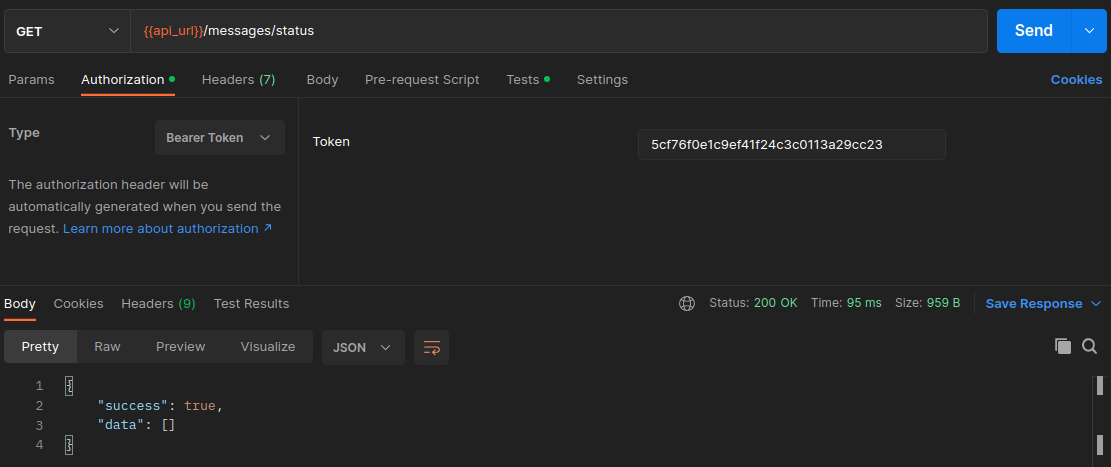
/messages/actions/send endpoint should work, do you send received token with API request?

There is official documentation with examples: https://developers.teltonika-networks.com/ just select correct device and FW version in top left corner.

Yes, I’m currently using this documentation and testing with Postman.

Any idea for my issue ?

When you do /login in response you get token. Copy value and add it to AuthorizationBearer Token.

Hello, @Thierry_v ,

Welcome to Teltonika Community!

To proceed with troubleshooting in a deterministic way, could you please provide the information below? Each item directly maps to an authorization or validation step enforced by RutOS.

  1. User role and permissions
  • Is the API login performed using the built-in admin user, or a custom user?
  • If a custom user is used, please confirm that it has full WebUI/API permissions , specifically:
    • Messages (SMS) access
  1. JWT token verification
  • Please confirm whether the JWT token returned by /api/login is used unchanged in the request.
  • If possible, provide:
    • Token expiration (exp ) value
    • Whether the failing request is made before token expiry
  • Also confirm that the header is sent exactly as:
Authorization: Bearer <token>
  1. Full request details
    Please share:
  • Full HTTP request headers (excluding password/token if needed)
  • Full JSON payload sent to /api/messages/actions/send
  • HTTP status code returned by the router (e.g. 401, 403)
  1. Modem identification
  • Please confirm the exact modem ID used in the payload (e.g. "1-1" ).
  • Additionally, provide the output of the modem status endpoint you are using to obtain this ID (API path + response).
  1. Router diagnostics
    To rule out server-side authorization rejection, please provide:
  • Output of:
logread | grep -i sms
logread | grep -i api
  1. Firmware
  • Does the same issue occur using both 07.18.3 and 07.20 versions?

taken immediately after a failed request.

  • Confirmation whether sending an SMS from the WebUI Messages page works on the same router.

Once these details are available, we can investigate further.

Best regards,
V.

Hello Vilius,

When preparing the answer to your long check-list (very helpfull thank you), I found the issue : The token was not set properly in postman.

Below the working API for me :slight_smile:

curl -X POST “https://192.168.1.70/api/messages/actions/send”
-H “Content-Type: application/json”
-H “Authorization: Bearer ba5de8e4190415edaa3fd7c0120c9b77”
-d ‘{“data”: {“number”: “+336xxxxxxxx”, “message”: “test sms from RUT901”, “modem”: “1-1”}}’
-k

All good now, thank you for the assistance.

This topic was automatically closed 2 days after the last reply. New replies are no longer allowed.