Hi, I have recently replaced my RUTX09 with a TRB501. However I keep getting intermittent internet disconnections with the TRB501 a few times a day. I have tried firmware TRB501_R_00.07.17.2, TRB501_R_00.07.17.5 and TRB501_R_00.07.18.1. The error messages are:
Event log:
Joined 5G-NSA network (internal modem)
Mobile data disconnected (internal modem)
System log:
5589 Mon Oct 20 09:29:23 2025 kern.err kernel: [329812.374821] subsys-pil-tz: subsys_err_fatal_intr_handler(): Fatal error on modem!
5590 Mon Oct 20 09:29:23 2025 kern.err kernel: [329812.374875] subsys-pil-tz: log_failure_reason(): modem subsystem failure reason: EX:kernel:0x1:diag:0x199:PC=0xc0c8c4e4:LR=0xc0c8c404:BADVA=0x1f:CAUSE=0x7003:SSR=0x1ff0070.
5591 Mon Oct 20 09:29:23 2025 kern.info kernel: [329812.381318] subsys-restart: subsystem_restart_dev(): Restart sequence requested for modem, tako restart_level = RELATED.
5592 Mon Oct 20 09:29:23 2025 kern.warn kernel: [329812.397165] [harden ]: restart modem,subsystem_restart_wq_func
5593 Mon Oct 20 09:29:23 2025 kern.warn kernel: [329812.408141] [harden] : Quectel_ModemFatalErrProcess ,init cnt :1
5594 Mon Oct 20 09:29:23 2025 kern.info kernel: [329812.413522] ipa-wan ipa3_lcl_mdm_ssr_notifier_cb:4317 IPA received MPSS BEFORE_SHUTDOWN
5595 Mon Oct 20 09:29:23 2025 kern.err kernel: [329812.419737] ipa ipa3_send_msg:619 wlan_msg_process failed
5596 Mon Oct 20 09:29:23 2025 kern.err kernel: [329812.428408] ipa ipa3_send_msg:622 lan_msg_process failed
5597 Mon Oct 20 09:29:23 2025 kern.info kernel: [329812.435789] ipa-wan ipa3_wwan_remove:4065 rmnet_ipa started deinitialization
5598 Mon Oct 20 09:29:23 2025 kern.info kernel: [329812.443241] ipa-wan ipa3_wwan_remove:4113 rmnet_ipa unregister_netdev
5599 Mon Oct 20 09:29:23 2025 kern.err kernel: [329812.446128] ipa-wan __ipa_wwan_close:1388 [rmnet_ipa0]: ipa3_deregister_intf failed -22
5600 Mon Oct 20 09:29:23 2025 daemon.notice netifd: Network device ‘rmnet_ipa0’ link is down
The RUTX09 works without any issues. I have now tried setting the TRB501 to 4G/3G auto to see if it has something to do with 5G
For troubleshooting purposes, we will require more sensitive information from your end, such as the troubleshoot file, which may contain passwords, public IP addresses, serial numbers, and such. To avoid leaking this information, we have sent you a form to fill out, which you will receive in your e-mail inbox that you have registered your account with in the forums. In the Ticket ID field of the form, please enter the ID of this thread, which is 16039.
Hi, my issue is still not resolved. I have an open ticket with support and we have tried a different modem firmware without any luck and they are still investigating.
A workaround for me has been disabling 5G. Not optimal but better then getting multiple disconnects per day. Setting the Preferred network type to 4G/3G auto under Network/Mobile/Connection
This kept on happening in midnight hours from 3 am to 6-7 am either due to cellular tower lowering signal(?) or low activity on my side. The changes I’ve made where:
cronjob to switch to 4G/3G auto at 3 am and back to 5G auto at 8 am
disable ims, volte
disable ipv6
apn set to isp’s apn and not auto
With these i haven’t seen a reboot for 4 days. I’ve noticed that these modem crashes happen either due to low signal or when slightly moving around the modem on 5G. This is very easy to reproduce so let me know if you need any logs @Matas
For the time being, we’re going to schedule a specific log-gathering remote session with the creator of the post in order to collect special logs to see what’s going on. If these don’t show us much or don’t help with the investigation, I’ll reach out to you through here by tagging you & will send you a form if that is required.
Could I possibly try upgrading your modem firmware upgrade through a remote session? I’ve sent you a form to fill out (which you’ll receive into your e-mail inbox). For the ticket ID, simply enter 16039, once you’re done, I’ll reach out to you through the provided e-mail as soon as possible.
I have exactly the same issue. If i use 5G the internet connection breaks after few minutes. The strange thing is, that ping is working all the time without issues. Also for example google.com is working fine. All other websites are not working.
If i disable 5G my connection is stable for days.
Can you please help me? Should i sent you the logfiles?
Could I try upgrading your modem firmware as well? I’ve sent you a form to fill out (which you’ll receive into your e-mail inbox). For the ticket ID, simply enter 16039-2 , once you’re done, I’ll reach out to you through the provided e-mail as soon as possible.
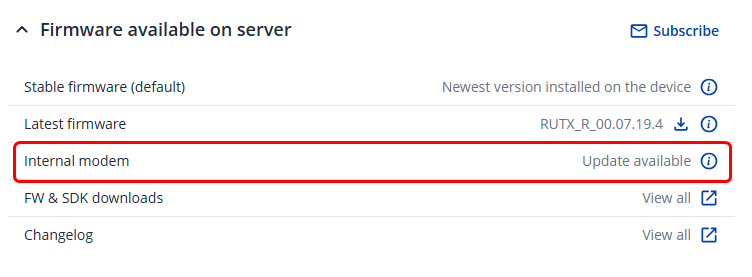
Usually, it is recommended to wait for a pop-up within the WebUI that a new modem firmware is available for download, which is officially updated by our R&D. This lets the user to update themselves, but when issues like these occur, we sort of “force” and upgrade to a firmware version that hasn’t been yet uploaded.
since I continue to get modem crashes (as mentioned a few weeks ago in this thread) daily even with a high gain directional antenna can we arrange a modem firmware upgrade?
Allow me to rephrase myself. I was initially referring to routers and not gateways, such as the TRB501 in specific. Usually, on routers, you would get a message with a new modem firmware being available, such as this:
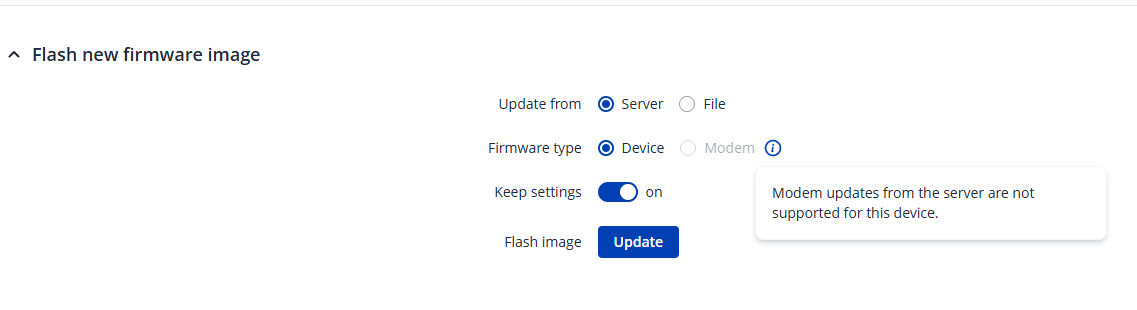
In the case of TRB devices (500, 501, etc.), they require a file to be uploaded, as seen in your screenshot. Now these files can only be obtained from us, depending on the situation & whether we deem that it is required for the issue to be resolved, or to at least move forward with it. Apologies for the confusion.
You released the TRB501 with pre-production firmware on the Quectel modem and have the audacity to reserve the right to determine if an update is required?
There are 2 ways to handle updates - either you provide official packages or you make it easy for users to help themselves. You offer neither.
I don’t remember saying that the firmware was “pre-production” I simply stated that they come with a firmware version already installed, one that is the newest at the time. I can count many cases where we jumped onto a remote session with clients owning TRB5x devices and they already had the latest versions installed.
Judging by your comments, do you require any support with your device, or is it not required?