TRB500 - Unable to Connect to 5G NR Despite Strong 5G Coverage

Hi everyone,

I have two TRB500 units deployed in the UAE on Etisalat (MCC/MNC 424/02) and both are connecting to LTE only, despite 5G NR coverage being available at the location, confirmed by both my phone connecting to 5G and by running AT+QSCAN on the devices themselves, which clearly shows strong 5G NR cells:

+QSCAN: "NR5G",424,02,634080,429,-81,-12,36,1
+QSCAN: "NR5G",424,02,627360,429,-91,-14,26,1
+QSCAN: "NR5G",424,02,522030,705,-107,-14,11,1
+QSCAN: "NR5G",424,03,501390,32,-101,-18,17,1
+QSCAN: "NR5G",424,03,640704,876,-81,-14,40,1

Despite seeing these cells, both units register on LTE only and never connect to 5G NR.

Device details:

  • Model: TRB500

  • Modem module: Quectel RG501Q-EA

  • Modem firmware: RG501QEUAAR13A01M4G_OCPU_REL_02.200.00.000

  • TRB500 firmware: TRB500_R_00.07.22.3

  • Carrier: Etisalat UAE

Questions:

  1. Could the modem firmware variant be the reason 5G NR registration is not happening, and if so what is the correct firmware to use?

  2. Is there any configuration required to enable 5G NR on these units?

  3. Are there any known issues with TRB500 and 5G NR on Etisalat UAE?

Any help appreciated, this is a production deployment.

Thanks

Are the sims 5G enabled sims

Yeah, I’ve tried different Sim cards, different carriers. All of them are only getting LTE.

What antennas are you using?

Using these: Poynting A-EPNT-0004-17

I can’t see that your doing anything wrong. I would perform a factory reset without saving settings and hope that that resolves the issue.

With my own knowledge at this time i can’t offer further assistance, someone else with greater knowledge may step in and offer further ideas.

Good luck and i hope you resolve the issue quickly.

Whilst this may not be directly related, I have observed similar behaviour in Saudi Arabia.
In 5G NSA (Non-Standalone) deployments, the network relies on a 4G core. As a result, the device typically remains on 4G for general connectivity and only engages the 5G radio layer when increased bandwidth is required.
To help validate this behaviour, could you please perform the following test:

Open two SSH sessions to the router.
In the first session, run the gsmctl -K command multiple times to monitor the access technology.
In the second session, start a continuous ping to a reliable external host (e.g., Google or Cloudflare).
While the ping is running, return to the first session and execute the gsmctl -K command several more times.

Below is an example output captured on an RUTC50 in Germany. You can observe the transition point where the connection shifts from LTE-only to LTE with 5G NSA:

root@RUTC50:~# gsmctl -K
Access tech: LTE | TDD mode: FDD | MCC: 262 | MNC: 03 | UE state: 3
root@RUTC50:~# gsmctl -K
Access tech: LTE | TDD mode: FDD | MCC: 262 | MNC: 03 | UE state: 3
root@RUTC50:~# gsmctl -K
Access tech: LTE | TDD mode: FDD | MCC: 262 | MNC: 03 | UE state: 3
root@RUTC50:~# gsmctl -K
Access tech: LTE | TDD mode: FDD | MCC: 262 | MNC: 03 | UE state: 3
root@RUTC50:~# gsmctl -K
Access tech: LTE | TDD mode: FDD | MCC: 262 | MNC: 03 | UE state: 3
root@RUTC50:~# gsmctl -K
Access tech: LTE | TDD mode: FDD | MCC: 262 | MNC: 03 | UE state: 3
root@RUTC50:~# gsmctl -K
Access tech: LTE | TDD mode: FDD | MCC: 262 | MNC: 03 | UE state: 3
Access tech: NR5G-NSA | TDD mode: | MCC: 262 | MNC: 03 | UE state: 3
root@RUTC50:~# gsmctl -K
Access tech: LTE | TDD mode: FDD | MCC: 262 | MNC: 03 | UE state: 3
Access tech: NR5G-NSA | TDD mode: | MCC: 262 | MNC: 03 | UE state: 3
root@RUTC50:~# gsmctl -K
Access tech: LTE | TDD mode: FDD | MCC: 262 | MNC: 03 | UE state: 3
Access tech: NR5G-NSA | TDD mode: | MCC: 262 | MNC: 03 | UE state: 3
root@RUTC50:~# gsmctl -K
Access tech: LTE | TDD mode: FDD | MCC: 262 | MNC: 03 | UE state: 3
Access tech: NR5G-NSA | TDD mode: | MCC: 262 | MNC: 03 | UE state: 3
root@RUTC50:~# gsmctl -K
Access tech: LTE | TDD mode: FDD | MCC: 262 | MNC: 03 | UE state: 3
Access tech: NR5G-NSA | TDD mode: | MCC: 262 | MNC: 03 | UE state: 3
root@RUTC50:~#

This demonstrates how the device initially stays on LTE and then activates 5G when traffic demand increases.

I have previously seen similar behaviour in Saudi Arabia using a Quectel RG520N-GL M.2 module (not in a Teltonika device). That said, it may be unrelated to your current case, but it could be worth verifying whether the same mechanism is occurring here.

Regards,

Nick

Hello,

Thank you for the detailed report. A few things to work through:

  1. NSA idle behaviour (most likely explanation)
    Etisalat UAE operates 5G in NSA mode - the device stays on LTE at idle and only activates the 5G NR layer when the network demands additional throughput. Please run this test to confirm whether that’s what’s happening:
  • Open two SSH sessions to the device.
  • Session 1: run gsmctl -K repeatedly to monitor the access technology.
  • Session 2: generate sustained traffic (e.g. ping -i 0.2 -s 1400 8.8.8.8).
  • If the output in Session 1 transitions to NR5G-NSA under load, the units are working as expected.
  1. WebUI configuration
    Under Network → Mobile → General, please confirm:
  • Preferred network type: 5G/4G/3G auto
  • 5G mode: Auto
  • Band selection: Auto (or share which bands are manually selected)
  1. MBN profile
    The modem firmware string (RG501QEUAAR13A01M4G) contains a “EU” identifier. An incorrect MBN profile can prevent 5G NR registration on Qualcomm-based modules. Please share the output of:

gsmctl -A ‘AT+QMBNCFG=“List”’
gsmctl -A ‘AT+QMBNCFG=“AutoSel”’

  1. Firmware
    Both units are on 07.22.3; the current latest is 07.23.5. Could you please test it out with the latest firmware?

Please start with the gsmctl -K traffic test and share the MBN output, and we’ll advise from there.

Best regards,
V.

Hello, Vilius.

Thank you for the guidance. I have performed the tests you requested with the following results:

1. NSA Idle Behavior Test

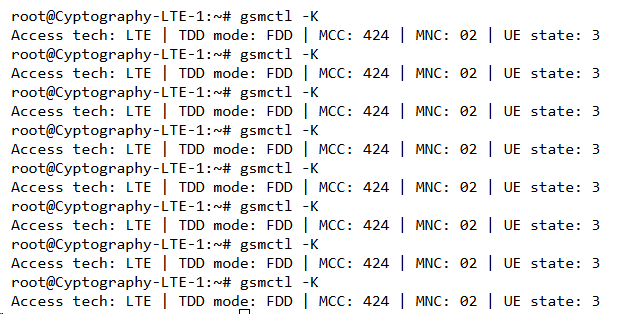
I ran the sustained traffic test as requested. Even while generating load, the device remains stuck on LTE and does not transition to 5G NR. showing the output of gsmctl -K while the ping test was running. As you can see, the Access Tech never switches to NR.

To rule out an issue with the device or the SIM slot, I tested a Virgin Mobile SIM in the same unit, and it connects to 5G without any issues. However, the Etisalat SIM (which is confirmed 5G-enabled) consistently fails to connect to the 5G layer on this device.

2. WebUI Configuration

I can confirm that the settings under Network → Mobile → General are all set to “Auto” (Preferred network type: 5G/4G/3G auto; 5G mode: Auto; Band selection: Auto).

3. MBN Profile

When attempting to run the AT commands to check the MBN profile, I received an “Invalid command” error. Here is the output from the terminal:

Bash

root@Cyptography-LTE-1:~# gsmctl -A 'AT+QMBNCFG="List"'
+QMBNCFG: "List",0,1,1,"ROW_Commercial",0x0A010809,202201191
+QMBNCFG: "List",1,0,0,"ROW_Generic_3GPP_PTCRB_GCF",0x0A01FB09,202102071
+QMBNCFG: "List",2,0,0,"Dito_Commercial",0x0A01FD09,202101151
+QMBNCFG: "List",3,0,0,"Telia_Sweden",0x0A012400,202101151
+QMBNCFG: "List",4,0,0,"TIM_Italy_Commercial",0x0A012B00,202101151
+QMBNCFG: "List",5,0,0,"France-Commercial-Orange",0x0A010B21,202101151
+QMBNCFG: "List",6,0,0,"Commercial-DT-VOLTE",0x0A011F1F,202101151
+QMBNCFG: "List",7,0,0,"Germany-VoLTE-Vodafone",0x0A010449,202101151
+QMBNCFG: "List",8,0,0,"UK-VoLTE-Vodafone",0x0A010426,202101151
+QMBNCFG: "List",9,0,0,"Commercial-EE",0x0A01220B,202101151
+QMBNCFG: "List",10,0,0,"Optus_Australia_Commercial",0x0A014400,202101151
+QMBNCFG: "List",11,0,0,"Telstra_Australia_Commercial",0x0A010F00,202201111
+QMBNCFG: "List",12,0,0,"Commercial-LGU",0x0A012608,202101151
+QMBNCFG: "List",13,0,0,"Commercial-KT",0x0A01280B,202101151
+QMBNCFG: "List",14,0,0,"Commercial-SKT",0x0A01270A,202101151
+QMBNCFG: "List",15,0,0,"Commercial-Reliance",0x0A011B0C,202210211
+QMBNCFG: "List",16,0,0,"Commercial-SBM",0x0A011C0B,202101151
+QMBNCFG: "List",17,0,0,"Commercial-KDDI",0x0A010709,202101151
+QMBNCFG: "List",18,0,0,"Commercial-DCM",0x0A010D0D,202101151
+QMBNCFG: "List",19,0,0,"VoLTE-CU",0x0A011561,202101151
+QMBNCFG: "List",20,0,0,"VoLTE_OPNMKT_CT",0x0A0113E0,202101151
+QMBNCFG: "List",21,0,0,"Volte_OpenMkt-Commercial-CMCC",0x0A012010,202411261
root@Cyptography-LTE-1:~# gsmctl -A 'AT+QMBNCFG="AutoSel"'
+QMBNCFG: "AutoSel",1

4. Firmware

Given that the Virgin SIM connects to 5G without issue while the Etisalat SIM refuses to register on the 5G layer, I suspect this may be related to the MBN profile rather than a firmware-level bug. I would appreciate your guidance on how to properly check or force the correct MBN profile, or if there might be an alternative solution to get Etisalat working as expected.