I’m currently working with a Teltonika TRB246 device running firmware version 07.17.5, and using its Modbus Client functionality for data acquisition. I’d like to clarify a few technical aspects regarding the internal Modbus Client database, assuming the data is stored in volatile memory (e.g., /tmp/modbus_db):
Is it possible to increase the number of Modbus records stored in the internal database? If so, what is the recommended or maximum supported limit?
Can the memory allocation for the Modbus Client database be increased? If configurable, what is the recommended upper limit?
I’m evaluating two datalogging scenarios:
Scenario A: Monitoring 20 energy meters, each queried every 10 minutes with a single Modbus request reading 5 registers. To support 30 days of datalogging, the device would need to store approximately 86,000 records.
Scenario B: Reading 1,000 Modbus registers from a single device every 10 minutes, using 10 Modbus requests. To support 30 days of datalogging, the device would need to store approximately 8.6 MB of data.
Could you please confirm whether either of these scenarios is feasible with the TRB246? If not, are there alternative Teltonika devices that support this level of datalogging capacity?
Neither of these are configurable by design, but can possibly be changed by compiling a Custom SDK of our firmware. This does require advanced technical knowledge, so bear that in mind. You can find more information on SDKs here: RUTOS Software Development Kit (SDK) Instruction - Teltonika Networks Wiki
Regarding the scenarios, I’m afraid it’ll be pretty hard to determine whether Scenario A is feasible due to the fact that these records can vary in size. Remember that the TRB246 has 128MB of RAM and 16MB of Flash memory available.
I would recommend looking into storing this data in a dedicated external server, or cloud (MQTT, for example, via the use of Data to Server), rather than retaining it all on the device. Here’s a wiki example for you to read: TRB246 Data to Server - Teltonika Networks Wiki
Wouldn’t necessarily call them “superior”, but I’d look into devices with USB support, you’d be able to store the logs into the USB, without having to worry about the device memory being overfilled. I’ve filtered out cellular devices with USB support for you: https://www.teltonika-networks.com/products?features=205&features=246
If using devices with USB support, would it be possible to increase the database size beyond the default limits (20,000 records and 1.2 MB)?
If so, how would that be configured — via the /etc/config/modbus_client file?
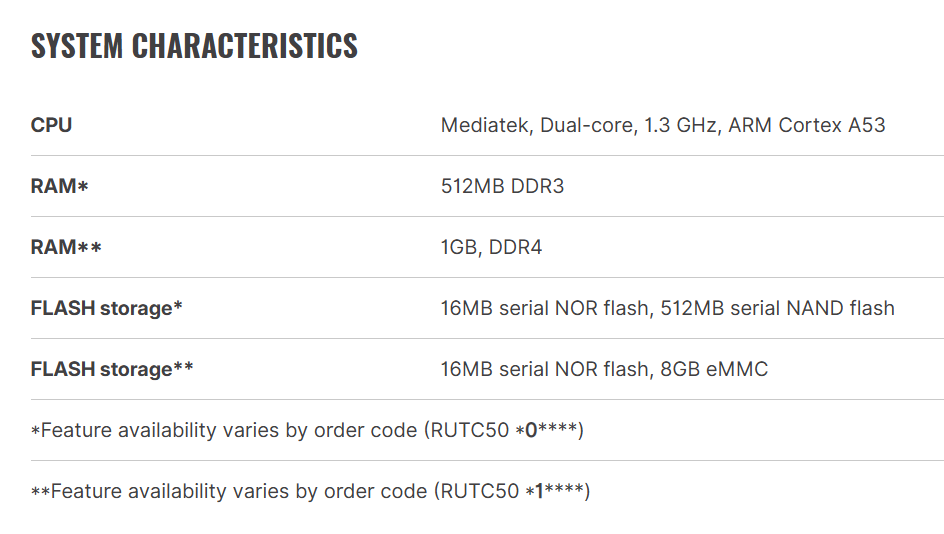
Also, does this possibility apply to the RUT-C50?
I would prefer not to compile a custom firmware, as that would likely reduce device reliability.
Apologies as I forgot to mention - but logging directly to a USB drive could and possibly might degrade the life expectancy of the flash drive. Still, if you want to continue with it, you can try writing a script that takes values from /tmp/modbus_db and writes to a mounted USB drive. When it comes to custom scripts, it is out of our technical support scope, but the general logic for it would be to simply read the data written inside & to generate a .txt (or whatever format you need) file to then be stored in the mounted USB drive. It should be pretty easy to write with ChatGPT or any other AI, for that matter.
As mentioned earlier on, increasing this limit is not possible. Teltonika devices can store up to 20,000 modbus records, so it really depends on the size of the modbus records itself. Once the 20,000 has been reached, it will just overwrite to oldest data, keeping it at the mentioned limit.
Therefore, you can have 20,000 records existing on the db, but due to the smaller size and/or data type, the size of the database may not even reach the mentioned size limit (1.2 MB).
The reason I’ve suggested the RUTC50 was mainly due to the fact that it has more internal memory than other devices available within our portfolio. With the use of the custom script, you could simply store those log files within the device, instead of having to rely on the USB stick that I also suggested using.