I have a quick question about the Teltonika interface, in my case the TRB145. I can’t say whether this also affects other interfaces.
The problem is quite simple, but somehow I can’t seem to solve it.
The problem is that when the normal USB connection is established, it basically ignores my own LAN/WLAN/LTE connection and replaces it with the LTE connection of the USB connection/TRB145 interface.
This is obviously not ideal because we use IoT SIM cards that only have a small data volume.
Is there a way to establish the connection via USB without it sharing the Internet connection from the TRB145 interface?
Unfortunately, I can’t find the corresponding setting in the interface either.
There are a few ways to disable the internet connection from the microUSB port, while still being able to access the device itself.
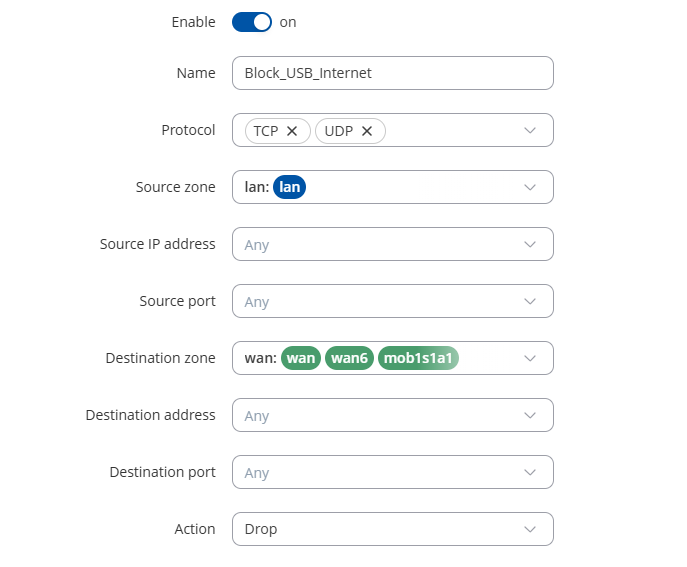
You can create a traffic rule that rejects traffic from LAN to WAN. Here is how to configure it:
Go to Network → Firewall → Traffic Rules, scroll down to the bottom of the page and add a new forward rule, configured just like this.
Another way you can achieve it is by turning off forwarding inside the zone of LAN → WAN
Go to Network → Firewall → Zones, and change the Forwarding inside zone option to Drop
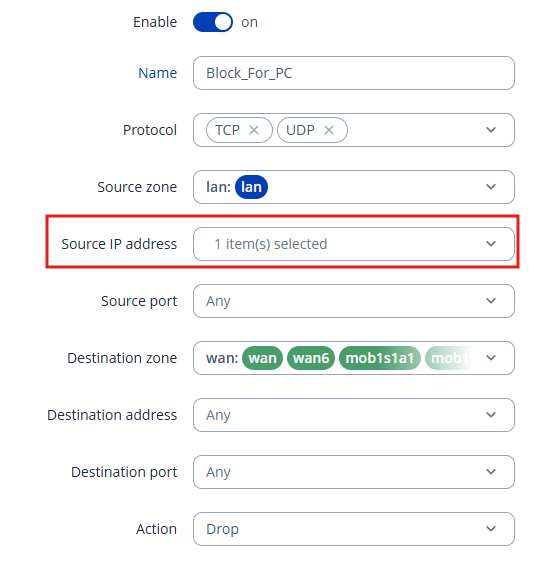
If you want to block the internet connection through the microUSB only for a specific device that you connect it to, you can do so this way:
Go to Network → Firewall → Traffic Rules, scroll down to the bottom of the page and add a new forward rule, configured just like this.
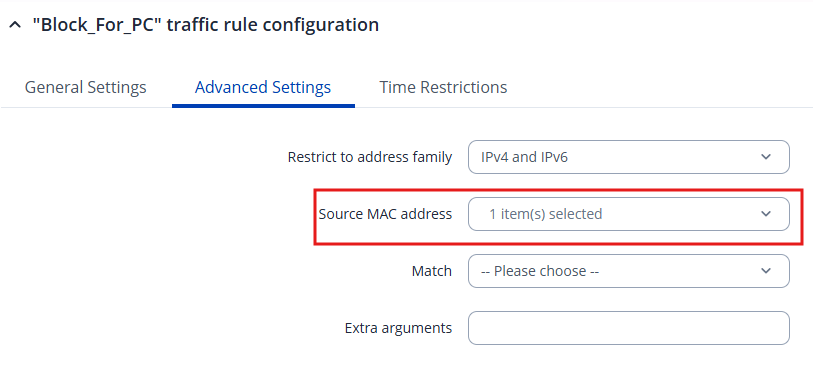
The only things that will differ from the previous traffic rule configuration is that you have to add the Source IP address, select the device that shouldn’t get the internet connection from the gateway from the list there and go to Advanced settings, in the Source MAC address select the same device
Additionally, for monitoring and management purposes you could use our RMS system, keep in mind that it is a paid service.
Here you can find more information about it: