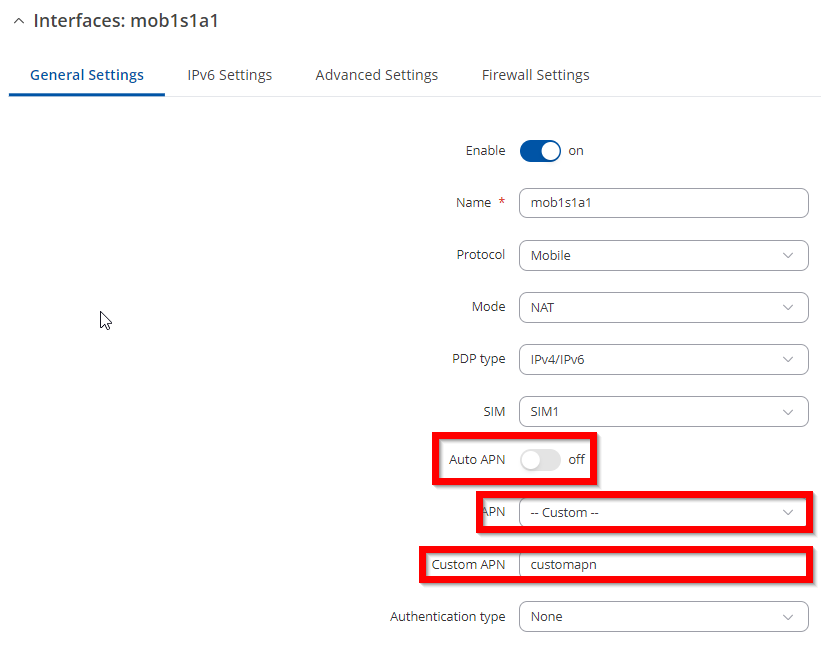
Hi,
my TRB145 give “disconnect” as mobile status; below the screenshot:
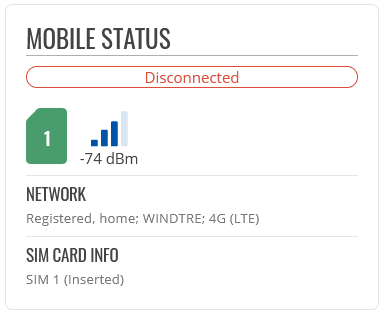
the signal it seems ok but cant connect and in the events logs i see " Mobile data disconnected (internal modem)"
and this is the output for modem:
root@HOST:~# uqmi -d /dev/cdc-wdm0 --get-data-status
"connected"
root@HOST:~# uqmi -d /dev/cdc-wdm0 --get-serving-system
{
        "registration": "registered",
        "CS": "attached",
        "PS": "attached",
        "plmn_mcc": 222,
        "plmn_mnc": 88,
        "plmn_description": "פ�H�\u0016\u0001",
        "roaming": false,
        "status": "available"
}
root@HOST:~#
furthermore
Tue Jun 25 23:53:37 2024 daemon.notice netifd: mob1s1a1 (640): pdh4: Reason type not found"
Tue Jun 25 23:53:37 2024 daemon.notice netifd: mob1s1a1 (640): "No effect"
Tue Jun 25 23:53:37 2024 daemon.notice netifd: mob1s1a1 (640): Unable to connect IPv4
Tue Jun 25 23:53:37 2024 daemon.notice netifd: mob1s1a1 (640): Releasing client-id 1 on /dev/cdc-wdm0
Tue Jun 25 23:53:37 2024 user.notice netifd: uqmi -d /dev/cdc-wdm0 --timeout 30000 --set-client-id wds,1 --release-client-id wds
Tue Jun 25 23:53:37 2024 daemon.notice netifd: mob1s1a1 (640): Failed to create IPV4 connection
Tue Jun 25 23:53:37 2024 daemon.info dnsmasq[4742]: read /etc/hosts - 4 addresses
Tue Jun 25 23:53:37 2024 daemon.info dnsmasq[4742]: read /tmp/hosts/dhcp.cfg01411c - 1 addresses
Tue Jun 25 23:53:37 2024 daemon.info dnsmasq-dhcp[4742]: read /etc/ethers - 0 addresses
Tue Jun 25 23:53:47 2024 daemon.notice netifd: mob1s1a1 (1202): Stopping network mob1s1a1
Tue Jun 25 23:53:47 2024 daemon.notice netifd: mob1s1a1 (1202): Command failed: Not found
Tue Jun 25 23:53:47 2024 daemon.notice netifd: mob1s1a1 (1202): Command failed: Not found
Tue Jun 25 23:53:47 2024 daemon.notice netifd: mob1s1a1 (1202): Command failed: Permission denied
is there any troubleshooting to be done to understand the problem? any Idea?
thanks