I am a first time Teltonika user and have recently got a TRB142 serial gateway with the idea to use it as a remote console server for network devices (switches, routers etc.). I want to be able to remotely connect to the device’s CLI through the console port, like described in this guide: Reaching Cisco router console port remotely RutOS - Teltonika Networks Wiki
But it isn’t working…
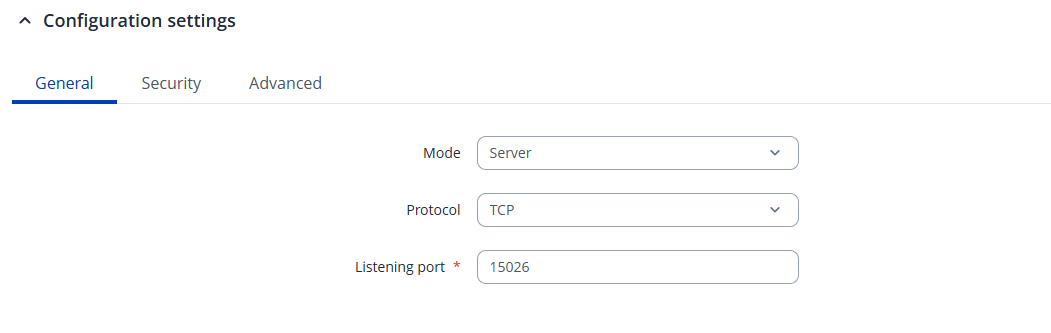
I have the TRB142 connected to the console port of a Cisco switch with a standard cisco console cable (DB9 RS232 male to RJ45). 4G is working fine and im able to connect to the TRB142 through RMS. I have set up the Serial OverIP RS232 configuration with server mode and gave a port. Finally, I have established a RMS VPN Hub and added the TRB142.
Now I open up Putty, enter the TRB142’s VPN IP and the port I configured in Serial OverIP. I see the connection works because “Connected clients“ goes up to 1 in the Serial OverIP dashboard and the data sent changes when I type in Putty. The problem is I don’t get anything back in putty, no CLI or any serial data whatsoever, just blank screen where I can type and enter but it doesnt do anything.
Alternatively, I have tried connecting through the TRB142 CLI with the command “microcom -s 9600 /dev/rs232”, as suggested in the guide but this also does not work, just freezes up the CLI.
How can I get this to work so I can access the Cisco switch’s console? Am I missing something? I have tried changing the Serial OverIP settings many times but nothing worked. Any help would be dearly appreciated
Could you tell me if this is the right type of cable to use for this setup? Do i need straight-through, rolled-over or crossed?
Im trying to connect to the console of a Cisco Catalyst 4948 Switch. But ive also tried with a Cisco 2911 router and Juniper MX204 router and still the same problem.
The cable you are currently using is intended for connecting two DTE devices. Since the TRB142 is a DCE device, a straight-through cable is required to connect it to the console port of the Cisco device.
Alright, i got it to work by adding a null modem adapter to my delock cable.
I have a follow-up question though: I have a serial DB9 Y-splitter cable. When i plug it in the trb142 and connect 2 cisco devices i will get a functioning serial over ip to one of them. Would it be possible to make a setup where i can switch consoles from device to device? I was hoping when i plugged the splitter cable in, the trb142 would see an extra tty in the dev directory to microcom to - like an extra interface, but this isnt the case.
I know its a stretch but would it be possible at all to achieve this? Or maybe use the micro usb port on trb142 for serial communication?