TRB141 time conditions don't send sms

Hello,

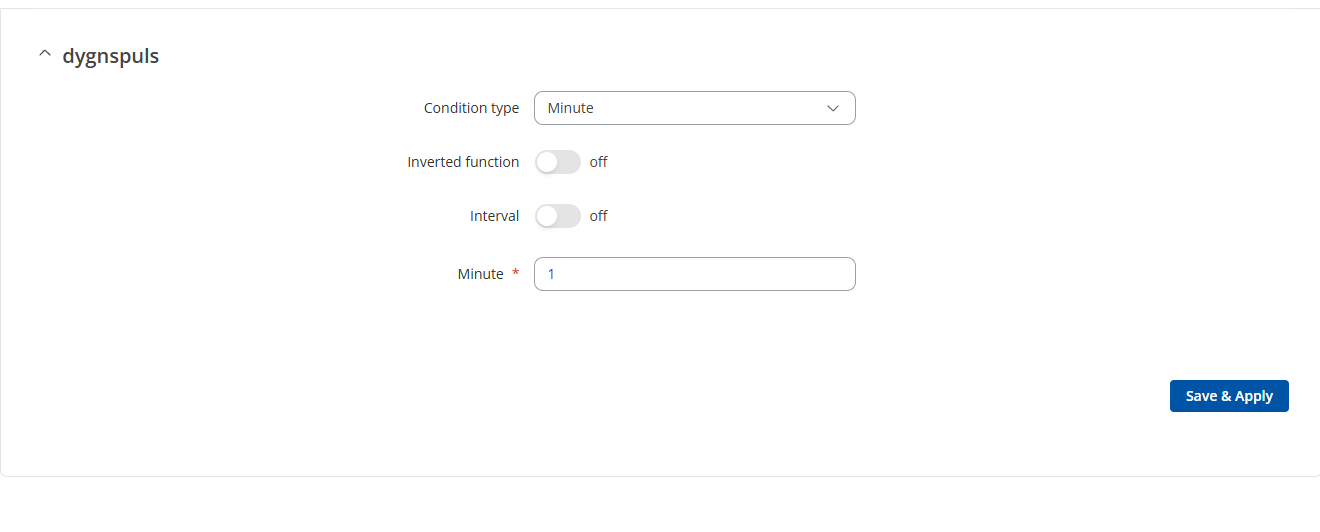
I’ve been trying to set up a TRB141 as a remote level alarm sender. I’m reading an input from a level switch, sending an sms when it turns high and another when it turns low. That works fine! However, these sometimes looses connection, gets drowned or otherwise stops working. I need a cyclical sms with a custom text sent every day as a watchdog to our system. I’ve tried using a minute condition (for testing, later an hour condition) and using that to send the sms, but it never sends it. From my understanding if the condition is “1” minute, the condition will be considered high from XX:01:00 to XX:01:59 every hour. I’ve tried using the condition for a relay to see if the time condition works, it doesnt. I’ve tried using a digital input to trigger the SMS and it sends it.

Is my understanding of the time conditions wrong or is there anything else I’ve missed?

Greetings, @awadman ,

Welcome to Teltonika Community!

Thank you for reaching out! I understand you’re using a TRB141 to send watchdog SMS messages via a time condition, but the SMS never triggers — even though input-based SMS works fine.

To help investigate, could you clarify the following:

  1. What firmware version is on the device?
  2. Can you share a screenshot of the time condition rule you’ve configured?
  3. Is the SMS action set to trigger on a state change (edge) or while the condition is active (level)?
  4. Is the device clock synced correctly via NTP?
  5. When testing with the relay, was it configured the same way as the SMS rule?

Looking forward to your response!

Best regards,
V.

1: TRB1_R_00.07.06.10

2: see attached

3: SMS is set in the I/O juggler as an action to send when the condition above is met. I’ve seen no alternatives for edge triggering.

4: Yes, ive synced it from the browser and when i load that page later, the time is keeping up.

5: Yes, it was configured the same way, and none of the will work.

Hi, @awadman ,

I hope you’re doing well,

For a fully autonomous, cyclical watchdog SMS, use the Output Scheduler + I/O Juggler together:

  1. Go to Services → Input/Output → Scheduler and create an instance that toggles a relay output at your desired interval (e.g. ON at 08:00, OFF at 08:01 daily).
  2. In I/O Juggler, create a rule triggered by the Rising edge of that relay/input, with your SMS action attached.

This gives you a reliable, time-driven SMS without needing any external trigger.

Note: The Output Scheduler may need to be installed first via System → Package Manager.

Please also verify the following:

• I/O Juggler is globally enabled (Services → Input/Output → I/O Juggler → General - it is OFF by default).
• Device clock and timezone are correct (System → Administration → Time Synchronization). An unsynced NTP clock will cause time conditions to evaluate incorrectly.
• SMS sending works independently - test via Services → Mobile Utilities → Send Messages to rule out a SIM or network issue.
• Firmware is up to date - some condition-related bugs have been fixed in recent releases. Check your version at System → Firmware.

Best regards,
V.

I just updated the firmware, moved the SMS-sending to the new event juggler, and i’m able do flip the relay in the I/O status page and it sends one SMS when opening, one when closing. But i cant get the relay to switch by itself. I’ve added a schedule to close the relay at a specific time (when im testing, im setting it to 2 minutes ahead and opening at 4 minutes ahead (monday to sunday) to troublehoot, but it doesnt do anything. Ive checked the time, also i’ve verified the time by checking the event log time stamps and it seems in order.

Hello,

I hope you’re doing well,

Why the scheduler + I/O juggler approach is limited:

The I/O Juggler can only be triggered by a physical input pin state change (e.g. DI1, DI2, Isolated Input, or a Configurable I/O pin set as input). Relay outputs cannot serve as I/O Juggler triggers - they are output-only in this context. This means a fully autonomous, time-driven SMS cannot be reliably achieved through the WebUI alone on the TRB141.

The recommended solution is a lightweight cron script via SSH, which is fully supported on RutOS.

Cron-based SMS script

This method sends an SMS automatically on a schedule without needing any physical input trigger.

  1. Enable SSH Access
    Go to System → Administration → Access Control and enable SSH. Connect to the device using an SSH client (e.g. PuTTY) with your admin credentials.

2, Create the SMS Script
Create a script file on the device:

vi /etc/watchdog_sms.sh

Paste the following content:

#!/bin/sh
gsmctl -S -s “+<recipient_number> Your watchdog message here”

Replace +<recipient_number> with the full international format phone number (e.g. +370XXXXXXXX) and adjust the message text as needed. Save and exit, then make it executable:

chmod +x /etc/watchdog_sms.sh

  1. Schedule it with Cron
    Edit the crontab:

crontab -e

Add a line to run the script daily at 08:00:

0 8 * * * /etc/watchdog_sms.sh

Save the file. The device will now send the watchdog SMS every day at 08:00 automatically.

Check the following before testing:

• Clock & Timezone: Confirm the device clock is correct under System → Administration → Date & Time → Time Synchronization. Cron relies on system time - an incorrect timezone will cause it to fire at the wrong time.

• SMS Test: Verify that SMS sending works independently via Services → Mobile Utilities → Messages → Send Messages before relying on the automated script.

• Firmware: Go to System → Firmware and update to the latest stable release if you are on an older version. Recent releases include fixes for SMS-related functionality.

This cron-based approach is the correct and reliable way to achieve a fully autonomous watchdog SMS on the TRB141.

Please don’t hesitate to reach out if you need any assistance with the setup.

Best regards,
V.
I got it to work. I probably controlled the relay from more than one point after i updated the firmware. After i cleared that and set it again, it worked. Thanks for all the help!