TRB140 default password

Hello,

I have a TRB140 device which worked perfectly. The batch number is 053.
The default login/password is printed on the case : admin/admin01
I had to reset the device last week and now it is impossible to connect to the GUI.

The reset button has be pushed during 10-15 seconds, and I am sure the device rebooted correctly with the factory setup. But impossible to connect to GUI with default password.
I have access to the web interface thru 192.168.2.1 but the couple admin / admin01
is rejected with message : Invalid username and/or password

The device has been updated recently with last firmware.

The situation is not catastrophic, the device works correctly but impossible to access to GUI and personalize the configuration.

Hope somebody can help.

Thanks

Christian

Are you addressing the default IP of 192.168.1.1 and is the End User Device you are using to access the UI, also on the 192.168.1.x subnet?

Hi Mike,

Sorry, after reading my post again I see that it was not so clear… I will correct it.

Yes I use the correct IP 192.168.2.1 , I have access to the web interface of the TRB140
but the couple admin / admin01 is rejected : the message is “Invalid username and/or password”

Thanks

Apologies Christian, I didn’t read you original message properly. Hopefully someone from Teltonika will have a better idea.

Hello @illinger,

Have you tried logging in using the password you had before the reset? If so, do you receive the same error message?

Best regards,

Thanks for answer.

Yes, my previous password is rejected with the same message.

I am sure that the factory reset occured because the default DHCP delivers an IP adress to my PC which is not in the range I have setup weeks ago.

Has something changed with the last firmware I downloaded last week ?

The TRB140 is not briked and can be used, but I can no longer put my own setup.
Difficult to use it now.

Thanks for help…

Christian

Hi,

I would recommend trying to clear “cookies and site data” on the browser. The browser might have cached very old version of router’s WebUI that is throwing random errors on login.

Yes I have cleared the cache and cookies, but nothing changed
Used firefox & chrome.

The login (admin / admin01) is still refused

Greetings,

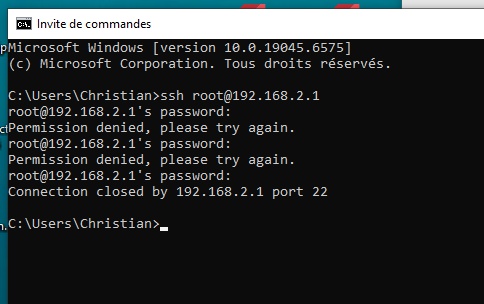
Could you please try logging in to the device via SSH?

You can use any console application, or simply open Command Prompt (or Terminal on macOS) and run the following command:

ssh root@192.168.2.1

You will then be prompted to enter the password.

Please let me know what the results are.

Best Regards,
Justinas

Hello,

Result is : Permission denied…

I tested with ‘root’ and ‘admin’ as username

Regards,

Christian

Greetings,

You could try to reset the device one more time following the instructions(TRB140 Device Recovery Options - Teltonika Networks Wiki)

And if that still doesn’t help, it could be a hardware issue, and you should proceed with the RMA procedure for warranty repairs. If you purchased through a vendor, please contact them for further assistance with the RMA procedure. Here you can find more information about it: RMA - Teltonika Networks Wiki

If you have bought the device directly from us, then contact us through HelpDesk or contact your sales manager.

I recommend mentioning the serial number in the first message when you contact the vendor or us, so it saves you some time.
Best Regards,
Justinas

I tryed again to reset but no miracle, nothing helps.
Default password is refused.

My TRB140 is in that state since the factory reset last week, I think it’s not my fault.
It will go to recycling because it is out of warranty.

I am sure something happend after upgrading and/or Factory reseting.
Is Teltonika interested in analysing the device ? I can send you if needed.

Regards

Christian

Greetings,

Unfortunately, we are unable to analyse individual devices.

Best Regards,
Justinas

This topic was automatically closed after 60 days. New replies are no longer allowed.