TRB 246 Data to Server HTTP Broken Payload

Dear Team,

I was triing do use the Data to Server over HTTP for a few Days now. I could temporary setup a MQTT to check if the Data arrives.

I found out, that the needed Values are sended over MQTT but not over HTTP.

The Data that arrives on the HTTP Interface are:

{“{“Temperatur”:[{“data”:”“:[{“775”:{”-9":{“448”:{“114”:“”}}}}]}

The Data that arrives on the MQTT Interface are:

{“RT4702”:[{“data”:“[30]”,“name”:“Temperature”},{“data”:“[851]”,“name”:“Relative_Humidity”},{“data”:“[508]”,“name”:“Absolute_humidity”}]}

Device: TRB246

Firmware: TRB2M_R_00.07.24.1

Something is going wrong.

Best regards

Adrian

Hello @GmdSaanen,

That json you posted double quotes are not ASCII (decimal 32) double quotes, but alternative UTF-8 variations of double quotes and therefore that is not valid json format.

Quick way to check with pythion3 command that your json is fine is below. I should not show any errors and show a pretty printed your json.

$ python3 -mjson.tool < GmdSaanen.json 
Expecting value: line 1 column 1 (char 0)
$

But unfortunately it just reveals first error location and doesn’t show you clearly what to fix. So when I had years ago this kind of issue, I found SO post which had nifty check and which I then used bit later wrote tiny script so that it’s bit easier to use and remember by name. I’ll attach it here below, but first I attach as an image.

So there is what you need to fix at source where you get that json. You need to change right leaning “ to " which are more straight standing ASCII 32 original double quotes.

You may find using Google “utf-8 alternative doube quotes” more variants and info if you like to know about what this double quote mess is all about.

I have no way to know where from your json data got those wrong UTF-8 alternative double quotes, but you are not first to encounter same issue. I suspect that some general text editors and perhaps browsers too prefer UTF-8 variants certain locale (language, country) setting by default. Developement IDE’s and editors specifically for programming AFAIK not.

OK, so here is the script promised, it works both recent modern Linux and macOS, but cannot work under RutOS cli mode, as there grep command is a busybox stripped down version which do not support colors.

show-nonascii.zip (381 Bytes)

:slight_smile: riku

ps.. I replied last February similar kind of issues where you can perhaps find bit more about json debugging if that interests you.

Hello @GmdSaanen,

Apologies for the delayed response.

Could you kindly confirm whether the issue has been resolved, or if you still require any assistance?

Best regards,

Hello @Marija

No, the problem has not been resolved. In fact, the problem is even worse than we initially thought.

Let me explain the issue again in more detail:

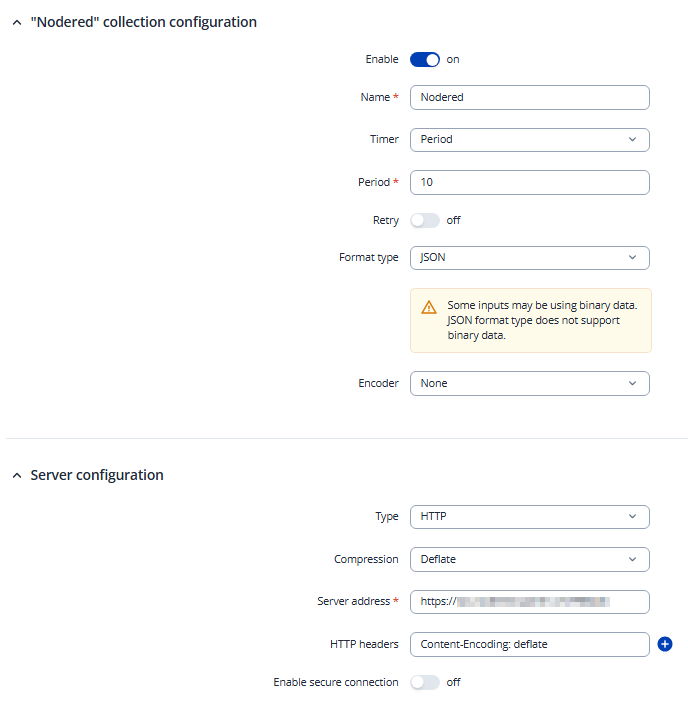
Under “Data to Server”, we created a collection that sends the data in JSON format to an HTTP server every X seconds.

The HTTP server is a Node-RED instance, which is supposed to decode and process the received data.

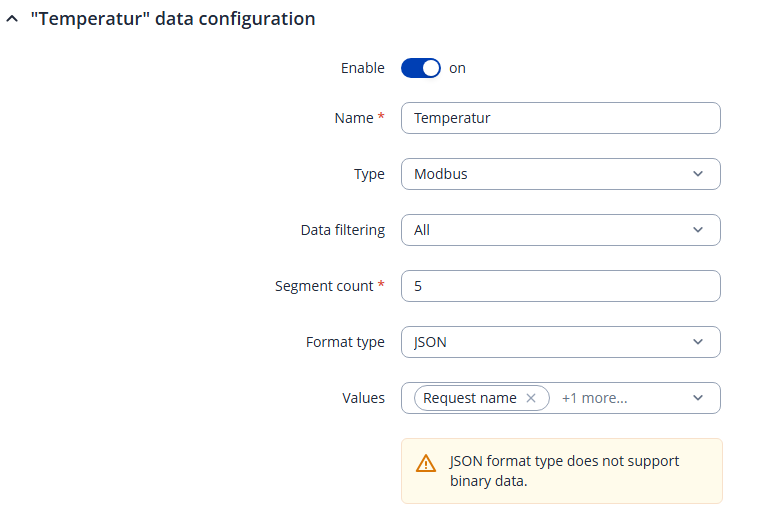
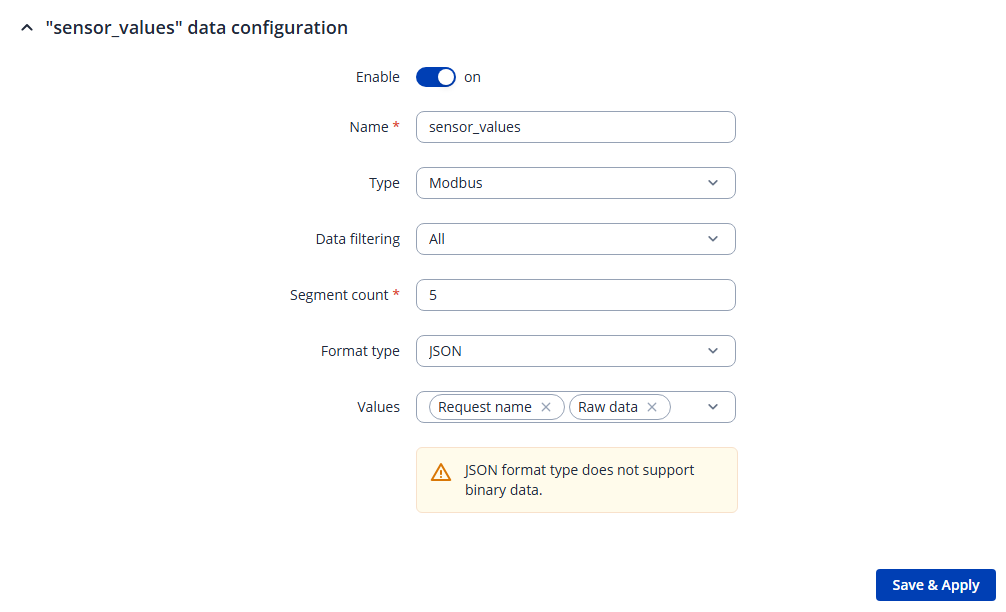
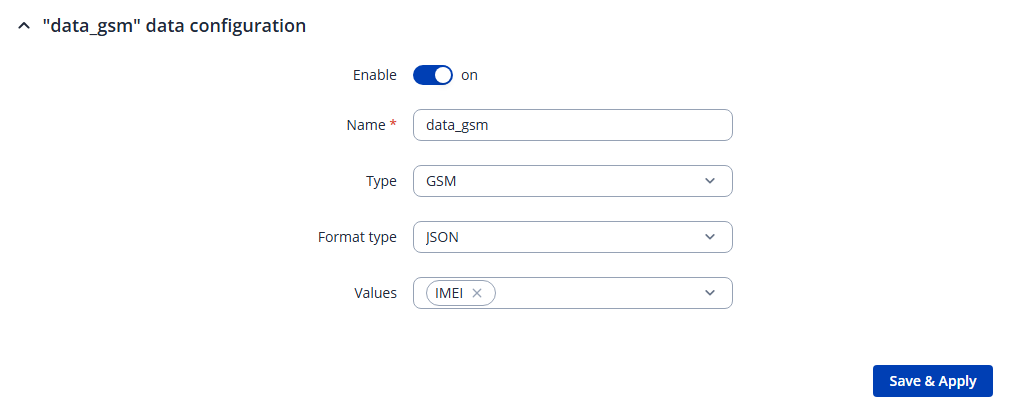
Within the collection, we created two data inputs:

  • one for Modbus

  • one for GSM

We do receive the Modbus data, but unfortunately the values are incorrect or outdated. The GSM data is not included at all.

Below are screenshots of the relevant settings:

As msg.payload, we receive the following string:

{“{\“sensor_values\”:”:{“{\“raw_data\”:\“5B33335D\”,\“name\”:\“Temperature\”},{\“raw_data\”:\“5B3937305D\”,\“name\”:\“Relative_Humidity\”},{\“raw_data\”:\“5B32395D\”,\“name\”:\“DewPoint\”},{\“raw_data\”:\“5B3539315D\”,\“name\”:\“Absolute_humidity\”},{\“raw_data\”:\“5B3135305D\”,\“name\”:\“Enthalpy\”}”:“”}}

Unfortunately, these values are always the same.

We found out that 5B33335D corresponds to [33]. However, this value does not match the current value reported by the Modbus RTU device.

The same data is also queried by another system via SNMP, and the values reported there are correct.

At this point, we do not know exactly where the problem is occurring.

Hello, @GmdSaanen ,

Apologies for the dealyed response, and thank you for providing the HTTP and MQTT payload examples.

Based on the information currently available, we can confirm that the data is being received as expected through MQTT, while the HTTP payload appears to have a different or malformed structure. However, the examples alone are not sufficient to determine whether the issue originates from the TRB246 configuration, the generated HTTP request, or the receiving server.

To investigate this further, could you please provide the following information?

  1. Data to Server configuration

Please share screenshots or an export of the relevant Data to Server instance, including:

  • Data input and selected data fields.

  • Format type and format string.

  • Collection settings.

  • Delimiter, segment count, and Send as object settings.

  • Any custom formatting or Lua scripts.

  • HTTP server settings, including configured headers and compression.

Please redact any credentials, tokens, or other sensitive information before sharing the configuration.

  1. Raw HTTP request

Please provide the exact HTTP request body as received by your server, preferably from a server log or packet capture, together with:

  • HTTP request headers, especially Content-Type and Content-Encoding.

  • HTTP response status code.

  • Any relevant server-side error or parsing logs.

Please share the raw payload rather than a screenshot or a copy from a rich-text editor, as the latter may alter quotation marks or other characters.

  1. Controlled test

If possible, please perform the following test:

  1. Create a minimal Data to Server test configuration using the default JSON format and only one or two data values.

  2. Send the data to a test HTTP endpoint.

  3. Capture the raw request body received by the server.

  4. Compare it with the MQTT payload generated from the same data source and test interval.

  5. If custom formatting or Lua scripts are currently used, please also confirm whether the issue persists when using the default JSON format.

The quotation marks shown in the forum example appear to be typographic quotation marks rather than the standard quotation marks used in JSON. However, we cannot determine from the forum representation whether these characters were actually transmitted by the router or introduced during copying or display. A raw HTTP capture will help us clarify this.

Additionally, please confirm whether the issue persists after upgrading the device to the latest supported TRB246 firmware, if an upgrade is available for your device.

Once we have the configuration and raw HTTP request details, we can determine the next steps more accurately and establish whether the issue is related to the payload formatting, HTTP transmission, or server-side processing.

I look forward to your reply,

Best regards,
V.