Greetings, @DanielGranitor ,
Welcome to Teltonika Community!
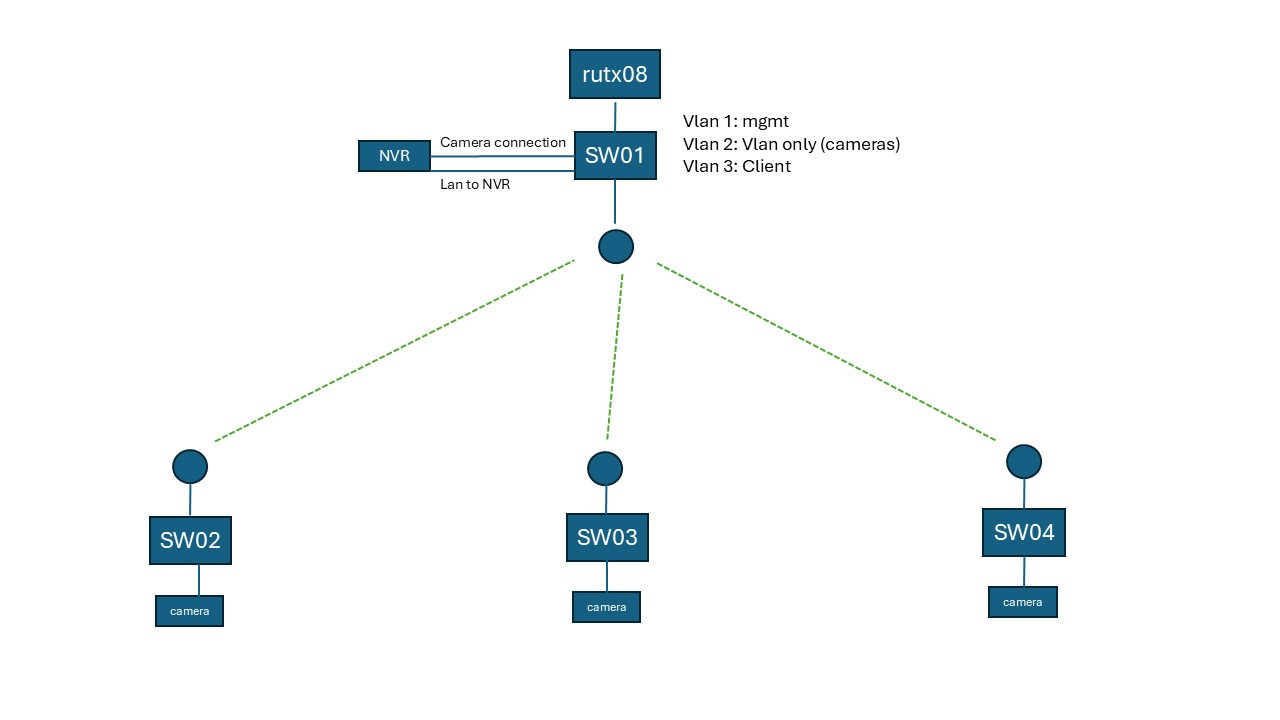
Thank you for the detailed description and network diagram. I’ve reviewed your setup and identified the likely causes of the STP instability. Please follow the steps below in order.
- Address the NVR Dual-Connection (Most Urgent)
Your NVR currently has two cables going into SW01 — one on the camera VLAN (VLAN2) and one on the management/LAN side (VLAN1). This is very likely creating a Layer 2 loop inside the NVR itself, which STP cannot detect or block, and is the primary cause of your port flapping.
Quick test: Disconnect the “Camera connection” cable from SW01 and monitor the network for 30–60 minutes. If the STP instability stops, the NVR is confirmed as the source.
Long-term fix: Configure the NVR-facing port on SW01 as a trunk port carrying both VLAN1 and VLAN2, and use a single cable to the NVR. VLAN trunk settings can be configured at:
Network → VLAN
- Switch from STP to RSTP on All Four TSW202 Switches
On each switch (SW01–SW04), go to:
Network → Spanning Tree
Set the Mode field to RSTP (802.1w).
RSTP reduces reconvergence time from ~30–50 seconds down to under 1 second, which dramatically reduces the impact of any brief wireless link dropouts on your Nanobeam connections.
- Set SW01 as the Permanent Root Bridge
On the same Spanning Tree page (Network → Spanning Tree), set:
• SW01 Priority → 4096
• SW02, SW03, SW04 Priority → leave at default (32768)
This ensures SW01 always wins the root bridge election and the topology reconverges predictably after any wireless disruption.
- Enable Edge Port on All Access Ports
On every port connected to an end device (cameras, NVR ports, TAP200), navigate to:
Network → Ports → Port Settings → select the port → Edit
From the firmware changelog, recent versions added a dedicated STP port configuration page. If you are on firmware TSW2_R_01.08.1 or newer, STP port settings (including Edge Port) are accessible directly from the Spanning Tree page per-port.
Setting a port as an Edge Port prevents cameras or other devices connecting/disconnecting from triggering a full STP topology change across all switches.
Summary of Priority:
- Test by removing the second NVR cable first — this alone may fully resolve the issue.
- Enable RSTP and set SW01 as Root Bridge on all four switches.
- Configure access ports as Edge Ports to prevent end devices from triggering topology changes.
Please let us know how Step 1 goes and we can proceed from there. Happy to assist further.
Best regards,
V.