I have two VOIP phones connected via ethernet cable to an RUTC50 router.
We’ve been having patchy phone calls since purchasing the router, and I have spoken to our VOIP provider who has said “Services on the router such as SIP-ALG need to be off as this can also cause issues with phones.”
I’ve tried working out how to disable SIP-ALG, but I’m lost.
So my VOIP provider came back and said that he ran some tests and SIP-ALG is already disabled on my router, but that my ping is anywhere from 35ms to 165ms, which could explain why I’m getting jitters on the VOIP phones when in use.
Is there anything I can do to the settings on the RUTC50 so that I can have it prioritise VOIP data first, and computer download speeds second, or would that already be setup on it from factory?
Could you please confirm which firmware version is currently running on your device?
Are you using a SIM card to provide an internet connection to the router? If so, could you share the signal strength values? You can find these under Status → Network → Mobile.
Please try the following:
Go to Network → Firewall → Settings, then disable Automatic helper assignment and Software flow offloading
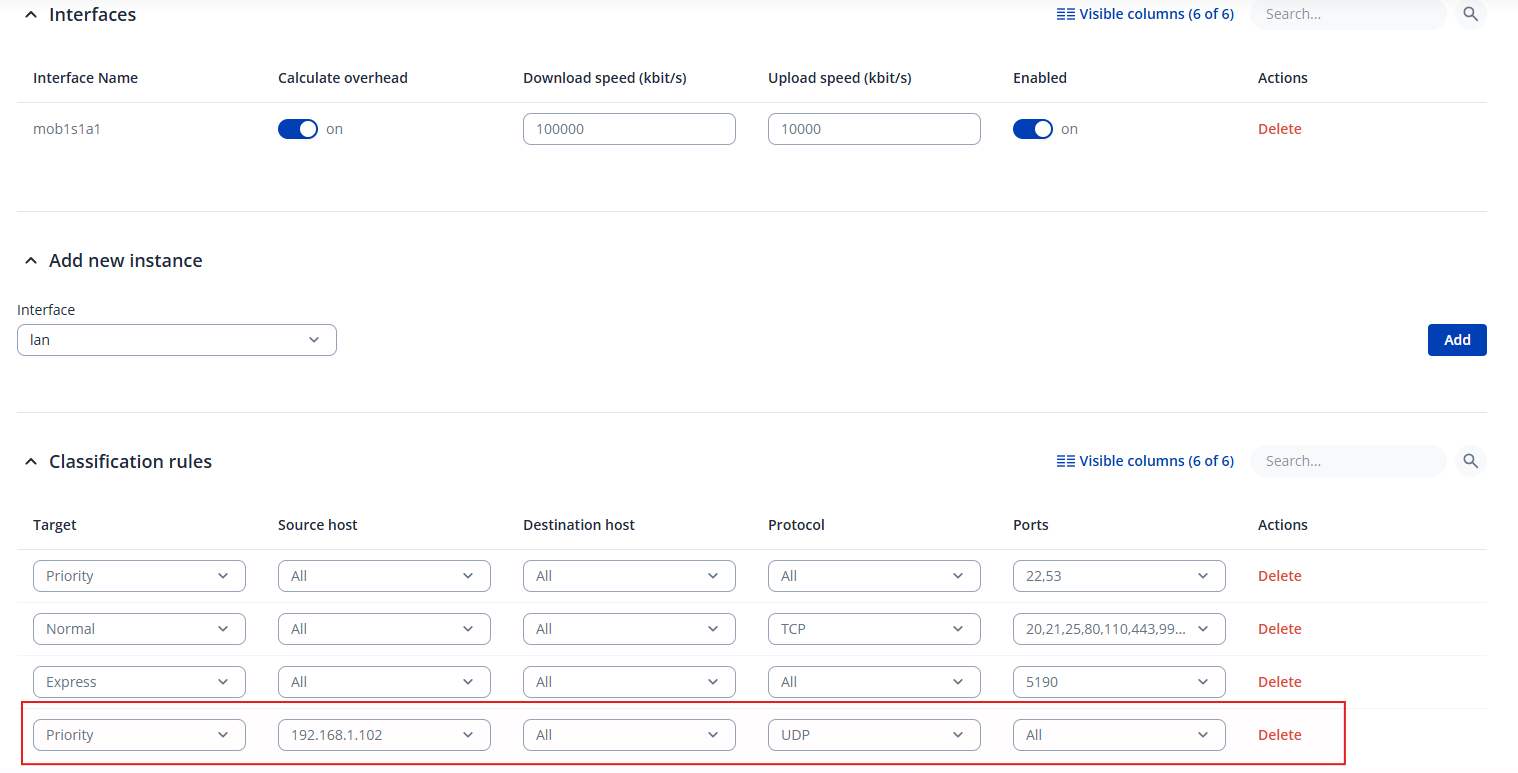
You will need to add a classification rule, the target should be Priority and then in the source host specify the IP of the phone (2 rules for 2 phones)
Alternatively, if you prefer not to use IP addresses, you can create rules based on the ports used by the phones.