Anyone able to “SIM switch” to different eSIM profiles?
My setup: RUTM52 FW 0.7.15 with no physical SIMs, just 2 x eSIM profiles on the Primary modem.
My expectation: When “SIM3 (eSIM1): Primary modem eSIM profile 1” runs out of data and can longer ping 8.8.8.8 switch to “SIM3 (eSIM2): Primary modem eSIM profile 2”…then eSIM profiles 3, 4, 5, 6 and finally 7.
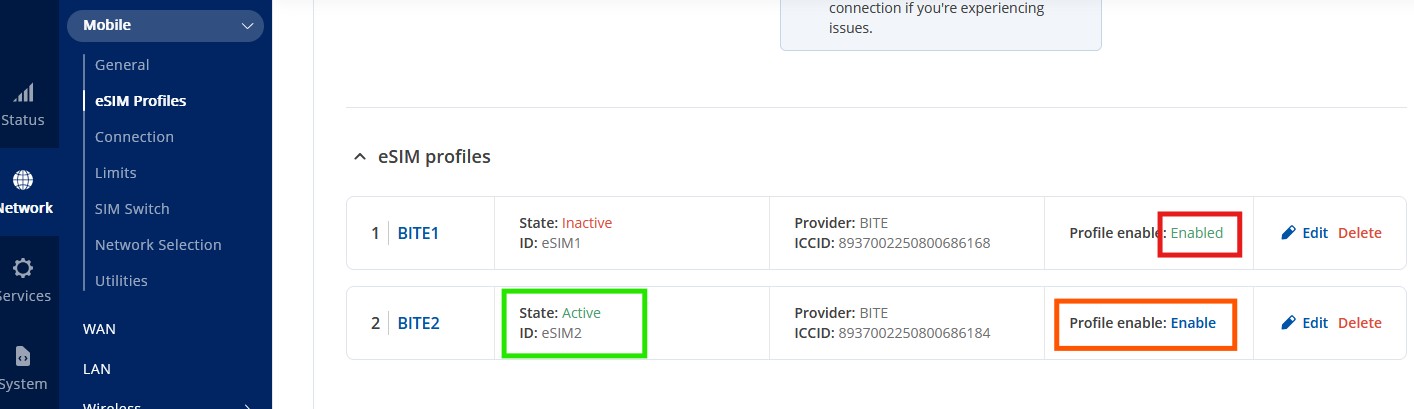
REALITY: Logs show that RUTOS attempts stage 1 of the process, switching the “active” SIM on Primary modem with status “SIM card info: Inserted (SIM3, eSIM2)”. However, it does not appear to attempt to “Enable” eSIM profile 2 on the Primary modem! If I manually click “Enable” in the Web GUI then a data connection is started.
Is this by design? If so, then why even offer “SIM switch” if it DOES NOT SWITCH AND ENABLE different eSIM profiles? Or, have Teltonika staff not properly tested switching to next eSIM profile? Are we the “lab rats” here, buying top-price kit and selling to our customers with promises we cannot fulfil?
Anyone on this forum managed to get eSIM profile switching to work?
Virgil
Image: Screenshot showing Web GUI after “SIM switch” (to eSIM profile 2) has happened; eSIM profile 2 showing “Active” but not “Enabled”.
SIM switch does work, like in your provided screenshot 2nd profile becomes active.
SIM switch switches to next SIM, but it doesn’t set it as default. What it means is if you reboot device it will try establish connection with default SIM (in your case 1st profile instead of continue using 2nd profile).
Enabled in eSIM profiles page means it sets that profile as default SIM.
Hi Lemondude. Thanks for your input and sharing your experience. Can you clarify which model you tested on, and are you stating that FW 7.15 does NOT work (switches to next eSIM profile, but does NOT mark it “Enabled”), but 7.18.2 switches to next eSIM profile AND makes it “enabled”?
You should check State if it’s Active - means that profile is currently in use and not Enable/Enabled.
As mentioned above SIM switch switches SIMs/eSIMs (not changes default SIM), so it makes next SIM/eSIM state as Active and previous changes to Inactive. Enabled will be always set on default eSIM profile and others will show Enable independently if they currently active or not.
Hi. So, you have not tested this yourself, because if you had then you would realize that the screenshot I showed is a problem: the eSIM profile DOES get marked “active”, but it does not automatically become “enabled” unless you MANUALLY click it (“enable”). You haven’t stated which model you tested on, or even if you have properly tested (waited for eSIM profile 1 to consume all data, then confirmed that eSIM profile 2 becomes both ACTIVE and ENABLED). It seems that your comments are purely theory, and I was inviting comments from anyone who have DEFINATELY tested this AND confirmed that the 2nd eSIM profile became both ACTIVE and ENABLED, making a data connection and becoming the default gateway for internet traffic.
Anyone else actually tested this for real?
For troubleshooting purposes, we will require more sensitive information from your end, such as the troubleshoot file, which may contain passwords, public IP addresses, serial numbers, and such. To avoid leaking this information, we have sent you a form to fill out, which you will receive in your e-mail inbox that you have registered your account with in the forums. In the Ticket ID field of the form, please enter the ID of this thread, which is 16161.