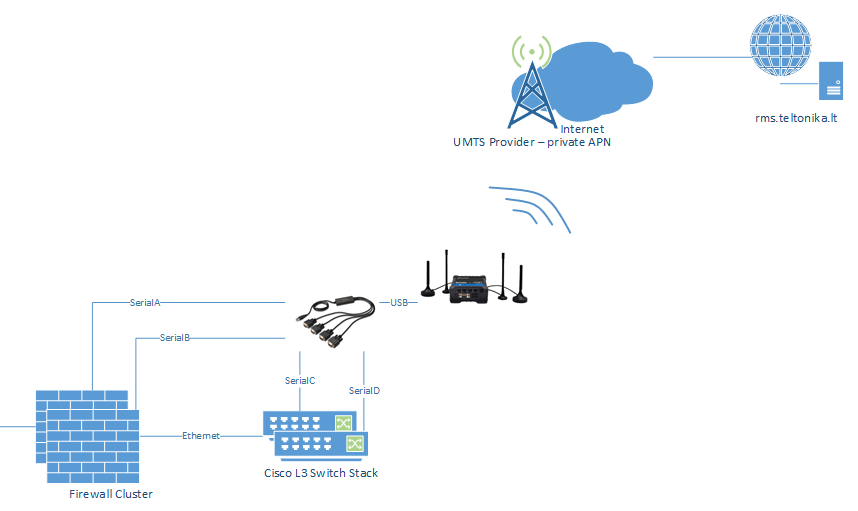
we already setup a out-of-band-mangement solution with Teltonika.
We have a Teltonika RUT955/956 with a USB-to-4x-Serial-Adapter connected. On the serial adapter we have Firewalls and Switches connected via the serial console.
We currently go via RMS to the Teltonika Device CLI and connect with Microcom to the Firewalls/Switches.
A great solution would be, to be able to connect via RMS directly to the Firewalls/Switches.
To help us better understand your setup, could you please clarify which communication protocols are used between the router and your end devices?
Additionally, you may consider using the RMS Connect functionality to remotely access your end devices. You can find more information on how to configure it in the following Wiki article:
Thank you for the clarification and for providing the example.
Based on the setup you described, the USB-to-Serial adapter is already working correctly, as you are able to access the connected device from the RUT955/956 CLI using /dev/ttyUSB0 with microcom.
Regarding the possibility of accessing /dev/ttyUSB* directly through RMS Connect, the current RMS documentation does not provide a serial or raw /dev/ttyUSB* connection type. RMS Connect Remote Access currently supports IP-based protocols such as SSH, Telnet, HTTP/HTTPS, RDP/VNC and SFTP.
Therefore, the fact that RMS Connect only presents IP-based protocols and does not allow /dev/ttyUSB* to be selected is expected according to the documented functionality.
As an alternative, the RUT956 supports configuring a USB RS232 interface in Services → Serial Utilities → Over IP, where the serial connection can be exposed over TCP or UDP. This could potentially be combined with an RMS VPN/Quick Connect connection so that the serial interface is accessed through an IP path rather than directly as /dev/ttyUSB*.
However, this would be a Serial-over-IP setup rather than a native serial connection in RMS Connect, and the complete workflow for your specific USB-to-4×serial adapter setup is not explicitly documented.
I just wanted to pop in and suggest Vilius, that if Teltonika considers adding this kind feature a old-timers knew long time as ‘reverse telnet’ functionality and now more formally known as “gensio accepters and gensio connectors” thing.
Please, don’t take a route starting from scratch and wasting effort inventing wheel again yourselves. A lot of valuable work is already done by industries deeply entrenched users of serial interfaces
Right, check Corey Minyard GitHub. com profile, where his projects implement the backend stack of features managing all what @friedheb was asking and much more regarding out of band usually requested stuff, Just needing frontend Web-gui stuff to RMS from you. Especially the ser2net, but check other related projects he has there also.
That is a very good piece of software. No surprise though, made by a carrier grade linux maker engineer.
Ser2net is quite readily available many linux distributions, at least Debian and its derivatives. Also raspberry pi Rasbian which together with a usb serial adapter is a one of the quickest and cheapest remote console solution you can get even with low budget.
ps. BTW, StarTech.com industrial usb multi serial port adapters while they are pricey to consumer gear are just great. Did seem to work and last forever even rough use. Google “startech.com usb multi port serial adapters” if interested, I’m not getting paid advertising, but those did not disappoint me ever.
I have forwarded this information to our R&D team as part of the feature request for further consideration. I will keep you informed and provide an update as soon as I receive a response from them.
For now, you can try using Serial Over IP. It can be configured on the device, allowing the client to connect to it via RMS Connect (Telnet). If the direct RMS Connect connection is unsuccessful, an alternative is to use RMS VPN together with Serial Over IP to establish the connection.
I am still waiting for an update from R&D regarding this feature request and I will inform you as soon as I have more information regarding this matter.