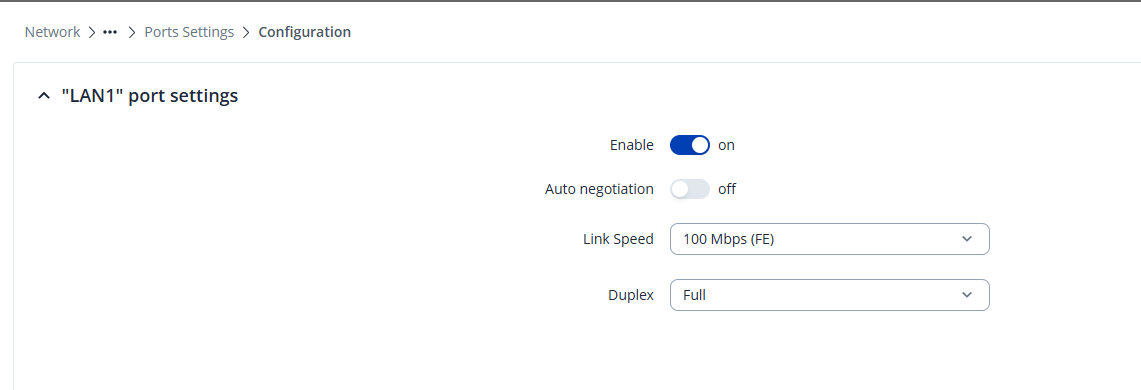
We have a RUT50 router which is connected via ethernet to a TSW010 switch (port LAN1 on RUTX50 is connected to port 5 on TSW010).
We have a computer connected to port LAN2 on the RUTX50 (let’s call it source) and we have a computer connected to port 1 on the TSW010 (let’s call it sink). We then have a GStreamer command running on source which sends video over UDP to sink with the following GStreamer command (beginning redacted but not important):
nvv4l2h264enc bitrate=15000000 num-B-Frames=0 control-rate=1 preset-level=UltraFastPreset profile=High maxperf-enable=1 idrinterval=30 ! rtph264pay pt=96 config-interval=-1 aggregate-mode=zero-latency ! udpsink host=sink.lan port=8900 sync=false
However, it doesn’t seem that the UDP packets are coming through to sink at all. When both computers are connected to LAN1 and LAN2 ports of RUTX50, then UDP video stream works great. So it seems that there’s some issue with the TSW010?
Furthermore, we’ve observed the same behavior when copying files over the LAN using scp , when both machines are connected to RUTX50 then we get speeds of 100MBps but when using the TSW010 we only get 10MBps.
This is with a brand-new RUTX50 and TSW010 which we haven’t configured in any particular way other than adding static IP addresses to the LAN. My understanding is that the TSW010 is unmanaged, so there’s no configuration that we can do with it, so maybe it’s just a hardware limitation? I’d be suprised though, since a switch should be able to handle these quite easily?