I have a RUTX50 from 2023 and it is installed in my camper van. It uses one SIM card with Deutsche Telekom and external MiMo antenna on the roof of the van and I keep it updated to the current firmware versions. Mobile connection has been great for almost 3 years. Since August 2026 the mobile connection gets frequently lost and the 3 LEDs above SIM1 keep blinking until I cut the power to restart. According to one recommendation I changed the Ping/Wget Reboot to “Modem reboot” but that is not helping. Any suggestions?
Yes, modem firmware is up to date: RG501QEUAAR12A11M4G
Device firmware up to date: RUTX_R_00.07.25.1
Are you using IPv6?
Have you try to disable it at WAN/LAN/SIM CARD?
IPv4. Please help me to understand how disabling WAN or SIM card could help. I wouldn’t have a connection then, would I?
Also I am trying a simple hardware fix now. Have put some tape under the SIM card to shim it up in case this is a SIM card connection issue. Will try this for a week while driving longer distance and report back.
Since the RUTX50 worked reliably for several years and the problem started recently, I’d first check the modem/system logs around the time the connection drops. It may help identify whether the issue is the cellular registration, SIM/network side, or the modem itself.
I’d also try the SIM in another device and, if possible, another SIM in the RUTX50 to rule out the Deutsche Telekom SIM/network. Since the three SIM1 LEDs keep blinking and a modem reboot doesn’t recover it, the logs could provide a useful clue before doing a factory reset.
Disabling IPv6 Solves Performance Problems
Prevents Loss of the Default IPv4 Route:When the mobile interface PDP type is set to IPv4/IPv6 (Dual Stack), certain cellular providers fail to correctly distribute the routing metrics. Users frequently report that when the RUT device attempts to initiate an IPv6 connection, it drops or completely overwrites the default IPv4 route, cutting off internet access entirely for legacy connected equipment.
Transitional Protocol Failures (464XLAT/CLAT):Many modern mobile carriers route traffic internally using IPv6-only networks. To let IPv4 devices talk to the internet, they rely on transition mechanisms like 464XLAT. If RutOS or the device’s specific internal modem lacks full native integration for these translation layers, network traffic stalls. Forcing the router to IPv4-only instructs the carrier to handle the translation at the tower level, improving stability.
DNS Leaks and Delays:By default, IPv6 has a higher priority than IPv4. If your router distributes an unconfigured IPv6 DNS server via DHCPv6, your devices will relentlessly try to resolve websites via IPv6 first. When these requests time out, it causes severe webpage loading delays or DNS leaks when running traffic through secure VPNs.
Prefix Delegation & Subnetting Outages:Cellular providers regularly hand out varying IPv6 prefix lengths (like a single /64 address instead of a standard block). Because a /64 block cannot easily be broken down into further subnets, the Teltonika device struggles to route packets downstream to its LAN ports or Wi-Fi clients, breaking local network communication
Also… It is best solution at my country. Save time when doing a troubleshooting.
Do you know how to use cli commands?
Try at cli:
logread | grep -i interface | grep -i mob
Can you share the output here?
Like what I got from my device.
20266 Tue Sep 15 17:23:55 2026 daemon.notice netifd: Interface ‘mob1s1a1’ has lost the connection
20270 Tue Sep 15 17:23:56 2026 daemon.notice netifd: mob1s1a1 (28608): Command failed: ubus call network.interface down {“interface”:“mob1s1a1_6”} (Not found)
20273 Tue Sep 15 17:23:56 2026 daemon.notice netifd: Interface ‘mob1s1a1_4’ has link connectivity loss
20276 Tue Sep 15 17:23:56 2026 daemon.notice netifd: Interface ‘mob1s1a1_4’ is disabled
20282 Tue Sep 15 17:23:56 2026 daemon.notice netifd: mob1s1a1_4 (10006): udhcpc: can’t bind to interface qmimux0: No such device
20285 Tue Sep 15 17:23:56 2026 daemon.notice netifd: mob1s1a1 (28608): Command failed: ubus call network.interface notify_proto { “action”: 0, “link-up”: false, “keep”: false, “interface”: “mob1s1a1” } (Permission denied)
20286 Tue Sep 15 17:23:56 2026 daemon.notice netifd: Interface ‘mob1s1a1’ is now down
20287 Tue Sep 15 17:23:56 2026 daemon.notice netifd: Interface ‘mob1s1a1’ is setting up now
20288 Tue Sep 15 17:23:56 2026 daemon.notice netifd: mob1s1a1_4 (10006): Command failed: ubus call network.interface notify_proto { “action”: 0, “link-up”: false, “keep”: false, “interface”: “mob1s1a1_4” } (Permission denied)
20289 Tue Sep 15 17:23:56 2026 daemon.notice netifd: Interface ‘mob1s1a1_4’ is now down
20318 Tue Sep 15 17:24:04 2026 daemon.notice netifd: Interface ‘mob1s1a1’ is now up
20321 Tue Sep 15 17:24:04 2026 daemon.notice netifd: Interface ‘mob1s1a1_4’ is enabled
20323 Tue Sep 15 17:24:04 2026 daemon.notice netifd: Interface ‘mob1s1a1_4’ has link connectivity
20324 Tue Sep 15 17:24:04 2026 daemon.notice netifd: Interface ‘mob1s1a1_4’ is setting up now
20329 Tue Sep 15 17:24:05 2026 daemon.notice netifd: Interface ‘mob1s1a1_4’ is now up
Marcelo is trying to help you to simply disable IPv6, this can improve things substantially.
Disabling some settings can improve performance of the RUT. These tweaks have helped to resolve problems successfully for a good few people. I, personally, have no idea why nor do i understand why, and i don’t want to… but my own experience is that it works for me, and that’s good enough. I’m sure that Marcelo’s explanation is excellent, having read it i find myself reaching for the bottle of brandy as it’s too much for my pea sized brain to grasp. Sometimes is just best not to know why in toooo much depth but just accept it works.
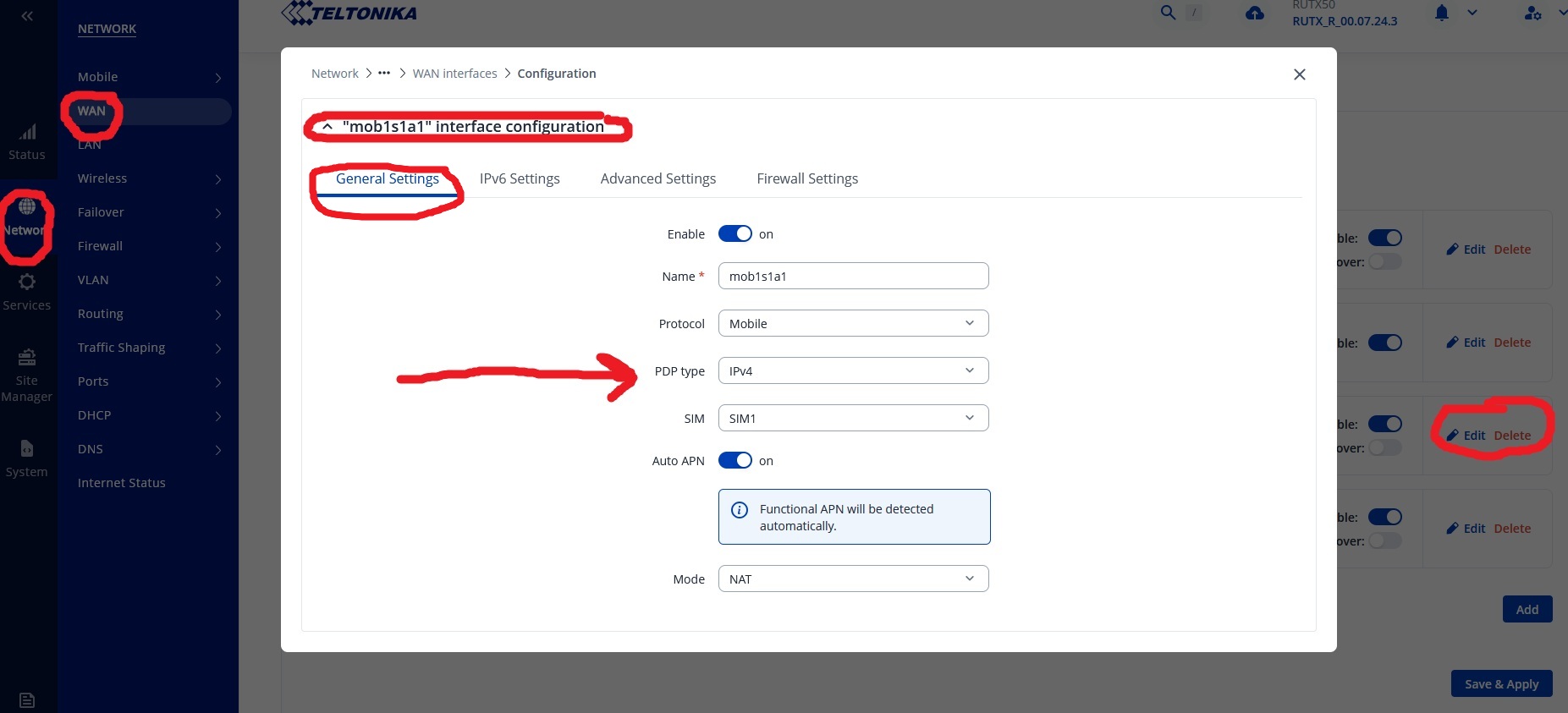
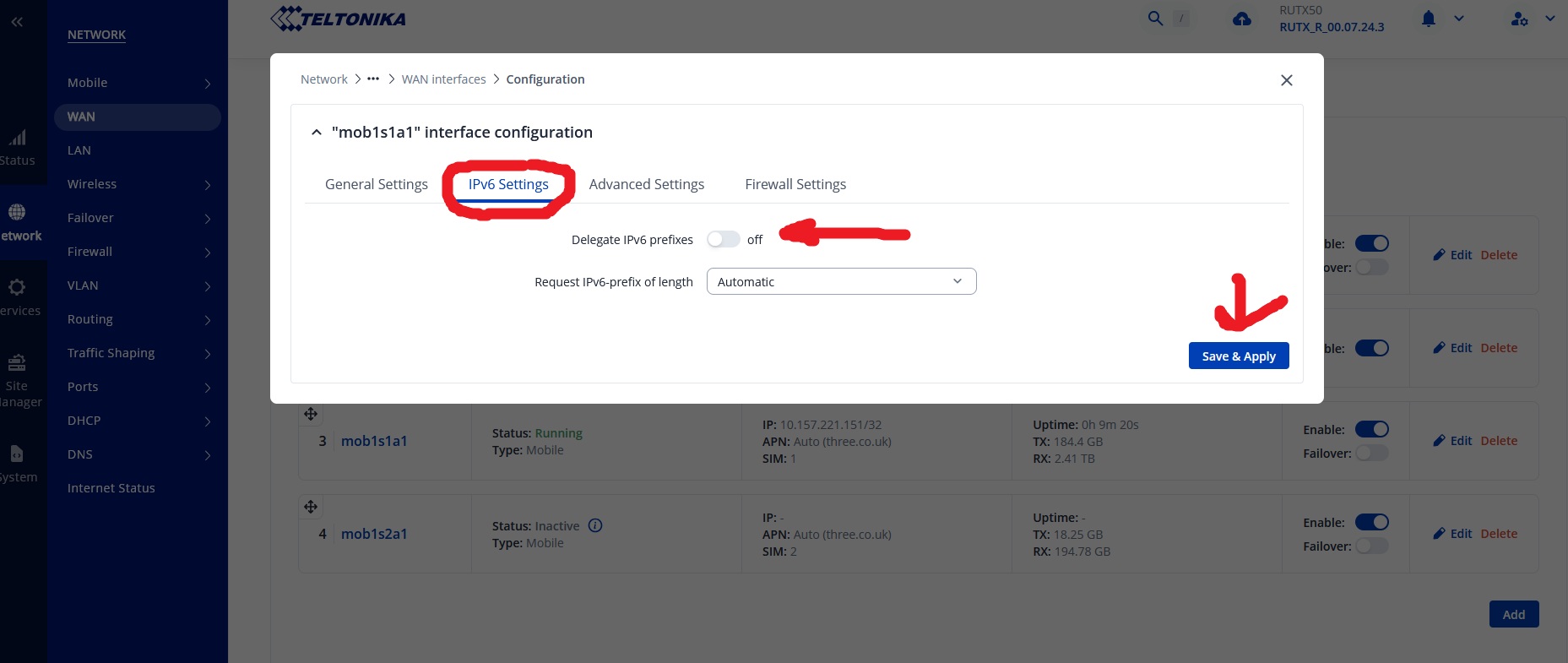
To disable IPv6 navigate the RUT’s user interface to page: Network > WAN and then click / tap to “EDIT” your mob1s1a1 interface. Save & Apply Twice.
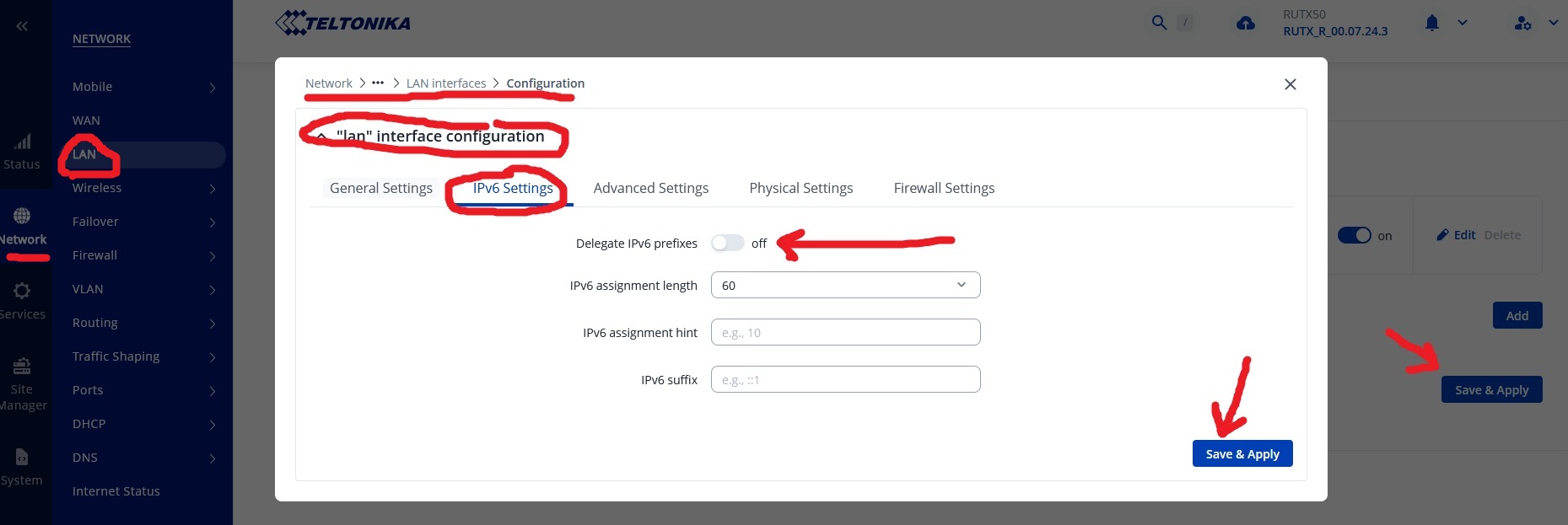
Then do: Network > LAN
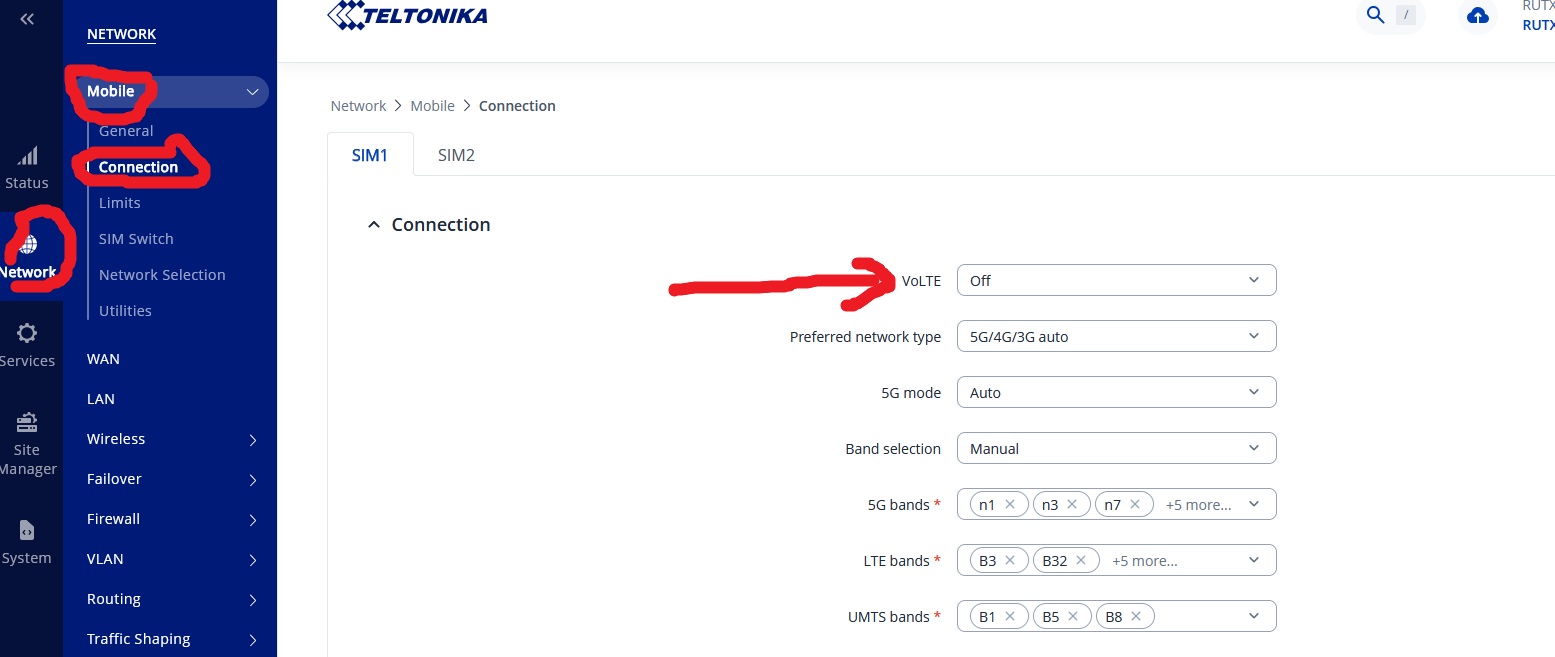
Then turn off VoLTE.
Save & Apply at each stage, sometimes twice which is a bit of a puzzle. I would then reboot.

Thank you for all your help and suggestions!
I will keep it simple for now and try the hardware fix that I mentioned (shim up the SIM card to ensure proper connection). I need to drive a longer distance with my van to try to repeat the issue (it doesn’t show up on the short distance drives I do right now). It will take me a week and then I will report back. If this doesn’t solve it, I will go with your proposals! Thank you!
You shouldn’t be shimming up the SIM card, shouldn’t be required. If you are experiencing loss of SIM card, have a look at:
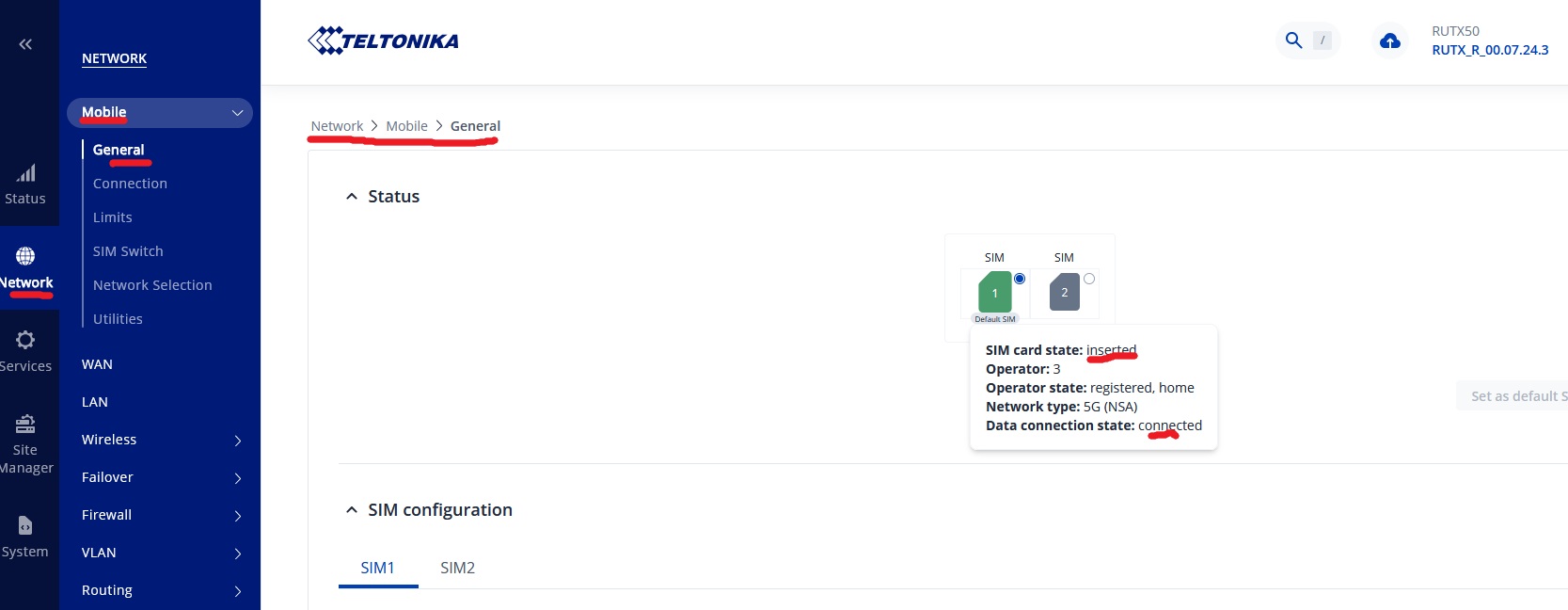
Is the SIM shown as inserted when a disconnection occurs? Do you / are you taking out, putting in / changing SIM’s on a very regular basis? Perhaps far toooo often!?
Try placing the SIM in slot two, make slot two the default SIM and try that if this is a sim slot issue. If it is a sim slot issue and the sim is loose in the tray with a poor connection then i don’t think this can be fixed unless it’s still under warranty and even then, it may be considered misuse, abuse.
Are you using a sim from your smartphone? in out every day, several times a day?
I think most people would agree that a sim usually goes in and then stays there for months even years before it needs changing. In the lifetime of the device most may change the sim just a handful of times.
If you are constantly inserting a sim in and then out of different devices on a regular basis, how old is the sim. Is it worth asking for a replacement sim from your network provider. That may resolve the issue short term.
Greetings, @ChristianDo,
The suggestions provided by @Marcelo.Barros and @akwe-xavante may help resolve the reported issue.
Could you please confirm whether the issue is still occurring or whether you require any further assistance from our side?
Please let me know about the outcome and if additional troubleshooting is required.
All the best,
V.
Thank you all for all these suggestions!
Let me state the current facts of the case:
RUTX50 worked great for about 3 years, installed in a camper van. Firmware incl. modem is up to date. Loss of connection on longer drives occurred a couple months ago. The SIM card from Deutsche Telekom was in the RUTX50 for several years, has not been pulled out other than to try to fix this issue.
With the loss of connection I assumed, it might be a hardware/connection issue and shimmed up the SIM card a couple days ago as I mentioned in this post before. I understand that SIM slot 2 is an alternative solution, in case this is a hardware/connection issue.
I have an opportunity to drive long distance on the weekend, during which the connection issue should show up.
If the connection issue still shows up on the weekend, I will try SIM slot 2 as mentioned by @akwe-xavante , if that doesn’t fix it, I will go for the other changes suggested by @Marcelo.Barros .
I will provide an update next week if this is ok with everyone. Thank you!
As an additional test, you can try inserting the SIM card to another device, such as a phone or a tablet to test if it connects to the internet.
If possible, test a different SIM card from another provider to see if the issue still persists.
If the issue persists, please provide us with the screenshot of Status → Network → Mobile, this might give us additional insights on the connectivity.
Please note: that this is a public forum, therefore, I kindly ask you to blur out any personal information, such as public IP addresses, IMEI, Serial numbers, etc.
I look forward to your reply.
Best regards
V.
A disconnection doesn’t firstly mean that the sim in the sim slot has become disconnected.
When experiencing a disconnection log in to the RUT and navigate the pages to find page at:
Network > Mobile > General to see if the sim is inserted, if it is then it’s probably not a sim / sim slot issue. Remove sim shims and put it back in, does the RUT say it’s inserted, if it is then my gut feeling is you are shimming up the sim in the slot for no reason and you could be doing more harm than good.
If the RUT says the sim is inserted can you post a screenshot of the page at Status > Network > Mobile this will help us to help you further.
Good evening. The hardware fix (shim up SIM card) worked during a long trip with the camper van. Let’s remember that the Teltonika is in a van and is exposed to constant vibrations, temperature changes etc. I’m glad it is working as well as it was before.
In addition I will replace the current SIM card with a new version from Telekom and put it in SIM slot 2 (will be the new default, with no shim).
Thank you all for your ideas and support!! You can close this issue now.
Hello, @ChristianDo ,
I hope you’re doing well,
I am glad that you managed to resolve the issue, in case you need any additional assistance, please don’t hesitate to make a new topic. We will be happy to help!
Best regards,
V.