RUTX50 intermittent mobile internet disconnects / poor band or modem behaviour

I’m having an issue with a Teltonika RUTX50 where the main problem is intermittent internet loss over Wi-Fi/LAN, not a Wi-Fi association problem.

The router has been working reliably for around a year with the same LAN devices connected, so I do not currently believe the root cause is the Ethernet ports or cables. I did notice some LAN port/link events during troubleshooting, so I temporarily disconnected Ethernet 2 and Ethernet 4 to isolate them, but the main issue appears to be on the mobile/WAN/modem side, not the LAN side.

Current firmware shown in the support/log export is:

RUTX_R_00.07.23

I can see that newer 00.07.23.x firmware builds exist, and Teltonika’s own firmware page describes “Latest firmware” as containing newer fixes but not yet as widely deployed as “Stable firmware.” (Tried this no difference)

Symptoms

  1. Internet connection drops while devices remain connected to the router.

  2. Wi-Fi clients still appear connected with good signal, so it does not look like the Wi-Fi radio itself is failing.

  3. When the connection is poor, speed can drop to around 11 Mbps, this router normally achieves around 100–150 Mbps in the same location.

  4. The behaviour looks like the modem may be attaching to a poor band/cell, failing to recover cleanly, or having a firmware/modem-session issue.

  5. Rebooting can temporarily restore connectivity.

Evidence from logs

The router is using a Quectel RG501Q-EU modem on O2 UK. The modem details in the diagnostic log show the RG501Q-EU modem, O2 UK operator, 4G/5G service support, and mobile modem state information.

After reboot, the system log shows the mobile interface eventually obtaining an IPv4 address on qmimux0, including DNS and gateway details, and then bringing the mobile interface up. This suggests the router can reconnect, but the recovery process is not always clean.

There are also modem/QMI connection errors around setup, including timeouts and IPv6/PDP connection failure messages. Example entries include Request timed out, QMI setup activity, and later PDN IPv6 call disallowed / Unable to connect IPv6, before IPv4 comes up.

The Wi-Fi status at the time of diagnostics shows clients connected with strong signal/SNR, which makes me think the Wi-Fi side is not the primary cause.

System information confirms the router was on RUTX_R_00.07.23 at the time of the diagnostic export.

LAN port isolation

There were some LAN link-state events, and I disconnected Ethernet 2 and Ethernet 4 as a test. However, those devices/cables have been connected for a long time and the setup has worked reliably until recently. I do not think the LAN ports explain the mobile internet drop or the large fall in throughput.

My current suspicion is one of:

  1. Firmware issue in 00.07.23.

  2. Mobile modem / QMI session instability.

  3. Band/cell selection problem.

  4. Router not recovering properly after mobile data/session failure.

  5. Possible issue fixed in later 00.07.23.x firmware.

Questions

  1. Are there known RUTX50 issues on RUTX_R_00.07.23 involving mobile internet drops, QMI/PDP failures, or band/cell selection?

  2. Would upgrading to the latest 00.07.23.x build be recommended for this type of issue? (tried this same result)

  3. Are there specific logs or modem status outputs I should capture at the exact moment the internet drops?

  4. Should I disable IPv6 on the mobile interface if the log repeatedly shows IPv6 PDP/session failures?

The main issue is not that LAN ports briefly show events; the main issue is that the router loses usable internet and sometimes drops to very low throughput despite normally achieving 100–150 Mbps. Its being doing this for the past month or so, tried removing LAN 4,2 same problem and upgrading the firmware still getting the same problem.
What bands and bandwidths are you getting?

A screenshot of Status > Network > Mobile will help masking out your IMSI number.

Have you recently changed the SIM or Network Provider?

What’s the Modems firmware, the modems firmware is different from the device firmware and needs updating too if required. Updating the device firmware doesn’t update the modems firmware.

I have disabled IPV6 and VoLTE too. I have also disabled all LTE bands that give a bandwidth of less than 20Mhz

Thanks. Based on my troubleshoot logs, the router appears to be connecting on:

  • Network mode: 5G-SA

  • Band: 5G N28

  • Bandwidth: 10 MHz

  • Operator: O2 - UK

  • SIM slot: SIM 2

  • Modem: Quectel RG501Q-EU

  • Modem firmware: RG501QEUAAR12A11M4G_04.202.04.202

  • EFS version: RG501QEU_VD_V00007_202207221

  • Signal shown in logs: around RSRP -69/-71, RSRQ -11, SINR 2–7

  • VoLTE: shown as ready/enabled in the logs

The serving cell section shows NR5G-SA, band 5G N28, bandwidth 10, and signal around RSRP -70, RSRQ -11, SINR 7. The cached modem state also shows 5G-SA, 5G N28, bandwidth 10, O2 UK, and modem firmware RG501QEUAAR12A11M4G_04.202.04.202.

I have not recently changed SIM or provider. It is the same O2 unlimited data SIM/provider setup I have been using. The router has been working normally for a long time in this setup.

The problem is that I normally expect roughly 100–150 Mbps from the RUTX50 with roof mounted 4G/5G antennas, and my O2 mobile phone in the same area can get around 150–160 Mbps, but the RUTX50 has dropped to around 11 Mbps and has also had intermittent mobile internet dropouts.

I understand now that router firmware and modem firmware are separate. Teltonika’s firmware page also states the update page is used for device/modem firmware, so I assume modem firmware needs checking separately from normal RutOS updates.

I have already tried both RutOS 00.07.23 and 00.07.23.3, and I have also done a full reset. The issue still appears to persist, so I am now wondering whether this is related to modem firmware, 5G-SA/N28 selection, or the router attaching to a poor/limited-bandwidth cell.

I have not yet disabled IPv6 or VoLTE. I can test those next if recommended. I can also try band locking. Teltonika’s docs say band selection can be set from Auto to Manual and LTE/5G bands can be selected manually, and the separate band-lock guide says this is done under Network → Mobile General by setting service mode and manual band selection.

Your 5G SA connection is very poor and struggling at just 10Mhz and your RSRP value of -70 is not good either (The lower the number the better).

If it was my problem i would disable VOLTE and IPV6 and under Network > Mobile > Connection i would change the 5G Mode to NSA (Not Auto) to see if you can get a much better 5G NSA connection to a band with a higher bandwidth (More than 20Mhz). It will establish a LTE connection too. I would then ban all LTE bands with a bandwidth of less than 20Mhz (You must have one enabled LTE band when connecting to a 5G NSA band, don’t ban the LTE band that has the highest bandwidth, hopefully the chosen LTE band will have a bandwidth of 20Mhz or better.

Make notes about you change so that you can reverse any chances later if you need too.

Your RUTS connection is very poor and can result in frequent disconnections and poor download speeds.

What are your external antennas and do you know if they are pointing to the best nearby O2 mast?

Just because you believe that your antennas are pointing to an O2 mast doesn’t mean that it is getting a connection to the mast you would prefer.

Do you know where your O2 masts are, how far away they are and in which direction they are?

On the WebUI page Status > Network > Mobile page in the section top right named Cell Info, you have a CELL ID number. Using this number hope over to cellmapper.net and using this page Cell ID Calculator - Cellular Coverage and Tower Map you can identify the mast number you are connected too. Using the map having configured things under menu you can find the mast that you are actually connected to… is it the mast that you expected?

Thanks. I understand the point about the poor 5G SA/N28/10 MHz connection, and I agree that could explain the low throughput.

However, I think we may be mixing two separate issues:

  1. Poor throughput / poor band selection

  2. Intermittent loss of usable internet through the router

My main problem is the second one. The original issue was not simply “slow 5G”. The router periodically loses usable internet while devices are still connected to the router/Wi-Fi. The Wi-Fi side appears alive; the failure is on the mobile/WAN/data path.

The logs also show that Wi-Fi clients were associated with strong SNR while the router had mobile/WAN behaviour being investigated. For example, Wi-Fi clients were connected with strong signal/SNR values, including one client at -32 dBm / -104 dBm with high RX/TX rates.

The router also had a mobile interface up with an IPv4 address on qmimux0, so this is not simply “the Wi-Fi disconnected”.

I agree the current radio state is not ideal. The logs show:

  • 5G-SA

  • 5G N28

  • 10 MHz bandwidth

  • RSRP around -70

  • RSRQ around -11

  • SINR around 7

  • O2 UK

  • RG501Q-EU modem firmware RG501QEUAAR12A11M4G_04.202.04.202

That can explain bad speed. But it does not fully explain why the router should lose usable internet if 4G is also available. The RUTX50 is a 5G/4G router and its status reporting includes network type, data connection state, bandwidth, connected band, RSRP, RSRQ and SINR, so I’m trying to distinguish a bad radio selection issue from a mobile-session/dropout issue.

Also, RSRP -70 does not look like poor signal strength to me. The weaker part seems more likely to be quality/bandwidth/SINR rather than raw signal strength. Teltonika describes RSRP as useful signal strength, RSRQ as signal cleanliness, and SINR as signal versus interference; higher SINR generally means faster and more stable service.

So I agree NSA-only and band testing may help prove whether the router is attaching badly. I can test:

  • 5G mode set to NSA only

  • IPv6 disabled temporarily

  • VoLTE disabled temporarily

  • manual LTE/5G band testing

  • checking Cell ID against CellMapper

  • comparing router speed/status against an O2 phone in the same location

But I still want to keep the root issue clear: the problem I’m chasing is periodic loss of usable internet, not only slow throughput. If changing from 5G SA/N28 to NSA improves speed but the router still periodically loses internet, then the fault is still open and points more toward modem/session recovery, firmware/modem firmware, or mobile data handling. key not this has only started in the past month.

Poor signal is the cause of your loss of internet and poor download speed.

To get good connectivity and a good download speed you need a higher bandwidth than 10Mhz and a lower RSRP value than -70. Getting both will greatly improve stability of your connection (Fewer disconnections) and a better download speed too.

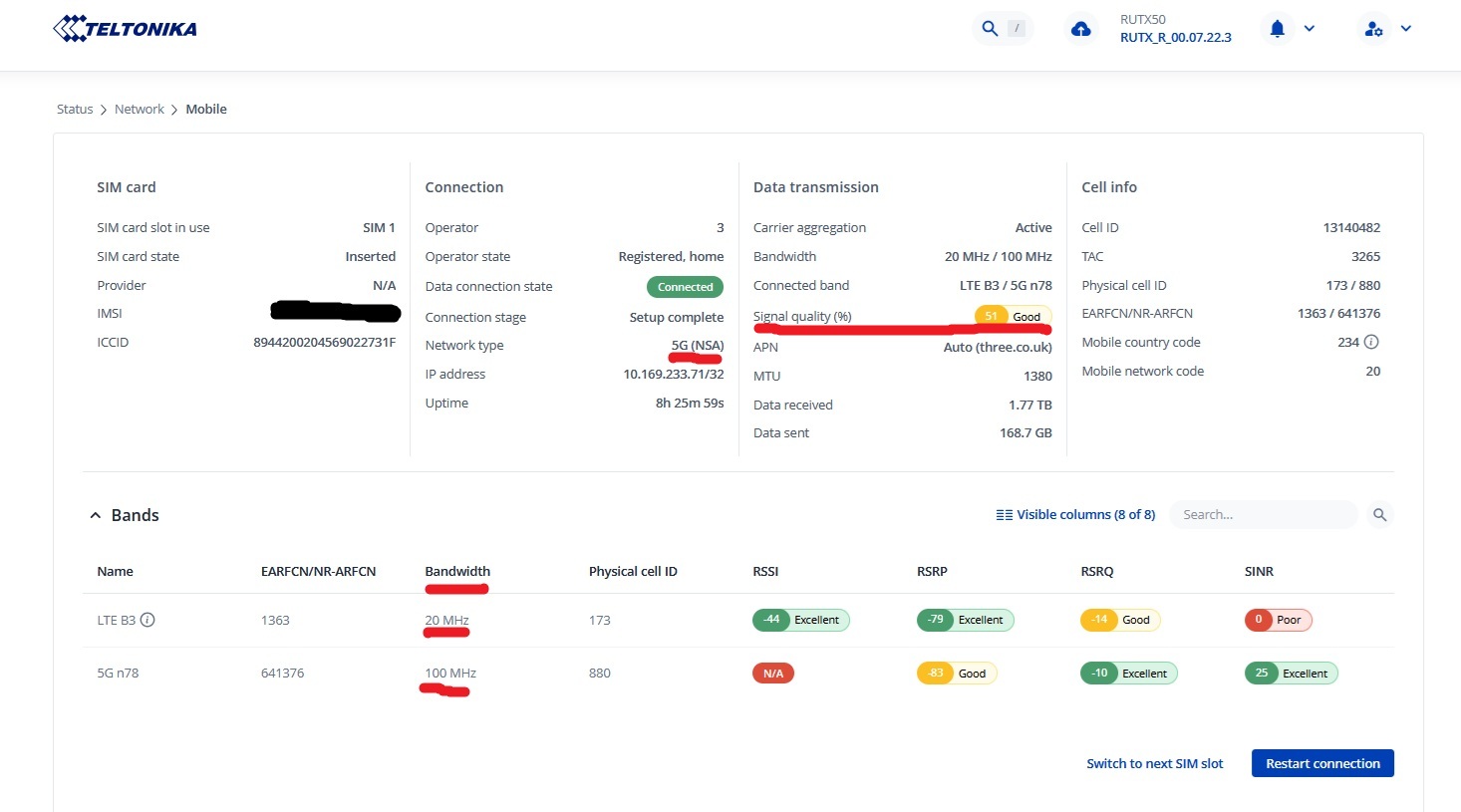
In the image below the RSSi value of band 5G n78 of N/A is a known issue that i hope Teltonika is going to resolve, and this error is falsely impacting on the value of the signal strength which should say Excellent, not Good.

I’m getting 350Mbs on a bad day and over 470Mbps on a good day and no drop-outs or disconnections. Note that LTE B3 has a bandwidth of 20Mhz whilst 5G n78 has a bandwidth of 100Mhz. I’m 2.5Km away from my Three UK mast.

It’s possible unless you know differently that you’ve had an 5G NSA connection up to now and O2 have turned on 5G SA which does not best suite your antenna or the distance you are from the O2 mast. It’s possible that your phone is connecting to a different band and mast to the RUT etc.

I may have my abc’s xyx’s a little mixed up sometimes, but you do need a better bandwidth and signal to reduce disconnections and get a better speed.

What is your antenna? Is it a directional antenna or a omnidirectional antenna? Finding out where your Three masts are and finding the best one from them which may not be the nearest and pointing a directional antenna to it from the correct side of your building will improve things dramatically.

I’m now going to disappear down my weekend bolthole for a couple of days.

Have a good drink, nice weather for it. - I understand the point about signal/band optimisation, but I think my original issue may be getting lost. - Using a 5G, 4G Wi-Fi NEMO. And to be fair, it’s been fantastic.

The main fault is not that the router is always slow or always has poor signal.

Example:

  • Router can be working normally and getting around 300 Mbps.
  • Nothing changes physically.
  • Later, for example the next morning, devices are still connected to the RUTX50 Wi-Fi/LAN, but there is no usable internet.
  • A reboot or recovery action brings it back.

That is why I do not think this is simply an antenna alignment or permanent poor-signal issue. If the router can get 300 Mbps in the same setup, the antenna/location is clearly capable of a good connection.

The low-speed 5G SA/N28/10 MHz result may be useful evidence, but I see that as the router being in a bad/failure state, not necessarily the root cause.

What I am trying to diagnose is:

Why does the RUTX50 mobile WAN/data path periodically fail or get stuck, while the router itself and Wi-Fi/LAN remain available?

I agree that testing NSA-only, IPv6 off, VoLTE off, and checking Cell ID may be useful, but I do not want to turn this into only a speed/band optimisation exercise. The real issue is intermittent loss of usable internet after the router has previously been working normally.

I have already tested RutOS 00.07.23 and 00.07.23.3 and performed a full reset. The issue still appears to occur. The modem is RG501Q-EU with firmware RG501QEUAAR12A11M4G_04.202.04.202.

What I would like to understand is whether this points to:

  • modem firmware/session recovery issue,
  • mobile data connection health monitor/reconnect behaviour,
  • 5G SA/NSA handover or fallback problem,
  • PDP/QMI/mobile interface getting stuck,
  • or a known RUTX50/RG501Q-EU issue.

I can provide troubleshoot logs from the failure state. The important condition is: local Wi-Fi/LAN stays connected, but usable internet through the mobile WAN is lost.

I think (Others May Disagree) that you’re trying to find a much more complex problem elsewhere when in my opinion your problem is a poor connectivity issue.

Connecting to different masts through the day can give you a good signal one moment then a poor one the next. I would want to monitor which masts your connected to through the day and make a note of which mast gives you a good stable connection and which mast gives you a poor one.

Are you suffering from IPV4 failing / offline problems?

Try setting up a daily or twice daily auto reboot say 6am and or 6pm.

The vast majority of issues that you have described are the result of poor signal brought about by any number of issues in isolation or collectively. Distance from masts, bad terrain in the landscape, poor alignment of antenna, poor choice / incompatibility of third party antenna. Your network provider giving your RUT unsuitable bands with low bandwidth (less than 20Mhz is unusable IMO).

The RUTX50 with the current stable firmwares is rock solid and reliable. IMO your pointing blame at the RUT when the issue is elsewhere, so OK a little tweaking of the RUTS settings, banning of a small number of LTE bands to stop your network provider from giving the RUT a poor band / bandwidth would IMO greatly improve things.

You won’t know if you don’t try the offered remedies, they worked well not just for me but for others too.

In your own words you have identified where the issue is, i’ve offered solutions to the described problem that i know work well and you haven’t tried.

I can’t offer you any further help, someone else may jump in and offer a different solution.

Good luck and i hope you resolve the problem in some way. Please share what works for you when you do find the answer to your problem as this helps others that follow behind you.

Have a look at this video: https://youtu.be/CAkjQ6a2qdc

Emphasis on reliability of service rather than speed, but the two go hand in hand.