RUTX50 - Forever inactive without a 5G connection (Possibly)

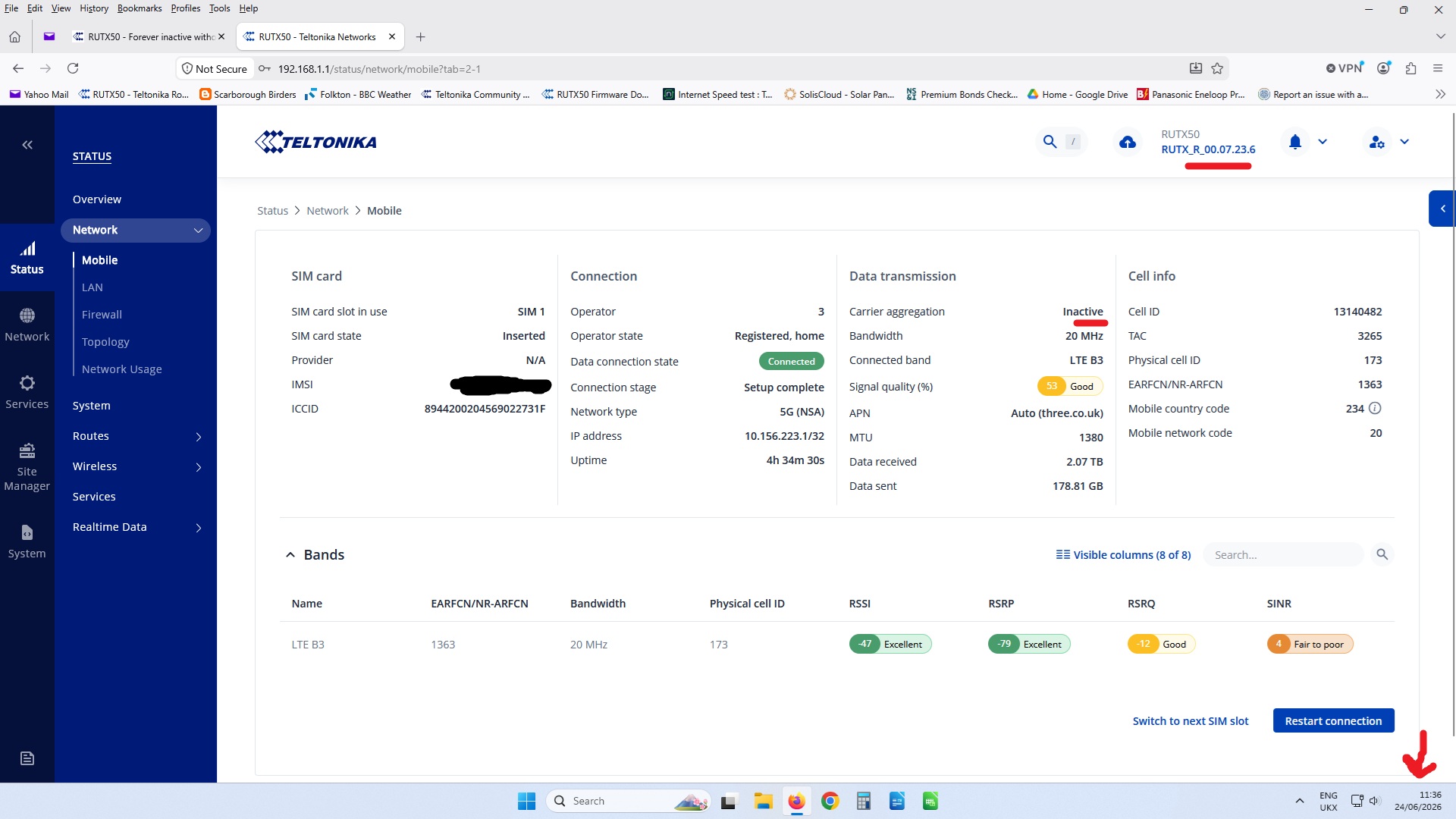
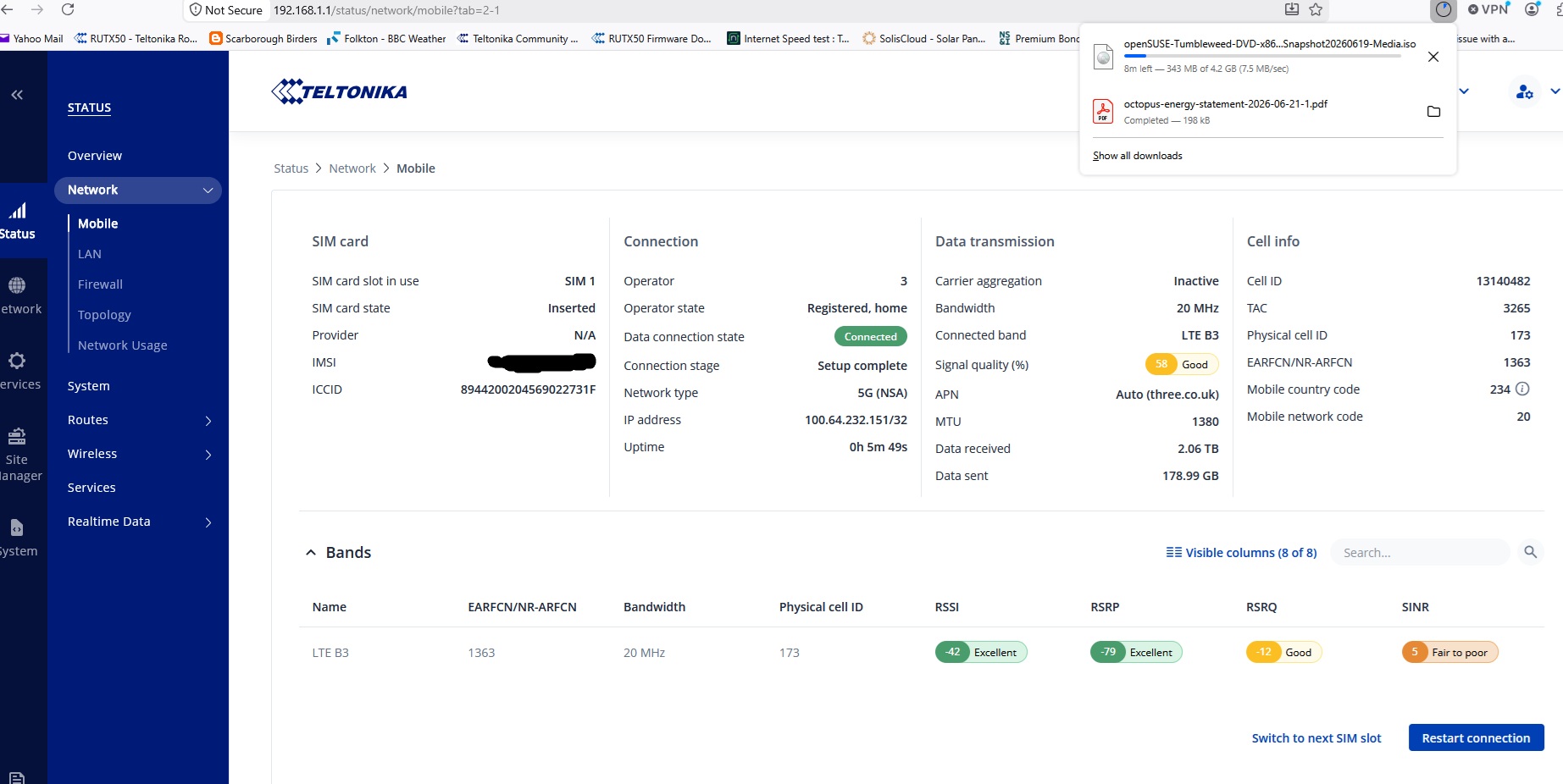
After updating firmware to 07.23.6 and after a scheduled reboot the GUI is forever indicating that the connection is “Inactive” and with just one connected LTE band only!

But internet connectivity, a speed test and my browsers download speed suggests i have a 5G connected band.

Hi, so “Carrier aggregation: inactive” is what you are wondering?

Googling “5G Carrier aggregation” returns

" 5G Carrier Aggregation is a fundamental technology that combines multiple distinct frequency blocks (component carriers) into a single, wider channel It functions like opening multiple highway lanes to let data flow simultaneously, directly increasing network capacity, reducing latency, and delivering multi-gigabit peak speeds to devices"

Now from that picture you attached, it seems there is just one Band you have there, right. If I understood what previous quotation states, I’d expect that it would be showing “active” like it has with me when I have multiple bands (blocks) used simultaneously.

Mine is still 4G, but 5G it’s basically same animal, except on steroids:

" 5G carrier aggregation (CA) significantly outperforms 4G CA by supporting much wider component carriers (up to 100 MHz in sub-6 GHz and 400 MHz in mmWave), allowing for more aggregated channels simultaneously, and operating flexibly across low-, mid-, and high-bands to deliver multi-gigabit speeds and ultra-low.

Or did I understand something in your concern wrong?

How about checking with cellmapper.net what the 5G availability is with your location there and if that doesn’t give you satisfying answer, ask from your 5G provider or check if they have coverage maps where you get more info?

That’s what I think how I would get more clarity to this if it would bother me still.

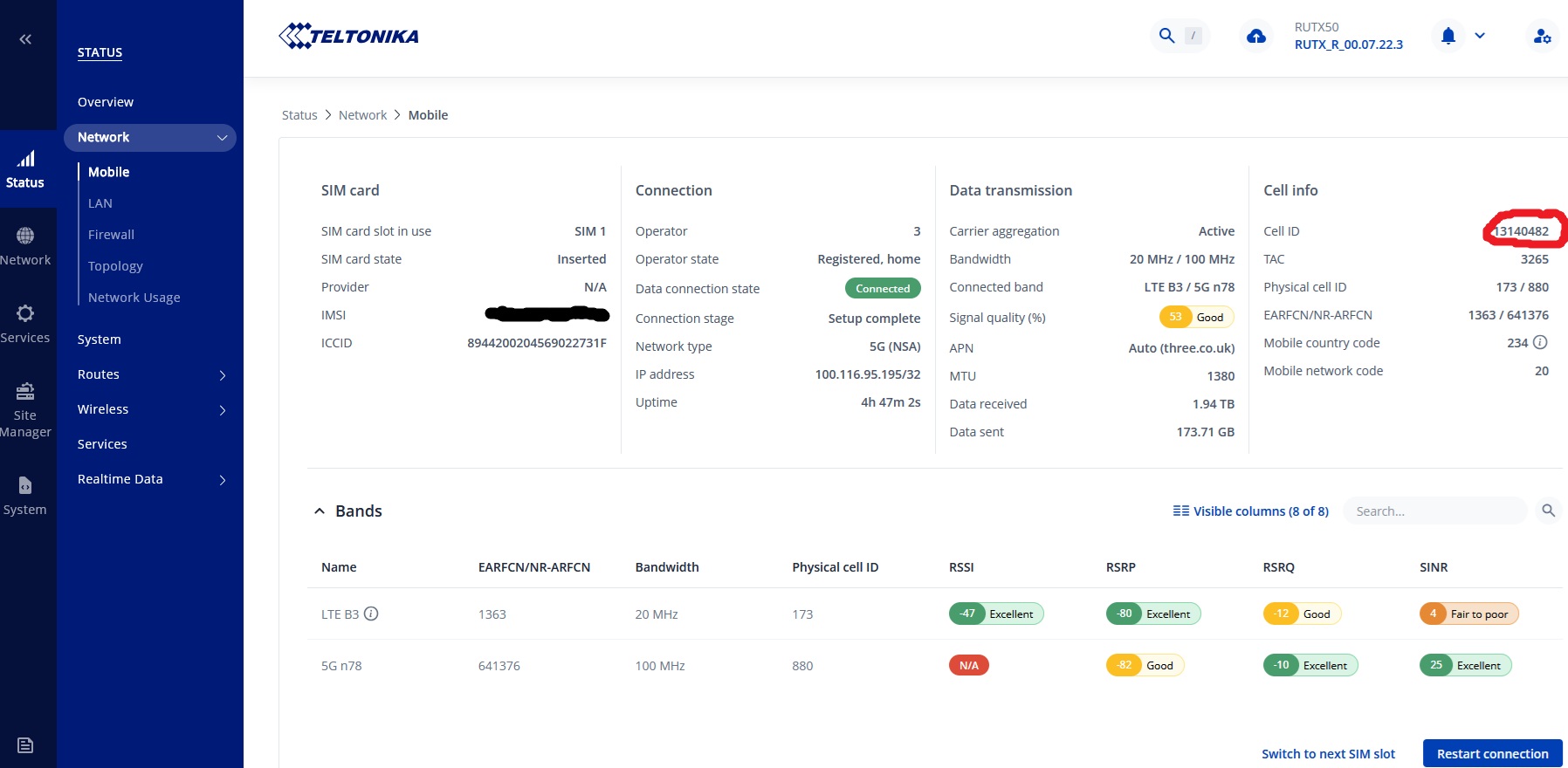
When active it would previously say active.

And i would normally have a 5g n78 band displayed at 100Mhz. (Ignore red circle around Cell ID.

Right, and now Cell Aggregation says active. So what’s the problem now?

Are you complaining that there is some delay or what? Duh, possibly. So what?
And it could also be that because the second band doesn’t seem too healthy in picture, router waits and see a while before it becomes useable, before rushing to change status which would be silly to flap back and forth, if second is not too useable after all. Could be a dampening feature like BGP route flapping preventing is exactly this kind of done intentionally so that it prefers stable routes and doesn’t try using routes which change up/down, flaps next hop from one AS to another. That provides better quality than jumping too fast using unstable routes. I guess same kind of feature would well be worth doing before activating Cell Aggregation too. It’s very likely better keep using one stable until second or any number more keep up state for a while.

The screenshot youre refering too was taken on the 12th june (11 days ago) with previous stable firmware to demonstate what’s normal for me before upgrade to firmware version 07.23.6.

Have another look at the two screenshots, top right of each.

I think I’m going to give up with you, sorry. Enough is enough for me.

Perhaps you find someone else to debug this with you.

Cheers,

I’m more than confident that this is a firmware issue and you can’t help anyway. It’s for a Teltonika engineer to have a look at it and pass it on to the back office to sort.

I believe that the problem is that data/information is not getting transferred to the webserver/web pages correctly. The link between the two has been broken.

The kids are now steaming whatever it is they stream in the evenings, the wife is using catchup TV and i’m repairing a PC remotely that’s 120 miles away and yet the RUT’s interface still says the connection is inactive with just one LTE band connected. Nobodies buffering or complaining! A Nperf.com speed test gives a download speed of 370Mb/s whilst the family are streaming stuff. The RUT’s speed test webpage is also broken.

I normally only update the firmware from stable version to stable version but for some reason this did not happen yesterday. I was not upgraded to the new stable version, i was upgraded to the current beta version!!!

It is not the connection that is inactive, but ‘carrier aggregation’ is inactive, and thats because you are connected to one band only, therefore no carrier aggregation is possible.

Hello, i have the same issue…

Device: RUTX50

RutOS version:
RUTX_R_00.07.23.6

Issue observed after upgrade:
After upgrading to RutOS 07.23.6, the WebUI behavior appears inconsistent.

Observed symptoms:

  • Event log occasionally shows: “Mobile 5GMM reject cause: N1 mode not allowed”

  • WebUI shows:

    • Connected band: LTE B7

    • Carrier Aggregation: Inactive

  • Before the upgrade I was expecting to see the active 5G band (n1) more clearly in the UI.

Diagnostics:

gsmctl -K
Access tech: LTE | MCC: 228 | MNC: 01
Access tech: NR5G-NSA | MCC: 228 | MNC: 01

AT+QNWINFO
+QNWINFO: “FDD LTE”,“22801”,“LTE BAND 7”,3100
+QNWINFO: “FDD NR5G”,“22801”,“NR5G BAND 1”,425290

AT+QCAINFO
+QCAINFO: “PCC”,3100,100,“LTE BAND 7”,1,247,…
+QCAINFO: “SCC”,425290,3,“NR5G BAND 1”,206

AT+QENG=“servingcell”
+QENG: “LTE”,“FDD”,228,01,…
+QENG: “NR5G-NSA”,228,01,206,-91,1,-12,425290,1,3,3

Signal:
RSSI: -66
RSRP: -97
SINR: 8
RSRQ: -10

Performance:
Download speed approximately 126 Mbps, which is normal for this location.

Question:
The modem diagnostics clearly show LTE Band 7 + NR5G Band 1 (n1) in NSA mode and normal performance. However, the WebUI only shows LTE B7 and “Carrier Aggregation: Inactive”.

Can Teltonika confirm whether this is:

  1. Expected behavior in RutOS 07.23.6,

  2. A WebUI display issue,

  3. Or related to the “N1 mode not allowed” log entry?

Thank you.

Hello eltigree,

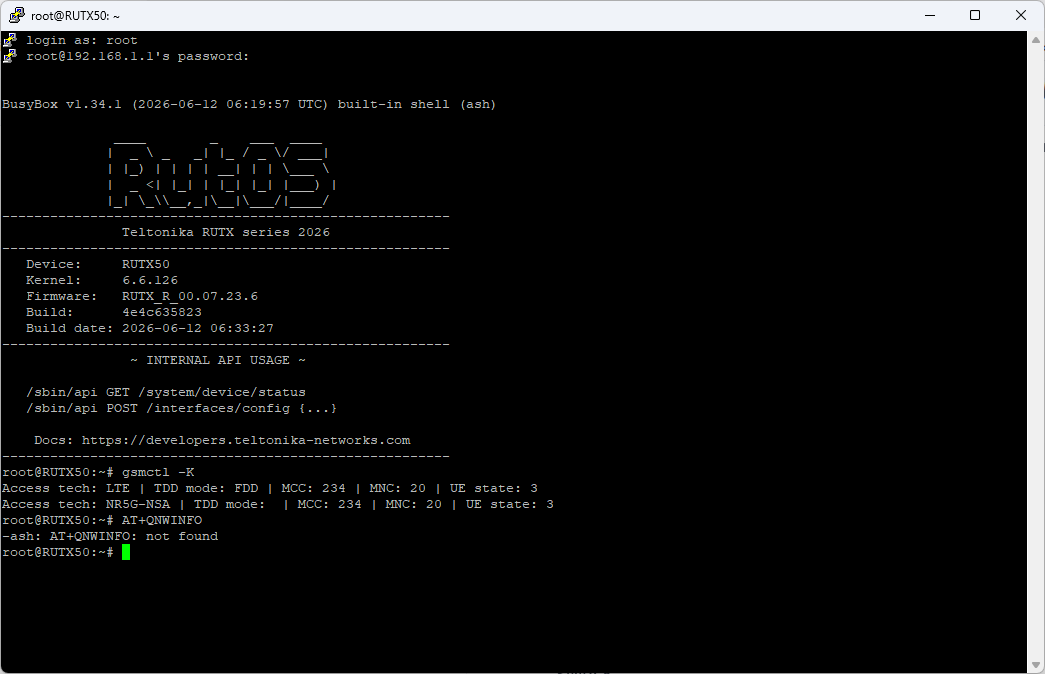
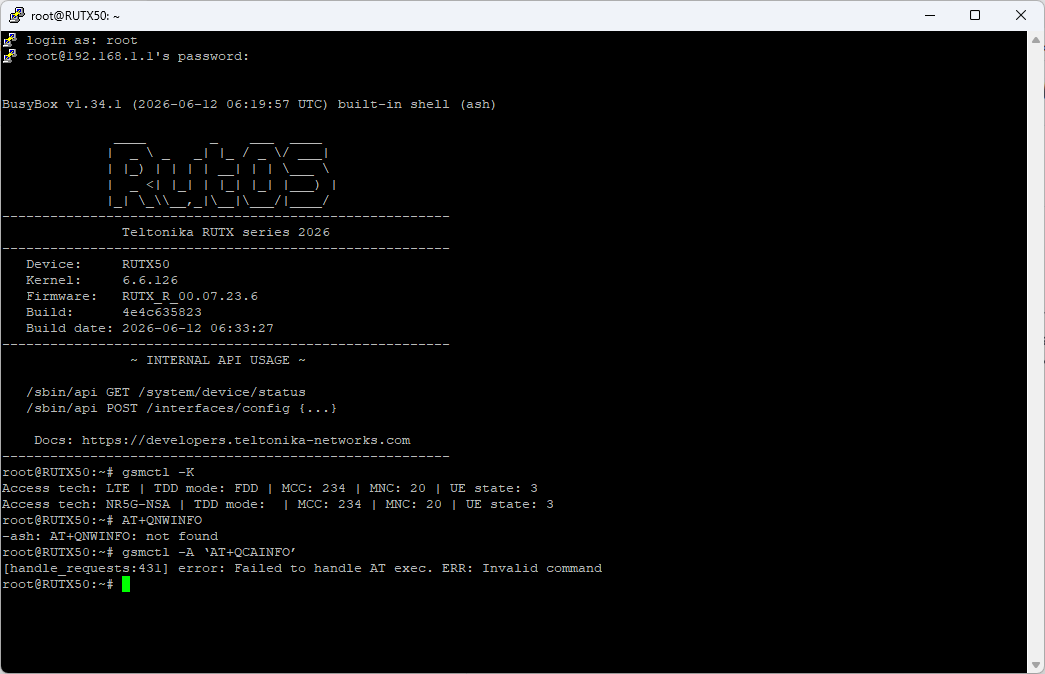
How are you executing these commands, i can’t work it out all i get is the response “Not Found”?

I’m clearly typing things in incorrectly or omitting something at the beginning! I clearly have a misunderstanding of how to offer these commands.

i get a similar response to the command gsmctl -k to you, but i’m struggling with the others.

Hi,

you must connect to your router in a terminal like “cmd” in windows, then connect with ssh root@yourrouterip there you can enter the commands… if yout have this warning at the first time: WARNING: REMOTE HOST IDENTIFICATION HAS CHANGED!, den generate a key with

ssh-keygen -R yourrouterip

For me its a bug in the current release…

commands:

-> gsmctl -A ‘AT+QCAINFO’

-> gsmctl -A ‘AT+QENG=“neighbourcell”’

-> gsmctl -A ‘AT+QNWINFO’


The quotation marks in AT+QNWINFO look wrong in your version…

OK got it, i’m copy pasting and it doesn’t like it.

Thank you so much.

I get the following:

root@RUTX50:~# gsmctl -K
Access tech: LTE | TDD mode: FDD | MCC: 234 | MNC: 20 | UE state: 3
Access tech: NR5G-NSA | TDD mode: | MCC: 234 | MNC: 20 | UE state: 3

root@RUTX50:~# gsmctl -A ‘AT+QCAINFO’
+QCAINFO: “PCC”,1363,100,“LTE BAND 3”,1,173,-79,-14,-44,4
+QCAINFO: “SCC”,641376,12,“NR5G BAND 78”,880

root@RUTX50:~# gsmctl -A ‘AT+QNWINFO’
+QNWINFO: “FDD LTE”,“23420”,“LTE BAND 3”,1363
+QNWINFO: “TDD NR5G”,“23420”,“NR5G BAND 78”,641376

root@RUTX50:~# gsmctl -A ‘AT+QENG=“servingcell”’
+QENG: “servingcell”,“NOCONN”
+QENG: “LTE”,“FDD”,234,20,C88202,173,1363,3,5,5,CC1,-79,-13,-45,12,8,20,-
+QENG: “NR5G-NSA”,234,20,880,-82,27,-10,641376,78,12,255

yes all looks good, you have band 3 and 78, but the GUI don’t show this values, its seems like a BUG in the current version :slight_smile:

If I understand correctly, the command AT+QCAINFO shows me the available bands. The command AT+QENG=“servingcell”, on the other hand, shows the bands that the router is currently connected to. Is that correct?

root@RUTX50:~# gsmctl -A AT+QCAINFO
+QCAINFO: “PCC”,1300,100,“LTE BAND 3”,1,331,-79,-9,-49,19
+QCAINFO: “SCC”,6400,50,“LTE BAND 20”,1,19,-67,-10,-48,15,0,-,-
+QCAINFO: “SCC”,431070,3,“NR5G BAND 1”,352

root@RUTX50:~# gsmctl -A ‘AT+QENG=“servingcell”’
+QENG: “servingcell”,“NOCONN”
+QENG: “LTE”,“FDD”,262,01,2306901,331,1300,3,5,5,1197,-79,-11,-47,20,15,-,-
+QENG: “NR5G-NSA”,262,01,352,-102,5,-12,431070,1,3,255

Apparently, Band 20 is no longer being used. For what reason?

The UI also shows it this way. What surprises me is that before the update, all three bands were being used. Even if I explicitly force the modem to use Band 20, it uses Band 3 instead.
Yes, actually you use Band 1, 3 and 20 → gsmctl -A AT+QCAINFO, the UI shows actually only the primary band, in my case this is Band 7 and in your case its band 3… i think we must wait, till teltonika has new release with fix avaiable…