My RUTX50 just won’t connect to the mobile network. The connection status indiicates it is connected and shows no error.
Also DNS lookups respond immediately and successfully with valid IP addresses, but a ping to 1.1.1.1 results is 100% packet loss.
RSSI is showing “Excellent”
I performed a full factory reset and reconfiiguration (several times) wiithout success and the SIM card works perfectly in a phone.
Is there some configuration that the setup wizard doesn’t make? It looks to me like some sort of routing or firewall issue, but I’m not sure what to do.
Please help me resolve this  Thanks
Hello,
Could you please provide a screenshot of the Status → Network → Mobile page in the WebUI?
Best regards,
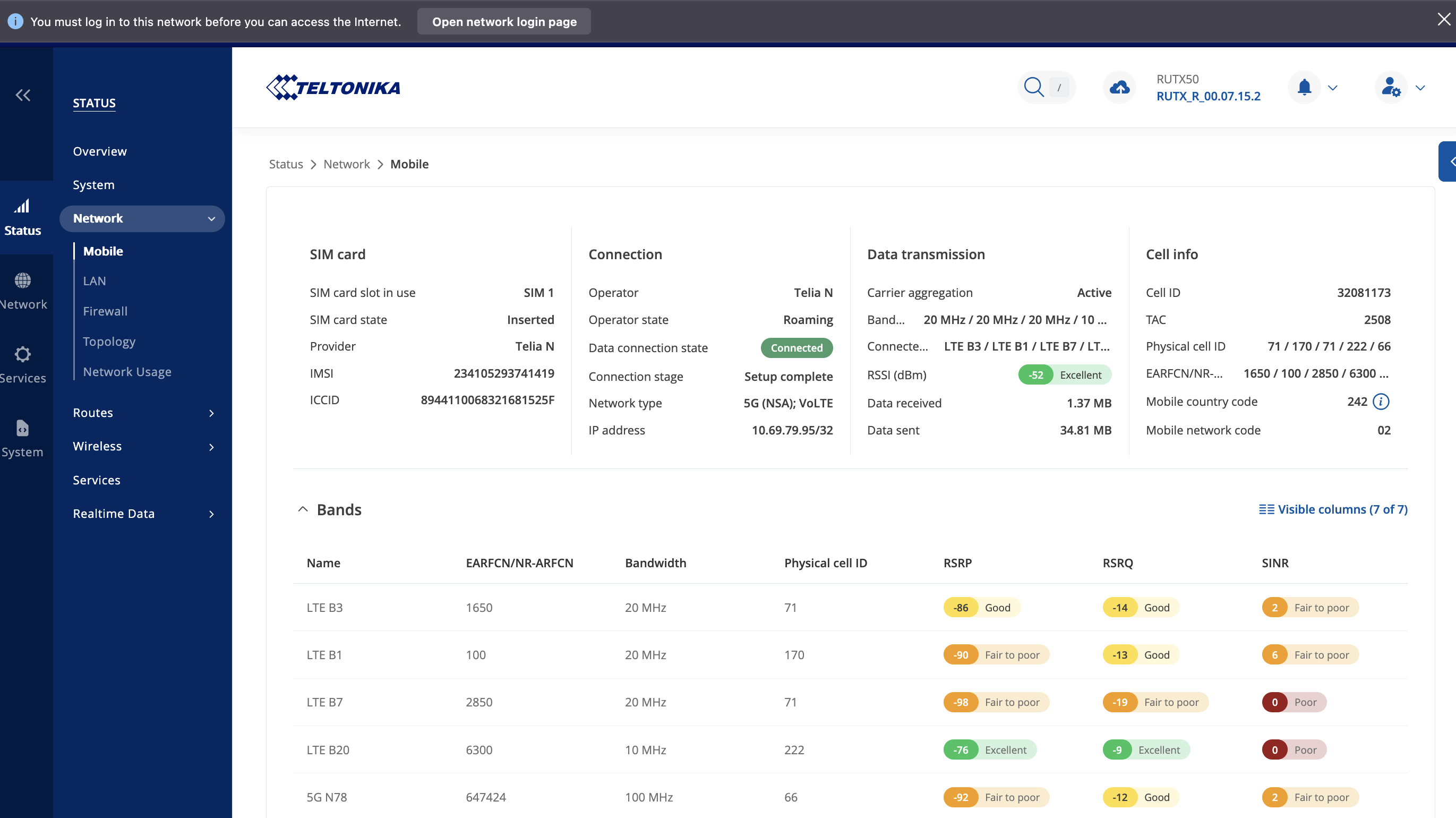
As I said, the interface looks like itt has connected fine, however pings to any internet addresses result in 100% packet loss and web pages don’t load. Plus DNS lookups appear to return successfully.
I seems like there is a firewall rule blocking data from flowing.
The device firmware version is the latest available: RUTX_R_00.07.15.2
and internal modem firmware: RG501QEUAAR12A11M4G_04.201.04.201
Hello,
I’ve sent you a form to fill out. Once completed, I’ll contact you privately regarding this issue. Please use the ticket ID “14638” when filling out the form.
Best regards,
Ah the anycast dns ping checks - This was actually due to an outage in the 1.1.1.1 cloudflare resolver which you test against by default (default teltonika config). I fixed this by adding another google dns server 8.8.4.4 and 9.9.9.9 (quad9). the default ping checks expects two of the ips in the list to work, but it is per interface so you will have to add for each. if two work it skips the rest I believe, at least that is what the interface says.
p.s. if anyone knows any other ‘stable’ anycast ips it would be nice - also teltonika please consider adding a few more to the list for the default configs, or handling this situation more gracefully by default ?
“TATA Communications AS4755 hijacked Cloudflare’s 1.1.1.0/24 prefix, impacting access to the popular DNS resolver. The hijack successfully propagated through TATA’s transit AS6453, despite the fact that 1.1.1.0/24 is properly RPKI signed (i.e., has a valid ROA) by Cloudflare. Interestingly, AS6453 normally filters RPKI Invalid routes - but in this case, it did not. The successful propagation of the hijacked prefix through AS6453 caused prolonged disruption for affected users.”
Thanks @atlex, but I’m not sure this has anything to do wiith Cloudfare, ALL pings to any valid IP addresses are failiing.
But what is interesting is a DNS lookup will return a valid IP address.
If I connect via a configured marina Wifi connection on WAN, then pings to 1.1.1.1 and other IP addresses etc return successfully. It’s just when I connect via the mobile interface that it is failing.
Under guidance from Teltonika, I have upgraded the modem firmware to > RG501QEUAAR12A11M4G_04.202.04.202. But this failed to resolve the problem.
This topic was automatically closed after 60 days. New replies are no longer allowed.