Hello,
I need help with a technical setup.
We would like to configure LTE failover on our UniFi Dream Machine Pro. We still had a Teltonika RUTX50 lying around in the warehouse, so we inserted a Telekom SIM card. The internet connection works fine when connecting directly via the RUTX50’s Wi-Fi.
The problem is: I can’t figure out how to put the LTE router into a kind of “modem only” mode, connect it to the UDM, and configure it as a failover WAN. DHCP and DNS should continue to run on the UDM – I really just want the internet traffic to switch over to LTE when our fiber connection has issues.
Ideally, it should also still be possible to access the RUTX50’s WebGUI while it’s connected to the UDM.
Currently, the setup is just one cable from the RUTX50 (WAN) to the UDM (WAN). The RUTX50 LAN1–LAN4 ports are not connected to anything.
Can anyone support me with this?
Hello @nebi.arslan,
Thank you for your inquiry.
To begin, firstly:
-
Could you please clarify whether you want to achieve failover on the RUTX itself, or if you want to use its LTE connection as a backup internet source for the UDM?
-
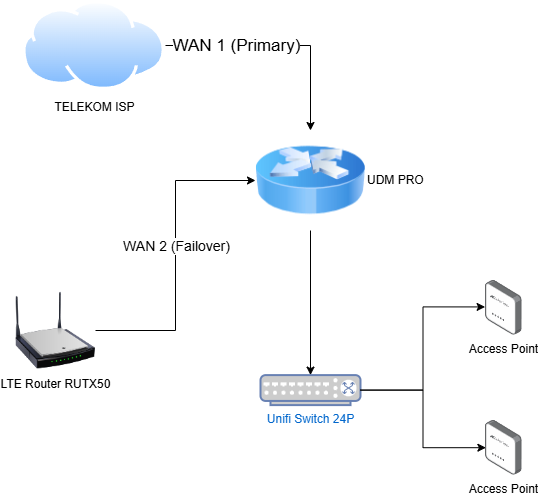
Would it be possible for you to provide a simple topology of the intended setup, including which gateway should handle the traffic when a failover event occurs?
- If the goal is to use the RUTX’s LTE connection as a backup WAN source for the UDM, then the RUTX should be connected via one of its LAN ports (LAN1–LAN4) to the UDM’s WAN port. Please make sure that the RUTX LAN IP subnet (found under Network → LAN settings) is different from the UDM LAN subnet, to avoid routing or IP conflicts.
I hope this helps. If you have any further questions or need assistance with the setup, feel free to reach out.
Best regards,
Hello, first of all, thank you for your message!
I hope my picture helps you. I’m no network expert, but it should make it clear what we want. As you already said, we want to use its LTE connection as a backup internet source for the UDM.
However, the RUTX50 should only enable access to the internet. Nothing else. So no DHCP, DNS, or anything like that. All of that should continue to run on the UDM Pro.
I hope I was able to express myself more clearly this time 
As you already mentioned in the third point, we have connected a LAN cable from LAN1 (RUTX50) to WAN2 (UDM Pro).
But that’s all. Can you tell me exactly what I should configure on the RUTX50 to avoid any problems?
Thank you!
Hello,
Apologies for the delayed response, and thank you for clarifying your setup.
From what you described, the best approach would be to configure the RUTX50 in DHCP relay mode. In this setup, your UDM Pro will remain the only DHCP server in the network, and all leases for devices behind the RUTX50 will originate from the UDM.
You can find more information and step-by-step configuration guidelines in the following wiki article:
Best regards,